1. Nhanganyaya
Thank you for choosing the ScopeAround M28 Digital Otoscope. This device is designed to provide a clear visual inspection of the ear canal, teeth, mouth, and other small areas. It features a 3.9mm ultra-thin HD camera with LED lights and a 2.8-inch IPS LCD screen for direct viewing. This manual provides essential information for safe and effective use, setup, operation, and maintenance of your otoscope.
2. Ruzivo Rwakakosha Chekuchengetedza
WARNING: Read all safety warnings and instructions before use. Failure to follow warnings and instructions may result in electrical shock, fire, and/or serious injury. Save all warnings and instructions for future reference.
- This device is intended for personal visual inspection and earwax removal. Consult a medical professional for diagnosis or treatment of ear conditions.
- Do not insert the otoscope too deeply into the ear canal. Use the included speculums to prevent excessive insertion and avoid injury.
- Always clean the camera lens and accessories with alcohol prep pads before and after each use to maintain hygiene and prevent cross-contamination.
- Keep the device out of reach of children. Adult supervision is required when used by children.
- Usashandise mudziyo kana wakuvadzwa kana kusashanda zvakanaka.
- Dzivisa kuisa mudziyo kune tembiricha yakanyanyisa kana zuva rakananga.
- Iva nechokwadi chekuti mudziyo wacho wachajwa zvizere usati washandisa kuti ushande zvakanaka.
3. Package Zviri mukati
Ona kuti zvinhu zvese zviripo mupasuru yako:
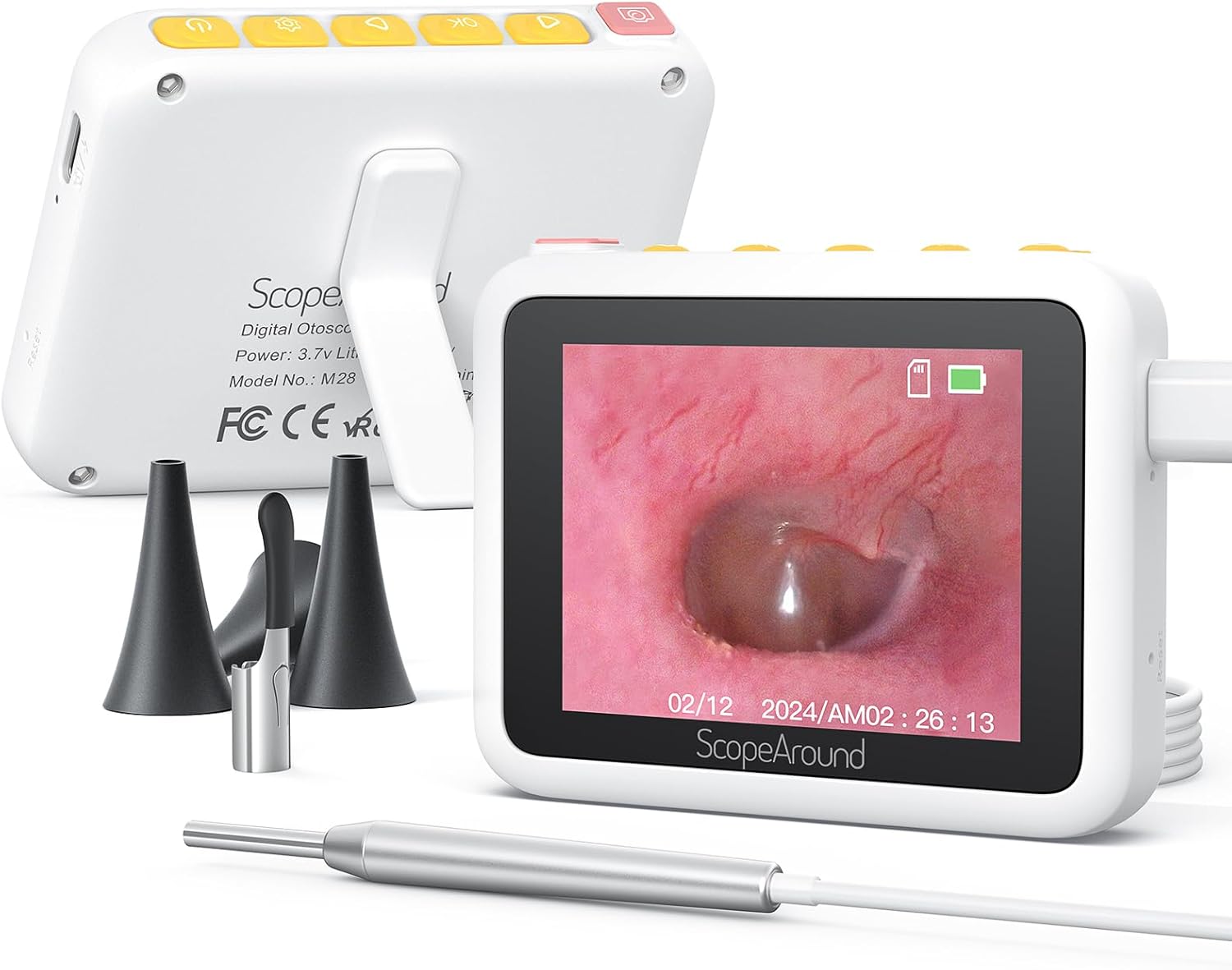
- Otoscope Device (Main unit with 2.8" IPS LCD screen)
- Camera Cable with 3.9mm Ultra-Thin HD Camera Lens
- Ear Spoon attachment
- Specula (3 pieces)
- USB Type-C Yekuchaja Cable
- Magnetic Stand
- Q-tip Pack
- Doro Prep Pads
- User Manual
- Kadhi Renyevero Dzekuchengetedza

4. Chigadzirwa Pamusoroview
The ScopeAround M28 Digital Otoscope is a compact and user-friendly device designed for visual inspection. Key features include:
- 3.9mm Ultra-Thin Camera Lens: Allows easy entry into narrow ear canals.
- 720P HD Camera with 6 LED Lights: Provides clear, bright images and videos of the inspection area.
- 2.8" IPS LCD Screen: Offers direct, real-time viewing without external apps or devices.
- Plug & Play Dhizaini: Simple operation, no Wi-Fi or app required.
- Magnetic Stand: Enables hands-free operation for convenience.
- 1200mAh Rechargeable Bhatiri: Provides 2-3 hours of continuous use.
- Fixed Focal Length: Optimized for sharp images at 0.4 to 0.8 inches.


5. Setup Instructions
Follow these steps to set up your ScopeAround M28 Digital Otoscope:
- Chaja Chishandiso: Before first use, fully charge the otoscope device using the provided USB Type-C charging cable. Connect the cable to the charging port on the device and a compatible USB power source. The battery indicator on the screen will show charging status.
- Batanidza Chinoongorora Kamera: Plug the camera probe cable into the designated port on the otoscope device.
- Sarudza uye Batanidza Chishongedzo: Depending on your intended use, attach either an ear spoon or a speculum to the tip of the camera probe. Ensure it is securely fitted.
- Power On: Long press the power button (usually located on the top right) to turn on the device. The screen will display the ScopeAround logo and then the live camera feed.
- Attach Magnetic Stand (Optional): For hands-free viewing, attach the magnetic stand to the back of the main unit. It can be positioned to prop up the screen at a comfortable vieweng angle


6. Operating Instructions
Once the device is set up, you can begin your inspection:
- Rarama View: The 2.8" IPS LCD screen will display a real-time view kubva kamera.
- Kutora Mifananidzo: Press the Photo/Video button (usually the leftmost button with a camera icon) to capture a still image.
- Kurekodha Mavhidhiyo: Hold down the Photo/Video button to start recording a video. Press it again to stop recording.
- Zoom Basa: Use the Left/Zoom buttons to adjust the magnification of the image on the screen (up to 1.5X zoom).
- Kutenderera Kwemufananidzo: Use the Right/Image Rotate buttons to rotate the image 180 degrees for better viewing angles.
- Kupinda Settings: Press the Setting button to enter the device menu. Here you can adjust resolution, language, date/time, and other parameters.
- ReviewMidhiya: Navigate to the Playback option in the settings menu to view yakatorwa mafoto nemavhidhiyo.
- Kuendesa Files: Connect the device to a computer using the USB Type-C cable to transfer captured images and videos.


7. Kuchengeta uye Kuchengeta
Proper maintenance ensures the longevity and hygiene of your otoscope:
- Kuchenesa Lens: Use the provided alcohol prep pads or Q-tips to gently clean the camera lens before and after each use. Ensure no residue remains.
- Zvishandiso zvekuchenesa: The ear spoon and speculums should also be cleaned with alcohol prep pads after each use.
- Kuchengeta: Chengeta mudziyo wacho nezvinhu zvawo munzvimbo yakachena, yakaoma kure nezuva rakananga uye tembiricha yakanyanya.
- Battery Care: Charge the device regularly, even if not in frequent use, to maintain battery health. Avoid fully depleting the battery for extended periods.

8. Kugadzirisa matambudziko
If you encounter issues with your ScopeAround M28 Digital Otoscope, try the following:
- Hapana Simba: Ita shuwa kuti mudziyo wachajiwa zvizere. Batanidza kune sosi yemagetsi uye mira maminetsi mashoma usati waedza kubatidza zvakare.
- Hapana mufananidzo paScreen: Verify that the camera probe is securely plugged into the device. If the issue persists, try unplugging and re-plugging the camera probe.
- Mufananidzo Wakasviba: Ensure the camera lens is clean. The device has a fixed focal length, so adjust the distance between the camera tip and the object for optimal clarity (0.4-0.8 inches).
- Mudziyo Haudairi: Use a thin pin to press the reset button (located near the charging port) to restart the device.
- Haikwanisi Kutamisa Files: Ensure the device is properly connected to your computer via the USB Type-C cable. Check your computer's file explorer for the device.
9. Zvinotsanangurwa
| Feature | Tsanangudzo |
|---|---|
| Product Dimensions | 3.94 x 3.94 x 3.94 inches |
| Item Weight | 8.8 ounces |
| Kamera Lens Diameter | 3.9mm |
| Ratidza Sikirini | 2.8" IPS LCD |
| Vhidhiyo Resolution | 1280 x 720 pixels (720P HD) |
| Battery Capacity | 1200mAh Lithium Polymer |
| Nguva Yekushanda | 2-3 hours (continuous usage) |
| Storage | Internal (8GB, not expandable) |
| Kubatana | USB Type-C (yekuchaja uye kutamisa data) |
| Mugadziri | ScopeAround |
10. Warranty uye Tsigiro
ScopeAround is committed to customer satisfaction. This product comes with a standard warranty as per the retailer's policy. For any questions, technical support, or warranty claims, please contact our US-based after-sales support team. Contact information can typically be found on our official websaiti kana kuburikidza nepuratifomu yako yekutenga.
We are dedicated to providing high-quality technology and support for your health and wellness needs.


