1. Chigadzirwa Pamusoroview
The Vorago BSP-500-V2 is a portable Bluetooth speaker designed for robust performance and durability. It features IPX5 water resistance, making it suitable for various environments, including outdoor adventures and parties. This manual provides detailed instructions for setting up, operating, and maintaining your speaker.
Zvinokosha:
- True Wireless Stereo (TWS) Connectivity: Connect two BSP-500-V2 speakers for an immersive stereo sound experience.
- Hupenyu Hwebhatiri Hwakawedzerwa: Enjoy up to 7 hours of music playback at 70% volume, thanks to its 2000 mAh battery.
- USB Type-C Kuchaja: Convenient and modern USB-C port for charging.
- Kubatana kwakasiyana-siyana: Supports Bluetooth for wireless streaming and a 3.5mm auxiliary input for wired connections.
- IPX5 Kuramba Mvura: Protected against low-pressure water jets from any direction.
Package Zviri mukati:
- Vorago BSP-500-V2 Bluetooth Mutauri
- USB Type-C Yekuchaja Cable
- 3.5mm Audio Cable
- Mushandisi Chinyorwa (gwaro iri)
Chigadzirwa Dhiyagiramu:

Mufananidzo 1.1: Mberi view of the Vorago BSP-500-V2 Bluetooth speaker, showcasing its mesh grille and central Vorago logo.

Mufananidzo 1.2: Angled view of the speaker, highlighting its robust, rectangular design and integrated carrying strap.

Mufananidzo 1.3: Pamusoro view showing the control panel with power, volume down, play/pause, and volume up buttons.
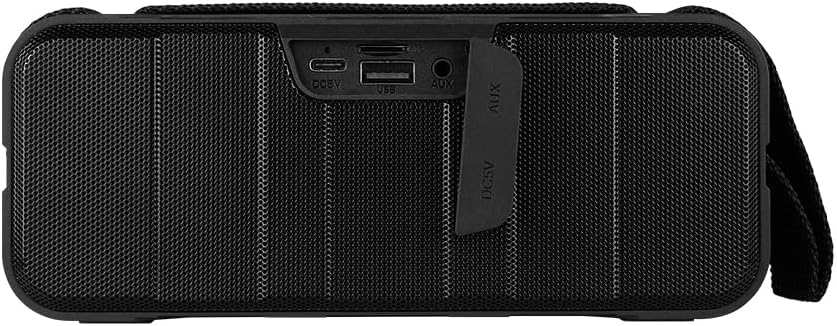
Mufananidzo 1.4: Kumashure view of the speaker, showing the protective flap covering the input ports.

Figure 1.5: Close-up of the input ports, including DC 5V (USB-C), USB-A, and AUX (3.5mm) inputs, protected by a rubber cover.
2. Safety Information
- Usaisa mutauri panzvimbo inopisa zvakanyanya (inopisa kana inotonhora).
- Dzivisa kudonhedza kana kuita kuti mukurukuri apedzisire akasimba.
- Keep the speaker away from direct sunlight and heat sources.
- Do not disassemble, repair, or modify the speaker yourself. This will void the warranty.
- Ensure the port cover is securely closed when using the speaker near water to maintain IPX5 water resistance.
- Do not immerse the speaker in water. IPX5 rating protects against splashes and light rain, not submersion.
- Use only the provided charging cable or a certified USB Type-C cable for charging.
- Geza mutauri nejira rakapfava, rakaoma. Usashandise abrasive cleaners kana solvents.
3. Setup
3.1 Kuchaja Mutauriri
- Open the protective rubber cover on the rear of the speaker to access the charging port.
- Connect the USB Type-C end of the charging cable to the speaker's DC 5V port.
- Batanidza rimwe divi retambo yeUSB kune adapta yemagetsi yeUSB (haisipo) kana pachiteshi cheUSB chekombuta.
- Chiedza chechiratidzo chekuchaja chinovhenekera panguva yekuchaja uye kudzima kana chazara chaji.
- Once charging is complete, securely close the protective rubber cover to maintain water resistance.
3.2 Kubatidza/Kudzima
- Kubatidza: Dzvanya uye ubate iyo Simba bhatani on the top panel for approximately 3 seconds until you hear an audible prompt.
- Kudzima: Dzvanya uye ubate iyo Simba bhatani for approximately 3 seconds until you hear an audible prompt.
3.3 Bluetooth Pairing
- Ensure the speaker is powered on. It will automatically enter Bluetooth pairing mode, indicated by a flashing LED light.
- Pamudziyo wako (smartphone, piritsi, laptop), shandisa Bluetooth uye tsvaga zvishandiso zviripo.
- Select "BSP-500-V2" from the list of found devices.
- Once successfully paired, the speaker will emit an audible confirmation, and the LED light will stop flashing and remain solid.
- Chinotaurisa chinozobatanidzazve otomatiki kumudziyo wekupedzisira wakabatana kana chabatidzwa, kana mudziyo uri pedyo uye Bluetooth yakabatidzwa.
3.4 Kubatanidza True Wireless Stereo (TWS)
TWS allows you to connect two BSP-500-V2 speakers together for a true stereo sound experience.
- Ensure both BSP-500-V2 speakers are powered on and not connected to any other Bluetooth device.
- On one of the speakers (this will be the primary speaker), double-press the Bhatani rekutamba/kumbomira. The speaker will enter TWS pairing mode.
- The two speakers will automatically search for and connect to each other. You will hear an audible confirmation once they are successfully paired.
- Once TWS is established, connect your device to the primary speaker via Bluetooth as described in Section 3.3.
- To disconnect TWS, double-press the Bhatani rekutamba/kumbomira pane mutauri.
3.5 Auxiliary (AUX) Connection
For devices without Bluetooth, you can use the 3.5mm audio cable.
- Open the protective rubber cover on the rear of the speaker.
- Connect one end of the 3.5mm audio cable to the speaker's AUX port.
- Batanidza rimwe divi retambo kune jack yekuburitsa ruzha yemudziyo wako.
- Mutauri anozochinja otomatiki kuenda kuAUX mode.
- Once disconnected, securely close the protective rubber cover.
4. Operating Instructions
4.1 Button Functions:
| Bhatani | Basa (Short Press) | Basa (Mutori wenguva refu) |
|---|---|---|
| Simba bhatani | N/A | Simba On/Kudzima |
| Bhatani reVolume Down | Deredza Inzwi | Previous Track |
| Bhatani rekutamba/kumbomira | Tamba/Misa Mimhanzi, Pindura/ Pedzisa Kufona | Reject Call, Double-press for TWS Pairing |
| Volume Up bhatani | Wedzera Inzwi | Next Track |
5. Kuchengeta
- Kuchenesa: Use a soft, dry, lint-free cloth to clean the speaker's surface. For stubborn dirt, slightly dampen the cloth with water. Do not use harsh chemicals, cleaning solvents, or strong detergents.
- Water Resistance Care: Always ensure the rubber port cover on the back of the speaker is fully and securely sealed when using the speaker outdoors or near water. This maintains its IPX5 water resistance. After exposure to water, wipe the speaker dry before opening the port cover for charging or auxiliary connections.
- Kuchengeta: When not in use for extended periods, store the speaker in a cool, dry place, away from direct sunlight and extreme temperatures. It is recommended to charge the speaker fully before storing and to recharge it every few months to maintain battery health.
- Battery Care: To prolong battery life, avoid fully discharging the battery frequently. Charge the speaker when the low battery indicator is active.
6. Kugadzirisa matambudziko
| Dambudziko | Zvinogona Kukonzera | Solution |
|---|---|---|
| Mutauri haabati simba. | Bhatiri rakaderera. | Charge the speaker fully using the provided USB Type-C cable. |
| Haikwanise kubatanidza kuburikidza neBluetooth. | Speaker is not in pairing mode; Device's Bluetooth is off; Speaker is already connected to another device; Device is too far from speaker. | Ensure speaker is powered on and flashing (pairing mode). Turn on Bluetooth on your device. Disconnect from other devices. Move device closer to speaker (within 10 meters). |
| Hapana ruzha kana vhoriyamu yakaderera. | Volume too low on speaker or device; Incorrect input mode; Speaker not connected. | Increase volume on both speaker and connected device. Ensure correct mode (Bluetooth or AUX) is active. Verify successful Bluetooth pairing or AUX cable connection. |
| Kurasika kwenzwi. | Volume too high; Device too far from speaker; Interference. | Reduce volume on speaker and/or device. Move device closer to speaker. Avoid obstacles between speaker and device. |
| TWS pairing inotadza. | Speakers are already paired to a device; Speakers are too far apart. | Ensure both speakers are disconnected from any Bluetooth devices. Place speakers close to each other during TWS pairing. |
7. Zvinotsanangurwa
| Feature | Detail |
|---|---|
| Model Name | BSP-500-V2 |
| Mutauri Rudzi | Multimedia |
| Special Feature | Bluetooth |
| Yakakurudzirwa Kushandisa | Kune vanoridza mimhanzi |
| Inowirirana Devices | Laptop, MP3 Player, Smartphone, Tablet |
| Controller Type | Bhatani |
| Kutenderedza Inzwi Channel Configuration | 5.0 |
| Hupenyu hwebhatiri | 7 Maawa |
| Zvikamu Zvinosanganisirwa | Mutauri |
| Product Dimensions | 5D x 15W x 18H masendimita |
| Product Weight | 1 kilogram |
| Isingapindi mvura | Hongu (IPX5) |
| Battery Capacity | 2000 mAh |
| Amplifier Rudzi | Active |
| Simba Source | Bhatiri |
| Frequency Response | 180 Hz |
| Kubatana Technology | Bluetooth |
| Audio Output Mode | Stereo |
| Mounting Type | Tabletop Mount |
8. Warranty uye Tsigiro
The Vorago BSP-500-V2 Bluetooth Speaker comes with a limited warranty. Please refer to the warranty card included with your product for specific terms and conditions, or visit the official Vorago websaiti kuti uwane rumwe ruzivo.
For technical support, troubleshooting assistance, or warranty claims, please contact Vorago customer service through their official channels. You can find more information and contact details on the Vorago Brand Store on Amazon kana mukuru wavo website.
Ndapota chengetedza humbowo hwako hwekutenga nekuda kwewaranti.


