Nhanganyaya
This manual provides detailed instructions for the safe and efficient operation of your boAt Partypal 390 Bluetooth Speaker. Please read this manual thoroughly before using the product and retain it for future reference. The Partypal 390 is a powerful portable speaker designed for various audio needs, featuring 160W boAt Signature Sound, multiple connectivity options, and integrated LED lighting.
Safety Information
- Usaisa mukurukuri pakupisa kwakanyanya, zuva rakananga, kana kuti mwando wakanyanya.
- Dzivisa kudonhedza kana kuita kuti mukurukuri apedzisire akasimba.
- Do not attempt to disassemble, repair, or modify the speaker yourself. Contact qualified service personnel for assistance.
- Keep the speaker away from water and other liquids. Although it is waterproof, prolonged submersion or exposure to high-pressure water jets should be avoided.
- Shandisa chete tambo yekuchaja yakapihwa kana imwe yakasimbiswa kuti ishande.
- Iva nechokwadi chekuti mhepo inofefetera zvakanaka paunenge uchifambisa sipika.
- Geza mutauri nejira rakapfava, rakaoma. Usashandise abrasive cleaners kana solvents.
Package Zviri mukati
Tarisa kuti zvinhu zvese zvakanyorwa pazasi zviripo mupakeji yako:
- boAt Partypal 390 Speaker
- Chaja Cable
- User Manual
- Warranty Card
Product Overview
The boAt Partypal 390 is a versatile Bluetooth speaker featuring powerful audio output and dynamic LED lighting. Below are key visual references and descriptions of its components.
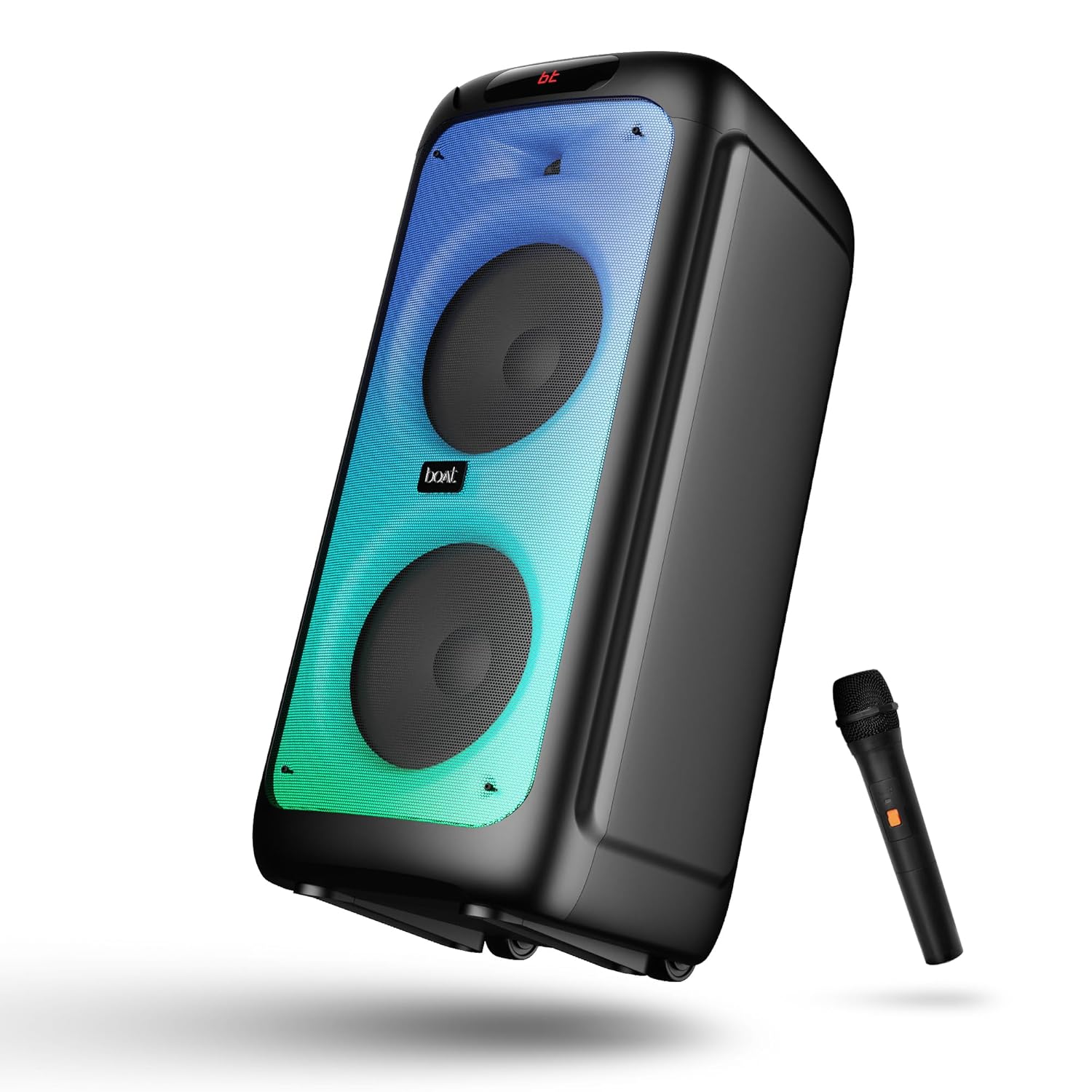
Mufananidzo 1: Mberi view of the boAt Partypal 390 speaker, showcasing its dual speaker design, integrated flame LEDs, and the included wired microphone.

Mufananidzo 2: Top panel of the speaker displaying the control buttons and various input ports including USB, AUX, Guitar In, Mic 1, Mic 2, and the USB Type-C charging port. Also shown are dedicated controls for Bass/Treble, LED modes, and volume.
Zvinokosha:
- 160W boAt Signature Sound: Inopa odhiyo ine simba uye yakajeka.
- Flame LEDs: Dynamic lighting effects to enhance the listening experience.
- Multiple Connectivity: Bluetooth v5.3, AUX, USB, and TF card support.
- Basa reKaraoke: Two microphone input ports for vocal performances.
- Gitare Input: Dedicated port for connecting a guitar.
- EQ Modes: Pre-set sound modes (Normal, Party, Pop, Rock, Jazz) for different audio preferences.
- TWS Maitiro: Allows wireless connection of two Partypal speakers for stereo sound.
- Bass uye Treble Controls: Adjustable audio settings for personalized sound.
- Kutamba Nguva Refu: Kusvika kumaawa 6 ehupenyu hwebhatiri.
Gadzirira
1. Kubhadharisa Mutauri
Before first use, fully charge the speaker. Connect the provided USB Type-C charging cable to the speaker's charging port and the other end to a compatible USB power adapter (not included). The charging indicator will show the charging status. A full charge provides up to 6 hours of playback.

Mufananidzo 3: The speaker in an outdoor setting, illustrating its portability and battery life.
2. Simba On / Off
- To power on, press and hold the Power button located on the control panel until the display illuminates.
- To power off, press and hold the Power button again until the display turns off.
3. Pakutanga Bluetooth Pairing
- Ensure the speaker is powered on and in Bluetooth mode. The display will show "bt" and the Bluetooth indicator will flash, indicating it's ready for pairing.
- Panharembozha yako, shandisa Bluetooth uye tsvaga zvishandiso zviripo.
- Select "boAt Partypal 390" from the list of devices.
- Once paired, the speaker will emit a confirmation sound, and the Bluetooth indicator will stop flashing.
Operating Instruction
1. Mode Selection
Press the "Mode" button on the control panel to cycle through available input modes: Bluetooth, AUX, USB, and TF Card.
2. Makaralı Mode
- After successful pairing, audio from your connected device will play through the speaker.
- Use the volume knob on the speaker or your connected device to adjust the volume.
- Shandisa mabhatani ekuti Previous/Next kuti usvetuke matraki.
- Dzvanya bhatani rekuti Play/Misa kuti udzore kutamba.
3. MUFANANIDZO
- Connect an audio device to the AUX input port using a 3.5mm audio cable.
- Switch the speaker to AUX mode using the "Mode" button.
- Dzora kutamba uye vhoriyamu kubva pamudziyo wako wakabatana.
4. USB/TF Card Mode
- Insert a USB flash drive into the USB port or a TF card into the TF card slot.
- The speaker will automatically switch to USB or TF card mode and begin playing audio files. If not, switch manually using the "Mode" button.
- Use the Previous/Next buttons to navigate tracks and Play/Pause for playback control.
5. Karaoke Function (Microphone Input)
- Connect up to two wired microphones to the "MIC 1" and "MIC 2" input ports.
- Adjust microphone volume using the dedicated MIC VOL knob.
- Adjust microphone echo effect using the ECHO knob.
6. Gitare Input
- Connect a guitar to the "GUITAR IN" port.
- Adjust guitar volume using the dedicated GUITAR VOL knob.
7. EQ Modes
The speaker offers several pre-set equalizer modes to optimize audio for different content types. Press the "EQ" button to cycle through:
- Normal
- Party
- Pop
- Dombo
- Jazz

Mufananidzo 4: Visual representation of the available EQ modes for sound customization.
8. TWS (True Wireless Stereo) Mode
To connect two Partypal 390 speakers for a stereo audio experience:
- Ensure both speakers are powered on and in Bluetooth mode, but not yet paired to any device.
- On one speaker (this will be the primary speaker), press and hold the TWS button. The speaker will emit a sound indicating it's searching for another speaker.
- The two speakers will automatically connect to each other. A confirmation sound will indicate successful TWS pairing.
- Now, pair your mobile device to the primary speaker via Bluetooth as described in the "Initial Bluetooth Pairing" section. Audio will play in stereo through both speakers.

Mufananidzo 5: Two Partypal 390 speakers wirelessly connected, demonstrating the TWS feature.
9. Kudzora kwe LED
Press the "LED Mode" button to cycle through different flame LED lighting effects or to turn them off.
10. Bass and Treble Controls
Use the dedicated Bass and Treble knobs on the control panel to adjust the low and high frequencies of the audio output according to your preference.
Maintenance
- Kuchenesa: Use a soft, dry, lint-free cloth to clean the speaker's exterior. Do not use liquid cleaners, aerosols, or solvents.
- Kuchengeta: Kana isingashandiswi kwenguva yakareba, chengeta mukurukuri munzvimbo inotonhorera, yakaoma, kure nechiedza chezuva uye tembiricha yakanyanyisa.
- Battery Care: To prolong battery life, avoid fully discharging the speaker frequently. Charge it regularly, even if not in use.
Kugadzirisa matambudziko
| Dambudziko | Zvinogona Kukonzera | Solution |
|---|---|---|
| Mutauri haabati simba. | Bhatiri rakaderera; Bhatani remagetsi harina kudzvanywa zvakanaka. | Chaja spika zvizere. Dzvanya wobata bhatani rePower kwemasekondi mashoma. |
| Hapana ruzha. | Volume too low; Incorrect input mode; Device not connected. | Increase speaker and device volume. Ensure correct mode is selected (Bluetooth, AUX, USB, TF). Re-pair Bluetooth device or check cable connections. |
| Bluetooth pairing inokundikana. | Mutauri asiri mukuita pairing; Mudziyo wakanyanya kureba; Kupindira. | Ensure speaker is in Bluetooth pairing mode (flashing "bt"). Move device closer to speaker. Turn off other Bluetooth devices. Forget "boAt Partypal 390" on your device and try pairing again. |
| Maikorofoni haisi kushanda. | Microphone not connected properly; MIC VOL too low. | Ensure microphone is securely plugged into MIC 1 or MIC 2 port. Increase the MIC VOL knob. |
| Kubatana kweTWS kwakundikana. | Speakers already paired to a device; Speakers too far apart. | Ensure both speakers are not connected to any Bluetooth device. Place speakers within close proximity. Repeat TWS pairing steps. |
Zvinotsanangurwa
Below are the technical specifications for the boAt Partypal 390 speaker:
| Model Name | Partypal 390 |
| Mutauri Rudzi | Multimedia, Floor Standing |
| Audio Output Power | 160 Watts |
| Kubatana Technology | Bluetooth v5.3, AUX, USB, TF Card |
| Bluetooth Range | Kusvika 10 metres |
| Hupenyu hwebhatiri | Kusvikira kuMaawa mashanu |
| Battery Capacity | 7500 mAh (Lead Acid) |
| Zviyero zveChigadzirwa (D x W x H) | 70D x 32W x 32H Masendimita |
| Item Weight | 10.8 kg |
| Mvura Resistance Level | Isingapindi mvura |
| Inosanganisirwa Zvikamu | Speaker, Charging Cable, User Manual, Warranty Card |

Mufananidzo 6: Diagram illustrating the physical dimensions of the Partypal 390 speaker.
Warranty uye Support
Your boAt Partypal 390 speaker comes with a limited warranty. Please refer to the included Warranty Card for specific terms and conditions, including the warranty period and coverage details. For technical support, service, or warranty claims, please contact boAt customer service through their official webwebhusaiti kana ruzivo rwekuonana rwuri pakadhi rako rewarandi.
For more information, visit the official boAt store: boAt Store on Amazon


