Nhanganyaya
This manual provides detailed instructions for the operation and maintenance of your RadioShack Portable Bluetooth Speaker. This versatile audio device offers multiple connectivity options and features to enhance your listening experience.

Mufananidzo 1: Mberi view of the RadioShack Portable Bluetooth Speaker, showcasing its black fabric grille and red accent symbols.
Package Zviri mukati
Before proceeding, please ensure all items are present in the package:
- RadioShack Portable Bluetooth Speaker
- USB Type-C Yekuchaja Cable
- Auxiliary 3.5mm Cable (Note: Some packages may not include this cable, as per customer feedback.)
- Kutakura Tambo

Figure 2: The speaker shown with its included USB Type-C charging cable and an auxiliary cable.
Gadzirira
1. Kubhadharisa Mutauri
Before first use, fully charge the speaker. The speaker is equipped with a 3000 mAh battery, providing up to 6 hours of playback on a full charge. A complete charge typically takes approximately 3 hours.
- Locate the USB Type-C charging port on the speaker. This is usually found on the top panel near the control buttons.
- Connect the provided USB Type-C cable to the speaker's charging port.
- Batanidza imwe magumo e USB tambo kune ino enderana USB magetsi adapta (isina kuisirwa) kana komputa USB port.
- Mwenje wechiratidzo chekuchaja unozopenya panguva yekuchaja uye unodzima kana kuchinja ruvara kana wachaja zvizere.
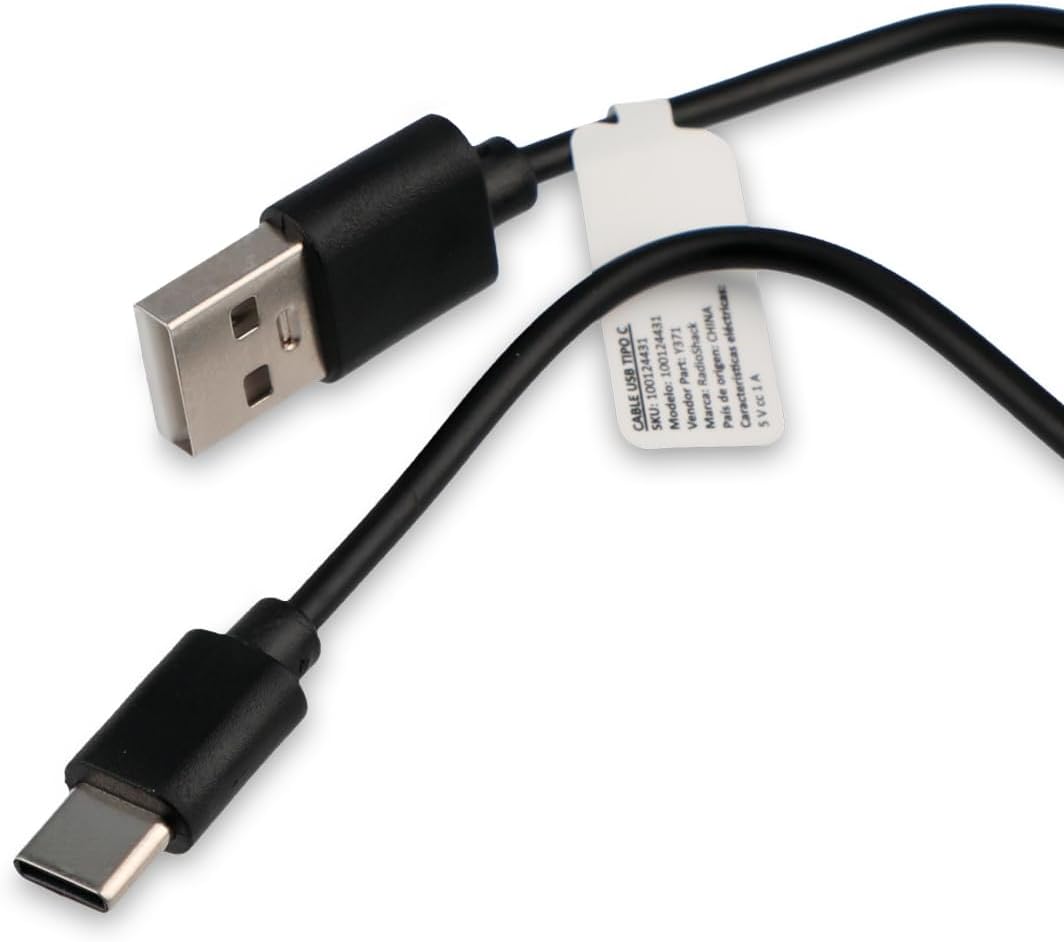
Figure 3: Close-up of the USB Type-C charging cable included with the speaker.
2. Chekutanga Power On
Press and hold the Power button (usually marked with a power symbol) on the speaker's control panel until you hear an audible prompt or see an indicator light illuminate.
Operating Instruction
Kudzora Panel Pamusoroview

Figure 4: Top panel of the speaker, displaying the control buttons and various input ports (AUX, TF, USB, Type-C).
The control panel on the top of the speaker features several buttons and ports for various functions:
- Bhatani reSimba: Inobatidza/kudzima mutauri.
- Bhatani reModhi: Cycles through input modes (Bluetooth, USB, SD, AUX, FM Radio).
- Bhatani reTamba/Kumbomira: Inotamba kana kumisa kutamba kweaudio.
- Bhatani reKukwidza/Kunoteera Track: Increases volume (short press) or skips to the next track (long press).
- Bhatani reVolume Down/Previous Track: Decreases volume (short press) or goes to the previous track (long press).
- Light Mode Bhatani: Changes or turns off the RGB LED lighting effects.
- AUX Port: For 3.5mm auxiliary cable connection.
- TF (Micro SD) Kadhi Slot: Zvekutamba odhiyo kubva kuMicro SD kadhi.
- USB Port: Yekutamba audio kubva pa USB flash drive.
- Type-C Port: Zvekuchaja mutauri.
1. Kubatana kweBluetooth
This speaker supports wireless audio streaming via Bluetooth, compatible with smartphones, tablets, and computers.
- Turn on the speaker. It will automatically enter Bluetooth pairing mode, indicated by a flashing LED light or an audible prompt.
- Pamudziyo wako, shandisa Bluetooth uye tsvaga zvishandiso zviripo.
- Select "RadioShack Speaker" (or similar name) from the list of found devices.
- Once paired, the speaker will confirm with an audible sound, and the LED indicator will become solid.
2. USB Playback
Isa USB flash drive ine audio files (MP3, WAV, etc.) into the USB port. The speaker will automatically switch to USB mode and begin playback.
3. SD Kadhi Kutamba
Insert a Micro SD (TF) card with audio files into the TF card slot. The speaker will automatically switch to SD card mode and begin playback.
4. Mubatsiri (AUX) Connection
For devices without Bluetooth, use the 3.5mm auxiliary input.
- Connect one end of a 3.5mm audio cable (not always included) to the AUX port on the speaker.
- Connect the other end to the headphone jack or audio output of your device.
- Press the Mode button on the speaker until it switches to AUX mode.
5. Basa reRadio yeFM
Kushandisa redhiyo yeFM yakavakirwa mukati:
- Press the Mode button until you hear the FM radio mode activated.
- Press the Play/Pause button to auto-scan and save available radio stations.
- Shandisa mabhatani eVolume Up/Down (kudzvanya kwenguva refu) kuti ufambe pakati pezviteshi zvakachengetwa.
6. RGB LED Lighting
The speaker features an RGB LED light panel that adds visual ambiance. The light panel is located on one side of the speaker.

Mufananidzo 5: Rutivi view of the speaker, highlighting the transparent panel designed for RGB lighting effects.
Press the Light Mode button (often indicated by a sun or lightbulb icon) on the control panel to cycle through different lighting modes or to turn the lights off.
Maintenance
Kuchenesa
Kuti chitarisiko uye mashandiro emutauri wako arambe akanaka:
- Pukuta kunze nemucheka wakapfava, wakaoma, usina lint.
- Usashandise abrasive cleaners, wax, kana solvents.
- Avoid getting moisture into any openings. The speaker is not waterproof.
Storage
When not in use for extended periods, store the speaker in a cool, dry place away from direct sunlight and extreme temperatures. It is recommended to charge the battery at least once every three months to preserve its lifespan.
Kugadzirisa matambudziko
| Dambudziko | Zvinogona Kukonzera | Solution |
|---|---|---|
| Mutauri habatiki. | Bhatiri rapera. | Chaja sipika uchishandisa tambo yeUSB Type-C yakapihwa. |
| Hapana ruzha kubva kumutauri. | Vhoriyamu yakaderera zvakanyanya kana kuti yakanyarara. Nzira yekuisa isiriyo. | Increase volume on both speaker and connected device. Press the Mode button to select the correct input source (Bluetooth, USB, SD, AUX, FM). |
| Haikwanise kubatanidza kuburikidza neBluetooth. | Chipika hachisi mumodhi yekuwiriranisa. Mudziyo uri kure zvakanyanya. Kupindira. | Ensure speaker is in Bluetooth pairing mode (flashing LED). Move device closer to speaker (within 10 meters). Turn off other Bluetooth devices. |
| Kadhi reUSB/SD harisi kutamba. | Haisi kutsigirwa file fomati. Kadhi/dhiraivha hazvina kuiswa nemazvo. | Iva nechokwadi chekuteerera files are in a supported format (e.g., MP3). Reinsert the USB drive or SD card firmly. |
| FM radio static. | Chiratidzo chisina kusimba. | Chinja chitauriri kunzvimbo ine vanhu vanogamuchira zviri nani. |
Zvinotsanangurwa
| Feature | Detail |
|---|---|
| Model Number | 100124431 (Y371) |
| Dimensions (L x W x H) | 9.6 masendimita x 22.7 masendimita x 8.2 masendimita |
| Kurema | 500 magiramu |
| Material | Metal, Silicone |
| Kubatana Technology | Bluetooth, USB, SD Card, 3.5mm Auxiliary |
| Bluetooth Range | Kusvika 10 metres |
| Mutauriri Wekubuda Simba | 10 Watts |
| Frequency Response | 80 KHz |
| Battery Capacity | 3000 mAh Lithium Ion |
| Hupenyu hwebhatiri | Kusvikira kuMaawa mashanu |
| Kuchaja Nguva | Anenge 3 Maawa |
| Chiyamuro Voltage | 5 Volts |
| Special Features | Portable, RGB LED Light, FM Radio |
| Isingapindi mvura | Aihwa |
Warranty Information
This RadioShack product comes with a limited warranty. For specific terms and conditions, including warranty duration and coverage details, please refer to the warranty card included with your product packaging or contact RadioShack customer support. Keep your purchase receipt as proof of purchase for warranty claims.
Mutengi Support
For further assistance, technical support, or warranty inquiries, please contact RadioShack customer service. Contact information can typically be found on the product packaging, the official RadioShack webwebhusaiti, kana kuburikidza nenzvimbo yako yekutenga.
Ndapota chengetedza bhuku rino kuti rizorishandisa mune remangwana.


