Model: Fairy 10
Thank you for choosing the TAB Fairy10 Robot Vacuum and Mop Combo. This advanced cleaning device is designed to provide a comprehensive and hands-free cleaning experience for your home. Featuring powerful suction, intelligent navigation, and a multifunctional docking station, the Fairy10 simplifies floor maintenance. This manual provides essential information for setup, operation, and maintenance to ensure optimal performance and longevity of your device.
Ndapota verengai mirairo yese yekuchengetedza musati mashandisa mudziyo uyu. Chengetai bhuku iri kuti muzoshandisa mune ramangwana.
Tarisa kuti zvese zvirimo zviripo mupakeji:
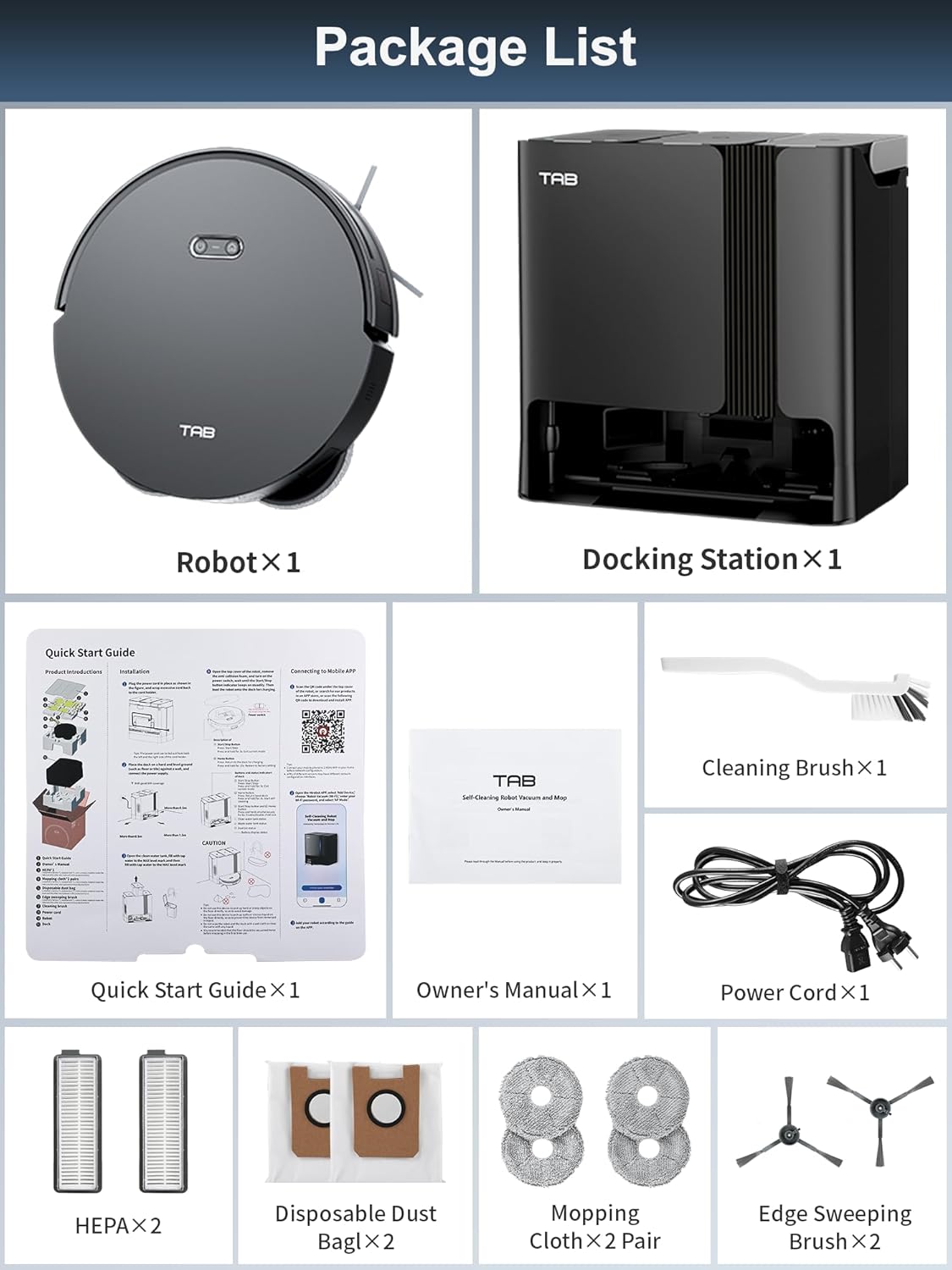
Image: All components included in the TAB Fairy10 package, neatly laid out.
The TAB Fairy10 consists of the robot vacuum and a multifunctional docking station.

Image: The TAB Fairy10 robot vacuum positioned in front of its docking station, with a smartphone showing the companion app.
The robot features a compact design with hidden LiDAR navigation, allowing it to access tighter spaces. It is equipped with a multi-directional floating brush and dual rotary mops for effective cleaning.
The docking station serves as an all-in-one hub for the robot, providing self-draining, self-washing, self-drying, self-cleaning, and self-refilling capabilities.

Image: A visual representation of the docking station's capabilities, including self-mop cleaning, self-dust emptying, self-mop drying, and self-refilling.
Nyatsobvisa zvese zvikamu kubva pakurongedza. Chengetedza zvekurongedza zvekutakura kana kuchengetedza.
Place the docking station on a hard, level surface against a wall. Ensure there is at least 0.5 meters (1.6 feet) of clear space on both sides and 1.5 meters (4.9 feet) in front of the station for the robot to dock properly. Connect the power adapter to the docking station and plug it into a wall outlet.
Install the side brushes by pressing them into their slots until they click. Ensure the mop pads are securely attached to the mop module.
Place the robot onto the docking station. Ensure the charging contacts align. The robot will begin charging automatically. For first use, fully charge the robot before operation.
Download the official TAB app from your smartphone's app store. Follow the in-app instructions to connect your Fairy10 robot. This typically involves creating an account, adding the device, and connecting it to your home Wi-Fi network.
Once connected, initiate a mapping run through the app. The hidden LiDAR navigation system will efficiently scan and map your home, creating a detailed floor plan for optimized cleaning routes.

Image: The robot vacuum actively mapping a room using its LiDAR system, with a visual representation of the map being created on a smartphone screen.
You can start or stop a cleaning cycle using the button on the robot or through the TAB app. The robot will automatically return to the docking station upon completion or when its battery is low.
The Fairy10 offers versatile cleaning modes to suit your needs:

Mufananidzo: Visual examples of the four available cleaning modes: sweep only, mop only, sweep then mop, and mop while sweeping.

Image: The robot vacuum demonstrating its powerful 6000Pa suction on a carpeted surface.

Image: The robot vacuum actively mopping a hard floor, showcasing its dual rotating mops and key specifications like rotation speed, lift, and pressure.
Set specific cleaning times via the app to automate your cleaning routine. The robot will start and return to the dock as scheduled.

Image: The robot vacuum returning to its base, indicating a successful scheduled cleaning setup.
Use the app to define specific areas for cleaning, such as the kitchen, living room, or bedroom, allowing for customized cleaning preferences.

Image: The app interface displaying targeted cleaning zones, with corresponding images of the robot cleaning different rooms.
Set virtual boundaries or no-go zones in the app to prevent the robot from entering specific areas, protecting delicate items or preventing access to certain rooms.

Image: The robot vacuum avoiding a designated 'No-Go Zone' in a home environment.
Activate the child lock feature in the app to prevent unintended operation by children or pets, ensuring safety.

Image: The robot vacuum with a child lock icon, illustrating its safety feature when children or pets are present.
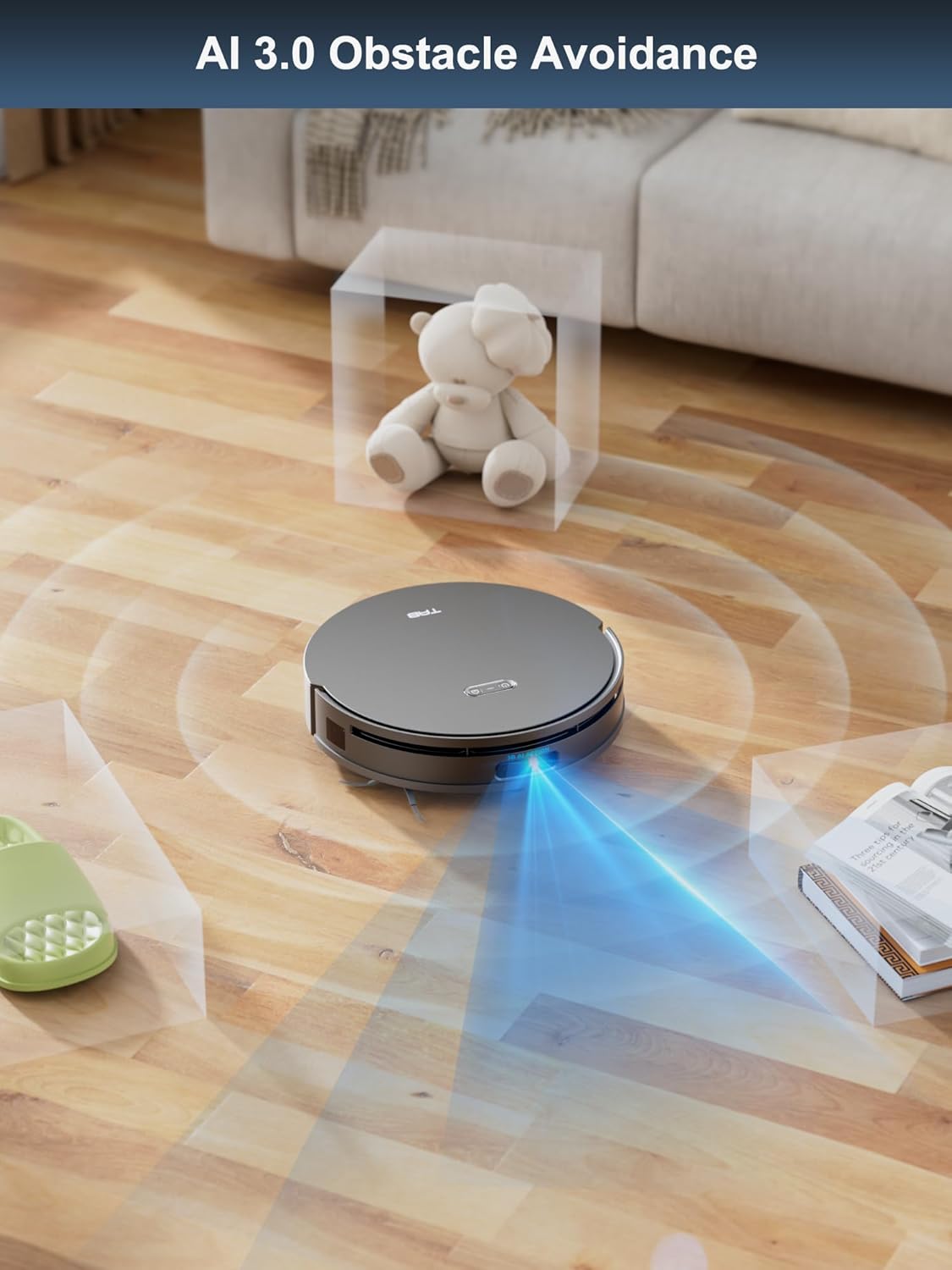
The hidden LiDAR navigation system allows the robot to create precise maps and navigate efficiently, even in tight spaces. AI 3.0 Obstacle Avoidance helps the robot detect and avoid objects on the floor, reducing the need for pre-cleaning.

Image: The robot vacuum demonstrating its hidden LiDAR navigation by cleaning under a sofa, highlighting its ability to access tight spaces.

Image: The robot vacuum employing AI 3.0 obstacle avoidance to detect and navigate around various items on the floor.
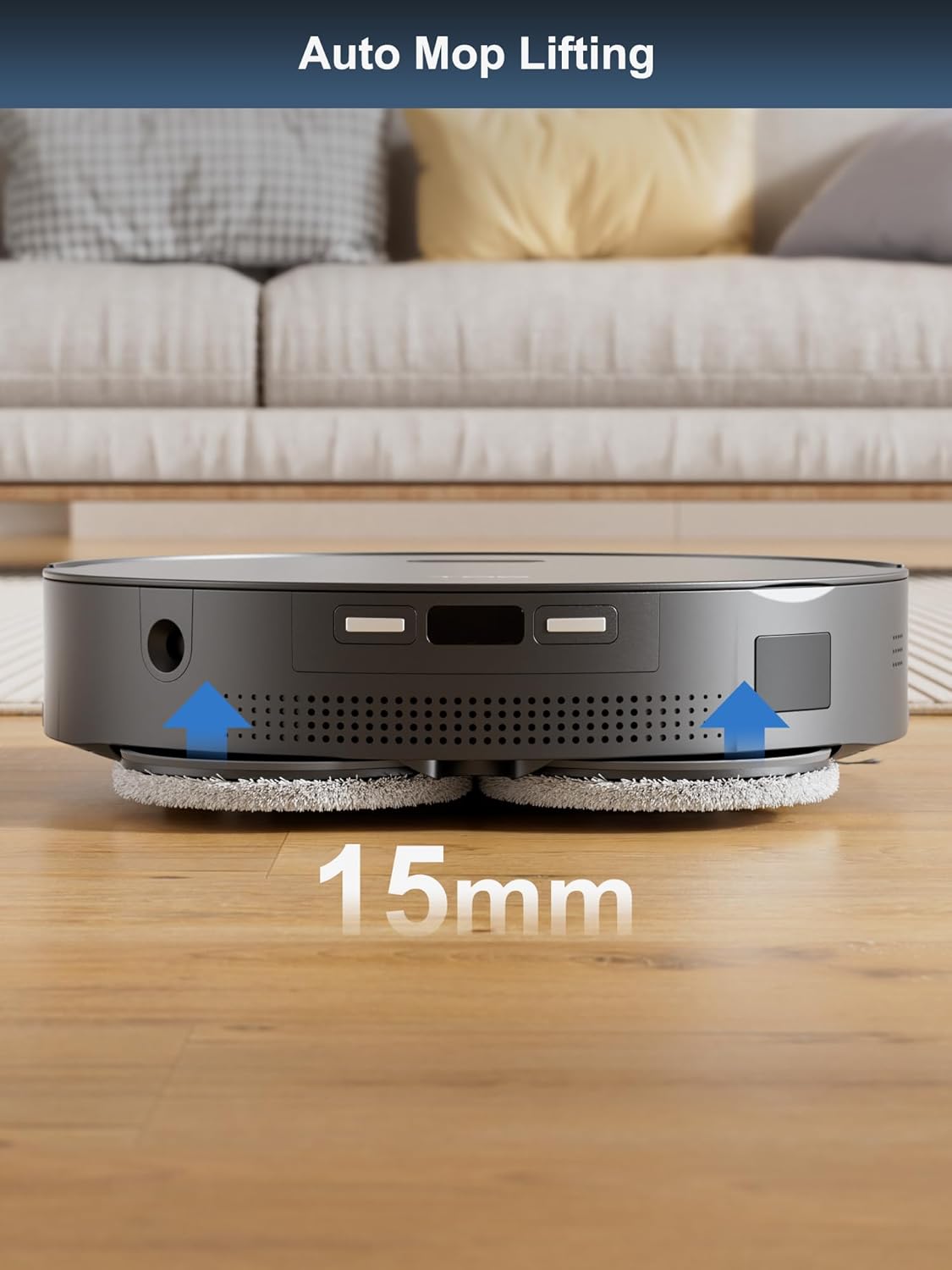
The robot automatically lifts its mops by 15mm when it detects carpets, preventing them from getting wet during vacuuming cycles.

Image: The robot vacuum demonstrating its auto mop lifting feature, raising its mops by 15mm as it approaches a carpet.
Regular maintenance ensures the optimal performance and longevity of your TAB Fairy10.
The docking station automates several maintenance tasks:

Image: The self-cleaning and hot air drying processes for the mop pads within the docking station.

Mufananidzo: Iri pachena view of the docking station illustrating the automatic dust emptying process.
Replace consumables according to usage or as indicated by the app:
If you encounter issues with your TAB Fairy10, refer to the following common solutions:
| Dambudziko | Zvinogona Kukonzera | Solution |
|---|---|---|
| Robhoti haribatike | Bhatiri rakaderera; Kudzima kwemagetsi | Chaja robhoti; Iva nechokwadi chekuti switch yemagetsi yakabatidzwa |
| Robot cannot dock | Docking station obstructed; Incorrect placement | Clear obstacles around the dock; Ensure proper placement as per setup instructions |
| Kusaita zvakanaka kwekuchenesa | Full dustbin; Clogged brushes/filters; Worn mop pads | Empty dustbin/replace dust bag; Clean brushes/filters; Replace mop pads |
| Matambudziko ekubatana kweApp | Incorrect Wi-Fi password; Robot too far from router; App outdated | Verify Wi-Fi credentials; Move robot closer to router; Update app to latest version |
| Mops not drying | Air vents blocked; Drying cycle not initiated | Check for obstructions in air vents; Ensure drying function is enabled in app |
For further assistance, please refer to the support section of the TAB app or visit the official TAB website.
| Feature | Tsanangudzo |
|---|---|
| Brand | TAB |
| Model Name | Fairy 10 |
| Special Feature | Auto Mop Washing, Auto-Docking, Automatic Dust Collection |
| Color | Nhema |
| Product Dimensions | 18.8"L x 18.8"W x 19.2"H |
| Rudzi rwesefa | Cartridge |
| Hupenyu hwebhatiri | 120 kwemaminitsi |
| Simba Source | Battery Powered |
| Kudzora Nzira | App |
| Inowirirana Devices | Mafonifoni |
| Item Weight | 42.1 makirogiramu |
For warranty information and customer support, please refer to the official TAB website or contact their customer service directly. Details can typically be found in the TAB app under the 'Support' or 'About Us' sections.
Zvekushandisa Pamhepo:
![]() |
TAB T6-Pro Smart Cordless Wet Dry Vacuum Cleaner uye Mop User Manual Bhuku rekushandisa rakazara reTAB T6-Pro Smart Cordless Wet Dry Vacuum Cleaner and Mop, rinosanganisira mirairo yekuchengetedza, kuunganidza, kushanda, kugadzirisa, uye kugadzirisa matambudziko. |
![]() |
TAB R6 Carpet Cleaner Machine Mushandisi Manual Bhuku rekushandisa rakazara reTAB R6 Carpet Cleaner Machine, rinosanganisira mirairo yekuchengetedza, sumo yechigadzirwa, kugadzirira, mirairo yekushandisa, kugadzirisa, uye kugadzirisa matambudziko. |
![]() |
Ruzivo rwechigadzirwa cheEG200/EG300 Series uye Gwaro rezvinhu zvakagadziriswazve Ruzivo maererano nezvigadzirwa zveEG200 neEG300, kusanganisira manotsi pamusoro pezvishongedzo, kusiyana kwemamodheru, uye nhungamiro dzemayuniti akagadziridzwa. Gwaro iri rinoshanda segwara remirairo kana rutsigiro. |
![]() |
Ruzivo rwechigadzirwa cheTAB EG200/EG300 Series uye Zvinyorwa Overview yezvigadzirwa zveTAB EG200, EG300 series, kusanganisira mamodheru EG201, EG351, uye EG351A. Gwaro iri rinopa ruzivo rwakawanda uye zvinyorwa zvakakosha maererano nezvishongedzo, mifananidzo inotsanangura, uye mabatirwo emayuniti akagadziridzwa. |
![]() |
TAB R6 Carpet Cleaner Machine Mushandisi Manual Bhuku rekushandisa reTAB R6 Carpet Cleaner Machine, rinopa mirairo yakazara yekushanda zvakachengeteka, kugadzirisa, uye kugadzirisa matambudziko. |
![]() |
Bhuku reKushanda kweTAB e.module L5.1 Lithium-ion Energy Storage System Bhuku rino rinopa mirairo yakazara yekuisa, kushandisa, uye nzira dzekuchengetedza dzeTAB e.module L5.1 Lithium-ion Energy Storage System. Dzidza nezvemagadzirirwo ayo, magadzirirwo ayo, zvidzoreso zvepamberi, uye maitiro ekubata nemazvo. |