Nhanganyaya
Welcome to the user manual for your new ECHO RAINBOW PRO Smartwatch. This device is designed to seamlessly integrate into your daily life, offering advanced health monitoring, sports tracking, and smart connectivity features. With its elegant rose metal finish and interchangeable straps, it combines style with functionality. This manual provides essential information on setting up, operating, maintaining, and troubleshooting your smartwatch to ensure optimal performance and a satisfying user experience.
Safety Information
- Usaedze kuparadzanisa, kugadzirisa, kana kugadzirisa mudziyo. Izvi zvinogona kukonzera kukuvara, moto, kana kuvhunduka kwemagetsi.
- Chengetedza mudziyo kure nekupisa kwakanyanya, zuva rakananga, uye hunyoro hwepamusoro.
- Dzivisa kuisa mudziyo kune zvinokanganisa zvakasimba kana mavibrations.
- Shandisa tambo yekuchaja yakapihwa chete uye adapta yemagetsi inoenderana nayo.
- Consult a medical professional before starting any new exercise regimen or if you have pre-existing health conditions, especially if relying on the health monitoring features. The health data provided by this device is for reference only and should not be used for medical diagnosis or treatment.
- If you experience skin irritation or discomfort while wearing the watch, discontinue use and consult a doctor.
Package Zviri mukati
Ndokumbira utarise bhokisi rezvinhu zvinotevera:
- ECHO RAINBOW PRO Smartwatch (with metal strap attached)
- 1 x Silicone Strap (interchangeable)
- Chaja Cable
- Mushandisi Chinyorwa (gwaro iri)

Image: The ECHO RAINBOW PRO Smartwatch in rose metal, shown with its pre-attached metal strap and a separate light pink silicone strap, highlighting the interchangeable design.

Image: The ECHO RAINBOW PRO Smartwatch body displayed alongside its detached light pink silicone strap and rose metal mesh strap, illustrating the modular design.

Image: The retail packaging for the ECHO RAINBOW PRO Smartwatch, showing the watch and its accessories through a clear window, with product features listed on the box.
Product Overview
Familiarize yourself with the components of your ECHO RAINBOW PRO Smartwatch.
- Ratidza: High-resolution touchscreen for interactive use.
- Side Button/Crown: Used for power on/off, screen wake/sleep, and navigating menus.
- Sensors: Located on the back of the watch for health monitoring (heart rate, SpO2, blood pressure, ECG).
- Strap Attachment Points: Allows for easy changing of straps.
- Kuchaja Mazita: Magnetic contacts on the back for charging.

Mufananidzo: Yakadzama view of the ECHO RAINBOW PRO Smartwatch's display, showcasing a watch face with a mechanical gear design, current time, date, temperature, and health metrics.

Mufananidzo: A side profile view of the ECHO RAINBOW PRO Smartwatch, highlighting its slim design and the functional side button/crown.
Gadzirira
1. Kuchaja Smartwatch
Before first use, fully charge your smartwatch.
- Batanidza tambo yekuchaja ine magineti kune zvinobata zvekuchaja zviri kumashure kwewachi.
- Plug the USB end of the cable into a USB power adapter (not included) or a computer's USB port.
- The watch display will show a charging indicator. A full charge typically takes about 2 hours.
2. Attaching/Changing Straps
Your ECHO RAINBOW PRO Smartwatch comes with interchangeable straps, allowing you to customize its look.
- To remove a strap, locate the quick-release pin on the underside of the strap near the watch body.
- Slide the pin inwards to detach the strap from the watch.
- To attach a new strap, insert one end of the pin into the watch lug.
- Slide the quick-release pin inwards and align the other end with the opposite lug hole. Release the pin to secure the strap. Gently pull on the strap to ensure it is properly locked in place.

Image: Two ECHO RAINBOW PRO Smartwatches are shown side-by-side, one fitted with the rose metal mesh strap and the other with the light pink silicone strap, demonstrating the versatility of interchangeable bands.
3. Kubatanidza neSmartphone Yako
To unlock the full potential of your smartwatch, pair it with your smartphone via the dedicated app.
- Dhaunirodha App: Tsvaga the "ECHO Fit" app (or similar, check packaging for exact name) on your smartphone's app store (Google Play Store for Android, Apple App Store for iOS). Install the app.
- Vhura Bluetooth: Ita shuwa kuti Bluetooth yakagoneswa pane yako smartphone.
- Vhura App: Launch the ECHO Fit app and follow the on-screen instructions to create an account or log in.
- Wedzera Mudziyo: In the app, navigate to the "Device" or "Add Device" section. The app will search for nearby smartwatches.
- Sarudza Wachi Yako: Select "ECHO RAINBOW PRO" from the list of found devices. A pairing request may appear on your watch and phone. Confirm the pairing on both devices.
- Zadzisa Setup: Once paired, the app will guide you through initial settings such as personal information, notification preferences, and health goals.
Kushandisa Smartwatch Yako
Basic Navigation
- Wake Screen: Press the side button or raise your wrist.
- Touchscreen Gestures:
- Swipe Up/Down: Scroll through menus or notifications.
- Swipe Left/Right: Access quick widgets or different functions.
- Tap: Select an item or confirm an action.
- Press and Hold: Customize watch faces (from home screen).
- Side Button Function:
- Short Press: Return to home screen, or go back in a menu.
- Long Press: Power on/off, or access a shortcut menu (e.g., restart).
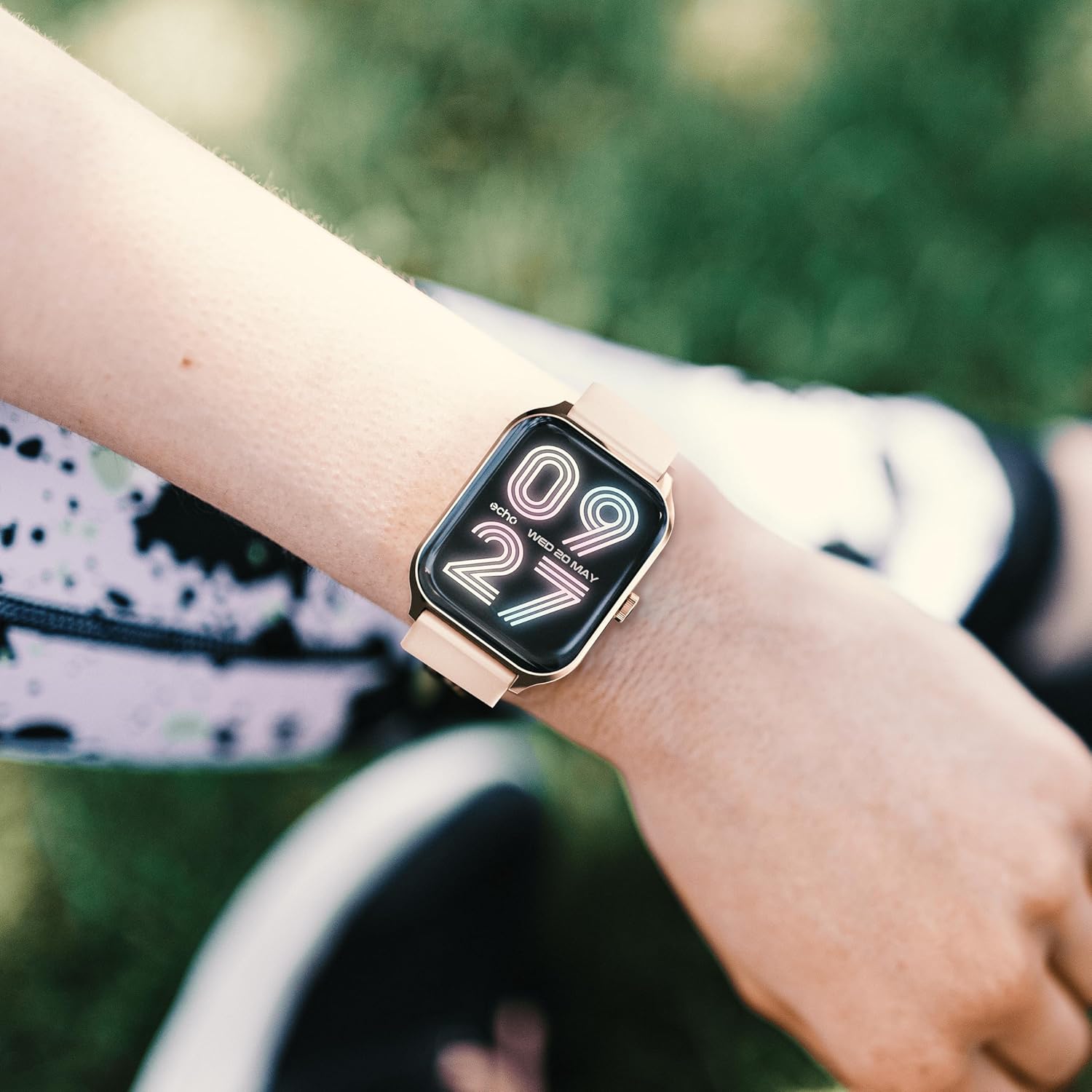
Image: The ECHO RAINBOW PRO Smartwatch worn on a wrist, displaying a digital watch face with the current time and date.

Image: A close-up of the ECHO RAINBOW PRO Smartwatch's screen, showing a clear digital time display along with battery status, step count, and temperature.
Health Monitoring
Your smartwatch is equipped with advanced sensors to help you monitor your health.
- Chiyero chemoyo: Access the heart rate function on your watch or through the app. Ensure the watch is snug on your wrist for accurate readings.
- Blood Pressure: Follow the instructions on the watch screen or app for taking a blood pressure measurement.
- Ropa Okisijeni (SpO2): Measure your blood oxygen saturation levels. Remain still during the measurement.
- ECG (Electrocardiogram): Use the ECG function as directed by the app to record your heart's electrical activity.
Zvakakosha: The health data provided by this device is for reference only and should not be used for medical diagnosis or treatment. Always consult a qualified medical professional for any health concerns.
Activity and Sports Modes
Track your daily activity and specific workouts.
- Pedometer: The watch automatically tracks your steps, distance, and calories burned throughout the day.
- Mitambo yemitambo: Select from various sports modes (e.g., running, cycling, walking) to track specific workout data like duration, heart rate zones, and calories.
- Personalized Goals: Set daily activity goals within the companion app to stay motivated.
Kurara Monitoring
Wear your smartwatch to bed to monitor your sleep patterns. The app will provide detailed analysis of your sleep stages (deep, light, REM) and sleep quality.
Menstrual Cycle Tracking
For female users, the app offers menstrual cycle tracking. Input your cycle data into the app to receive predictions and insights.
Smart Kubatana
Stay connected without constantly checking your phone.
- Zviziviso: Receive call, message, and app notifications directly on your wrist. Customize notification settings in the app.
- Smartphone Kudzora: Control certain smartphone functions, such as music playback or camera shutter, directly from your watch.
Hupenyu hwebhatiri
The ECHO RAINBOW PRO Smartwatch offers an extended battery life, typically requiring a recharge only every 5 days, depending on usage. To maximize battery life:
- Deredza kupenya kwescreen.
- Disable continuous heart rate monitoring (if continuous monitoring is enabled).
- Dzima zviziviso zvisina basa.
Maintenance
Kuchenesa Smartwatch Yako
- Wipe the watch screen and body with a soft, lint-free cloth. If necessary, dampjira racho nemvura zvishoma.
- For the metal strap, use a soft brush to gently clean between links. For the silicone strap, wash with mild soap and water, then rinse thoroughly.
- Ensure the watch is completely dry before charging or wearing.
- Avoid using harsh chemicals, abrasive cleaners, or solvents, as these can damage the watch's finish.
Kuramba Mvura
The ECHO RAINBOW PRO Smartwatch is designed to be resistant to splashes and sweat. It is suitable for daily use and light exercise. However, it is not recommended for swimming, showering, or diving. Prolonged exposure to water or use in high-pressure water environments may cause damage.
Kugadzirisa matambudziko
| Dambudziko | Zvinogoneka Chikonzero / Mhinduro |
|---|---|
| Wachi haibatidzi. | Battery might be depleted. Charge the watch for at least 30 minutes. If it still doesn't turn on, try a different charging port or adapter. |
| Haikwanise kubatana ne smartphone. |
|
| Inaccurate health readings. |
|
| Zviziviso hazvina kugamuchirwa. |
|
| Hupenyu hupfupi hwebhatiri. |
|
Zvinotsanangurwa
| Feature | Detail |
|---|---|
| Model Number | e40c8026-5752-4c6b-9f6c-f5735f7e9eaf |
| Bhatiri Type | 1 Lithium-ion (inosanganisirwa) |
| Typical Battery Hupenyu | Up to 5 days (depending on usage) |
| Package Dimensions | 18.1 x 10.6 x 3.5 cm |
| Item Weight | 20 grams (watch body only, approximate) |
| Mugadziri | Samsung (as per product data) |
| Nyika Yekwakabva | China |
| Kubatana | Bluetooth (compatible with all smartphones) |
| Utano Sensors | ECG, Blood Pressure, Blood Oxygen (SpO2), Heart Rate, Sleep Tracker, Pedometer |
| Included Straps | 1 Metal Strap, 1 Silicone Strap |
Warranty uye Support
For warranty information and customer support, please refer to the warranty card included in your product packaging or visit the official ECHO website.
If you encounter any issues not covered in this manual, please contact our customer service team for assistance.
- Rutsigiro rwepamhepo: www.echo.com/support (example link, ndapota tarisa kune chaiwo zvinyorwa zvechigadzirwa)
- Email Support: support@echo.com (exampne email)


