1. Nhanganyaya
Thank you for choosing the boAt Wave Flex Connect Smart Watch. This manual provides essential information for setting up, operating, and maintaining your device. Please read it carefully to ensure optimal performance and longevity of your smartwatch.
2. Chii chiri muBhokisi
- boAt Wave Flex Connect Smart Watch
- Chaja Cable
- User Manual
- Warranty Card
3. Setup
3.1 Kutanga Kuchaja
Before first use, fully charge your boAt Wave Flex Connect Smart Watch. Connect the charging cable to the watch's charging port and plug the USB end into a compatible power adapter (not included) or a computer's USB port. The watch display will indicate charging status.

Image: The smartwatch screen showing 100% battery, indicating a full charge. This image highlights the impressive battery life of up to 10 days on normal use and 30 days on standby.
3.2 Kubatanidza neSmartphone Yako
- Download the "boAt Crest" app from your smartphone's app store (Google Play Store for Android or Apple App Store for iOS).
- Ita shuwa kuti Bluetooth yakagoneswa pane yako smartphone.
- Open the boAt Crest app and follow the on-screen instructions to create an account or log in.
- Select "Add Device" within the app and choose "Wave Flex Connect" from the list of available devices.
- Simbisa chikumbiro chekubatanidza pane zvese zviri zviviri smartphone yako uye smartwatch.
4. Kushandisa Wachi Yako Yakangwara
4.1 Basic Navigation
The boAt Wave Flex Connect features a responsive touch display and a physical button for navigation.
- Swipe Kumusoro/Kudzika: Scroll through notifications, menus, or quick settings.
- Swipe Kuruboshwe/Kurudyi: Access different widgets like activity tracking, heart rate, weather, or music control.
- Top: Sarudza chinhu kana vhura application.
- Dzvanya Bhatani: Dzokera kuchiratidziro chekumba kana kumutsa chiratidziro.
4.2 Kufona kweBluetooth
The Wave Flex Connect supports Bluetooth calling, allowing you to make and receive calls directly from your wrist when connected to your smartphone.

Image: The smartwatch screen showing an incoming call notification, demonstrating the Bluetooth calling feature. Users can accept or decline calls directly from the watch.
4.3 Ratidza Zvimiro
Experience clear visuals on the 1.83" HD Display with a resolution of 240 x 280. The 2.5D Curve Display and 550 Nits Brightness ensure excellent readability even in bright conditions. The Wake Gesture feature allows you to simply raise your wrist to activate the screen.

Image: A close-up of the smartwatch display, emphasizing its 1.83" HD screen, 240x280 resolution, 2.5D curve, and 550 Nits brightness for clear visibility.
4.4 Health & Wellness Monitoring
The boAt Wave Flex Connect helps you keep track of your health with various monitoring features:
- YeMoyo Rate Kuongorora: Ramba uchitevera kurova kwemoyo wako zuva rese.
- Ropa Oxygen (SpO2) Monitoring: Yera huwandu hweokisijeni muropa rako.
- Kuongorora Kurara: Analyze your sleep patterns (deep sleep, light sleep, awake time).
- Sedentary Alerts: Receive reminders to move after periods of inactivity.
4.5 Utility Features
Your smartwatch comes equipped with several convenient utility functions:
- Alamu: Seta maaramu zvakananga kubva pawachi yako.
- Weather Update: Wana ruzivo rwemamiriro ekunze panguva chaiyo.
- Kudzora Mumhanzi: Dzora kutamba kwemimhanzi pane yako yakabatana smartphone.
- Kudzora Kamera: Shandisa wachi yako sevhavha yekure kure kune kamera yefoni yako.
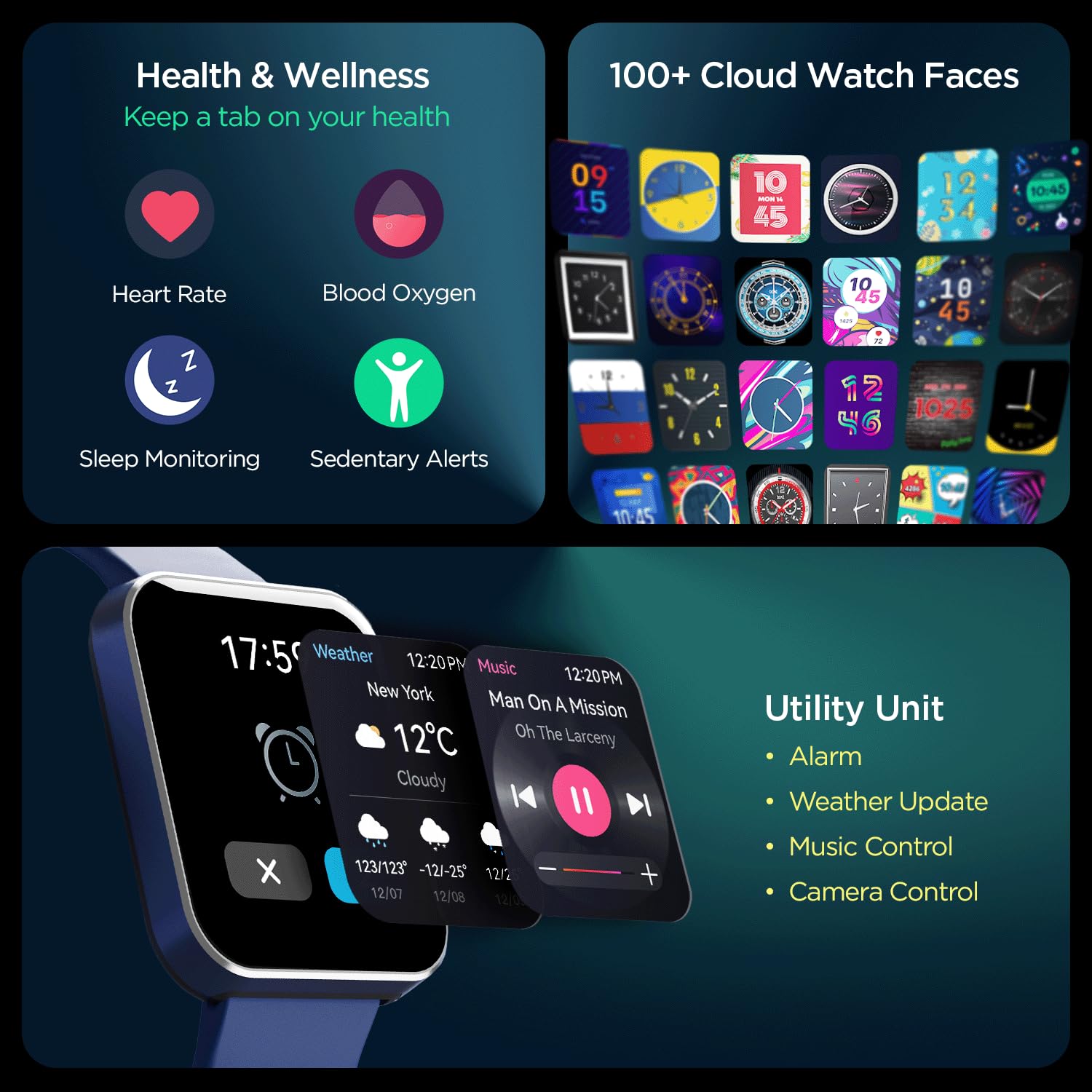
Mufananidzo: Yakakwana view of the smartwatch's capabilities, including health tracking (heart rate, SpO2, sleep, sedentary alerts), a wide selection of watch faces, and practical utilities like weather, music, and camera control.
4.6 boAt Coins Integration
Earn rewards via boAt Coins on the boAt Crest App by engaging with your smartwatch and the ecosystem.

Image: The smartwatch paired with a smartphone showing the boAt Crest app interface, highlighting the boAt Coins reward system and available vouchers.
5. Kuchengeta
- Kuchenesa: Pukuta wachi uye sunga nguva nenguva nejira rakapfava, rakaoma. Kana wakaita tsvina yakaoma, shandisa d zvishomaamp mucheka uye woomesa zvakakwana.
- Kuramba Mvura: Refer to the product specifications for water resistance ratings. Avoid exposing the watch to hot water, steam, or high-pressure water jets.
- Kuchaja: Shandisa tambo yekuchaja yakapihwa chete. Dzivisa kushandisa tambo kana machaja akakuvara.
- Kuchengeta: Chengeta wachi yacho munzvimbo inotonhorera, yakaoma kure nezuva rakananga uye tembiricha yakanyanya.
6. Kugadzirisa matambudziko
6.1 Tarisa Isingabatike
- Ita shuwa kuti wachi yachajiwa zvizere. Isungirire pachaja kweinenge maminitsi makumi matatu.
- Dzvanya wobata bhatani repadivi kwemasekonzi gumi kusvika gumi nemashanu kuti uedze kutangazve zvine simba.
6.2 Kubatanidza Nyaya
- Iva nechokwadi chekuti Bluetooth yakabatidzwa pafoni yako nepawachi.
- Make sure the watch is within the Bluetooth range of your phone (typically 10 meters).
- Tangazve zvese zviri zviviri smartphone yako uye smartwatch.
- Forget the device in your phone's Bluetooth settings and try pairing again through the boAt Crest app.
6.3 Nhamba Yehutano Yakashata
- Iva nechokwadi chekuti wachi yacho yakapfekwa zvakanaka paruoko rwako, pahupamhi hwemunwe mumwe chete pamusoro pepfupa reruoko.
- Chengetedza sensor yakachena uye isina tsvina kana dikita.
- Ziva kuti zvakatipoteredza zvinhu uye physiology yega inogona kukanganisa sensor kunyatsoita.
7. Zvinotsanangurwa
| Feature | Detail |
|---|---|
| Brand | boAt |
| Model Name | Wave Flex Connect |
| Kukura Kwekuratidza | 1.83 inches |
| Resolution | 240 x 240 pixels |
| Display Type | Dhijitari LCD |
| Kupenya | Kusvika ku550 Nits |
| Hupenyu hwebhatiri | Up to 10 days (normal use), 30 days (standby), 3 days (with Bluetooth Calling) |
| Bhatiri Type | Lithium Polymer |
| Kubatana | Bluetooth |
| Inowirirana Devices | Smartphone |
| Operating System | Smartwatch OS |
| Item Weight | 51 g |
| Mugadziri | Imagine Marketing Limited. |
8. Warranty uye Tsigiro
8.1 Ruzivo rweWaranti
Your boAt Wave Flex Connect Smart Watch comes with a 1 Year Warranty from the date of purchase. Please retain your purchase receipt and the warranty card for any warranty claims. The warranty covers manufacturing defects and does not cover damage caused by misuse, accidents, unauthorized repairs, or normal wear and tear.
8.2 Mutengi Tsigiro
For any queries, technical assistance, or warranty claims, please contact boAt customer support. You can find contact details on the official boAt website or refer to the warranty card included in your product package.
Manufacturer: Imagine Marketing Limited., info@imaginemarketingindia.com


