Nhanganyaya
Thank you for choosing the TECNO TRUE 1 TWS Earbuds. This manual provides essential information on setting up, operating, maintaining, and troubleshooting your new earbuds. Please read it carefully before use to ensure optimal performance and longevity of your device.
The TECNO TRUE 1 TWS Earbuds are designed to deliver a superior audio experience with advanced features such as 42 dB Active Noise Cancellation, deep bass from 10mm drivers, and a long-lasting battery life of up to 45 hours with the charging case. They are also IPX5 rated for sweat, water, and dust resistance, making them suitable for various activities.
Chii chiri muBhokisi
- TECNO TRUE 1 TWS Earbuds (Left and Right)
- Kuchaja Case
- User Manual
- Ear Tip Pairs (various sizes)
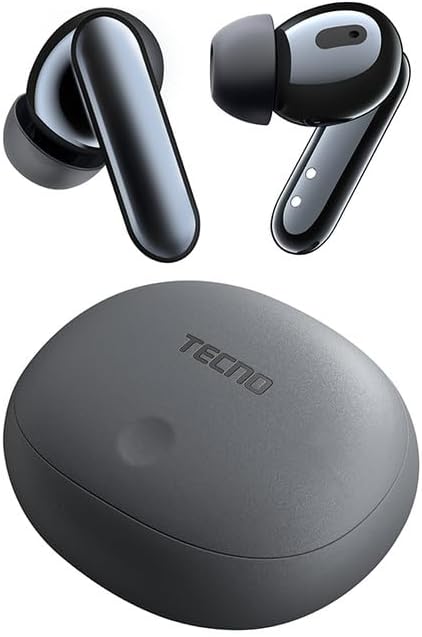
Image: The TECNO TRUE 1 TWS Earbuds and their charging case, showcasing dhizaini yakanaka.
Gadzirira
1. Kuchaja maEarbuds uye Case
Before first use, fully charge the earbuds and the charging case. Connect the charging case to a power source using a compatible USB cable. The indicator lights on the case will show the charging status.

Image: The TECNO TRUE 1 TWS charging case connected to a charging cable, illustrating the charging process.
Place the earbuds into the charging case. They will begin charging automatically. A full charge provides up to 6 hours of playback for the earbuds, and the case extends total playtime to 45 hours.
2. Kubatanidza neChishandiso Chako
- Ita shuwa kuti maearbuds ari mucheji yekuchaja uye chivharo chekesi chakavhurika.
- Pamudziyo wako (smartphone, piritsi, nezvimwewo), shandisa Bluetooth.
- Tsvaga new Bluetooth devices. The earbuds should appear as "TECNO TRUE 1" or similar.
- Select the earbuds to pair. A voice prompt will confirm successful connection.
The earbuds support pop-up connection for compatible devices, simplifying the pairing process.
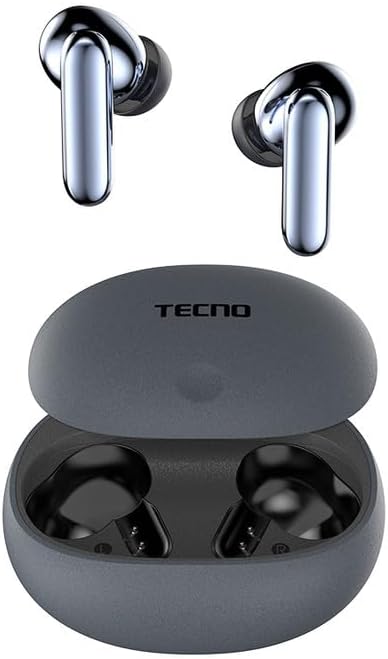
Image: The TECNO TRUE 1 TWS Earbuds resting inside their open charging case, ready for pairing.
3. Kupfeka maEarbuds
Gently insert the earbuds into your ear canals. Rotate them slightly to find a comfortable and secure fit. Choose the appropriate ear tip size from the included pairs for optimal sound quality and noise cancellation.
Operating Instruction
Touch Controls
The TECNO TRUE 1 TWS Earbuds feature intuitive touch controls on each earbud. The specific functions may vary slightly based on your device and app, but common controls include:
- Mumwe Tap: Tamba/Misa mimhanzi, Pindura/ Pedzisa kufona.
- Kudzvanya kaviri (Kuruboshwe/Kurudyi): Next/Previous track (may vary).
- Katatu Tap: Activate Voice Assistant.
- Yakareba Press: Chinja pakati peActive Noise Cancellation (ANC) uye Transparency Mode.
Active Noise Cancellation (ANC) uye Transparency Mode
The earbuds offer 42 dB Active Noise Cancellation to minimize ambient sounds, providing a more immersive listening experience. Transparency Mode allows you to hear your surroundings without removing the earbuds, which is useful for awareness in busy environments.
To switch between ANC and Transparency Mode, perform a long press on either earbud's touch sensor.
Maintenance
Kuchenesa
Kugara kuchenesa kunobatsira kuchengetedza ruzha rwemhando uye hutsanana:
- Shandisa jira rakapfava, rakaoma, risina lint kupukuta maearbud nekesi yekuchaja.
- Kuti uwane mazano munzeve, bvisa kubva munzeve uye uchenese nekushambadziraamp cloth and mild soap if necessary. Rinse thoroughly and dry completely before reattaching.
- Bvisa zvinyoro nyoro chero wakisi kana marara kubva pamesh ye earbud uchishandisa bhurashi diki, rakapfava kana swab yedonje.
Storage
Kana isiri kushandiswa, gara uchichengeta maearbuds mukesi yekuchaja kuti azvidzivirire kubva kuguruva, kukuvadzwa, uye kuti arambe achichajwa.
Kuramba Mvura (IPX5)
The earbuds are IPX5 rated, meaning they are resistant to sweat and splashes of water. They are not designed for submersion in water. Avoid exposing them to heavy rain or showering with them. Ensure the earbuds and charging port are dry before charging to prevent damage.
Kugadzirisa matambudziko
| Dambudziko | Zvinogona Kukonzera | Solution |
|---|---|---|
| Maearbuds haasi kubatanidza | Low battery, out of range, not in pairing mode, previously paired to another device. | Charge earbuds and case. Ensure Bluetooth is on and within range. Place earbuds in case, close and reopen lid to re-enter pairing mode. Disconnect from other devices. |
| Hapana ruzha kana yakaderera vhoriyamu | Volume too low, earbuds not properly seated, debris in earbud mesh, connection issue. | Increase volume on device and earbuds. Adjust earbud fit. Clean earbud mesh. Re-pair earbuds. |
| Nyaya dzekuchaja | Cable or adapter fault, dirty charging contacts, case battery empty. | Try a different cable/adapter. Clean charging contacts on earbuds and case. Charge the charging case. |
| ANC haisi kushanda nemazvo | Improper fit, ear tips not sealed, very high-frequency noise. | Adjust earbud fit and try different ear tip sizes for a better seal. ANC is most effective on low-frequency sounds. |
Zvinotsanangurwa
| Feature | Detail |
|---|---|
| Brand | Tecno |
| Model Name | 10309821 |
| Color | Gireyi |
| Material | Plastiki |
| Kuiswa Nzeve | Munzeve |
| Fomu Factor | Munzeve |
| Noise Isolation | Active Noise Cancellation (42 dB) |
| Kubatana Technology | Wireless |
| Wireless Communication Technology | Bluetooth |
| Inowirirana Devices | Smartphones, Tablets, Laptops, Desktop Computers, Smart Speakers |
| Chaiyo Chigadzirwa Mashandisirwo | Travel, Sport |
| Mvura Resistance Level | IPX5 (Isingatende mvura) |
| Frequency Range | 20 kusvika 20,000 Hz |
| Playback Time | Kusvika kumaawa manomwe (maearbuds), anosvika maawa makumi maviri nemasere (nekesi yekuchaja) |
| Inosanganisirwa Zvikamu | Charging Case, User Manual, Ear Tip Pairs |
Warranty uye Support
For warranty information and customer support, please refer to the official TECNO webtsvaga webhusaiti kana kuti taura nemutengesi wemuno. Chengeta humbowo hwekutenga kwako kana paine chero zvikumbiro zvewaranti.
Kuti uwane rumwe rubatsiro, unogona kushanyira product page on Amazon.com.be or contact TECNO customer service directly.


