Nhanganyaya
Welcome to the SENTRY Ultra-Light Bluetooth Earbuds user manual. These earbuds are designed to provide a seamless and immersive audio experience, perfect for active lifestyles. With an ultra-light design, LED power display, and intelligent touch controls, you can enjoy high-quality sound and convenient operation. Please read this manual carefully to ensure proper use and maintenance of your new earbuds.
Package Zviri mukati
- SENTRY Ultra-Light Bluetooth Earbuds (Left and Right)
- Portable Charging Case
- USB Kuchaja Cable
- User Manual
Product Features
- LED Simba Ratidzo: Transparent design on the charging case allows real-time battery monitoring.
- Compact Design: Ultra-compact and space-saving, making them highly portable.
- Bass Acoustic Design: Advanced dynamic drivers deliver crystal-clear audio with enhanced bass and treble.
- Intelligent Touch Controls: Effortlessly manage volume, music tracks, calls, and voice assistants.
- Stable Connections: Advanced Bluetooth technology ensures lag-free and reliable performance.
Product Overview
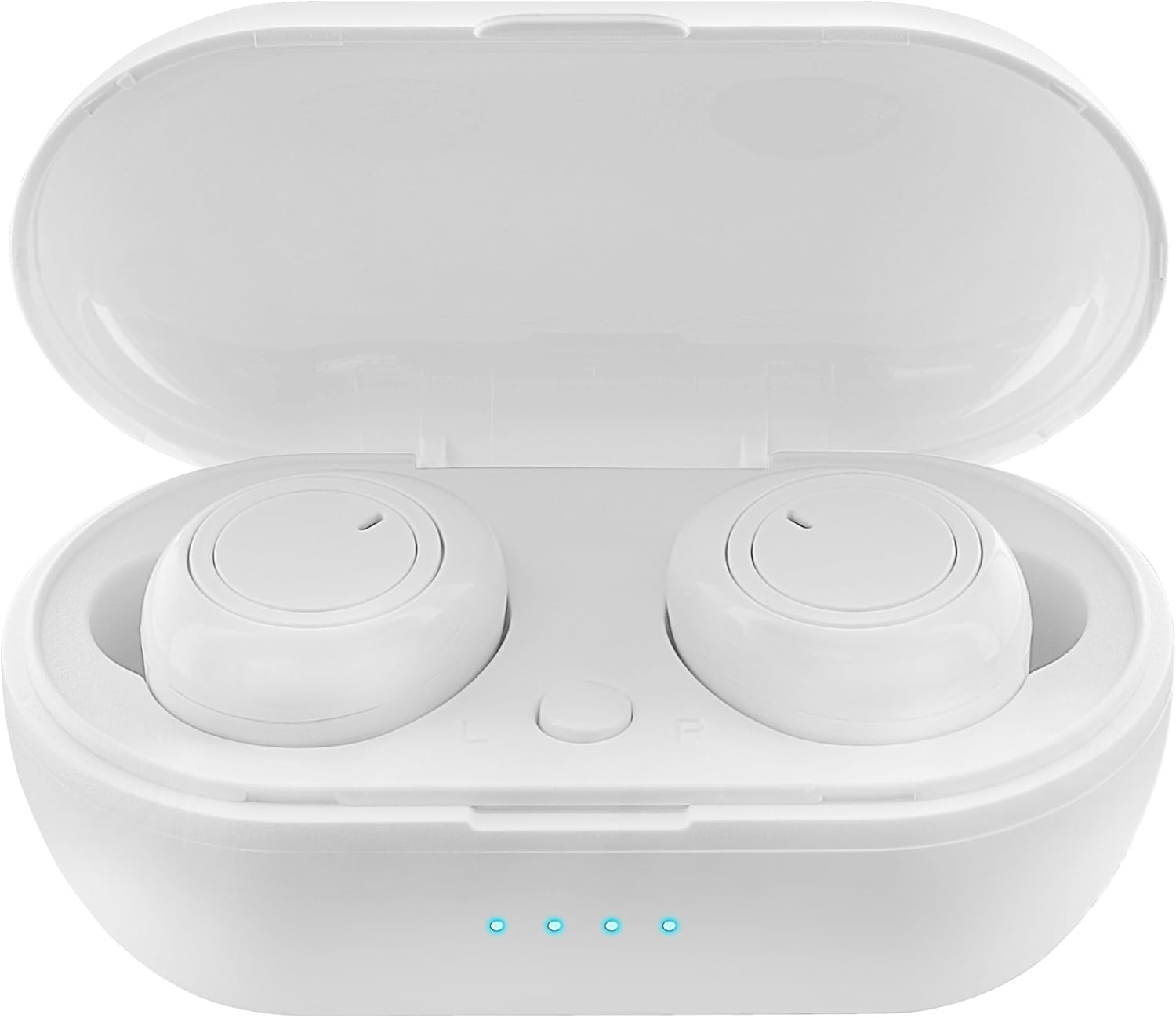
Figure 1: Earbuds in Charging Case with LED Indicators. The charging case features a transparent lid and three blue LED lights indicating battery status.

Figure 2: Individual Earbuds (Front View). Each earbud features a circular touch control area for easy operation.

Figure 3: Individual Earbuds (Side View). The ergonomic design ensures a comfortable and secure fit in the ear.
Gadzirira
1. Kuchaja maEarbuds uye Case
- Isa maearbuds muchesi yekuchaja. Ita shuwa kuti vakagara zvakanaka.
- Batanidza tambo yekuchaja yeUSB kune chinobatidza chiri pabhokisi uye kune simba (semuenzaniso, adapta yemadziro eUSB, chinobatidza USB yekombuta).
- The LED display on the charging case will indicate the charging status. A full charge is indicated when all lights are solid.
- Allow approximately 1-2 hours for a full charge of both earbuds and the case.
2. Kubatanidza neChishandiso Chako
- Vhura bhokisi rekuchaja. Ma earbuds anopinda otomatiki mu pairing mode (zvinoratidzwa nemwenje inopenya pama earbuds).
- Pane yako smartphone kana Bluetooth-inogonesa mudziyo, enda kune iyo Bluetooth marongero.
- Tsvaga new devices and select "SENTRY Earbuds" (or similar name) from the list.
- Once connected, the earbud lights will stop flashing, and you will hear a confirmation tone.
- Maearbuds anozobatana otomatiki kune yekupedzisira paired mudziyo kana aburitswa kunze kwekesi, kana Bluetooth yakagoneswa pachigadzirwa.
Operating Instruction
Your SENTRY Ultra-Light Bluetooth Earbuds feature intelligent touch controls for easy management of your audio and calls.
| Function | Chiito |
|---|---|
| Ridza/Misa Mimhanzi | Top kamwechete pane imwe earbud |
| Next Track | Tokonya kaviri parudyi rwenzeve |
| Previous Track | Tokonya kaviri paLeft earbud |
| Pindura/Pedzisa Kufona | Top kamwechete pane imwe earbud |
| Ramba Kufona | Dzvanya uye bata chero earbud kwemasekonzi maviri |
| Activate Voice Assistant | Tokonya katatu pane imwe earbud |
| Volume Up | Press and hold Right earbud |
| Volume Down | Press and hold Left earbud |
Maintenance
- Kuchenesa: Shandisa jira rakapfava, rakaoma, risina lint kuchenesa maearbud nekesi yekuchaja. Usashandise makemikari ane hasha kana abrasive zvinhu.
- Kuchengeta: Kana isiri kushandiswa, chengeta maearbuds mukesi yavo yekuchaja kuti uzvidzivirire uye ugare wakachajwa. Chengetedza munzvimbo inotonhorera, yakaoma kure nechiedza chezuva uye tembiricha yakanyanyisa.
- Battery Care: Kuti urebese hupenyu hwebhatiri, dzivisa kuburitsa zvizere maearbuds uye kesi yekuchaja nguva zhinji. Vachajise nguva nenguva, kunyangwe isiri mukushandiswa nguva dzose.
- Kuramba Mvura: These earbuds are not water resistant. Avoid exposure to water, sweat, or high humidity.
Kugadzirisa matambudziko
- Maearbuds haana kubatanidza: Ensure both earbuds are charged. Place them back in the case, close the lid, then open it again to re-enter pairing mode. Check your device's Bluetooth settings and try reconnecting.
- Imwe chete earbud inoshanda: Try placing both earbuds back in the charging case, closing the lid, and then taking them out again. This often re-syncs them.
- Hapana ruzha: Tarisa huwandu hwevhoriyamu pamudziyo wako nepama earbuds. Iva nechokwadi chekuti ma earbuds akabatana zvakanaka nemudziyo wako.
- Kuchaja nyaya: Ensure the charging cable is securely connected to both the case and the power source. Try a different USB port or charger. Clean the charging contacts on the earbuds and inside the case.
- Hunhu husina kunaka: Ensure the earbuds are properly seated in your ears. Try cleaning any debris from the earbud grilles.
Zvinotsanangurwa
| Feature | Detail |
|---|---|
| Model Name | 5002-407 |
| Kubatana Technology | Wireless (Bluetooth) |
| Wireless Communication Technology | Bluetooth |
| Age Range (Tsanangudzo) | Mukuru |
| Kuchaja Nguva | Approximately 1-2 Hours (for earbuds and case) |
| Inowirirana Devices | Smartphones, Apple Devices |
| Control Type | Midhiya Kudzora |
| Cable Feature | Pasina Cable |
| Mvura Resistance Level | Kwete Kudzivirira Mvura |
| Frequency Range | 20Hz - 20kHz |
| Kudzora Nzira | Bata |
| Hupenyu hwebhatiri | Kusvikira kumaawa makumi mana nemasere (ine kesi yekuchaja) |
| Audio Driver Type | Dynamic Driver |
| Kutakura Case Color | Chena |
| Earpiece Shape | Rounded |
| Brand | SENTRY |
| Color | Chena |
| Kuiswa Nzeve | Munzeve |
| Fomu Factor | Munzeve |
| Noise Control | Hapana |
Warranty uye Support
SENTRY products are designed for reliability and performance. For information regarding warranty coverage and customer support, please refer to the warranty card included with your product or visit the official SENTRY website. Unogonawo kushanyira Chitoro cheSENTRY paAmazon kune rumwe ruzivo rwechigadzirwa uye zviwanikwa zvekutsigira.


