1. Nhanganyaya
This manual provides essential information for the safe and effective operation, maintenance, and troubleshooting of your SIMATE Self-Balancing Scooter. Please read this manual thoroughly before first use and retain it for future reference.
The SIMATE Scooter features a self-balancing control system, dual 250W motors, and all-terrain tires, designed for users of various ages. It includes integrated Bluetooth speakers and colorful LED lights for an enhanced riding experience.
2. Setup uye Kutanga Kushandisa
2.1 Unboxing uye Chikamu Chengetedza
Nyatsobvisa zvese zvikamu kubva pakurongedza. Iva nechokwadi chokuti zvinhu zvinotevera zvakabatanidzwa:
- SIMATE Self-Balancing Scooter
- Power Charger
- Mushandisi Chinyorwa (gwaro iri)
If any components are missing or damaged, please contact SIMATE customer support.
2.2 Kutanga Kuchaja
Before first use, fully charge the scooter's battery. Locate the charging port, typically near the power switch. Connect the charger to the scooter and then to a power outlet. The battery indicator light will show charging status. Disconnect the charger once the battery is full.
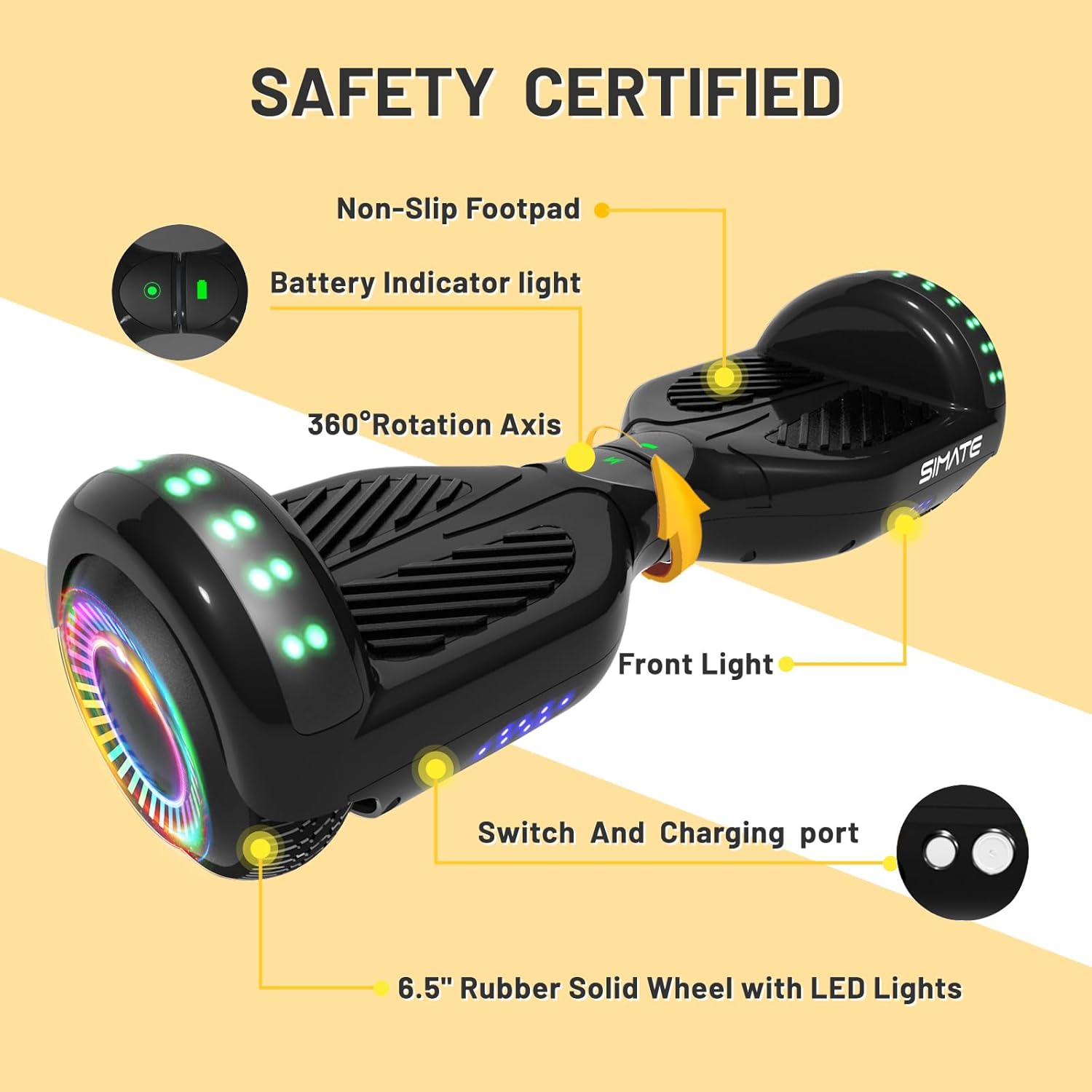
Mufananidzo: Pamusoroview of the SIMATE Scooter highlighting key components including the charging port and battery indicator light.
3. Operating Instructions
3.1 Basic Operation
The SIMATE Scooter utilizes a self-balancing system for intuitive control. To move forward, gently lean your body forward. To turn, apply slight pressure with your feet in the desired direction. Practice in a safe, open area until comfortable with the controls.

Image: Visual guide demonstrating the self-balancing system for forward movement, balance, and backward movement.
3.2 Speed Modes and Performance
The scooter features three adjustable speed modes, allowing for a top speed of 7.5 mph. It is powered by dual 250W motors, providing a range of approximately 7.5 miles on a full charge and capable of handling inclines up to 15 degrees. The maximum load capacity is 220 lbs.
3.3 Bluetooth Speaker and LED Lights
Your scooter is equipped with a built-in Bluetooth speaker and colorful LED lights. To activate the Bluetooth speaker, ensure the scooter is powered on. Tsvaga "SIMATE Scooter" on your mobile device's Bluetooth settings and pair. The LED lights and flashing wheels activate automatically when the scooter is in use, enhancing visibility and enjoyment.

Image: The SIMATE Scooter showcasing its integrated Bluetooth speaker and vibrant LED lights.
3.4 APP Control (XsCar App)
For advanced control and monitoring, download the exclusive XsCar app. The app allows you to:
- Power the scooter on/off
- Rongedza zvigadziriso zvemwenje we LED
- Monitor current speed and battery level
- Set different speed modes
- Access additional features

Image: The XsCar mobile application interface, demonstrating its control capabilities over the scooter's functions.
4. Kuchengeta
4.1 Kuchenesa
Regularly wipe down the scooter with a damp cloth to remove dirt and dust. Avoid using harsh chemicals or abrasive materials that could damage the finish. Do not use high-pressure water jets or submerge the scooter in water.
4.2 Kuchengeta Battery
To maximize battery life, charge the scooter fully before storage if it will not be used for an extended period. Recharge the battery at least once every three months to prevent deep discharge. Store the scooter in a cool, dry place away from direct sunlight and extreme temperatures.
4.3 Chikamu Chekuongorora
Periodically inspect the 6.5-inch solid rubber wheels for wear or damage. Check the non-slip footpads for secure attachment and any signs of deterioration. Ensure the aluminum frame is free from cracks or bends. If any issues are found, contact customer support for guidance.
5. Kugadzirisa matambudziko
| Dambudziko | Zvinogona Kukonzera | Solution |
|---|---|---|
| Sikuta haibati simba. | Bhatiri rakaderera kana rapera. | Charge the scooter fully. |
| Mwenje haisi kushanda. | Scooter not powered on; internal connection issue. | Ensure scooter is on. If problem persists, contact support. |
| Bluetooth haina kubatana. | Scooter not in pairing mode; device too far. | Ensure scooter is on and Bluetooth is enabled on your device. Move device closer. Restart both devices. |
| Scooter beeps constantly or is unstable. | Overload; uneven surface; sensor calibration issue. | Reduce load. Move to a flat surface. Recalibrate the scooter (refer to app or online resources for specific steps). |
For issues not listed here, or if solutions do not resolve the problem, please contact SIMATE customer support.
6. Zvinotsanangurwa
- Zita remuenzanisi: P6 Scooter
- Brand: SIMATE
- Ruvara: Nhema
- Material: Aluminium, Rubber
- Motokari Simba: Dual 250W
- Kumhanya Kwepamusoro: 7.5 mph (12 km/h)
- Max Range: 7.5 mamaira (12 km)
- Max Load: 220 lbs (100 kg)
- Climbing Angle: Kusvikira ku15 degrees
- Wheel size: 6.5 inches (Solid Rubber)
- Chinhu Weight: 13 Mapaundi (5.9 kg)
- Package Dimensions: 24.5 x 8.3 x 8 inches (62.2 x 21.1 x 20.3 cm)
- Special Features: Built-In Bluetooth speaker, LED Lights, Light Up Wheels, Lightweight, Long Battery Life
- Mugadziri: Jinhua Smart Electric Technology Co., Ltd
7. Warranty uye Tsigiro
7.1 Ruzivo rweWaranti
The SIMATE Scooter comes with a 1-year limited warranty from the date of purchase. This warranty covers manufacturing defects under normal use. It does not cover damage caused by misuse, accidents, unauthorized modifications, or normal wear and tear. Please retain your proof of purchase for warranty claims.
7.2 Mutengi Tsigiro
SIMATE provides 7x24 hours online support for any inquiries or issues you may encounter. A 365-day after-sales service is also available. For assistance, please visit the official SIMATE websaiti kana kubata nzira yavo yebasa revatengi.
Kuti uwane rumwe ruzivo, shanya iyo SIMATE Store on Amazon.