Nhanganyaya
Ndatenda nekutengaasing the Muse M-780 BTB Bluetooth Speaker. This portable speaker features 20W output, colored lights, IPX5 splash resistance, hands-free calling, and stereo pairing capabilities. It supports Bluetooth, Auxiliary input, and USB MP3 playback. Please read this manual carefully before use to ensure proper operation and to maximize your listening experience.
Safety Information
- Usaisa mudziyo kune tembiricha yakanyanyisa, zuva rakananga, kana hunyoro hwepamusoro.
- Dzivisa kudonhedza kana kuita kuti mukurukuri apedzisire akasimba.
- The speaker is IPX5 splash-resistant. Do not immerse it in water or expose it to strong jets of water.
- Usaedze kupatsanura kana kugadzirisa sipika. Izvi zvinoita kuti garandi isashande.
- Use only the provided or approved charging cable.
- Chengetedza pasingasvikirwi nevana.
Package Zviri mukati
Ndapota tarisai kuti zvinhu zvese zviripo:
- Muse M-780 BTB Bluetooth Speaker
- USB-C Kuchaja Cable
- Anobatsira Inzwa Zvinotaurwa Cable
- Chinyorwa Chirairo (gwaro iri)
Product Overview
Ziva zvinhu zvinodzora spika uye maports.
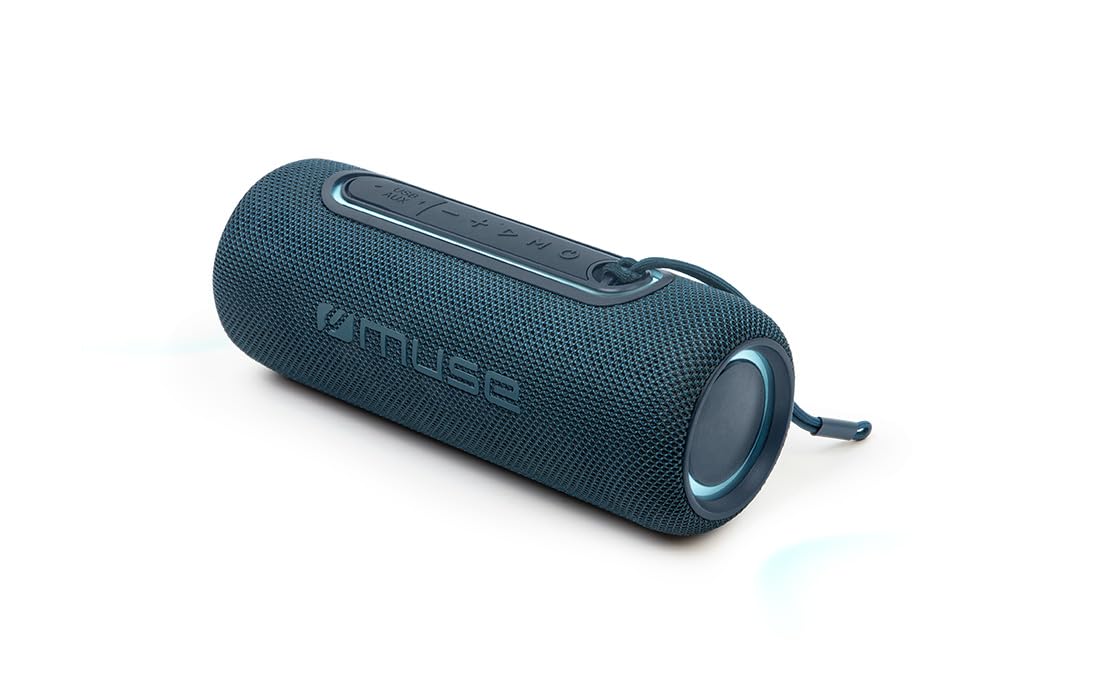
Mufananidzo 1: Mberi view of the Muse M-780 BTB Bluetooth Speaker, showing the speaker grille and control buttons on top.
Zvidzore uye zviratidzo:
- Bhatani reSimba: Dzvanya uye bata kuti ubatidze/kudzima.
- Bhatani reTamba/Kumbomira: Press to play or pause music. Answer/end calls.
- Kukwidza inzwi (+): Dzvanya kuti uwedzere vhoriyamu. Dzvanya wobata kuti utarise rwiyo runotevera.
- Vhoriyamu Pasi (-): Dzvanya kuti uderedze vhoriyamu. Dzvanya wobata rwiyo rwekare.
- Bhatani reModhi (M): Press to switch between Bluetooth, Aux-in, and USB modes.
- Light Mode Bhatani: Press to cycle through different colored light effects.
- Bluetooth Pairing LED Indicator: Inoratidza mamiriro ekubatana kweBluetooth.
- Kuchaja LED Indicator: Inoratidza mamiriro ekuchaja bhatiri.
Zviteshi:
- USB-C yekuchaja Port: Yekuchaja bhatiri remukati.
- Chiteshi cheAUX-IN: For connecting external audio devices via 3.5mm cable.
- USB Port: For MP3 playback from a USB flash drive.
Gadzirira
1. Kutanga Kuchaja
Before first use, fully charge the speaker. Connect the supplied USB-C cable to the speaker's USB-C charging port and the other end to a USB power adapter (not included) or a computer's USB port. The Charging LED indicator will illuminate during charging and turn off when fully charged. A full charge provides up to 10 hours of music playback.
2. Powering On / Off
Dzvanya uye ubate iyo Bhatani reSimba for approximately 3 seconds to turn the speaker ON or OFF.
Operating Instruction
Bluetooth Kubatanidza
- Turn on the speaker. It will automatically enter Bluetooth pairing mode, and the Bluetooth Pairing LED indicator will flash.
- Enable Bluetooth on your smartphone, tablet, or other Bluetooth-compatible device.
- Tsvaga "M-780 BTB" in the list of available devices and select it to connect.
- Once successfully paired, the Bluetooth Pairing LED indicator will stop flashing and remain solid. You can now stream music wirelessly from your device within a range of up to 10 meters.
Auxiliary Input (AUX-IN)
- Connect one end of the supplied 3.5mm auxiliary cable to the AUX-IN port on the speaker.
- Batanidza rimwe divi kune headphone jack kana odhiyo inobuda kubva pamudziyo wako wekunze weaudio.
- Press the Bhatani reModhi (M) to switch to AUX-IN mode.
- Dzora kutamba uye vhoriyamu kubva pamudziyo wako wekunze.
Kutamba kweUSB MP3
- Isa USB flash drive ine MP3 audio files mu USB port iri paspika.
- Press the Bhatani reModhi (M) kuchinja ku USB mode.
- The speaker will automatically begin playing MP3 files kubva pa USB drive.
- Use the Play/Pause, Volume Up (+), and Volume Down (-) buttons to control playback.
Kufona Kwemaoko Kwemahara
When connected via Bluetooth to your smartphone:
- Pindura/Pedzisa Kufona: Press the Bhatani rekutamba/kumbomira kamwe.
- Ramba Kufona: Dzvanya uye ubate iyo Bhatani rekutamba/kumbomira kwe 2 seconds.
Stereo Pairing (TWS - True Wireless Stereo)
You can pair two M-780 BTB speakers together for a true wireless stereo sound experience.
- Ensure both M-780 BTB speakers are turned on and not connected to any Bluetooth device.
- Pane imwe spika (iyi ndiyo ichange iri spika huru), tinya wobata bhatani Bhatani reModhi (M) for 2-3 seconds until you hear a confirmation tone. The speakers will attempt to pair with each other.
- Once successfully paired, you will hear another confirmation tone. The Bluetooth LED on the primary speaker will flash, and the LED on the secondary speaker will be solid.
- Now, connect your Bluetooth device to the primary speaker as described in the "Bluetooth Pairing" section. Both speakers will play audio in stereo.
Colored Mwenje
Press the Chiedza Modhi Bhatani to cycle through various colored light effects. Press again to change the effect or turn the lights off.
Kuchaja Mutauriri
When the battery is low, the speaker may emit an audible alert. Connect the USB-C charging cable to the speaker and a power source. The Charging LED indicator will show the charging status. Disconnect the cable once fully charged to preserve battery life.
Maintenance
- Kuchenesa: Shandisa jira rakapfava, rakaoma kuchenesa pamusoro pemukurukuri. Usashandise abrasive cleaners kana solvents.
- Kuramba Mvura: The M-780 BTB has an IPX5 splash-resistant rating, meaning it can withstand splashes of water. Do not submerge the speaker in water or expose it to running water. Ensure the port cover is securely closed to maintain water resistance.
- Kuchengeta: Chengeta mukurukuri munzvimbo inotonhorera, yakaoma asi isingashandiswi kwenguva yakareba.
Kugadzirisa matambudziko
| Dambudziko | Zvinogona Kukonzera | Solution |
|---|---|---|
| Mutauri habatiki. | Bhatiri rapera. | Chaja spika uchishandisa tambo ye USB-C. |
| Hapana ruzha. | Vhoriyamu yakaderera zvakanyanya kana kuti yakanyarara. Nzira yekuisa isiriyo. | Increase volume on both the speaker and the connected device. Press the Mode button to select the correct input (Bluetooth, AUX, USB). |
| Haikwanise kubatanidza kuburikidza neBluetooth. | Chipika hachisi mumodhi yekuwiriranisa. Mudziyo uri kure zvakanyanya. Kupindira. | Ensure speaker is in pairing mode (flashing LED). Move device closer to speaker (within 10m). Turn off other Bluetooth devices. |
| Kubatana kwe stereo hakusi kushanda. | Speakers not correctly paired. | Ensure both speakers are disconnected from other devices. Follow the stereo pairing instructions carefully. |
Zvinotsanangurwa
| Zita remuenzanisi: | M-780 BTB |
| Brand: | Muse |
| Output Power: | 20 Watts |
| Kubatana: | Bluetooth, USB, AUX-IN |
| Bluetooth Range: | Kusvika kumamita gumi (10 tsoka) |
| Kuramba Mvura: | IPX5 Splash-Resistant |
| Nguva Yekutamba: | Kusvika maawa makumi matatu (pahuwandu huri pakati nepakati) |
| Kuchaja Port: | USB-C |
| Zviyero (L x W x H): | 24.2 x 9.2 x 9.2 masendimita (9.5 x 3.6 x 3.6 inches) |
| Kurema | 1 kg (2.2 lbs) |
| Zvishandiso Zvinoenderana: | Mafoni, Mahwendefa, Malaptop |
| Special Features: | Colored Lights, Hands-Free Calling, Stereo Pairing (TWS) |
Warranty uye Support
This product is covered by a standard manufacturer's warranty. For detailed warranty terms and conditions, please refer to the warranty card included with your purchase or contact your retailer. For technical support or service inquiries, please contact Muse customer service through their official webwebhusaiti kana ruzivo rwekuonana rwunopihwa nechigadzirwa chako.


