1. Nhanganyaya
The Pronomic DX-50 USB MKII is a professional 4-channel DJ mixer designed for a wide range of applications, including discos, parties, restaurants, and presentations. Its user-friendly design ensures that both experienced and less experienced users can fully utilize its features. This manual provides detailed instructions for setting up, operating, and maintaining your mixer.
Key features include a recording function, integrated Bluetooth interface, USB player with transport controls, and multiple input channels.
2. Yakakosha Mirayiridzo Yekuchengetedza
- Verenga Mirairo: Read all safety and operating instructions before using the product.
- Chengetedza Mirairo: Chengetedza kuchengetedzwa uye mirairo yekushanda kuitira ramangwana.
- Teerera Nyevero: Teerera kune yese yambiro pane chigadzirwa uye mumirairo yekushandisa.
- Tevera Mirairo: Tevera mirairo yese yekushandisa uye yekushandisa.
- Mvura uye Unyoro: Do not use this apparatus near water (e.g., bathtub, washbowl, kitchen sink, laundry tub, wet basement, or swimming pool).
- Kufefetedza Usavhare chero mazaru emhepo. Isa maererano nemirairo yemugadziri.
- Kupisa: Usaise padhuze nechero zvitubu zvekupisa zvakaita semaradiator, marejita ekupisa, zvitofu, kana zvimwe midziyo (kusanganisira amplifiers) zvinoburitsa kupisa.
- Power Sources: Use only power sources specified by the manufacturer.
- Simba-Cord Kudzivirirwa: Chengetedza tambo yemagetsi kubva pakufambiswa kana kudzvanywa, kunyanya pamapulagi, midziyo yekurerutsira, nenzvimbo yavanobuda kubva mumidziyo.
- Kuchenesa: Chenesa chete nemucheka wakaoma.
- Sevhisi: Usaedze kushandira chigadzirwa ichi pachako nekuti kuvhura kana kubvisa zvivharo zvinogona kukuisa kune njodzi voltage kana dzimwe njodzi. Tumira masevhisi ese kuvashandi vanokwanisa.
3. Package Zviri mukati
Please check that all items listed below are included in your package. If any items are missing or damaged, contact your dealer immediately.
- Pronomic DX-50 USB MKII DJ Mixer
- Power Adapter (AC 12V)
- USB Stick (32 GB, if included in your specific bundle)
- Mushandisi Chinyorwa (gwaro iri)
4. Chigadzirwa Pamusoroview
Familiarize yourself with the various controls and connections on your DX-50 USB MKII mixer.
4.1 Front Panel Controls
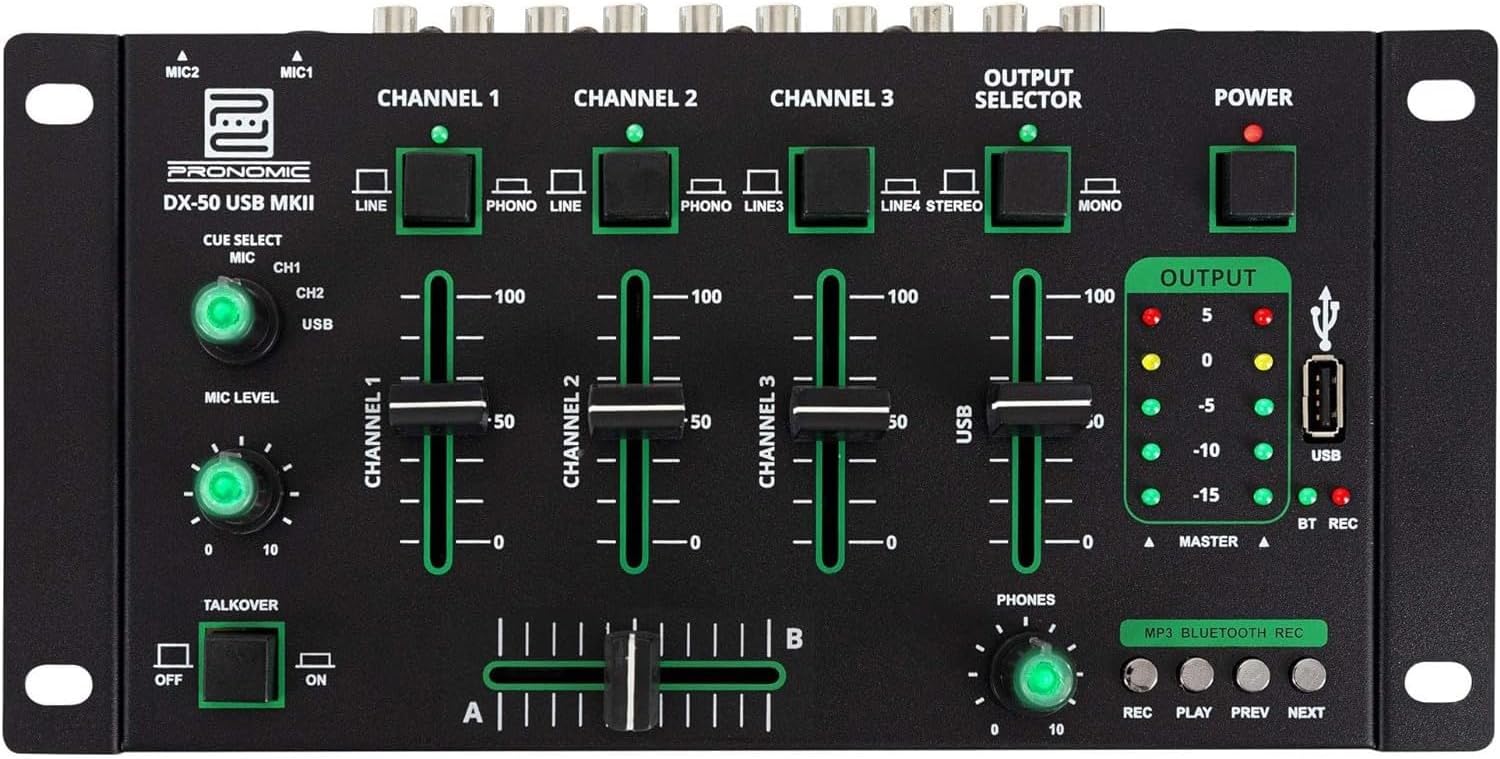
- MIC 1/2 Inputs: Connect microphones.
- Channel 1-4 Input Selectors: Switch between LINE, PHONO, or USB/Bluetooth inputs for each channel.
- Chiteshi Faders: Adjust the volume level for each channel.
- CUE Select Buttons: Route specific channels to the headphone output for monitoring.
- MIC Level Knob: Adjust the volume of the microphone inputs.
- Talkover Switch: Activates the talkover function, which automatically lowers music volume when speaking into the microphone.
- Output Selector: Choose between Stereo or Mono master output.
- Simba Chinja: Turns the mixer on/off.
- Output Level Meters: LED indicators showing the master output level.
- USB Port: Connect a USB drive for MP3 playback and recording.
- MP3/Bluetooth/REC Player Controls: Buttons for Play/Pause, Previous, Next, and Record functions for the integrated player.
- Phones Level Knob: Inogadzirisa vhoriyamu yemuchina wekutumira mahedhifoni.
- Crossfader (A/B): Blends between channels assigned to A and B.
4.2 Rear Panel Connections

- Simba reAC 12V: Batanidza adapta yemagetsi yakapihwa pano.
- PHONES Output: 6.3mm jack yekubatanidza mahedhifoni.
- MASTER OUT L/R (RCA): Connect to your main amplifier kana vatauri vane simba.
- Channel 1 & 2 Inputs (RCA Line/Phono): Connect turntables (Phono) or other line-level devices (CD players, media players). Use the front panel selector to switch.
- Channel 3 & 4 Inputs (RCA Line): Connect line-level devices.
- MIC 1 & 2 Inputs (6.3mm Jack): Connect microphones.
5. Setup
Follow these steps to set up your Pronomic DX-50 USB MKII mixer:
- Power Connection: Ensure the mixer's power switch is in the OFF position. Connect the supplied AC 12V power adapter to the "AC 12V" input on the rear panel of the mixer. Plug the adapter into a suitable power outlet.
- Master Output Connection: Connect the "MASTER OUT L/R" RCA outputs on the rear panel to the inputs of your amplifier kana vatauri vane simba.
- Input Device Connection:
- Turntables: Connect turntables to the "CHANNEL 1" or "CHANNEL 2" RCA inputs. Set the corresponding input selector on the front panel to "PHONO".
- CD Players/Line Devices: Connect CD players, media players, or other line-level devices to "CHANNEL 1", "CHANNEL 2", "CHANNEL 3", or "CHANNEL 4" RCA inputs. Set the corresponding input selector on the front panel to "LINE".
- Maikorofoni: Connect microphones to the "MIC 1" or "MIC 2" 6.3mm jack inputs on the rear panel.
- Kubatanidza Headphone: Connect your headphones to the "PHONES" 6.3mm jack on the rear panel.
- USB Drive (Optional): If using a USB drive for playback or recording, insert it into the "USB" port on the front panel.
- Power On: Once all connections are made, switch the mixer's power switch to the ON position. The power indicator LED will illuminate.
6. Operating Instructions
6.1 Kusanganisa Kwepakutanga
- Sarudza Input: For each channel, use the input selector switch (LINE/PHONO/USB/BT) to choose the desired audio source.
- Adjust Channel Volume: Use the vertical faders for each channel to adjust its individual volume level.
- Master Output: Monitor the "OUTPUT" LED meters and adjust the master volume knob (if present, otherwise rely on channel faders and amplifier volume) to achieve a suitable overall output level without clipping.
- Crossfader: Use the crossfader to smoothly transition between channels assigned to A and B. Channels 1 and 2 are typically assigned to the crossfader.
6.2 Kushandisa Maikorofoni
- Connect your microphone to one of the MIC inputs on the rear panel.
- Adjust the "MIC LEVEL" knob on the front panel to control the microphone's volume.
- Talkover Function: Activate the "TALKOVER" switch to automatically reduce the volume of the music when you speak into the microphone. This is useful for announcements.
6.3 USB Playback and Recording
- USB Kutamba: Isa USB drive ine MP3 files into the "USB" port. Select "USB" as the input source for the dedicated USB channel. Use the "PLAY/PAUSE", "PREV", and "NEXT" buttons to control playback.
- USB Kurekodha: Press the "REC" button to start recording the master output to the connected USB drive. Press "REC" again to stop recording. Ensure your USB drive has sufficient free space and is formatted correctly (FAT32 is commonly supported).
6.4 Kubatana kweBluetooth
- Activate Bluetooth: Select "BT" as the input source for the dedicated Bluetooth channel. The mixer will enter pairing mode.
- Paya Chishandiso: On your Bluetooth-enabled device (smartphone, tablet, etc.), search for available Bluetooth devices. Select "Pronomic DX-50 USB MKII" (or similar name) from the list to pair.
- Ridza Audio: Once paired, you can play audio from your device through the mixer. Control playback from your device or using the mixer's transport controls (if supported by your device).
6.5 Monitoring with Headphones
- Connect headphones to the "PHONES" output.
- Use the "CUE SELECT" buttons to choose which channels you want to monitor in your headphones without affecting the main output.
- Adjust the "PHONES" level knob to set your desired headphone volume.
7. Kuchengeta
- Kuchenesa: Disconnect the power before cleaning. Use a soft, dry cloth to wipe the surface of the mixer. Do not use liquid cleaners, aerosols, or solvents.
- Kuchengeta: Chengeta musanganiswa munzvimbo inotonhorera, yakaoma kure nezuva rakananga uye tembiricha yakanyanya.
- Fader and Knob Care: Avoid excessive force when operating faders and knobs. Periodically check for dust or debris accumulation around moving parts.
- Cable Management: Ensure cables are not kinked or strained, which can lead to damage.
8. Kugadzirisa matambudziko
| Dambudziko | Zvinogona Kukonzera | Solution |
|---|---|---|
| Hapana simba | Power adapter not connected; Power switch off; Faulty power outlet. | Check power adapter connection; Ensure power switch is ON; Try a different power outlet. |
| No sound from main output | Master volume too low; Amplifier/speakers off or disconnected; Incorrect input selection; Channel faders down. | Increase master volume; Check amplifier/speaker connections and power; Verify correct input selected for channels; Raise channel faders. |
| Hapana ruzha kubva kumahedhifoni | Headphone volume too low; Headphones not connected; No CUE selected. | Increase PHONES level; Connect headphones properly; Press CUE button for desired channel. |
| Bluetooth haina kubatanidza | Mixer not in pairing mode; Device too far; Interference. | Ensure BT input is selected; Bring device closer; Restart mixer and device. |
| Kutamba kwe USB hakusi kushanda | USB drive not inserted correctly; Incorrect file format; USB drive not formatted correctly. | Re-insert USB drive; Ensure files are MP3; Format USB drive to FAT32. |
9. Zvinotsanangurwa
| Model | Pronomic DX-50 USB MKII |
| Nhamba yeChannels | 4 |
| Kubatana Technology | Bluetooth, USB |
| Audio Input | RCA (line/phono), 6.3mm microphone, Bluetooth, USB |
| Output Connector Type | RCA (Master Out), 6.3mm (Phones) |
| Simba Source | Electric Cable (AC 12V adapter) |
| Dimensions (without corner brackets and controls) | 222 x 129 x 28 mm (Kufara x Kudzika x Kureba) |
| Total Dimensions (with corner brackets and controls) | 267 x 136 x 51 mm (Kufara x Kudzika x Kureba) |
| Kurema | 790 g |
10. Warranty uye Tsigiro
Kuti uwane ruzivo rwewaranti uye rutsigiro rwehunyanzvi, ndapota tarisa kune zvinyorwa zvakapihwa nekutenga kwako kana kubata mutengesi wako. Chengetedza humbowo hwako hwekutenga kune chero vimbiso yewaranti.
For further assistance, you may also visit the official Pronomic websaiti kana kubata dhipatimendi ravo rebasa revatengi.


