Nhanganyaya
Welcome to the GOBOULT UFO True Wireless Earbuds user manual. These earbuds are designed to provide a superior audio experience with features like extended playtime, low latency gaming, advanced noise cancellation, and robust bass drivers. Please read this manual carefully to ensure proper use and optimal performance of your device.
Chii chiri muBhokisi
- GOBOULT UFO True Wireless Earbuds
- Wireless Charging Case
- Tambo Yekuchaja Yemhando C Inokurumidza
- Extra Pair of Ertips
- User Manual
- Warranty Card
Product Overview
The GOBOULT UFO earbuds feature a distinctive design with integrated breathing LEDs on both the earbuds and the charging case. They are equipped with 13mm drivers for rich bass and Quad Mic ENC for clear calls.

Image: GOBOULT UFO Earbuds and Charging Case. This image highlights key features such as Bluetooth 5.3 connectivity, 48 hours of playtime, Quad Mic ENC, 13mm drivers, 45ms low latency, and Type-C fast charging.
Kufema LEDs
The breathing LEDs on the case and earbuds provide visual feedback for various actions, including opening/closing the case, charging, and when buds are connected.

Image: The GOBOULT UFO charging case and earbuds displaying their distinctive breathing LED lights, which indicate various operational states.
Audio Quality
Experience high-fidelity sound with precision-tuned 13mm drivers, ensuring clear audio across all frequencies and rich bass. The Quad Mic ENC (Environmental Noise Cancellation) system ensures crystal-clear, interference-free calls.

Image: A close-up of a GOBOULT UFO earbud, highlighting the 13mm drivers responsible for supreme bass surge.

Mufananidzo: Yakadzama view of a GOBOULT UFO earbud, showcasing the AI-powered Quad Mic AI-ENC technology for high-definition call clarity and Zen™ mode for silence.
Gadzirira
Kutanga Pairing
- Vhura kesi yekuchaja. Maearbuds anozopinda otomatiki maitiro ekubatanidza.
- Pamudziyo wako (smartphone, piritsi, nezvimwewo), shandisa Bluetooth.
- Tsvaga "GOBOULT UFO" in the list of available Bluetooth devices and select it to connect.
- Once connected, you will hear an audio prompt, and the LED indicators on the earbuds will change.
The earbuds utilize Bluetooth 5.3 for stable and efficient connection, featuring Blink & Pair™ technology for fast pairing.

Image: GOBOULT UFO Earbuds illustrating stable connectivity with Bluetooth 5.3 and fast pairing technology.
App Support
Enhance your experience by downloading the dedicated GOBOULT app. The app allows you to:
- Switch between 6 Equalizer Modes.
- Gadzirisa kubata zvidhinha.
- Rename your earbuds.
- Wana mamwe marongero nezvimwe zvinhu.
Operating Instruction
Touch Controls
The GOBOULT UFO earbuds feature intuitive touch controls on each earbud.
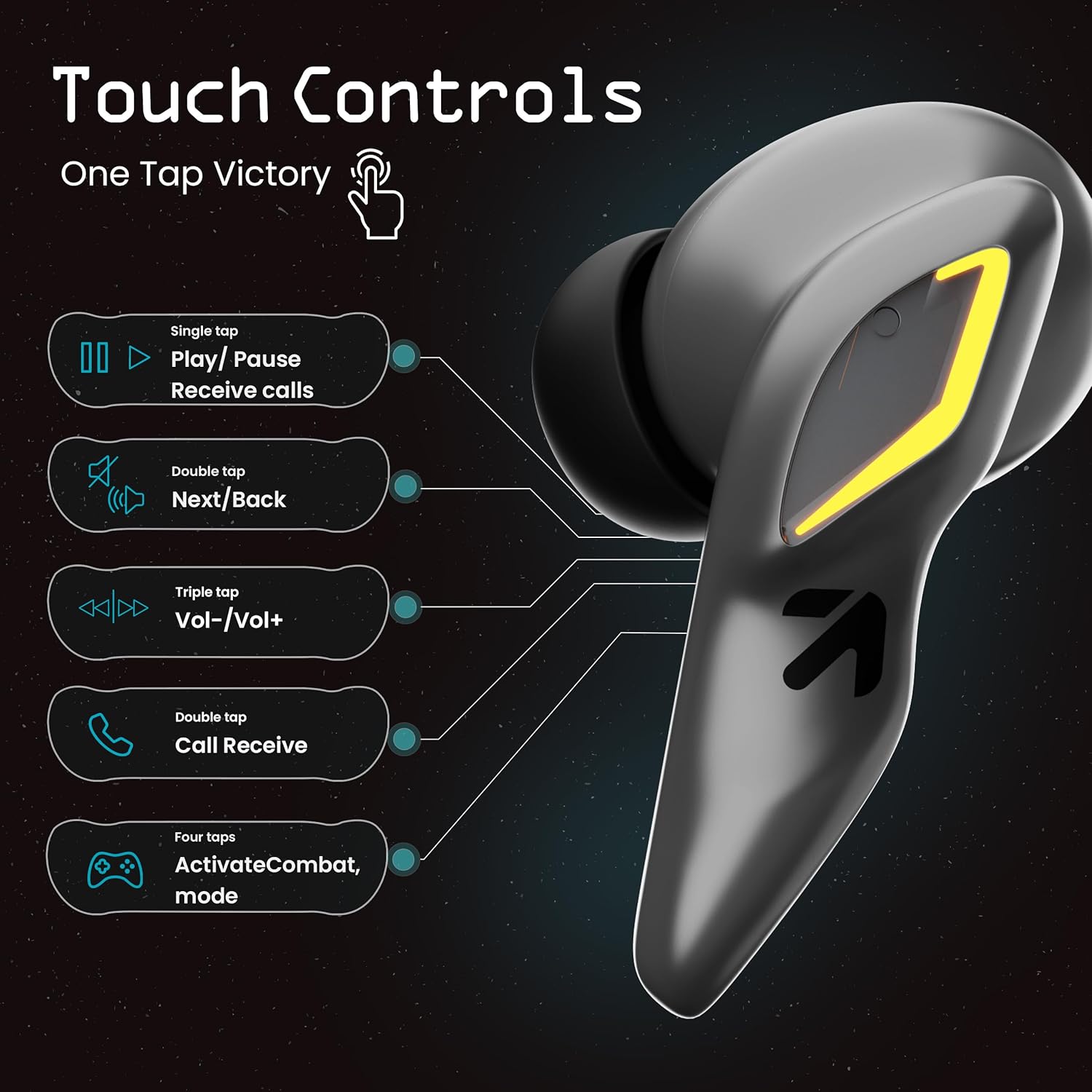
Image: A visual guide to the touch controls on the GOBOULT UFO Earbuds, detailing single, double, triple, and four-tap functions.
- Mumwe Tap: Play/Pause music, Receive calls.
- Dhinda kaviri: Next/Back track.
- Katatu Tap: Volume Up/Down.
- Four Taps: Activate Combat Mode (Gaming Mode).
- Yakareba Press: Activate Voice Assistant (Google Assistant, Siri).
Nzira Yekutamba (Nzira Yekurwisa)
Activate Combat Mode for an ultra-low latency experience of 45ms, ideal for gaming. Tap the earbud four times to toggle this mode.

Image: The GOBOULT UFO Earbuds case open, highlighting the Combat Gaming Mode with 45ms ultra-low latency, activated by four taps.
Voice Assistant
Long press the touch control area on either earbud to activate your device's voice assistant (e.g., Google Assistant, Siri).

Image: GOBOULT UFO Earbuds demonstrating the long-press gesture to activate the voice assistant feature.
Kuchaja
The GOBOULT UFO earbuds offer up to 48 hours of total playtime with the charging case.
Kuchaja Kesi uye maEarbuds
- Isa maearbuds muchesi yekuchaja. Ita shuwa kuti vakagara zvakanaka.
- Connect the Type-C fast charging cable to the charging port on the case and to a power source.
- Iwo ma LED zviratidzo pane iyo kesi inoratidza iyo yekuchaja mamiriro.
- A full charge for the earbuds and case takes approximately 100 minutes.
- With Type-C fast charging, a 10-minute charge can provide up to 1.5 hours of playtime.
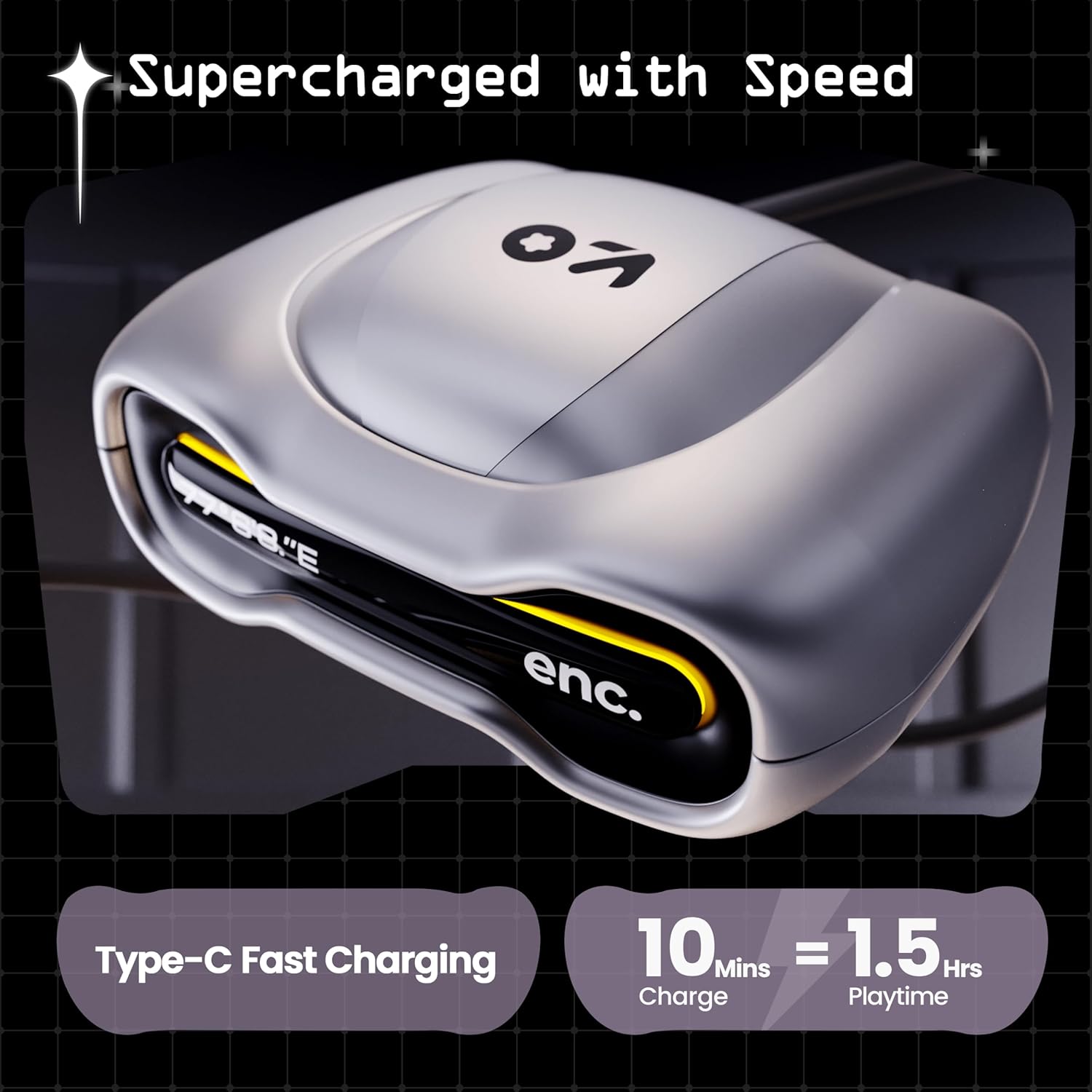
Image: The GOBOULT UFO charging case, illustrating its Type-C fast charging capability, providing 1.5 hours of playtime from a 10-minute charge.
Maintenance
Kuramba Mvura
The GOBOULT UFO earbuds are IPX5 water-resistant, making them sweatproof, rainproof, and splashproof. This protection allows for use during workouts or in light rain.

Image: GOBOULT UFO Earbuds on a metallic surface, indicating their IPX5 water resistance, making them suitable for sweat, rain, and splashes.
Kuchenesa
Kuti urambe uchishanda zvakanaka uye uine hutsanana, gara uchichenesa mahedhifoni ako nebhokisi rekuchaja.
- Shandisa jira rakapfava, rakaoma, risina lint kupukuta maearbud nekesi.
- Patsvina yakasindimara, zvishoma dampen jira nemvura. Dzivisa kushandisa makemikari ane hasha kana abrasive zvinhu.
- Ita shuwa kuti macontacts ekuchaja pane ese maearbuds nekesi akachena uye haana tsvina.
- Allow all components to dry completely before placing earbuds back in the case or charging.
Kugadzirisa matambudziko
If you encounter any issues with your GOBOULT UFO earbuds, please refer to the following common solutions:
- Hapana Inzwi: Ensure earbuds are charged and properly connected to your device. Check device volume.
- Kubatanidza Matambudziko: Make sure Bluetooth is enabled on your device. Try forgetting the device in your Bluetooth settings and re-pairing. Ensure earbuds are fully charged.
- Imwe Earbud Haisi Kushanda: Place both earbuds back in the case, close it, and then open it again. This often resets the connection.
- Hunhu Hwakashata hwekufona: Ensure microphones are clean. Check for strong Bluetooth connection.
- Kusapindura Kubata Kudzora: Ita shuwa kuti minwe yako yakachena uye yakaoma. Edza kutangisa maearbuds nekuaisa mukesi uye nekuaburitsa.
Kuti uwane rumwe rubatsiro, ndapota taura nerutsigiro rwevatengi rweGOBOULT.
Zvinotsanangurwa
| Feature | Detail |
|---|---|
| Model Name | UFO (Airbass Earbuds) |
| Bluetooth Version | 5.3 |
| Nguva yekutamba | Kusvikira kumaawa makumi mana nemasere (ine kesi yekuchaja) |
| Sravana Sameeralu Serial XNUMXth Audio Latency | 45 Milliseconds (Gaming Mode) |
| Vatyairi | 13mm Dynamic Drivers |
| Maikorofoni | Quad Mic ENC (Environmental Noise Cancellation) |
| Kuramba Mvura | IPX5 (Inodzivirira ziya, Inodzivirira mvura, Inodzivirira kupwanyika) |
| Kuchaja Port | Type-C Inokurumidza Kuchaja |
| Kuchaja Nguva | Approx. Maminitsi gumi |
| Bluetooth Range | 10 Mamita |
| Frequency Response | 20 Hz |
| Sensitivity | 115 dB |
| Impedance | 32 Ohms |
| Item Weight | 60 magiramu |
| Product Dimensions | 4.7 x 9 x 10 cm |
| Material | Metal |
Warranty uye Support
Warranty Information
The GOBOULT UFO True Wireless Earbuds come with a Waranti yemugadziri wegore rimwe chete from the date of purchase. Please retain your proof of purchase for warranty claims. The warranty covers manufacturing defects. It does not cover damage caused by misuse, accidents, or unauthorized modifications.
Mutengi Support
For any questions, technical support, or warranty claims, please contact GOBOULT customer service.
Mugadziri: Exotic Mile Pvt. Ltd.
Kero: B67 Wazirpur Industrial Area, New Delhi 110052, India.
Please refer to the warranty card included in your product packaging for specific contact details and procedures.


