1. Nhanganyaya
Ndatenda nekutengaasing the MUSE M-295 ANC Bluetooth Stereo Headphones. This manual provides detailed instructions for the proper use, setup, and maintenance of your headphones. Please read this manual carefully before use and retain it for future reference.
2. Safety Information
- Usaise mahedhifoni pakupisa kwakanyanya, hunyoro, kana zvinhu zvinoparadza.
- Dzivisa kudonhedza kana kuisa mahedhifoni pasi kune akasimba maitiro.
- Usabvisa kana kuedza kugadzirisa mahedhifoni iwe pachako. Izvi zvinoita kuti garandi isashande.
- Geza mahedhifoni nejira rakapfava, rakaoma. Usashandise mishonga yekuchenesa yemvura.
- Teererai pahuwandu huri pakati nepakati kuti musakanganiswe nekunzwa.
- Chengetedza pasingasvikirwi nevana.
3. Package Zviri mukati
Ndokumbira utarise kuti zvinhu zvese zviripo mupasuru yako:
- MUSE M-295 ANC Bluetooth Stereo Headphones
- Detachable Microphone
- USB-C Kuchaja Cable
- 3.5mm Audio Cable (for wired use)
- Inodzivirira Kutakura Nyaya
- Mushandisi Chinyorwa (gwaro iri)
4. Chigadzirwa Pamusoroview
Familiarize yourself with the various parts and controls of your MUSE M-295 ANC headphones.
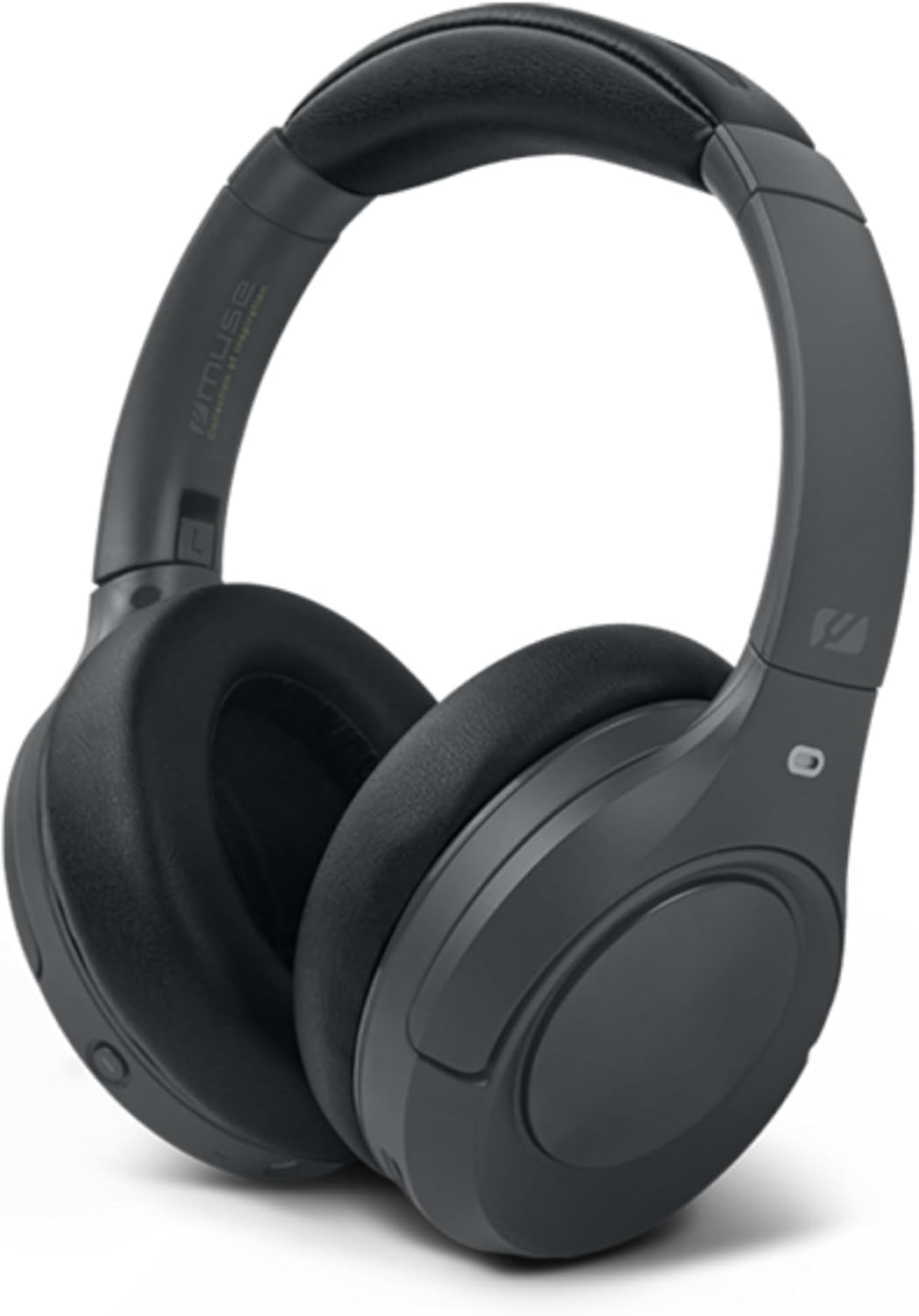
Mufananidzo 4.1: Mberi view of the MUSE M-295 ANC Bluetooth Stereo Headphones.

Mufananidzo 4.2: Kupfuuraview of headphone features including ANC, hands-free calling, USB-C charging, detachable microphone, up to 60 hours music time, AUX input, and adjustable design.
4.1 Zvigadzirwa zveHeadphone
- Adjustable Headband: Kuti ikwane zvakanaka.
- Nzeve: Soft, circum-aural earcups for comfort and passive noise isolation.
- Mabhatani ekudzora: Power, Volume Up/Next Track, Volume Down/Previous Track, Multi-function Button (Play/Pause, Call Answer/End), ANC/Transparent Mode Button.
- USB-C Chiteshi: Zvekuchaja mahedhifoni.
- 3.5mm Audio Jack: Zvekubatanidza newaya.
- Maikorofoni Port: For attaching the detachable boom microphone.
- Chiratidzo che LED: Inoratidza simba, kuchaja, uye mamiriro ekuwiriranisa.
5. Setup
5.1 Kuchaja mahedhifoni
- Connect the supplied USB-C charging cable to the USB-C port on the headphones.
- Batanidza imwe magumo etambo kune USB magetsi adapta (isina kuisirwa) kana komputa USB port.
- Chiratidzo che LED chinoratidza mamiriro ekuchaja (semuenzaniso, tsvuku yekuchaja, bhuruu yekuchaja zvizere).
- Kuchaja kwakazara kunotora maawa maviri uye kunoita kuti mutambo urambe uchitamba kwemaawa gumi nemashanu.

Figure 5.1: Key features including Bluetooth 5.3, lightweight design (0.26 kg), up to 60 hours of battery life, and fast charging (2 hours).
5.2 Bluetooth Pairing
- Ita shuwa kuti mahedhifoni akachajwa.
- Dzvanya wobata bhatani rePower kwemasekondi mashanu kusvika manomwe kusvika chiratidzo che LED chapenya bhuruu netsvuku, zvichiratidza nzira yekuwiriranisa.
- Pamudziyo wako (smartphone, piritsi, komputa), gonesa Bluetooth uye tsvaga zvishandiso zviripo.
- Select "MUSE M-295 ANC" from the list of devices.
- Once paired, the LED indicator will flash blue slowly or turn solid blue.
5.3 Wired Kubatana
To use the headphones without battery power or Bluetooth:
- Batanidza mugumo mumwe wetambo yekuteerera ye3.5mm kune jeki yekuteerera iri pamahedhifoni.
- Batanidza rimwe divi kune odhiyo inobuda mumudziyo wako ye3.5mm.
- In wired mode, Bluetooth and ANC functions may be unavailable or have limited functionality depending on the headphone's power status.
6. Operating Instructions
6.1 Simba On/Kudzima
- Power On: Press and hold the Power button for 3 seconds. The LED will flash blue.
- Power Off: Press and hold the Power button for 3 seconds. The LED will turn off.
6.2 Kuridza Mumhanzi
- Tamba/Kumbomira: Dzvanya iyo Multi-function Bhatani kamwe.
- Vhoriyamu Kumusoro: Press the 'Volume Up' button.
- Vhoriyamu Pasi: Press the 'Volume Down' button.
- Next Track: Press and hold the 'Volume Up' button.
- Previous Track: Press and hold the 'Volume Down' button.
6.3 Call Management
- Pindura/Pedzisa Kufona: Dzvanya iyo Multi-function Bhatani kamwe.
- Ramba Kufona: Dhinda uye ubatisise iyo Multi-function Bhatani kwemasekondi maviri.
- Izwi Mubatsiri: Dzvanya kaviri Bhatani reMulti-function.
6.4 Active Noise Cancellation (ANC) and Transparent Mode
The MUSE M-295 ANC headphones feature 35 dB hybrid noise reduction.

Figure 6.1: The MUSE M-295 ANC headphones actively reducing ambient noise.

Figure 6.2: Features such as the detachable microphone, 60-hour battery life, and acoustic isolation with ANC.
- Shandisa ANC: Press the dedicated ANC button once. The LED indicator will turn green.
- Activate Transparent Mode: Press the ANC button a second time. This mode allows you to hear your surroundings while still enjoying your audio.
- Deactivate ANC/Transparent Mode: Press the ANC button a third time. The green LED will turn off.
6.5 Detachable Microphone
The headphones come with a detachable boom microphone for enhanced call clarity.
- Batanidza Maikorofoni: Insert the detachable microphone into the dedicated microphone port on the earcup until it clicks into place.
- Detach Microphone: Gently pull the microphone out of the port.
- When the detachable microphone is connected, it will automatically be used for calls. The integrated dual microphones will be used when the detachable microphone is not connected.
7. Kuchengeta
- Kuchenesa: Shandisa jira rakapfava, rakaoma, risina lint kuchenesa mahedhifoni. Usashandise abrasive cleaners, doro, kana makemikari zvinonyungudutsa.
- Kuchengeta: When not in use, store the headphones in the provided protective carrying case to prevent damage. Avoid storing in direct sunlight or extreme temperatures.
- Battery Care: Kurebesa hupenyu hwebhatiri, dzivisa kuburitsa mahedhifoni zvakazara nguva zhinji. Vachajise nguva dzose, kunyange kana vasina kushandiswa kwenguva yakareba.
8. Kugadzirisa matambudziko
| Dambudziko | Zvinogona Kukonzera | Solution |
|---|---|---|
| Mahedhifoni haabatike. | Bhatiri rakaderera. | Charge the headphones using the USB-C cable. |
| Haikwanise kubatanidza kuburikidza neBluetooth. | Mahedhifoni haasi mumodhi yekuwiriranisa; Bluetooth yakadzimwa pamudziyo; mudziyo wakanyanya kure. | Ensure headphones are in pairing mode (flashing blue/red LED). Enable Bluetooth on your device. Move device closer to headphones. |
| Hapana ruzha. | Vhoriyamu yakaderera zvakanyanya; mahedhifoni haana kubatana; ruzha rwakabva zvisiri izvo. | Increase volume on headphones and device. Re-pair Bluetooth or check wired connection. Ensure correct audio output is selected on your device. |
| ANC haisi kushanda nemazvo. | ANC haina kushanda; kukodzera kwayo hakukodzeri. | Press the ANC button to activate (green LED). Adjust headphones for a snug fit over your ears. |
| Maikorofoni haisi kushanda. | Detachable microphone not properly connected; device microphone settings. | Ensure the detachable microphone is fully inserted. Check your device's audio input settings to confirm the headphone microphone is selected. |
9. Zvinotsanangurwa
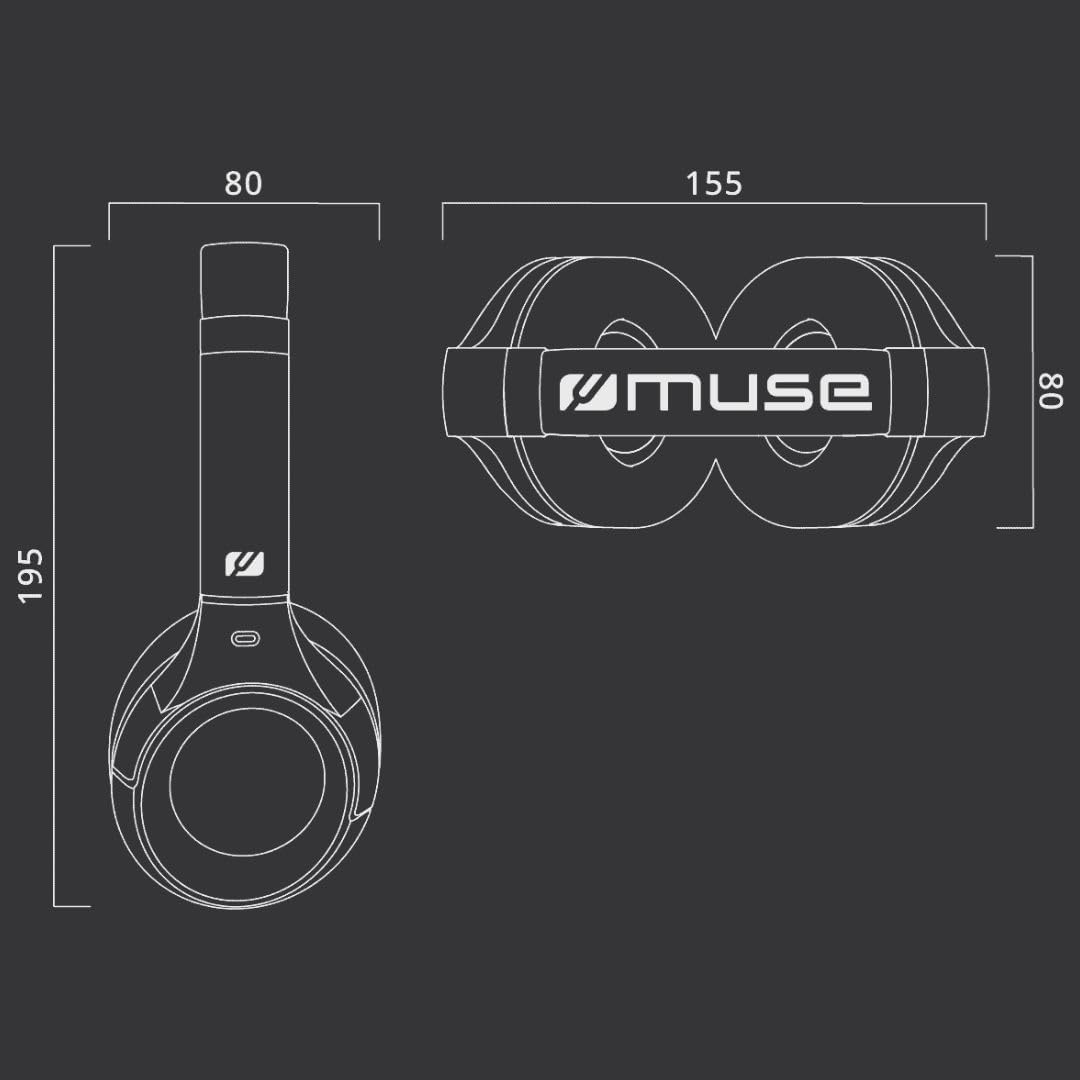
Figure 9.1: Dimensions of the MUSE M-295 ANC headphones (in mm).
- Brand: MUSE
- Zita remuenzanisi: M-295 ANC
- Kubatana Technology: Waya isina waya (Bluetooth), Yakabatana newaya (3.5mm AUX)
- Wireless Communication Technology: Bluetooth 5.3
- Active Noise Cancellation (ANC): 35 dB Hybrid Noise Reduction
- Maikorofoni: Dual integrated, Detachable boom microphone
- Hupenyu hwebhatiri: Up to 60 hours (music time)
- Nguva yekuchaja: Anenge maawa maviri
- Impedance: 32 ohm
- Kurema 260 magiramu
- Fomu Factor: Pamusoro Penzeve (Dzinotenderera-Dzekunzwa)
- Special Features: Noise Cancellation, Rechargeable Battery, Transparent Mode
- Zvishandiso Zvinoenderana: Phones, Desktop Computers
- Zvinosanganisirwa Zvikamu: User Manual, Protective Case, USB-C Charging Cable, 3.5mm Audio Cable, Detachable Microphone
10. Warranty uye Tsigiro
MUSE products are designed and manufactured to the highest quality standards. For detailed warranty information, please refer to the warranty card included with your purchase or visit the official MUSE website. For technical support or customer service inquiries, please contact your retailer or the manufacturer directly.


