1. Nhanganyaya
Welcome to the user manual for your Natec FURY SHOBO SH4F RGB MIDI TOWER PC Case. This guide provides essential information for the proper assembly, installation, operation, and maintenance of your new computer chassis. Please read this manual thoroughly before beginning installation to ensure optimal performance and longevity of your components.
2. Mirayiridzo Yekuchengetedza
- Always disconnect the power supply from the wall outlet before installing or removing any components inside the PC case.
- Handle components with care to avoid damage from electrostatic discharge (ESD). Consider using an anti-static wrist strap.
- Keep small parts, such as screws, away from children.
- Iva nechokwadi chekuti mhepo inofefetera zvakanaka paPC kuti isanyanya kupisa.
- Do not expose the case to extreme temperatures, humidity, or direct sunlight.
- Avoid placing heavy objects on top of the case.
3. Package Zviri mukati
Ndokumbira utarise kuti zvinhu zvese zvirimo mupasuru yako:
- Natec FURY SHOBO SH4F RGB MIDI TOWER PC Case
- Accessory box (containing screws, cable ties, and other small parts)
- Mushandisi Chinyorwa (gwaro iri)
4. Chigadzirwa Pamusoroview
The Natec FURY SHOBO SH4F is a MIDI TOWER PC case designed for gaming and general-purpose computing, offering ample space for components and efficient cooling. It features a modern design with RGB lighting.
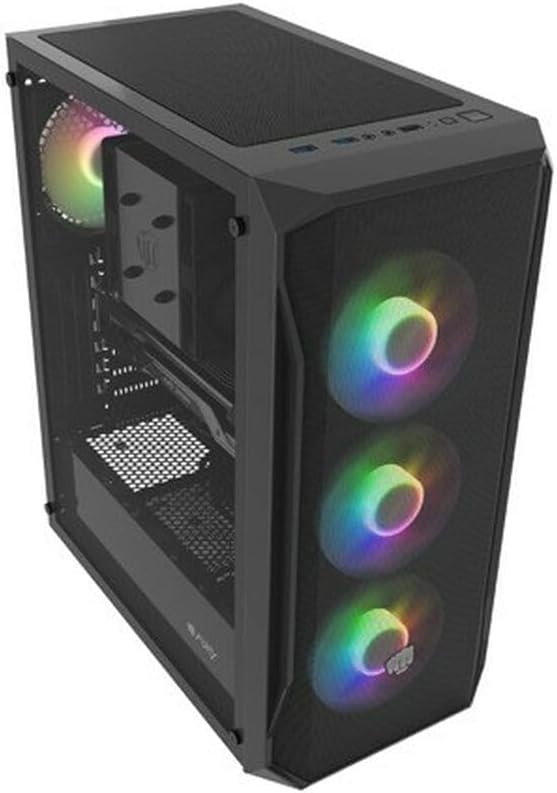
Mufananidzo 4.1: An angled view of the Natec FURY SHOBO SH4F RGB MIDI TOWER PC Case, showcasing its black metal and tempered glass construction. The front panel features a mesh design with three illuminated RGB fans, and a single RGB fan is visible at the rear exhaust. The top panel includes I/O ports and a mesh filter.
4.1 Mberi I/O Panel
- Bhatani reSimba
- Reset Bhatani
- USB 2.0 Chiteshi (x1)
- Audio Jacks (Headphone/Microphone)
- RGB Control Button (if applicable)
4.2 Internal Layout
The case supports Micro ATX and Mini ATX motherboards and features a bottom-mounted power supply bay. It includes dedicated areas for storage drives and efficient cable management.
5. Kugadzirisa uye Kuisa Zvikamu
Follow these steps to install your PC components into the FURY SHOBO SH4F case.
5.1 Kugadzirira Nyaya
- Isa bhokisi panzvimbo yakati sandara, yakagadzikana.
- Remove the side panels. Typically, the tempered glass side panel is secured with thumbscrews.
5.2 Kuisirwa mamaboardboard
- Isa shield yeI/O (kana isina kuiswa kare pabhodhi reamai rako) muburi rekumashure rebhokisi.
- Ensure the motherboard standoffs are correctly aligned for your Micro ATX or Mini ATX motherboard. Adjust or install additional standoffs if necessary.
- Isa motherboard nokungwarira panzvimbo dzekumira, uchigadzirisa maburi escrews.
- Batidza motherboard ne screws dzakapihwa. Usazvisimbise zvakanyanya.
5.3 Kuisa Simba reMagetsi
- Locate the power supply bay at the bottom rear of the case.
- Slide your power supply unit (PSU) into the bay from the rear of the case, ensuring the fan faces downwards (if the case has a bottom vent) or upwards.
- Chengetedza PSU ne screws kubva kumashure kwebhokisi.
5.4 Kuisa Dhiraivha Yekuchengetera Zvinhu
Refer to your case's specific drive bay design for 2.5" SSDs and 3.5" HDDs. Typically, these involve trays or direct screw mounting.
5.5 Expansion Card Installation (e.g., Graphics Card)
- Bvisa zvivharo zvePCI-E zvinodiwa kubva kumashure kwekesi.
- Insert your expansion card into the corresponding PCI-E slot on the motherboard.
- Secure the card with a screw or the case's retention mechanism.
5.6 Cable Management
Shandisa ma cutouts uye ma t-down points ari kuseri kwe motherboard tray kuti uchengetedze tambo. Izvi zvinovandudza kufamba kwemhepo uye runako.
5.7 Connecting RGB Fans
The pre-installed RGB fans typically connect to a central RGB controller or directly to your motherboard's RGB headers. Consult your motherboard manual for specific RGB header locations and software control. Ensure all fan power cables are connected to appropriate fan headers on the motherboard or a fan hub.
6. Kushanda Kesi Yekombuta Yako
6.1 Kubatidza/Kudzima
After all components are installed and cables connected, plug your power supply into a wall outlet. Press the power button on the front I/O panel to turn on your system. To turn off, use the operating system's shutdown function or press and hold the power button for several seconds.
6.2 Kudzora Mwenje weRGB
If your case features an RGB control button on the front I/O panel, press it to cycle through various lighting modes and colors. For advanced customization, use your motherboard's RGB software (e.g., ASUS Aura Sync, MSI Mystic Light, Gigabyte RGB Fusion) if the fans are connected to compatible headers.
7. Kuchengeta
Regular maintenance helps ensure optimal performance and extends the lifespan of your PC components.
7.1 Dust Sefa Yekuchenesa
The FURY SHOBO SH4F case includes dust filters (e.g., on the top and bottom). Periodically remove and clean these filters by rinsing them with water and allowing them to dry completely before re-installing. This prevents dust buildup and maintains airflow.
7.2 Kucheneswa Kwekunze
Pukuta kunze kwekesi nekanyoro, damp jira. Dzivisa zvinochenesa zvinogumbura kana zvinonyungudutsa zvinogona kukuvadza girazi rakapfava kana kuti rakanyoroveswa.
8. Kugadzirisa matambudziko
Kana ukasangana nematambudziko, tarisa kune anotevera akajairika matanho ekugadzirisa dambudziko:
- Hapana Simba: Ensure the power supply is properly connected to the wall outlet and the motherboard. Check all internal power cables (24-pin ATX, 8-pin CPU, GPU power). Verify the power button cable is correctly connected to the motherboard's front panel header.
- Vateveri Vasiri Kutenderera: Check if fan power cables are securely connected to the motherboard or fan hub. Ensure the power supply is functioning.
- RGB Mwenje Haisi Kushanda: Verify RGB cables are correctly connected to the RGB controller or motherboard header. If using a button, try cycling through modes. If using software, ensure it's installed and configured correctly.
- Kupisa zvakanyanya: Ensure all fans are spinning correctly and oriented for proper airflow (intake/exhaust). Clean dust filters and internal components. Verify CPU cooler and GPU cooler are properly installed.
9. Zvinotsanangurwa
| Brand | Natec |
| Series | SH4F |
| Model Number | NFO-2154 |
| Nyaya Type | Midi Tower |
| Motherboard Kuenderana | Micro ATX, Mini ATX |
| Color | Nhema |
| Material | Metal |
| Zviyero zveChigadzirwa (LxWxH) | 19.69 x 16.93 x 9.84 inches (50 x 43 x 25 cm) |
| Item Weight | 9.46 pounds (4.3 Makirogiramu) |
| Power Supply Mounting Type | Gomo rezasi |
| Kutonhodza Nzira | Air |
| Nhamba ye USB 2.0 Ports | 1 |
10. Warranty uye Tsigiro
Natec products are manufactured to high-quality standards. For information regarding warranty terms and conditions, please refer to the warranty card included with your product or visit the official Natec website. If you encounter any issues not covered in this manual or require further assistance, please contact Natec customer support through their official channels.
Mugadziri: Natec


