1. Nhanganyaya
This manual provides comprehensive instructions for the safe and effective operation of the ZOYI ZT303 Digital Multimeter. The ZT303 is a high-precision, auto-ranging measurement tool designed for professionals and enthusiasts, capable of measuring voltage, current, resistance, capacitance, frequency, and duty cycle. Please read this manual thoroughly before use to ensure proper operation and to prevent potential hazards.
2. Safety Information
Kuchengetedza kushanda kwakachengeteka uye sevhisi yemamita, tevera iyi mirairo. Kukundikana kuchengeta yambiro idzi kunogona kukonzera kukuvara kwakanyanya kana kufa.
- Always ensure the meter is in the correct function and range before making measurements.
- Usashandise mita kana ichiita seyakakuvadzwa kana kana ma test lead akakuvadzwa.
- Usashandise zvinopfuura zvakatemerwa voltage, sezvakarongwa pamamita, pakati pematerminals kana pakati pechero terminal nepasi pasi.
- Shandisa kungwarira zvakanyanya paunenge uchishanda nevoltages pamusoro pe30V AC RMS, 42V peak, kana 60V DC. Aya voltages inokonzeresa njodzi.
- Disconnect the test leads from the circuit before changing functions.
- Remove the test leads from the meter before opening the battery cover.
- Do not operate the meter with the battery cover removed.
- Omerera kune makodhi ekuchengetedza emunharaunda uye enyika.
3. Chigadzirwa Pamusoroview
The ZOYI ZT303 Digital Multimeter features a clear display, a rotary switch for function selection, and various input jacks for test leads.

Mufananidzo 3.1: Mberi view of the ZOYI ZT303 Digital Multimeter, showing the display, rotary switch, and input terminals.
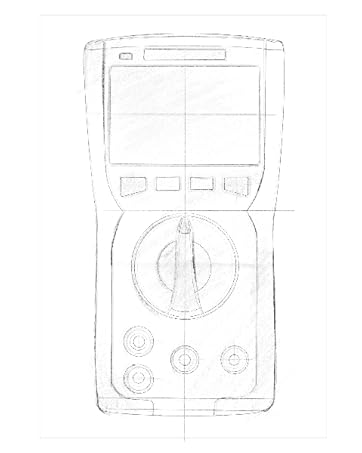
Figure 3.2: Technical drawing illustrating the internal layout or design elements of the ZOYI ZT303 Digital Multimeter.
3.1. Zvikamu
- Chiratidziro cheLCD: Inoratidza kuyerwa kuverenga, mayuniti, uye zviratidzo zvebasa.
- Mabhatani ebasa: For selecting specific modes (e.g., RANGE, REL, MAX/MIN, Hz, SELECT, HOLD).
- Rotary Switch: Used to select the desired measurement function (e.g., V~, V-, A~, A-, Ω, NCV).
- Input Jacks:
- COM Jack: Chinongedzo chakajairika chezviyero zvese. Batanidza tambo nhema yekuyedza pano.
- VHzΩCAP Diode Jack: Input yevoltage, frequency, resistance, capacitance, and diode/continuity tests. Connect the red test lead here for these functions.
- mAµA Jack: Zvinoiswa pamamiriyoniamppano uye microampere current measurements. Connect the red test lead here for these functions.
- 10A Jack: Zvinongedzo zvegumi Ampere current measurements. Connect the red test lead here for high current measurements.
4. Setup
4.1. Kuiswa kwebhatiri
- Iva nechokwadi chekuti multimeter yadzimwa uye bvisa ma lead ese ekuyedza.
- Tsvaga chivharo chebhatiri kuseri kweyuniti.
- Vhura siruu (s) yekuchengeta uye bvisa kavha.
- Insert new batteries (e.g., 2 x AAA or 9V, refer to the battery compartment for specific type) observing the correct polarity.
- Tsiva chivharo chebhatiri uye chichengetedze ne screw(s).
4.2. Kubatanidza Test Leads
Gara uchibatanidza tambo nhema yekuyedza kuCOM jack. Batanidza tambo tsvuku yekuyedza kujack yakakodzera yekupinda zvichibva pabasa rekuyera:
- For Voltage, Resistance, Capacitance, Frequency, Diode, and Continuity: Connect the red lead to the VHzΩCAP Diode jack.
- For mA/µA Current: Connect the red lead to the mAµA jack.
- For 10A Current: Connect the red lead to the 10A jack.
5. Operating Instructions
5.1. Simba On / Off
Turn the rotary switch from the "OFF" position to any desired measurement function to power on the meter. To power off, turn the rotary switch back to the "OFF" position.
5.2. Auto Ranging
The ZT303 features auto-ranging, which automatically selects the appropriate measurement range. For manual range selection, press the CHIYERO bhatani.
5.3. DC/AC Voltage Kuyera (V)
- Seta iyo rotary switch kune iyo V~ (AC Voltage) kana V- (DC Voltage) chinzvimbo.
- Connect the black test lead to the COM jack and the red test lead to the VHzΩCAP Diode jack.
- Batanidza ma test probe kudunhu rese kana chikamu kuti chiyerwe.
- Verenga bhukutage kukosha pane LCD kuratidza.
5.4. DC/AC Current Measurement (A, mA, µA)
Yambiro: Never connect the meter in parallel to a voltage source when measuring current. This can damage the meter and the circuit.
- Set the rotary switch to the appropriate current range (A~, A-, mAµA~, mAµA-).
- Connect the black test lead to the COM jack. Connect the red test lead to the mAµA jack for low current or the 10A jack for high current.
- Open the circuit where current is to be measured and connect the meter in series with the load.
- Verenga kukosha kwazvino paLCD kuratidza.
5.5. Kuyerwa kweKuramba (Ω)
Yambiro: Ita shuwa kuti dunhu harina-simba uye ese ma capacitor anoburitswa asati ayera kuramba.
- Seta iyo rotary switch kune iyo Ω chinzvimbo.
- Connect the black test lead to the COM jack and the red test lead to the VHzΩCAP Diode jack.
- Batanidza ma test probe mukati mechikamu kuti ayerwe.
- Verenga kukosha kwekupikisa pane LCD kuratidza.
5.6. Kuyerwa kweCapacitance (F)
Yambiro: Iva nechokwadi chekuti capacitor yaburitswa zvizere usati wayera kuti udzivise kukuvara kwemita.
- Seta iyo rotary switch kune iyo CAP position (often shared with Ω or Diode, use SELECT button if needed).
- Connect the black test lead to the COM jack and the red test lead to the VHzΩCAP Diode jack.
- Batanidza test probes mhiri kwecapacitor terminals.
- Verenga iyo capacitance kukosha paLCD kuratidza.
5.7. Frequency/Duty Cycle Measurement (Hz/%)
- Seta iyo rotary switch kune iyo Hz /% position (often shared with voltage or other functions, use SELECT button if needed).
- Connect the black test lead to the COM jack and the red test lead to the VHzΩCAP Diode jack.
- Batanidza ma test probes pane iyo signal source.
- Read the frequency or duty cycle value on the LCD display.
5.8. Diode Test and Continuity Test
- Seta iyo rotary switch kune iyo Diode/Kuenderera mberi chinzvimbo. Shandisa iyo SARUDZA button to toggle between diode test and continuity test.
- Connect the black test lead to the COM jack and the red test lead to the VHzΩCAP Diode jack.
- Diode Bvunzo: Batanidza probe tsvuku kune anode uye dema probe kune cathode ye diode. A mberi voltage drop will be displayed. Reverse the probes; an "OL" (Overload) reading indicates a good diode.
- Continuity Test: Connect the probes across the circuit or component. A continuous beep and a low resistance reading indicate continuity.
5.9. Vasina-Kubata Voltage (NCV) Kuonekwa
- Seta iyo rotary switch kune iyo NCV chinzvimbo.
- Move the top part of the meter close to the conductor or outlet.
- The meter will emit an audible beep and/or flash an LED indicator when AC voltage inowanikwa.
5.10. Data Bata Basa
Press the BATA bhatani kuti uomese kuverenga kuripo pachiratidziro. Dzvanya zvakare kuti ubudise basa rekubata.
5.11. MAX/MIN Function
Press the MAX/MIN button to enter MAX/MIN recording mode. The meter will display the maximum or minimum reading detected since the mode was activated. Press again to cycle between MAX, MIN, and current reading. Hold to exit.
5.12. Relative Measurement (REL)
Press the REL button to store the current reading as a reference value. Subsequent measurements will be displayed as the difference from this reference value. Press again to exit relative mode.
6. Kuchengeta
6.1. Kuchenesa
Pukuta nyaya yacho neadamp jira nesipo isina kunyorova. Usashandise zvinogumbura kana zvinonyungudutsa. Iva nechokwadi chekuti mita yacho yakaoma zvachose usati washandisa.
6.2. Kutsiviwa kwebhatiri
When the low battery indicator appears on the display, replace the batteries as described in Section 4.1. Prompt replacement ensures accurate readings and proper operation.
6.3. Fuse Replacement
If the current measurement function fails, the fuse may need replacement. Refer to the specific fuse ratings printed near the input jacks or inside the battery compartment. Fuse replacement typically involves opening the back case (after removing batteries) and carefully replacing the blown fuse with one of the identical type and rating. If unsure, consult a qualified technician.
7. Kugadzirisa matambudziko
| Dambudziko | Zvinogona Kukonzera | Solution |
|---|---|---|
| Hapana kuratidza kana dim kuratidza | Mabhatiri akaderera kana akafa | Tsiva mabhatiri (Chikamu 4.1) |
| "OL" (Overload) inoratidzwa | Measurement exceeds selected range or meter's maximum capacity | Select a higher range (if in manual range) or ensure measurement is within meter's limits. |
| Kurava kusina kururama | Incorrect function selected, poor test lead connection, or damaged test leads | Verify function, check lead connections, inspect and replace damaged leads. |
| Kuyera kwazvino hakusi kushanda | Fuse inoputika | Tsiva fuse (Chikamu 6.3) |
8. Zvinotsanangurwa
| Feature | Detail |
|---|---|
| Brand | ZOYI |
| Model Number | ZT303 |
| Product Dimensions | 4.53 x 1.97 x 7.68 inches |
| Item Weight | 14.11 ounces (399.98 magiramu) |
| Simba Source | Battery Powered |
| Color | Bhuruu |
| Display | Digital LCD, 19999 Counts (typical for ZT303 series) |
| Ranging | Auto/Manual Range |
| Special Features | True RMS, NCV, Data Hold, Backlight, MAX/MIN, REL |
Note: Detailed electrical specifications (e.g., voltage/current ranges, accuracy) are typically printed on the device or included in a separate specification sheet.
9. Warranty uye Tsigiro
Warranty information for the ZOYI ZT303 Digital Multimeter is typically provided at the point of purchase or within the product packaging. For specific warranty terms, technical support, or service inquiries, please refer to the official ZOYI websaiti kana kubata mutengesi wako ane mvumo.
Kuti uwane rumwe rubatsiro, shanya: ZOYI Official Flagship Store on Amazon


