Nhanganyaya
This manual provides detailed instructions for the setup, programming, operation, and troubleshooting of your DDcafor 890MAX Universal Garage Door Remote. Please read this manual thoroughly before use to ensure proper functionality and safety.
Kugarisana
The DDcafor 890MAX remote is designed for compatibility with various garage door openers. To ensure proper function, your garage door opener must meet the following criteria:
- Brand Kuenderana: Compatible with LiftMaster, Chamberlain, and Craftsman brand garage door openers manufactured from 1993 to the present.
- Learn Button Type: Your opener must have a Red/Orange, Purple, Yellow, or Green learn button. The remote supports Security+ and Security+ 2.0 rolling codes.

This image illustrates the two key compatibility requirements: the garage door opener brand (LiftMaster, Chamberlain, Craftsman from 1993-current) and the presence of a Red/Orange, Purple, Yellow, or Green learn button on the motor unit.
Universal Compatibility Guide

This diagram highlights the typical location of the learn button on a garage door opener motor unit and provides visual examples of purple, red/orange, yellow, and green learn buttons.
Detailed Compatibility Table

This table provides a comprehensive list of compatible LiftMaster, Chamberlain, and Craftsman models, categorized by the color of their learn button and operating frequency.
| Brand | Yellow Learn Button (2011+, 310/315/390MHz) | Purple Learn Button (2005-2014, 315MHz) | Red/Orange Learn Button (1997-2005, 390MHz) | Green Learn Button (1993-1997, 390MHz) |
|---|---|---|---|---|
| LiftMaster | 891LM, 893LM, 893MAX, 81LM, 61LM, 82LM, 83LM, 84LM | 371LM, 373LM, 375LM | 91LM, 92LM, 94LM, 96LM, 971LM, 972LM, 973LM, 974LM, 973W | 81LM, 61LM |
| Chamberlain | 950ESTD, 953EV, 850CB, 853CB, 856CB, KLIK1U | 950CD, 953D, 956D, KLIK1U | 950CB, 953CB, 956CB, KLIK1U | KLIK1U |
| Craftsman | 139.53707, 139.53870, 139.53779, 139.53879, 139.53800, 139.53637, SRTHBW1136 | 139.53753, 139.18191 | HBW1255, 139.53980/B, 139.53681, 00953680000, 009536810000 | - |
Setup uye Programming
Follow these steps to program your DDcafor 890MAX remote to your garage door opener.
Step 1: Identify Your Opener's Learn Button Color
Locate the learn button on your garage door opener motor unit. Note its color (Yellow, Purple, Red/Orange, or Green). This is crucial for setting the correct mode on your remote.

This image demonstrates the process of finding the learn button on your garage door opener's motor unit.
Step 2: Set Remote's Working Mode
Press and hold any button on your DDcafor remote. Observe the LED status on the remote. Compare the LED status with the table below to determine if the remote's current mode matches your opener's learn button color.
| Status ye LED | Mode | Compatible Opener Type |
|---|---|---|
| Solid | Modhi 1 | Purple Learn Button, Red/Orange Learn Button |
| Kupenya | Modhi 2 | Yellow Learn Button, Green Learn Button |
If the LED status matches your learn button color, proceed to Step 3. If not, you need to change the remote's working mode. Refer to the troubleshooting section or the product listing for instructions on how to change the remote's mode, then return to Step 3.
Step 3: Program Remote to Motor Unit
- Press and release the learn button on your garage door opener motor unit. The Learn LED indicator on the motor unit will glow steadily for approximately 30 seconds.
- Within these 30 seconds, press and hold the desired button on your DDcafor remote (the one you wish to use for this opener).
- Release the remote control button when the motor unit light blinks or two clicks are heard from the motor unit. This indicates successful programming.
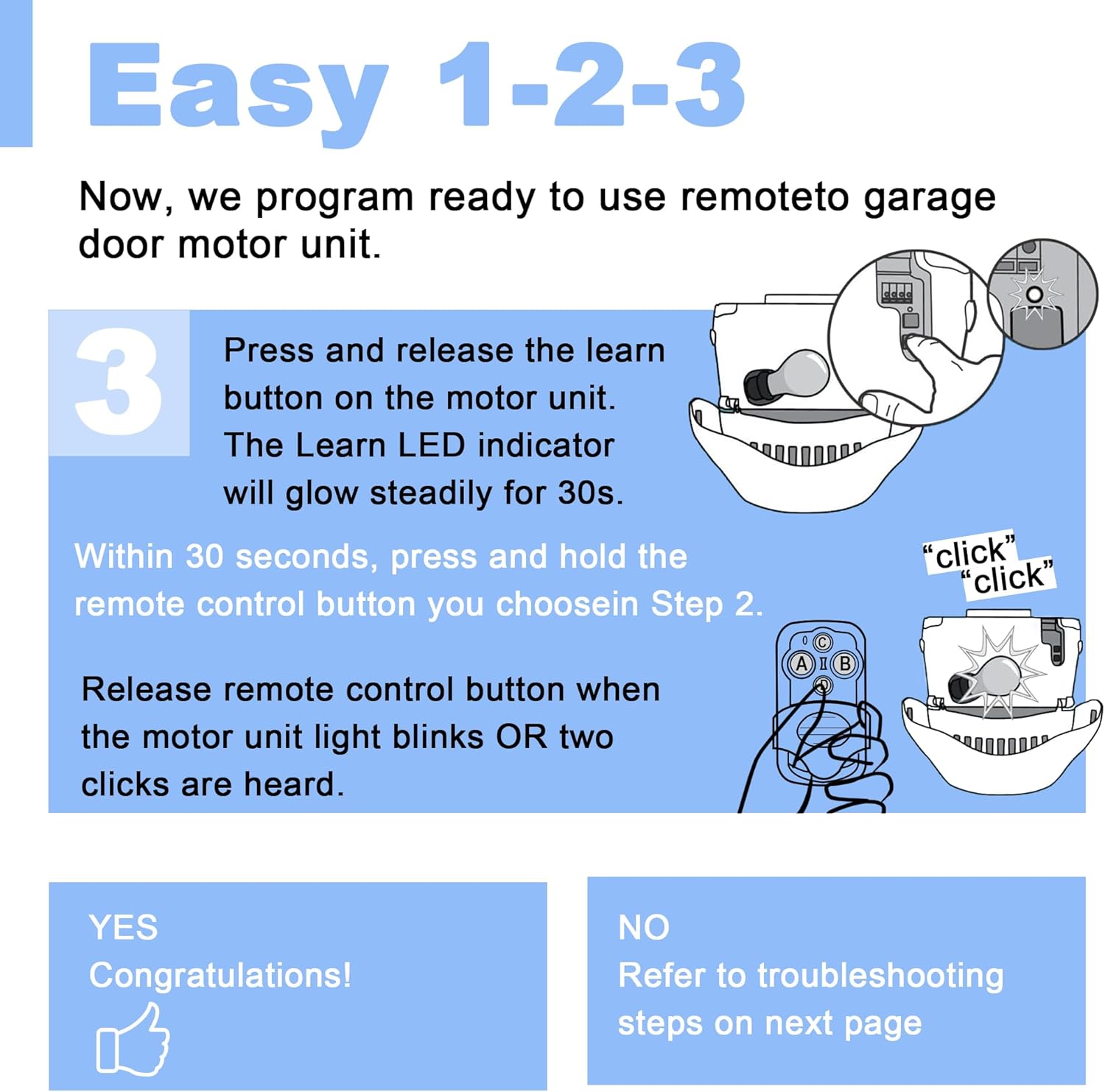
This image visually guides you through pressing the learn button on the opener and then the desired button on the remote for programming.
If programming is successful, your remote is ready for use. If not, refer to the troubleshooting section.
Operating Instruction
Once programmed, operating your DDcafor 890MAX remote is straightforward:
- Kuvhura/Kuvhara: Press the programmed button on the remote to open or close your garage door.
- Masuo Akawanda: If you have programmed multiple garage doors to different buttons, press the corresponding button for the desired door.
- Accidental Press Prevention: The remote features a sliding cover to prevent accidental button presses when carried in a pocket or purse. Slide the cover down to expose the buttons for use.

This image highlights the compact design of the remote and its portability, suitable for carrying in a car, on a keychain, in a pocket, or a purse.
Maintenance
Kutsiviwa kwebhatiri
The DDcafor 890MAX remote uses one CR2032 lithium manganese dioxide battery. If the remote's range decreases or the LED indicator does not light up, it may be time to replace the battery.
- Vhura remote c nokungwariraasing.
- Bvisa bhatiri rekare reCR2032.
- Isa bhatiri idzva reCR2032 rine divi rakanaka (+) rakatarisa mudenga.
- Vhara remote casing zvakachengeteka.
Kuchenesa
Wipe the remote with a soft, dry cloth. Avoid using harsh chemicals or abrasive cleaners, as these can damage the remote's surface or internal components.
Kugadzirisa matambudziko
If you encounter issues with your DDcafor 890MAX remote, refer to the following common solutions:

This image provides a quick reference for common troubleshooting steps.
- Remote's working mode does not match opener's learn button color: Double-check that the remote's operating mode (indicated by LED status) corresponds to your opener's learn button color. If the learn button color is incorrect or the remote is in the wrong mode, try changing the remote's mode.
- New remote programming cancelled old one: Your opener's memory might be full. Consult your motor unit's operation manual to erase its memory, then attempt to program the remote again.
- Short range or inconsistent operation: This often indicates a low battery. Replace the CR2032 battery with a fresh one.
- Programming issues: Sometimes, the garage door must be fully closed before programming can be successfully initiated. Ensure the door is closed before starting the programming sequence.
- A specific button does not work: If one button fails to respond, try programming the opener to a different button on the remote.
Zvinotsanangurwa
- Model Number: 890MAX Garage Door Remote
- Mugadziri: DDcafor
- Chinhu Weight: 1.12 ounces
- Zviyero zvechigadzirwa: 2.7 x 1.18 x 0.78 inches
- Ruvara: Nhema
- Mabhatiri: 1 CR2032 bhatiri inodiwa (inosanganisirwa)
- Battery Cell Type: Lithium Manganese Dioxide
- Zvinosanganisirwa Zvikamu: Remote control, Garage door opener manual
- Technology: Billion Code/Security+/Security+ 2.0 rolling code
- Frequency: 310, 315, and 390 MHz multi-frequency
Mutengi Support
DDcafor prioritizes customer satisfaction. If you have any questions regarding your DDcafor 890MAX Universal Garage Door Remote or require assistance, please do not hesitate to contact us. We are committed to providing prompt support.


