1. Nhanganyaya
Welcome to the ACwO DwOTS Fire user manual. These innovative earbuds offer a unique dual-style design, providing both in-ear and half-in-ear options within a single charging case. Designed for versatility and high-quality audio, the DwOTS Fire earbuds feature advanced connectivity, extended battery life, and intuitive controls to enhance your listening experience.

Image: ACwO DwOTS Fire earbuds showcasing both half-in-ear and in-ear styles from a single case.
2. Chii chiri muBhokisi
Ndokumbira utarise kuti zvinhu zvese zvirimo mupasuru yako:
- 2 x Set of Wireless Earbuds (one in-ear, one half-in-ear)
- 1 x Type-C Fast Charging Cable
- 4 x Extra Earmuffs (for in-ear style)
- 1 x Warranty Card
- Kadhi re1 x Scan Me

Image: The ACwO DwOTS Fire earbuds and charging case.
3. Setup uye Pairing
3.1 Kutanga Kubatanidza
- Ita shuwa kuti maearbuds akachajwa.
- Vhura kesi yekuchaja. Maearbuds anozopinda otomatiki maitiro ekubatanidza.
- Pamudziyo wako (smartphone, piritsi, nezvimwewo), shandisa Bluetooth.
- Tsvaga available devices and select "ACwO Fire" or "ACwO DwOTS Fire" to connect.
- Kana yangobatana, iwe unozonzwa odhiyo yekuchimbidza, uye mwenje wechiratidzo pane mahedhifoni uchachinja.
3.2 Dual Connectivity
The ACwO DwOTS Fire earbuds offer unique dual connectivity options:
- Connect Each Pair to Two Different Devices: Ideal for sharing your listening experience.
- Connect Both Pairs to a Single Device: Perfect for watching movies or listening to music together with a loved one. This feature is available only for devices with dual audio connectivity (e.g., certain Android devices).

Image: Illustration of the dual connectivity feature, showing two pairs of earbuds.
Steps for Dual Sharing (Connecting Both Pairs to a Single Device):
- Connect both 'ACwO DwOTS Fire' and 'ACwO Fire +' with your device's Bluetooth.
- Once both pairs are connected, scroll down your device's notification panel and click on 'Media Output'.
- One pair will already be selected. Select the other pair to enable dual audio.
- You can now listen on both pairs of your earbuds simultaneously.

Image: Visual guide for setting up dual sharing on a compatible device.
4. Operating Instructions
4.1 Kudzora Kubata Kwemaziso
The earbuds feature intuitive touch controls for easy management of music, calls, and voice assistants. Refer to the included 'Scan Me Card' for a detailed diagram of touch functions.
- Tamba/Kumbomira: Top kamwechete pane imwe earbud.
- Next Track: Tokonya kaviri pane earbud yekurudyi.
- Previous Track: Tokonya kaviri kuruboshwe rwenzeve.
- Pindura/Pedzisa Kufona: Top kamwechete pane imwe earbud.
- Ramba Kufona: Dzvanya kwenguva refu pane chero earbud.
- Shandisa Izwi Mubatsiri: Tokonya katatu pane imwe earbud.
4.2 EQ Modes
Customize your audio experience with 3 preset EQ modes, offering a total of 3+3 EQ options across the two earbud styles. Switch between modes to suit your preference for deep bass, balanced sound, or enhanced treble.
- Gaming Mode: Optimized for immersive gaming audio with low latency.
- Theatre Mode: Enhanced soundstage for movies and videos.
- Maitiro Akaenzana: Provides a neutral and clear audio profile yekuteererawo zvayo.

Image: ACwO DwOTS Fire earbuds with a visual representation of available EQ modes.
4.3 Izwi Mubatsiri
Easily access your device's voice assistant by triple-tapping either earbud. Compatible with "Ok Google" and "Hey Siri" for hands-free control.
5. Kuchaja
5.1 Earbuds and Case Charging
The ACwO DwOTS Fire earbuds provide up to 52 hours of music playtime with the charging case. The case supports both wired and wireless charging.
- Kuchaja Wired: Connect the provided Type-C fast charging cable to the charging port on the case and a power source.
- Kuchaja Wireless: Place the charging case on a compatible wireless charging pad (wireless charger not included). The indicator light on the case will show charging status.

Image: ACwO DwOTS Fire charging case highlighting 52 hours of playtime.

Image: 'One On, One Charging' feature for extended use.
6. Kuchengeta
6.1 Kuramba Mvura uye Kudikitira
The earbuds are IPX5 water and sweat resistant, making them suitable for workouts and outdoor activities. This rating protects against low-pressure water jets from any direction. Do not submerge the earbuds in water.

Image: ACwO DwOTS Fire earbuds demonstrating IPX5 water and sweat resistance.
6.2 Kuchenesa
Regularly clean your earbuds and charging case with a soft, dry, lint-free cloth. Avoid using abrasive materials or harsh chemicals. For the in-ear style, gently remove and clean the earmuffs with water and mild soap, ensuring they are completely dry before reattaching.
7. Zvinotsanangurwa
| Feature | Detail |
|---|---|
| Model Name | DwOTS Moto |
| Kubatana Technology | Wireless (Bluetooth V5.3) |
| Audio Driver Type | 13mm Real Drivers |
| Noise Control | AI-ENC with Quad Mics, Passive Noise Cancellation |
| Nguva yekutamba | Kusvikira kumaawa makumi mana nemasere (ine kesi yekuchaja) |
| Kunonoka | Up to 45ms (Ultra-low) |
| Mvura Resistance Level | IPX5 (Water Repellent) |
| Kuchaja | Type-C Fast Charging, Wireless Charging Capability |
| Kudzora Nzira | Touch Controls, Voice Assistant (Ok Google, Hey Siri) |
| Earpiece Shape | In-Ear, Half-in-Ear |
| Item Weight | 43 g |
| Product Dimensions | 5.6 x 5.6 x 1.8 cm |
| Material | Plastiki |
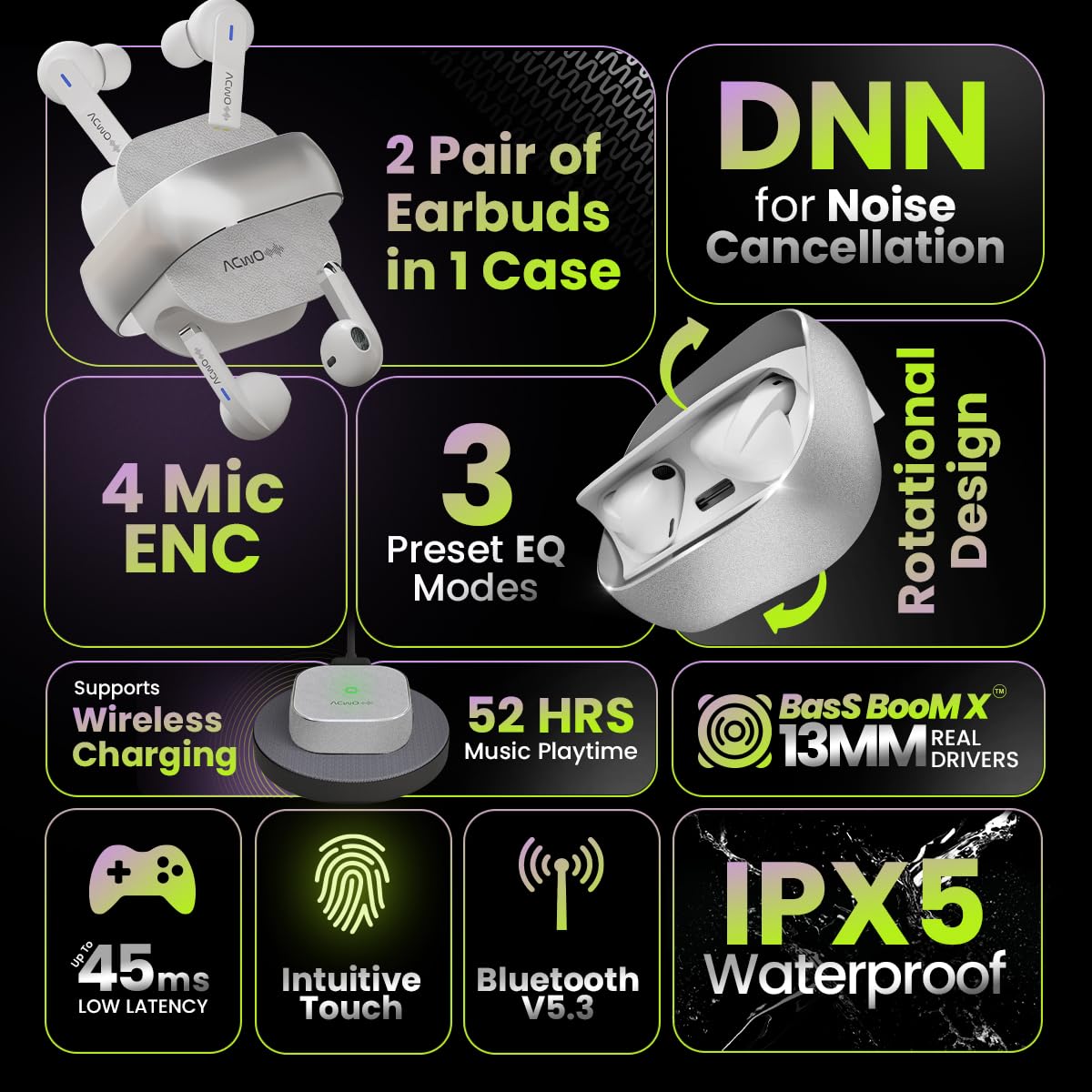
Image: Summary of ACwO DwOTS Fire key features.
8. Kugadzirisa matambudziko
8.1 Earbuds Kwete Kubatana
- Ensure earbuds are charged and the case lid is open.
- Dzima uye paBluetooth yemudziyo wako.
- Kanganwa mudziyo kubva pane yako Bluetooth runyorwa uye edza kubatanidza zvakare.
- Reset the earbuds (refer to the 'Scan Me Card' for specific reset instructions).
8.2 Hapana Ruzha kana Yakaderera Vhoriyamu
- Tarisa mazinga evhoriyamu pane zvese mudziyo wako uye munzeve.
- Ita shuwa kuti maearbuds akagara zvakanaka munzeve dzako.
- Chenesa chero ungwandangwanda kubva pamataurirwo emunzeve uye madhizaini ekuchaja.
- Batanidzazve maearbuds kumudziyo wako.
8.3 Nyaya dzekuchaja
- Ita shuwa kuti tambo yekuchaja yakabatana zvakachengeteka kune ese ari maviri kesi uye sosi yemagetsi.
- If using wireless charging, ensure the case is correctly placed on a compatible wireless charging pad.
- Check for any obstructions on the charging contacts of the earbuds and inside the case.
- Edza tambo yekuchaja yakasiyana kana adapta yemagetsi.
9. Warranty uye Tsigiro
The ACwO DwOTS Fire earbuds come with a standard brand warranty. Please refer to the included Warranty Card for specific terms and conditions.
Tsigiro yeVatengi:
For any queries, technical assistance, or warranty claims, please contact ACwO customer support:
- Email: help@acwo.com
- Runhare: +91 9320420001
- Mugadziri: ACWO LIFESTYLE PRIVATE LIMITED, Borivali, Mumbai, Maharashtra - 400092, India


