Nhanganyaya
Welcome to your new RadioShack 1702-2 LM Cordless Phone System. This system includes two handsets designed for clear communication in your home or office. This manual provides instructions for setting up, operating, and maintaining your phone system.
Zvinokosha:
- Chiratidziro chakajeka uye chiri nyore kuverenga.
- Quick dialing and easy number editing before calls.
- Access to essential functions with a single button.
- Storage for up to 30 incoming numbers.
- Phonebook capacity for up to 50 numbers (12 characters, 20 digits).
1. Setup
1.1 Kusunungura
Carefully remove all components from the packaging. Ensure you have:
- 2 Handsets
- 2 Charging Bases
- 1 AC Power Adapter
- 1 Runhare Mutsara Mutambo
- User Manual
1.2 Kubatanidza Chikamu Chekutanga
- Connect the AC power adapter to the main charging base and plug it into a standard electrical outlet.
- Connect the telephone line cord to the main charging base and plug the other end into your telephone wall jack.
1.3 Kuchaja Mafoni
Place each handset onto its respective charging base. The handsets will begin charging automatically. For optimal battery performance, allow the handsets to charge for at least 12-15 hours before initial use.
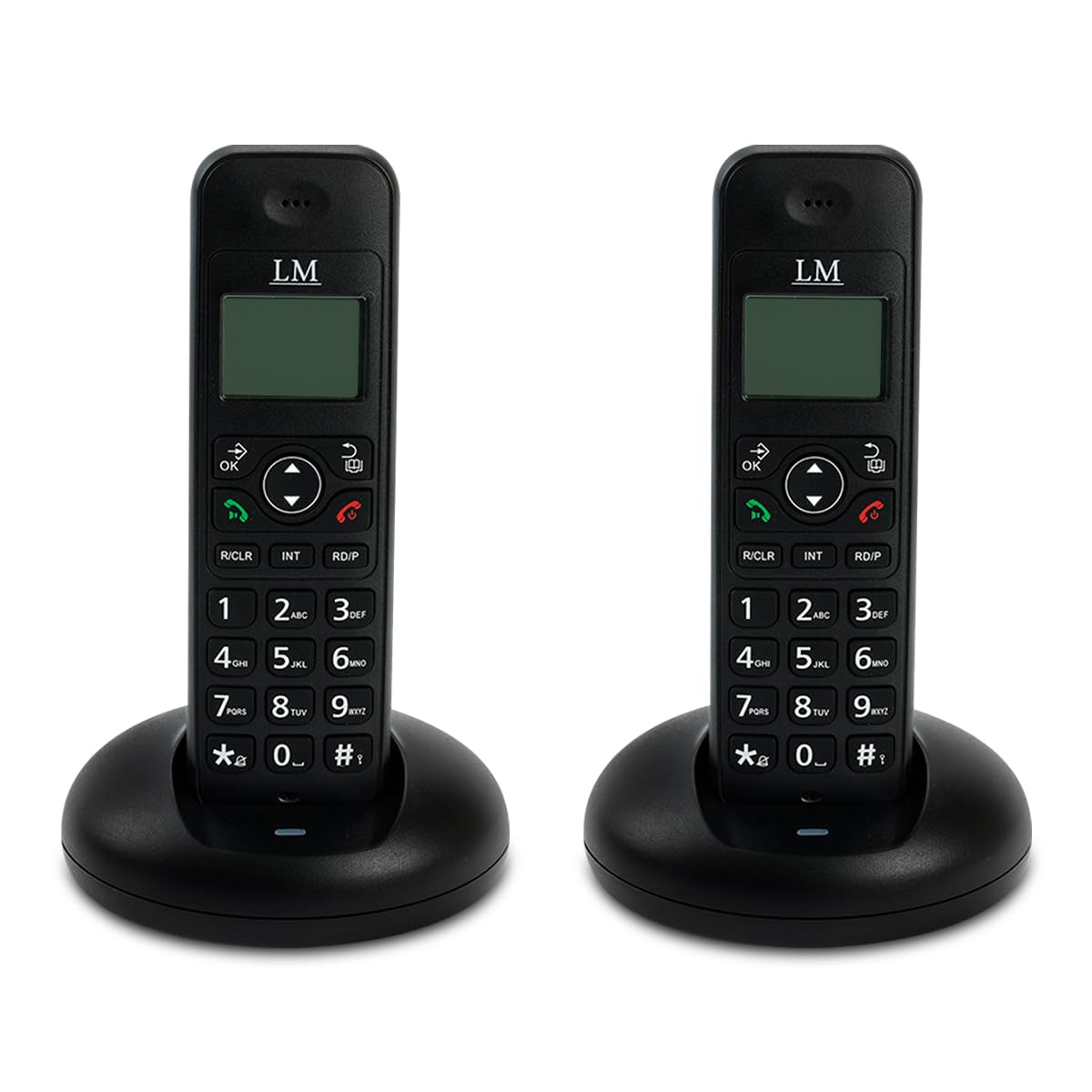
Image: Two RadioShack 1702-2 LM cordless phones on their charging bases, ready for setup.
2. Kushandisa Foni Yako
2.1 Kufona
- Pick up a handset from its base or press the TALK bhatani.
- Dial the desired phone number. The number will appear on the display.
- Press the TALK bhatani zvakare kana wasimudza ruoko kutanga, kana kumirira kuti runhare rwubatane.
- Kuti upedze kufona, tinya iyo END button or place the handset back on its charging base.
2.2 Kudavira runhare
Kana foni yarira, simudza ruoko kana kudzvanya iyo TALK bhatani.
2.3 Bhuku rerunhare
Your phone can store up to 50 contacts. Refer to the on-screen menu for adding, editing, and deleting entries.
2.4 Dhonzazve
Press the REDIAL bhatani rekufonera nhamba yekupedzisira yakafonwa.
2.5 Intercom (Internal Calls)
To call another handset within your system, press the INT button and then the number of the desired handset (e.g., 1 or 2).

Image: Close-up of a single RadioShack 1702-2 LM cordless phone on its charging base, highlighting the keypad and display for operation.
3. Kuchengeta
3.1 Kuchenesa
Pukuta foni nebase units ne soft, damp jira. Usashandise abrasive cleaners kana solvents.
3.2 Kuchengeta Battery
The handsets use rechargeable batteries. If the battery indicator is low, place the handset on its charging base. Over time, rechargeable batteries may lose capacity. If you notice a significant decrease in talk time, consider replacing the batteries with compatible ones.
3.3 Kuchengeta
Kana ukachengeta foni kwenguva yakareba, bvisa mabhatiri kubva mufoni.
4. Kugadzirisa matambudziko
Matambudziko Anowanikwa uye Mhinduro:
- Hapana dial toni:
- Ita shuwa kuti tambo yefoni yakabatana zvakachengeteka kune ese base base unit uye jack madziro.
- Tarisa kana adapta yemagetsi yeAC yakabatana zvakanaka nebase unit uye nemagetsi ari kushanda.
- Verify that your telephone service is active.
- Havakwanise kufona kana kugamuchira mafoni:
- Check the battery level of the handset. Place it on the charging base if low.
- Iva nechokwadi chekuti foni iri pedyo nebase unit.
- Temporarily disconnect the base unit's power adapter and telephone line cord, wait a few minutes, then reconnect them.
- Kuratidzwa hakuna chinhu kana kuderera:
- Charge the handset battery.
- Adjust contrast settings if available (refer to on-screen menu).
- Poor sound quality or static:
- Move closer to the base unit.
- Ensure the base unit is not near other electronic devices that may cause interference (e.g., microwaves, Wi-Fi routers).
- Tarisa tambo yetambo yefoni kuti yakanganisa here.
5. Zvinotsanangurwa
- Brand: RadioShack
- Muenzaniso: 1702-2 LM
- Ruvara: Nhema
- Type: Cordless Phone System (2 Handsets)
- Material: Plastiki
- Kunobva Simba: Corded Electric
- Runharembozha 50 zvinyorwa
- Caller ID Memory: 30 incoming numbers
- Musangano Kufona Kugona: 1-nzira
- Multi-line Operation: Single line operation
- Package Dimensions: 20.7 x 17.2 x 10.7cm; 650g

Mufananidzo: Rear view of the RadioShack 1702-2 LM cordless phone and its base, illustrating the power input and telephone line port connections.
6. Warranty uye Tsigiro
6.1 Ruzivo rweWaranti
This RadioShack 1702-2 LM Cordless Phone System comes with an extended 5-year warranty. Please retain your proof of purchase for warranty claims.
6.2 Mutengi Tsigiro
For technical assistance or warranty service, please contact RadioShack customer support. Refer to the product packaging or official RadioShack websaiti kuti uwane ruzivo.

Image: Product packaging for the LM Duo Wireless Phone, clearly indicating the '5 YEARS WARRANTY' for the system.


