1. Nhanganyaya
Ndatenda nekutengaasing the TOPTECH STAR-115 Portable Bluetooth Speaker. This powerful speaker is designed to deliver blazing sound with a vibrant flame light show, perfect for home use, outdoor gatherings, and parties. Please read this manual carefully before operating the device to ensure proper use and to maximize its performance and lifespan.
2. Safety Information
- Usaisa sipika mumvura kana hunyoro hwakawandisa. Chigadzirwa ichi hachipindi mvura.
- Dzivisa kuisa sipika pedyo nezvinhu zvinopisa zvakaita sema radiator, ma heat registers, mastove, kana zvimwe zvinhu (kusanganisira amplifiers) zvinoburitsa kupisa.
- Shandisa zvakanamirwa chete/zvishandiso zvinotsanangurwa nemugadziri.
- Bvisa sipika kana mheni ichinaya kana kuti kana isingashandiswi kwenguva yakareba.
- Usavhare chero mazaru emhepo. Isa maererano nemirairo yemugadziri.
- Chengetedza tambo yemagetsi kubva pakufambiswa kana kudzvanywa, kunyanya pamapulagi, midziyo yekurerutsira, nenzvimbo yavanobuda kubva mumidziyo.
- Tumira masevhisi ese kuvashandi vanokwanisa. Kushumira kunodiwa kana mudziyo wakuvadzwa neimwe nzira, senge tambo yemagetsi-yekugovera kana plug yakuvadzwa, mvura yadeuka kana zvinhu zvawira mumidziyo, iyo midziyo yave ichinaya mvura kana hunyoro, haishande zvakajairika. , kana kuti yadonha.
3. Package Zviri mukati
Ndokumbira utarise bhokisi rezvinhu zvinotevera:
- STAR-115 Portable Bluetooth Speaker
- Remote Control
- Wired Maikorofoni
- Power Adapter
- Mushandisi Chinyorwa (gwaro iri)
- Warranty Card
4. Chigadzirwa Pamusoroview
Familiarize yourself with the various parts of your STAR-115 speaker.

Mberi view of the STAR-115 speaker, showcasing its 15-inch woofer and vibrant multi-color flame light display.
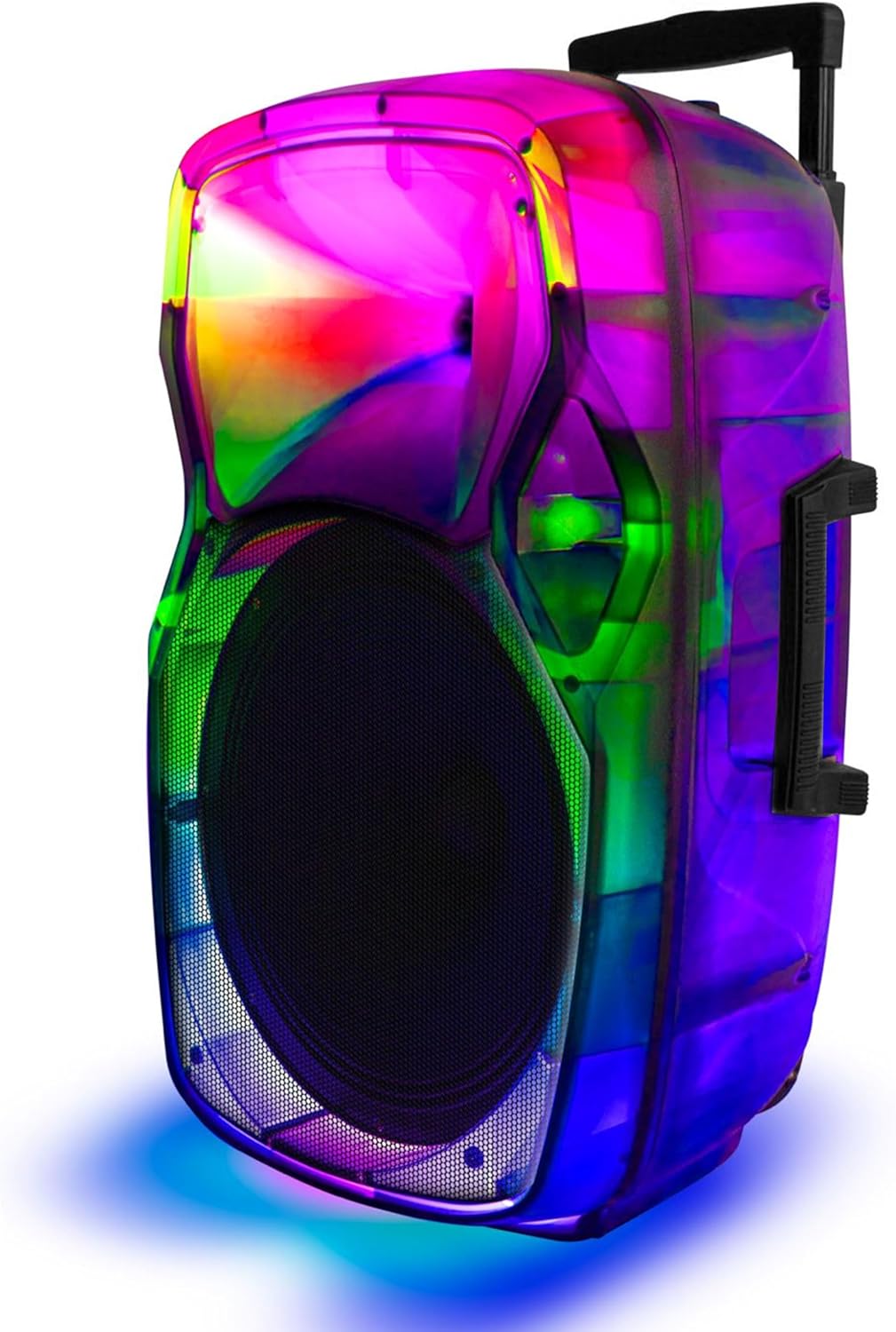
Side view of the STAR-115 speaker, highlighting its integrated handle and wheels for easy portability.
Control Panel (Top/Rear)
- Bhatani reSimba: Inobatidza/kudzima mutauri.
- Bhatani reModhi: Switches between Bluetooth, FM Radio, AUX, USB, and TF Card modes.
- Kudzora inzwi: Inogadzirisa iyo tenzi vhoriyamu.
- Maikorofoni Inopinza: Yekubatanidza maikorofoni ine waya.
- USB Port: Kune madhiraivha eUSB flash.
- TF Kadhi Slot: Makadhi eTF (MicroSD).
- AUX Input: Kubatanidza zvishandiso zvekunze zveaudio uchishandisa waya ye3.5mm.
- Light Mode Bhatani: Controls the flame light effects.
- Mabhatani Anotevera/Anotevera: Navigates through tracks in media playback modes.
- Bhatani reTamba/Kumbomira: Inodzora kutamba.
5. Setup
5.1 Kuchaja Mutauriri
Before first use, fully charge the speaker. Connect the provided power adapter to the speaker's charging port and plug it into a standard wall outlet. The charging indicator light will show the charging status (e.g., red for charging, off or green for fully charged).

The speaker features a reliable battery for extended playback. Ensure it is fully charged before use.
A full charge provides approximately 6 hours of battery life, depending on usage and volume levels.
5.2 Kubatidza/Kudzima
Dzvanya uye ubate iyo Bhatani reSimba on the control panel to turn the speaker on or off.
6. Operating Instructions
6.1 Bluetooth Connection
The STAR-115 speaker is compatible with Bluetooth-enabled devices for wireless audio streaming.
- Batidza sipika. Inopinda otomatiki muBluetooth pairing mode, inoratidzwa nechiedza che LED chinopenya.
- Panharembozha yako (smartphone, piritsi, nezvimwewo), gonesa Bluetooth uye tsvaga zvishandiso zviripo.
- Select "STAR-115" from the list of devices.
- Kana yabatanidzwa, sipika ichaburitsa ruzha rwekusimbisa, uye mwenje we LED uchamira kupenya.

Quick and easy connection via Bluetooth, USB, TF card, AUX, or FM Radio.
6.2 USB/TF Kadhi Kutamba
Insert a USB flash drive or TF (MicroSD) card into the respective port. The speaker will automatically switch to USB/TF mode and begin playing audio files (MP3, WAV, etc.) from the storage device.
- Use the Previous/Next Track buttons to navigate.
- Dzvanya bhatani rekuti Play/Misa kuti udzore kutamba.
6.3 AUX Input
Connect an external audio device (e.g., MP3 player, laptop) to the speaker's AUX input using a 3.5mm audio cable. The speaker will automatically switch to AUX mode. Control playback from your connected device.
6.4 FM Radio
Press the Bhatani reModhi to switch to FM Radio mode. The speaker will automatically scan and save available radio stations. Use the Previous/Next Track buttons to switch between saved stations.
6.5 Kushandisa Maikorofoni
Connect the wired microphone to the Microphone Input port. Adjust the microphone volume using the dedicated knob on the control panel (if available) or the master volume.
6.6 Flame Light Operation
The STAR-115 features a multi-color flame light show. Press the Chiedza Modhi Bhatani to activate or change the lighting effects. Press again to cycle through different patterns or turn off the lights.

One click activation of multi-color disco lights adds extra excitement to your gathering.
6.7 Kubatanidza True Wireless Stereo (TWS)
For an unparalleled stereo sound experience, you can pair two STAR-115 speakers together.
- Ita shuwa kuti vese vatauri vakabatidzwa uye havana kubatana kune chero mudziyo weBluetooth.
- On one speaker (this will be the primary speaker), press and hold the TWS button (refer to control panel diagram if available, or try the Mode button for 3 seconds if no dedicated TWS button).
- Mutauri mukuru achatsvaga mutauri wechipiri. Kana angobatanidzwa, maspika ese ari maviri achaburitsa ruzha rwekusimbisa.
- Now, connect your mobile device to the primary speaker via Bluetooth as described in section 6.1. Audio will play through both speakers in stereo.

Pair two speakers to get true wireless stereo sound, creating a harmonious and immersive sound environment.
6.8 Remote Control Kushandisa
The included remote control allows for convenient operation from a distance. Functions include power on/off, mode selection, volume control, track navigation, play/pause, and light control.
7. Kuchengeta
7.1 Kuchenesa
Wipe the speaker's exterior with a soft, dry cloth. Do not use abrasive cleaners, waxes, or solvents as they may damage the finish. Avoid spraying liquids directly onto the speaker.
7.2 Kuchengeta
When not in use for extended periods, store the speaker in a cool, dry place away from direct sunlight and extreme temperatures. It is recommended to charge the battery periodically (e.g., every 3 months) to maintain its health.
8. Kugadzirisa matambudziko
| Dambudziko | Zvinogona Kukonzera | Solution |
|---|---|---|
| Mutauri habatiki. | Bhatiri rapera. | Batanidza sipika kune adapta yemagetsi woichaja. |
| Hapana ruzha. | Inzwi rakaderera kana kunyarara. | Increase the volume on the speaker and your connected device. |
| Kubatana kweBluetooth kwakundikana. | Mutauri haasi mukuita pairing; mudziyo uri kure kwazvo; kupindira. | Ensure speaker is in pairing mode. Move device closer. Disconnect other Bluetooth devices. Try restarting both speaker and device. |
| Kadhi reUSB/TF harisi kutamba. | Hazvina kururama file fomati; kadhi/dhiraivha haina kuiswa nemazvo; yakaora files. | Iva nechokwadi files are in supported format (MP3, WAV). Reinsert the card/drive. Try a different card/drive. |
| Maikorofoni haisi kushanda. | Microphone not connected properly; microphone volume too low. | Ensure microphone is fully plugged in. Adjust microphone volume. |
| TWS pairing inotadza. | Speakers already connected to other devices; too far apart. | Ensure both speakers are disconnected from other Bluetooth devices. Place them close together during pairing. |
9. Zvinotsanangurwa
| Feature | Detail |
|---|---|
| Model Name | STAR-115 |
| Mutauri Rudzi | Woofer |
| Woofer Diameter | 15 inches |
| Kubatana Technology | Bluetooth |
| Wireless Communication Technology | Bluetooth |
| Bluetooth Range | Mafiti 33 (10 metres) |
| Simba Source | Battery Powered |
| Hupenyu hwebhatiri | 6 Maawa |
| Mutauri Mukuru Wekubuda Simba | 150 Watts |
| Audio Output Mode | Stereo |
| Inosanganisirwa Zvikamu | Remote control, wired microphone, adapter, user manual, warranty card |
| Product Dimensions | 1"D x 1"W x 1"H (Note: This appears to be a placeholder, actual dimensions may vary) |
| Color | Nhema |
| Inodzivirira Mvura | NHEMA |
| Mugadziri | Ruzha rweTekinoroji Rwepamusoro |
| UPC | 755824425859 |
10. Warranty uye Tsigiro
10.1 Ruzivo rweWaranti
This product comes with a Limited Warranty. Please refer to the included Warranty Card for detailed terms and conditions, including coverage period and what is covered. Keep your purchase receipt as proof of purchase for warranty claims.
10.2 Mutengi Tsigiro
If you encounter any issues not covered in this manual or require further assistance, please contact TOPTECH customer support. Contact information can typically be found on the product packaging, warranty card, or the official TOPTECH website.
Kuti uwane rumwe ruzivo, unogona kushanyira iyo Chitoro cheTOPTECH paAmazon.


