1. Nhanganyaya
Welcome to the user manual for your new realme 12x 5G smartphone. This guide provides essential information on setting up, operating, maintaining, and troubleshooting your device. The realme 12x 5G is designed to offer a seamless mobile experience with its advanced features and robust performance.
This smartphone features a Dimensity 6100+ 6nm chipset for 5G connectivity, a 45W SUPERVOOC Charge with a 5000 mAh battery, a 12.07 cm (6.72 inch) 120 Hz FHD+ Display, a 50 MP AI camera, and dual stereo speakers. Its ultra-slim 7.69 mm profile and lightweight 188g body ensure portability and comfort.
2. Package Zviri mukati
Ndokumbira utarise bhokisi rezvinhu zvinotevera:
- Handset
- Charger
- USB Data Cable
- SIM Ejector Tool
- Safety Guide
- Kurumidza Kutungamira
- TPU Protective Case
3. Mudziyo Pamusoroview
The realme 12x 5G features a sleek design with an ultra-slim 7.69 mm profile and a lightweight 188g body, making it comfortable to hold and carry. The device is equipped with a 12.07 cm (6.72 inch) 120 Hz FHD+ Display for clear and smooth visuals.
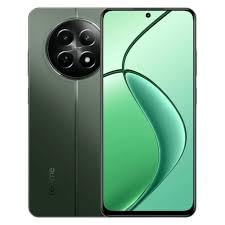
Image: realme 12x 5G Smartphone, showcasing its design and display. Note: This image is a small thumbnail and may not show full detail.
Zvekuona pamusoroview of the realme 12x 5G, please watch the official product video below:
Vhidhiyo: Zviri pamutemo pamusoroview of the realme 12x 5G, highlighting its key features and design.
4. Setup Guide
4.1 Kuisa SIM Card
- Tsvaga iyo SIM kadhi tireyi padivi pechishandiso chako.
- Isa iyo SIM ejector chishandiso mugomba diki padivi petireyi wodzvanya zvinyoro nyoro kusvika tireyi yabuda.
- Isa Nano-SIM kadhi yako (s) uye/kana microSD kadhi mutireyi ine macontacts egoridhe akatarisa pasi. Ita shuwa kuti vakagara zvakanaka.
- Nyatsosaidzira tireyi kumashure mumudziyo kusvika yadzvanya panzvimbo.
4.2 Kubatidza/Kudzima
- Kubatidza: Dzvanya wobata bhatani rePower (kazhinji kurudyi) kusvika logo ye realme yaonekwa pachiratidziro.
- Kudzima: Dzvanya wobata bhatani rekuti Power, wobva wasarudza 'Cream off' kubva pane zviri kuoneka pachiratidziro.
- Kuti utangezve: Dzvanya uye ubate bhatani reMasimba, wobva wasarudza 'Restart' kubva pane zvingasarudzwa.
4.3 Magadzirirwo ekutanga
Upon first power-on, follow the on-screen prompts to set up your device:
- Sarudza mutauro nenharaunda yaunofarira.
- Batanidza kunetiweki yeWi-Fi kuti uwane internet.
- Pinda neakaundi yako yeGoogle kana gadzira itsva.
- Seta kukiya skrini (PIN, pateni, password, zvigunwe, kana kuvhura kumeso).
- Review uye gamuchira zviga nemamiriro.
5. Basic Operation
5.1 Navigation
Your realme 12x 5G supports both gesture navigation and traditional navigation buttons. You can customize your preferred navigation method in the device settings.
- Sikirini Yemba: Svetera kumusoro kubva pasi (chiratidzo) kana kuti tinya bhatani rekuti Home.
- Kumashure: Sveta kubva kuruboshwe kana kurudyi (chiratidzo) kana kuti tinya bhatani rekuti Back.
- Zvichangoburwa Zvishandiso: Swipe up from the bottom and hold (gesture) or tap the Recent Apps button.
5.2 Kuchaja
The device supports 45W SUPERVOOC Charge. Use the provided charger and USB data cable for optimal charging speed. The 5000 mAh battery provides extended usage time.
5.3 Kubatana
The realme 12x 5G is equipped with a Dimensity 6100+ 6nm chipset, enabling fast 5G connectivity. It also supports Wi-Fi for internet access and Cellular for mobile data and calls.
5.4 Performance and Cooling
With 6GB RAM, the device offers seamless multitasking. A vapour chamber cooling system is integrated to maintain optimal performance during intensive use, preventing overheating.
6. Camera Features
The realme 12x 5G features a versatile camera system to capture various moments:
- Main Rear Camera: 50 MP AI camera for detailed photos.
- Secondary Rear Camera: 2 MP camera for additional imaging capabilities.
- Front Camera: 8 MP selfie shooter for clear self-portraits and video calls.
Access the Camera app from your home screen or app drawer. Explore various modes such as Photo, Video, Portrait, Night, and more to enhance your photography.
7. Zvinyorwa zveUnyanzvi
Below are the detailed technical specifications for the realme 12x 5G:
| Feature | Tsanangudzo |
|---|---|
| Operating System | Android |
| RAM | 6 GB |
| Package Dimensions | 25.1 x 17.8 x 6.7 cm |
| Mabhatiri | 1 Lithium Ion bhatiri (inosanganisirwa) |
| Item Model Number | 12X |
| Wireless Communication Technologies | Nharembozha, Wi-Fi |
| Connectivity Technologies | Wi-Fi |
| Special Features | (6.72 inch) Full HD+ Display, 5000 mAh Battery, 50MP + 2MP | 8MP Front Camera, Dimensity 6100+ Processor |
| Zvimwe Zviratidziro | Wireless |
| Device Interface - Primary | Touchscreen |
| Resolution | 1080 x 2400 |
| Zvimwe Zvimiro zveKamera | Mberi, Kumashure |
| Sravana Sameeralu Serial 4th Audio Jack | USB |
| Fomu Factor | Smartphone |
| Color | Girinhi |
| Battery Power Rating | 5000 mamiriyoniamp Maawa |
| Nguva Yekutaura Parunhare | 6 Maawa |
| Item Weight | 188 g |
| CPU Model | Snapdragon (Note: Description mentions Dimensity 6100+ 6nm chipset, please refer to device for exact CPU) |
| CPU Speed | 2.2 GHz |
8. Kugadzirisa matambudziko
If you encounter issues with your realme 12x 5G, try the following basic troubleshooting steps:
- Mudziyo Haubatiki. Ita shuwa kuti bhatiri rachajwa. Batanidza charger womira maminetsi mashoma usati waedza kubatidza zvakare.
- Zvishandiso Zvirikuputsika/Kuomesa nechando: Close the app and reopen it. If the issue persists, clear the app's cache and data in Settings > Apps. As a last resort, uninstall and reinstall the app.
- Network Connectivity Matambudziko: Check if Airplane Mode is off. Restart your device. Verify your SIM card is properly inserted. Reset network settings in Settings > System > Reset options.
- Kuita Kunonoka: Close unnecessary background apps. Clear cache regularly. Ensure your device software is up to date.
- Bhatiri Kudonha Nekukurumidza: Reduce screen brightness, disable unnecessary features like GPS or Bluetooth when not in use, and identify power-hungry apps in battery settings.
For more complex issues, refer to the official realme support websaiti kana kubata basa revatengi.
9. Warranty uye Tsigiro
Your realme 12x 5G smartphone comes with a manufacturer's warranty. Please refer to the warranty card included in your package for specific terms and conditions, including warranty period and coverage details.
Kuti uwane rutsigiro rwehunyanzvi, sevhisi, kana zvimwe kubvunza, ndapota shanyira iyo official realme rutsigiro webwebhusaiti kana kuti bata runhare rwavo rwekubatsira vatengi. Chengeta humbowo hwekutenga kwako pedyo paunenge uchitsvaga rubatsiro.


