1. Nhanganyaya
Thank you for choosing the Brilagi BG0499 Smart Dimmable LED Ceiling Light. This product combines energy-efficient LED technology with smart control features, including Wi-Fi connectivity, remote control, and voice assistant compatibility. This manual provides essential information for safe installation, operation, and maintenance of your new ceiling light.
2. Safety Information
Ndapota verenga mirairo yose yekuchengetedza zvakanaka usati waisa uye kushandisa. Chengeta bhuku rino kuti ugozorishandisa mune ramangwana.
- Ita shuwa kuti magetsi adzimwa usati waiswa, kuchenesa, kana kugadzirisa.
- Kuiswa kunofanira kuitwa nemunhu ane ruzivo rwemagetsi maererano nemakodhi emagetsi emunharaunda.
- Do not expose the light fixture to excessive moisture or direct water spray.
- Ichi chigadzirwa chakagadzirirwa kushandiswa kwemukati chete.
- Do not attempt to disassemble or modify the light fixture, as this will void the warranty and may cause electrical hazards.
- Keep the remote control and small parts out of reach of children.
3. Package Zviri mukati
Tarisa kuti zvese zvirimo zviripo mupakeji:
- 1 x Brilagi BG0499 Smart Dimmable LED Ceiling Light Unit
- 1 x Remote Control
- 1 x Chinyorwa cheMushandisi (gwaro iri)
- Mounting hardware (screws, anchors - typically included, though not explicitly listed in JSON)
4. Setup uye Kuiswa
Tevedza nhanho idzi kuti uise zvakakodzera:
- Kudzima Simba: Usati watanga, iva nechokwadi chekuti magetsi makuru anoenda kunzvimbo yekuisa adzimwa pacircuit breaker.
- Kukwidza: Securely attach the mounting bracket (if separate) to the ceiling using appropriate screws and anchors. Ensure the mounting surface can support the weight of the fixture.
- Kubatanidza Magetsi: Connect the AC adapter wires from the ceiling light to your household electrical wiring (Live, Neutral, Earth) according to local electrical codes. Ensure all connections are secure and insulated. This fixture requires a 230V AC power source.
- Fixture Attachment: Carefully attach the ceiling light fixture to the mounting bracket, ensuring it is firmly secured.
- Kudzoreredza Simba: Kana kuiswa kwapera, dzorera simba pane circuit breaker.
5. Operating Instructions
5.1 Remote Control Kushanda
The included remote control allows for convenient adjustment of the light's settings.
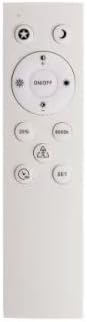
Image of the remote control for the Brilagi BG0499 Smart Dimmable LED Ceiling Light, showing buttons for power, dimming, color temperature adjustment, and scene modes.
- Batidza/Kudzima: Press the ON/OFF bhatani rekubatidza kana kudzima mwenje.
- Kubuda: Use the brightness adjustment buttons (typically marked with sun icons or +/-) to increase or decrease light intensity.
- Rudzi rweKugadzirisa Tembiricha: Use the color temperature buttons (e.g., 'K' or sun/moon icons) to cycle through or adjust the color temperature between 2700K (warm white) and 6500K (cool white).
- Scene Modes: Some remotes include preset scene buttons (e.g., '25%', '50%', '100%', '6000K') for quick access to specific brightness or color temperature settings.
5.2 Kubatana kweWi-Fi uye Kudzora Mapurogiramu
For optimal operation and smart features, connect your ceiling light to Wi-Fi using the Immax NEO PRO app.
- Download the Immax NEO PRO app kubva kuApp Store (iOS) kana Google Play Store (Android).
- Register or log in to your Immax NEO PRO account.
- Ita shuwa kuti nharembozha yako yakabatana kune 2.4 GHz Wi-Fi network.
- Follow the in-app instructions to add a new device. The light may need to be put into pairing mode (often by cycling power on/off a few times).
- Once connected, you can control the light's brightness, color temperature, set schedules, and create custom scenes from your smartphone or tablet.
5.3 Voice Assistant Integration
The Brilagi BG0499 is compatible with popular voice assistants:
- Amazon Alexa: Enable the Immax NEO PRO skill in your Alexa app and link your accounts.
- Google Assistant: Link your Immax NEO PRO account through the Google Home app.
- Apple Siri: Use Siri Shortcuts configured through the Immax NEO PRO app.
Refer to the respective voice assistant's documentation for detailed setup instructions.
6. Kuchengeta
To ensure the longevity and optimal performance of your Brilagi BG0499 ceiling light, follow these maintenance guidelines:
- Kuchenesa: Bvisa magetsi usati wachenesa. Pukuta mudziyo nechinhu chakapfava, chakaoma, kana kuti chakapfava zvishoma.amp jira. Usashandise zvinochenesa zvinogumbura, zvinonyungudutsa, kana makemikari ane simba, sezvo izvi zvinogona kukuvadza magumo kana zvikamu zvemagetsi.
- Kuongorora: Periodically check for any signs of damage to the fixture or wiring. If any damage is found, disconnect power and contact a qualified technician.
- Hapana Zvikamu Zvinoshandiswa Nemushandisi: The LED components are integrated and not user-replaceable. Do not attempt to open the light fixture.
7. Kugadzirisa matambudziko
If you encounter issues with your Brilagi BG0499 ceiling light, refer to the following common solutions:
- Chiedza hachibatiki:
- Tarisa kana magetsi akabatana uye kana circuit breaker yakabatidzwa.
- Ita shuwa kuti mabhatiri eremote control haana kupera.
- Verify that the light is not in a scheduled 'off' state via the app.
- Light flickers or behaves erratically:
- A brief flicker may occur during the initial power-on. This is normal.
- Check for loose electrical connections. Disconnect power before inspecting.
- Ensure the light is connected to a stable Wi-Fi network for optimal smart functionality.
- Haikwanisi kubatana neWi-Fi:
- Ensure your Wi-Fi network is 2.4 GHz. This device may not support 5 GHz networks.
- Tarisa password yako yeWi-Fi.
- Move the light closer to your Wi-Fi router or consider a Wi-Fi extender.
- Try resetting the light to pairing mode (refer to app instructions for specific steps, often involves cycling power).
- Remote control haisi kushanda:
- Dzorera mabhatiri muremote control.
- Iva nechokwadi chekuti hapana zvipingamupinyi pakati pe remote nechiedza.
If problems persist, contact Brilagi customer support.
8. Zvinotsanangurwa
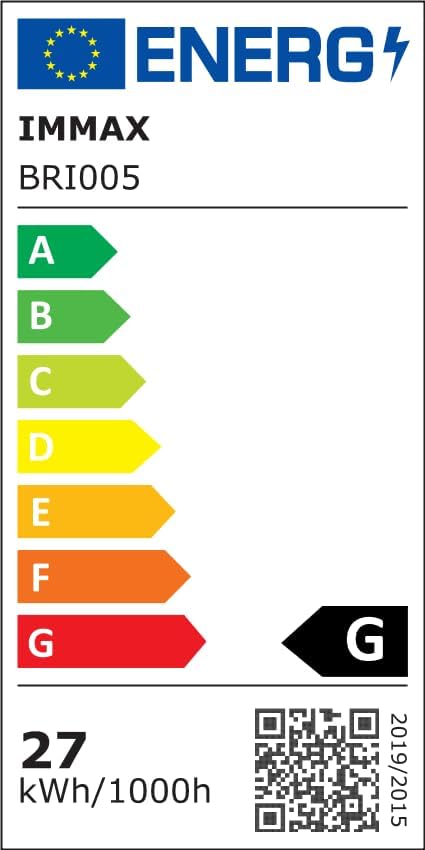
Energy efficiency label for the Brilagi BG0499 Smart Dimmable LED Ceiling Light, indicating an energy class G and 27 kWh/1000h consumption. Includes a QR code linking to the EPREL database. For more details, visit: https://eprel.ec.europa.eu/qr/1426130
| Feature | Tsanangudzo |
|---|---|
| Brand | Brilagi |
| Mugadziri | Brilagi |
| Product Model Number | BG0499 |
| Product Dimensions | 43 x 43 x 5.5 cm |
| Color | Chena |
| Shape | Disc |
| Material | Metal |
| Nhamba Yechiedza Sources | 1 |
| Inosanganisirwa Zvikamu | Remote Control |
| Voltage | 230 Volts |
| Simba Source | AC Adapter |
| Rudzi rweChiedza Chinobva | Dimmable LED Ceiling Chiedza |
| Electrical Power (Wattage) | 28 Watts |
| Zvimwe Zvimiro | Color Change, Remote Control, Wi-Fi Connectivity |
| Kushandisa Kwemukati/Kunze | Indoor |
| Chiedza Rudzi | White (Adjustable 2700-6500K) |
| Kugadziriswa kweSoftware Kwakavimbiswa Kusvika | Unknown |
9. Warranty uye Tsigiro
Brilagi products are designed for quality and reliability. For warranty information, please refer to the terms and conditions provided at the point of purchase or visit the official Brilagi website. If you require technical assistance or have questions not covered in this manual, please contact Brilagi customer support through their official channels.


