Nhanganyaya
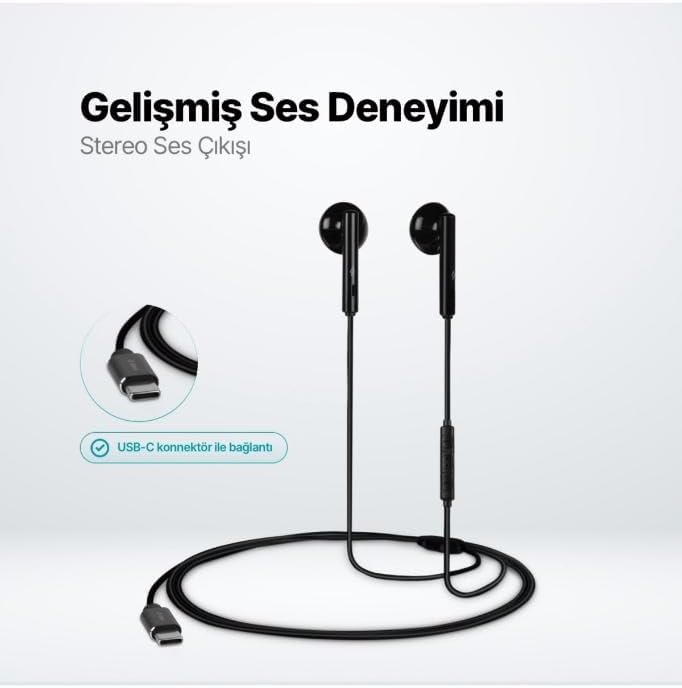
The TTEC Rio 2 Stereo USB-C Headset with Microphone is designed to provide a high-quality audio experience for music and calls. Its comfortable, lightweight design ensures a perfect fit and effective ambient noise isolation, allowing for hands-free communication and entertainment.
Zvinokosha:
- Advanced stereo sound output for an immersive audio experience.
- Integrated microphone for clear phone calls.
- Smart inline controller for easy management of volume, calls, and music playback.
- Lightweight and ergonomic design for extended comfort.
- Universal USB-C connection.
Gadzirira
To begin using your TTEC Rio 2 headset, follow these simple steps:
- Batanidza Headset: Locate the USB-C port on your device (smartphone, tablet, laptop, etc.). Insert the USB-C connector of the TTEC Rio 2 headset firmly into the device's USB-C port.
- Kuzivikanwa Kwemudziyo: Your device should automatically recognize the headset. If prompted, select the TTEC Rio 2 as the audio output and input device.
- Gadzirisa Fit: Place the earbuds comfortably in your ears. The ergonomic design ensures a snug fit for optimal sound quality and noise isolation.
Operating Instruction
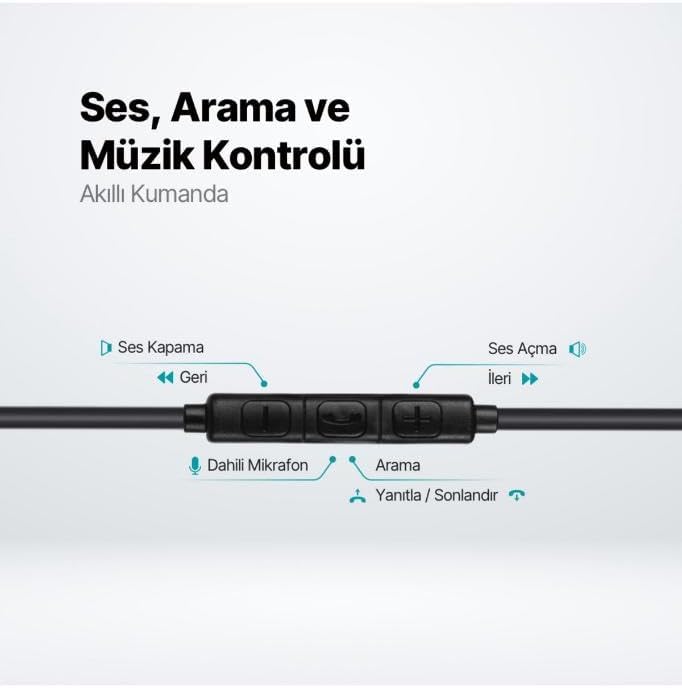
The TTEC Rio 2 headset features an inline smart controller for convenient management of your audio and calls.
Inline Controller Functions:
- Kukwidza inzwi (+): Dzvanya kuti uwedzere ruzha rwenzwi.
- Vhoriyamu Pasi (-): Dzvanya kuti uderedze vhoriyamu yeruzha.
- Play/Pause/Answer/End Call (Center Button):
- Single press to play or pause music.
- Single press to answer an incoming call.
- Single press to end an active call.
- Tora nguva refu kuti urambe kupinda kuri kufona.
- Next Track (Forward Button): Dzvanya kuti usvetuke kuenda kuimba inotevera.
- Previous Track (Backward Button): Press to go back to the beginning of the current song or to the previous song.
- Yakavakirwa-mukati Maikorofoni: Located on the inline controller, it captures your voice for calls and voice commands.
Maintenance
Proper care will extend the life and performance of your TTEC Rio 2 headset.
- Kuchenesa: Pukuta zvinyoro nyoro maearbuds newaya nejira rakapfava, rakaoma. Usashandise makemikari akaomarara kana zvinhu zvinokwesha.
- Kuchengeta: When not in use, store the headset in a clean, dry place. Avoid extreme temperatures. The included cable organizer clip can help prevent tangling.
- Dzivisa Unyoro: Usaise headset mumvura kana hunyoro hwakawandisa.
- Bata Nekungwarira: Avoid pulling on the cable or applying excessive force to the connectors.

Kugadzirisa matambudziko
If you encounter issues with your TTEC Rio 2 headset, refer to the following common solutions:
| Dambudziko | Possible Solution |
|---|---|
| Hapana ruzha kubva kumahedhifoni. |
|
| Maikorofoni haisi kushanda. |
|
| Hunhu hweruzha hahuna kunaka kana kuti hwakakanganisika. |
|
| Hissing or static noise. |
|
Zvinotsanangurwa
| Feature | Detail |
|---|---|
| Brand | TTEC |
| Model Number | 2KMM14S |
| Kubatana | USB-C |
| Mahedhifoni Form Factor | Munzeve |
| Kuiswa Nzeve | Munzeve |
| Maikorofoni | Yakavakwa-mukati |
| Package Dimensions | 19.8 x 8.5 x 3.1 cm |
| Item Weight | 40 magiramu |
| ASIN | B0D3XJ5SP7 |
Warranty uye Support
For warranty information and customer support, please refer to the documentation included with your purchase or visit the official TTEC website. Chengetedza humbowo hwako hwekutenga kune chero vimbiso yewaranti.