1. Nhanganyaya
Thank you for choosing the Mibro Earbuds AC1 Wireless Earbuds. These earbuds combine an elegant design with exceptional audio performance, offering clear, immersive sound for your favorite music. With stable Bluetooth connectivity and a comfortable ergonomic fit, they are designed for convenience and quality audio on the go. This manual provides detailed instructions to help you get the most out of your new earbuds.
2. Safety Information
Ndapota verengai mirairo yese yekuchengetedza musati mashandisa chigadzirwa ichi.
- Usaisa maearbuds kana kechi yekuchaja kune tembiricha yakanyanyisa, mwando, kana zvinwiwa.
- Dzivisa kudonhedza, kukanganisa, kana kubvisa mudziyo.
- Gara kure nevana nemhuka dzinovaraidza.
- Shandisa tambo yakapihwa chete kana yakasimbiswa yekuchaja.
- Kuteerera kwenguva refu kwepamusoro-soro kunogona kukonzera kukuvara kwekunzwa.
3. Package Zviri mukati
Ita shuwa kuti zvinhu zvese zviripo mupakeji yako:
- Mibro Earbuds AC1 (Left and Right)
- Kuchaja Case
- Chaja Cable
- Mushandisi Chinyorwa (gwaro iri)
4. Chigadzirwa Pamusoroview
Familiarize yourself with the components of your Mibro Earbuds AC1.

Mufananidzo 4.1: Mibro Earbuds AC1 removed from their open charging case, displaying the earbuds and the case.
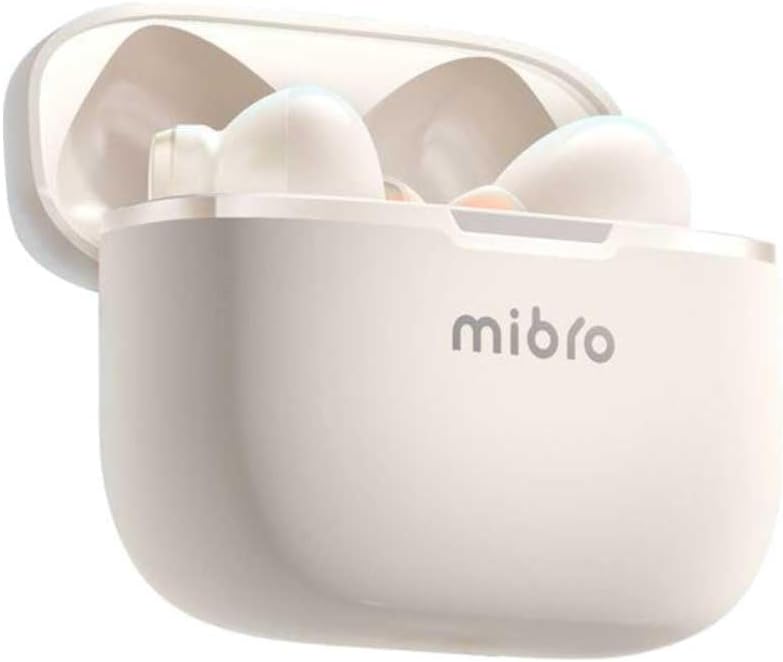
Mufananidzo 4.2: Mibro Earbuds AC1 placed inside their open charging case, showing the compact design.
The earbuds feature an ergonomic design for a secure and comfortable fit. The charging case protects the earbuds and recharges them on the go.
5. Setup
5.1 Kuchaja maEarbuds uye Case
Usati watanga kushandisa, chaja zvizere maearbud nekesi yekuchaja.
- Isa maearbuds muchesi yekuchaja.
- Batanidza tambo yekuchaja kuchiteshi chekuchaja pane kesi uye kune USB magetsi sosi.
- The indicator light on the case will show charging status. A full charge may take up to 1 day (Note: This is an unusual specification, typically measured in hours. Please refer to product packaging for precise charging time).
- Kana wanyatsochajiswa, bvisa tambo.
5.2 Kubatanidza neBluetooth Chishandiso
To connect your Mibro Earbuds AC1 to your smartphone or other Bluetooth-enabled device:
- Ita shuwa kuti maearbuds akachajwa uye aiswa muchesi yekuchaja.
- Open the charging case lid. The earbuds will automatically enter pairing mode (indicator lights will flash).
- Pamudziyo wako, enda kuBluetooth settings wobva wabatidza Bluetooth.
- Tsvaga available devices and select "Mibro AC1" from the list.
- Once connected, the indicator lights on the earbuds will stop flashing.
- Maearbud anozobatana otomatiki kumudziyo wekupedzisira wakabatana kana abviswa mubhokisi, kana Bluetooth yakabatidzwa pamudziyo.
6. Operating Instructions
6.1 Simba On/Kudzima
- Power On: Open the charging case lid, or take the earbuds out of the case. They will power on automatically.
- Power Off: Place the earbuds back into the charging case and close the lid. They will power off automatically and begin charging.
6.2 Kuridza Mumhanzi
Use the touch controls on the earbuds to manage music:
- Tamba/Kumbomira: Top kamwechete pane imwe earbud.
- Next Track: Tokonya kaviri pane earbud yekurudyi.
- Previous Track: Tokonya kaviri kuruboshwe rwenzeve.
6.3 Call Management
Manage phone calls with the touch controls:
- Pindura/Pedzisa Kufona: Top kamwechete pane imwe earbud.
- Ramba Kufona: Dzvanya uye bata chero earbud kwemasekonzi maviri.
6.4 Kudzima ruzha
The Mibro AC1 Earbuds feature noise cancellation. Specific controls for activating or deactivating this feature are typically managed via a long press or a specific tap sequence. Refer to the quick start guide included in your package for precise instructions, as these can vary.
7. Kuchengeta
7.1 Kuchenesa
- Pukuta maearbud nekesi yekuchaja nejira rakapfava, rakaoma, risina lint.
- Usashandise abrasive cleaners, doro, kana makemikari zvinonyungudutsa.
- Ensure charging contacts are clean and dry.
7.2 Kuchengeta
Kana isiri kushandiswa, chengeta maearbuds mukesi yavo yekuchaja kuti uzvidzivirire uye ugare wakachajwa. Chengetedza munzvimbo inotonhorera, yakaoma kure nechiedza chezuva.
8. Kugadzirisa matambudziko
If you encounter issues with your Mibro Earbuds AC1, try the following solutions:
| Dambudziko | Solution |
|---|---|
| Maearbuds haasi kubatanidza |
|
| Hapana ruzha kubva munzeve |
|
| Maearbuds haasi kuchaja |
|
9. Zvinotsanangurwa
| Feature | Detail |
|---|---|
| Model Name | XPEJ010WW (AC1) |
| Brand | Mibro |
| Kubatana Technology | Wireless (Bluetooth) |
| Special Features | Noise Cancellation |
| Color | Warm White |
| Fomu Factor | Munzeve |
| Material | Plastiki |
| Mvura Resistance Level | Kwete kudzivirira mvura |
| Kuchaja Nguva | Up to 1 day (Note: This is an unusual specification, typically measured in hours. Please refer to product packaging for precise charging time.) |
10. Warranty uye Tsigiro
Mibro products are designed and manufactured to the highest quality standards. For detailed warranty information, please refer to the warranty card included with your purchase or visit the official Mibro website.
For further assistance, technical support, or to explore other Mibro products, please visit the Mibro Store on Amazon.


