1. Nhanganyaya
Thank you for choosing the SCHWAIGER RAFM0100 Bathroom Radio Plug. This device combines an FM radio, Bluetooth speaker, alarm clock, and an integrated light sensor into a compact plug-in unit. This manual provides essential information for the safe and efficient operation of your device. Please read these instructions carefully before use and retain them for future reference.
2. Mirayiridzo Yekuchengetedza
- Ensure the device is connected to a properly grounded power outlet.
- Usaisa mudziyo kune tembiricha yakanyanyisa, zuva rakananga, kana hunyoro hwepamusoro.
- Avoid placing the device near water sources or in areas where it may be splashed.
- Usaedze kuvhura kana kugadzirisa mudziyo wega. Tumira masevhisi ese kuvashandi vanokwanisa.
- Chengetedza pasingasvikirwi nevana.
- Bvisa mudziyo kubva pamagetsi usati wachenesa.
3. Package Zviri mukati
- 1x SCHWAIGER RAFM0100 Bathroom Radio Plug
- 1x Chinyorwa cheMushandisi
4. Chigadzirwa Pamusoroview
The SCHWAIGER RAFM0100 is designed for convenience and functionality, featuring an integrated plug for direct power connection. It includes an LED display, control buttons, a rotary volume knob, a speaker, and a light sensor.

SCHWAIGER RAFM0100 Bathroom Radio Plug, front view showing the LED display and control buttons, with a German flag ribbon indicating 'Deutsche Marke'.
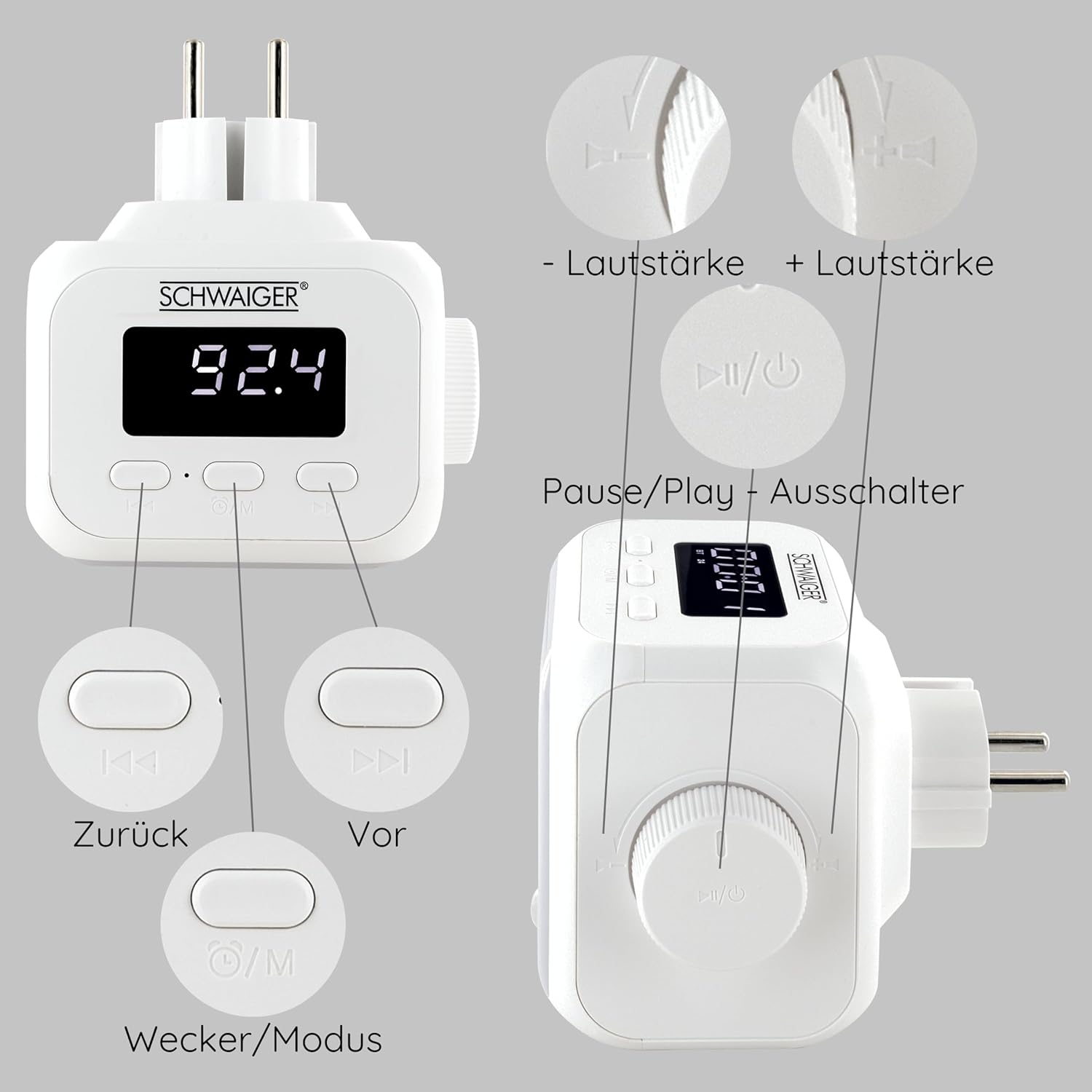
Detailed diagram of the SCHWAIGER RAFM0100 controls, showing buttons for volume, track navigation, power/mode, and alarm.
Zvidzore uye zviratidzo:
- Akatungamirira Ratidza: Shows time, FM frequency, and mode indicators.
- Vhoriyamu Knob: Rotary control for adjusting audio volume. Press to Power On/Off or Play/Pause.
- Previous Button (<<): Skips to the previous track in Bluetooth mode or tunes down in FM mode.
- Next Button (>>): Skips to the next track in Bluetooth mode or tunes up in FM mode.
- Mode/Alarm Button (⏰/M): Switches between FM, Bluetooth, and AUX modes. Long press to enter alarm setting.
- Chiedza chechiedza: Automatically activates LED lighting in dark environments when noise is detected.
5. Setup
- Power Connection: Plug the device directly into a standard wall power outlet. The LED display will illuminate.
- Kutanga Kubatidza Press the Volume knob (Power/Play/Pause button) to turn on the device.
6. Operating Instructions
6.1 Simba On/Kudzima
- Kubatidza: Dzvanya iyo Volume knob.
- Kudzima: Press and hold the Volume knob for a few seconds.
6.2 FM Radio Kushanda

The SCHWAIGER RAFM0100 radio plug highlighting its FM radio functionality, with a graphic representation of radio waves.
- Sarudza Modhi yeFM: Press the Mode/Alarm button (⏰/M) until 'FM' is displayed.
- Otomatiki Kutsvaga pachiteshi: Press and hold the Play/Pause button (Volume knob) in FM mode to initiate an automatic scan for available stations. The radio will save found stations.
- Chinyorwa Kugadziridza: Briefly press the Previous (<<) or Next (>>) buttons to manually tune to the next available station.
6.3 Bluetooth Pairing
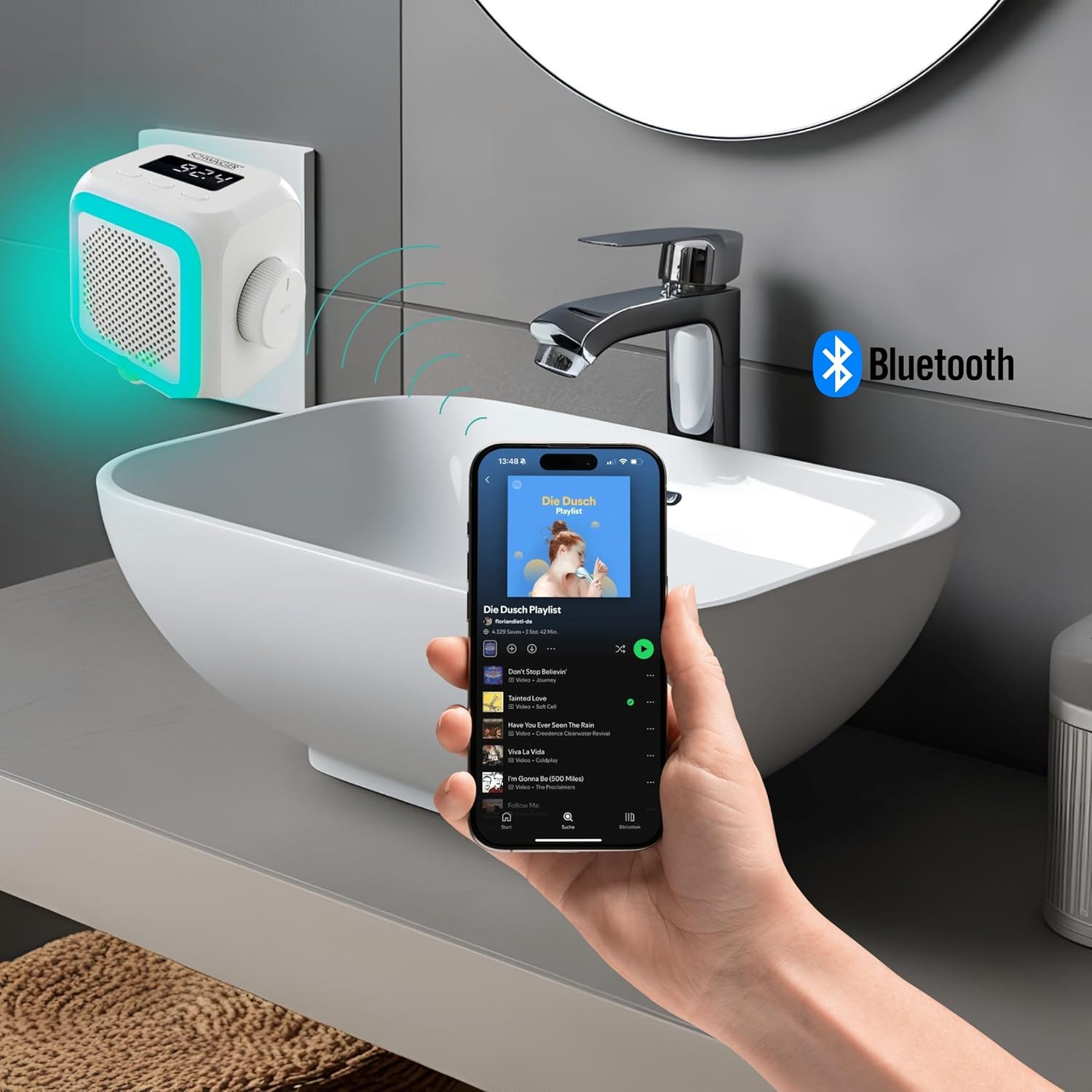
The SCHWAIGER RAFM0100 radio plug in a bathroom setting, connected via Bluetooth to a smartphone playing music.
- Sarudza Bluetooth Mode: Press the Mode/Alarm button (⏰/M) until 'BT' is displayed on the screen. The device will enter pairing mode.
- Vhura Bluetooth pamudziyo wako: On your smartphone, tablet, or other Bluetooth-enabled device, go to the Bluetooth settings and enable Bluetooth.
- Batanidza: Tsvaga 'SCHWAIGER RAFM0100' in the list of available devices and select it to pair. A confirmation sound will indicate successful pairing.
- Ridza Mumhanzi: Once paired, you can play audio from your connected device through the radio's speaker. Use the Previous (<<), Next (>>), and Play/Pause (Volume knob) buttons to control playback.
6.4 Kugadziridza Vhoriyamu
- Tenderedza Vhoriyamu knob newachi kuti uwedzere vhoriyamu.
- Tenderedza Volume knob counter-clockwise kuderedza vhoriyamu.
6.5 Alarm Basa
- Seta Alamu: Press and hold the Mode/Alarm button (⏰/M) to enter alarm setting mode. Use the Previous (<<) and Next (>>) buttons to adjust the hour and minute, and press the Mode/Alarm button to confirm each setting.
- Activate / Deactivate Alarm: Briefly press the Mode/Alarm button to toggle the alarm on or off. An alarm icon will appear on the display when active.
- Zivai: When the alarm sounds, press any button to activate snooze.
- Mira Alarm: To stop the alarm completely, press and hold the Volume knob.
6.6 Integrated Light Sensor

Side view of the SCHWAIGER RAFM0100 radio plug, showing the speaker grille and the integrated light sensor at the bottom.
The device features an integrated light sensor that, in dark environments, will automatically activate the LED display and ambient lighting when it detects noise. This provides a convenient night light function.
7. Kuchengeta
- Kuchenesa: Disconnect the device from the power outlet before cleaning. Use a soft, dry cloth to wipe the surface. Do not use abrasive cleaners or solvents.
- Kuchengeta: Kana usingashandiswe kwenguva yakareba, bvisa mudziyo wacho wouchengeta munzvimbo inotonhorera, yakaoma.
8. Kugadzirisa matambudziko
| Dambudziko | Zvinogona Kukonzera | Solution |
|---|---|---|
| Mudziyo haubatike. | Not properly plugged in; Power outlet not active. | Ensure the device is securely plugged into a working power outlet. Test the outlet with another device. |
| Kusagamuchirwa zvakanaka kweredhiyo yeFM. | Weak signal; Interference from other electronics. | Try repositioning the device. Move away from other electronic devices that may cause interference. |
| Haikwanise kubatanidza kuburikidza neBluetooth. | Bluetooth not enabled on source device; Device already paired; Out of range. | Ensure Bluetooth is enabled on your device and it's in pairing mode. Make sure the radio is in 'BT' mode. Unpair from other devices if necessary. Keep devices within 10 meters. |
| Hapana ruzha kana vhoriyamu yakaderera. | Volume too low; Muted; Incorrect mode selected. | Increase volume using the rotary knob. Check volume on the connected Bluetooth device. Ensure the correct mode (FM/BT) is selected. |
9. Zvinotsanangurwa
- Brand: SCHWAIGER
- Model Number: RAFM0100
- Ruvara: Chena
- Kubatana Technology: Bluetooth
- Special Features: Bluetooth, Integrated Clock, Compact Size, Night Light (Light Sensor)
- Zvishandiso Zvinoenderana: Smartphone, Tablet, MP3 Player, Laptop, Headphones
- Zviyero zvechigadzirwa: 8.6L x 11.4W x 9.7H masendimita
- Tekinoroji Yekugadzirisa: FM
- Style: Mazuvano
- Kunobva Simba: Corded Electric
- Mabhendi eredhiyo anotsigirwa: FM
- Zvinosanganisirwa Zvikamu: Bhuku reMuridzi
10. Warranty uye Tsigiro
SCHWAIGER products are designed and manufactured to the highest quality standards. For information regarding warranty, returns, or technical support, please refer to the warranty card included with your product or visit the official SCHWAIGER website. Please have your model number (RAFM0100) and purchase details ready when contacting support.


