1. Yakakosha Mirayiridzo Yekuchengetedza
Ndapota verenga bhuku rino nokungwarira usati washandisa mudziyo uyu uye chengeta kuti uzoshandisa mune ramangwana. Kukundikana kutevedzera mirairo iyi kunogona kukonzera kuvhunduka kwemagetsi, moto, kana kukuvara kwakanyanya.
- Always connect the dehumidifier to a grounded power outlet.
- Usashandise chikwata netambo yemagetsi yakakuvadzwa kana plug.
- Keep the appliance away from water and other liquids. Do not immerse it.
- Iva nechokwadi chekuti mhepo inofefetera zvakanaka kutenderedza mudziyo. Usavhare nzvimbo dzinopinda mweya kana nzira dzinobuda nadzo.
- Bvisa dehumidifier usati wachenesa kana kuita chero kugadzirisa.
- Chishandiso ichi hachina kuitirwa kuti chishandiswe nevanhu (kusanganisira vana) vane masimba emuviri, pfungwa kana pfungwa dzakadzikira, kana kushaya ruzivo neruzivo, kunze kwekunge vapihwa tarisiro kana kuraira maererano nekushandiswa kwemudziyo nemunhu ane mutoro wekuchengetedza kwavo.
- Usashandise mudziyo uyu munzvimbo dzine magasi kana utsi hunogona kutsva.
- Operate the unit within the specified temperature range of 5-32 °C.
2. Chigadzirwa Pamusoroview
The SENCOR SDH 3028WH is a portable smart dehumidifier designed to efficiently remove excess moisture from your indoor environment. It features Wi-Fi connectivity for app control, multiple operating modes, and a large water tank capacity.
Zvinokosha:
- Dehumidification Capacity: 30 liters per day (at 30 °C, 80% Relative Humidity).
- Water Tank Capacity: 6 liters.
- Control: Wi-Fi enabled with Sencor HOME app (iOS and Android).
- Dehumidification Settings: Adjustable from 35% to 85% Relative Humidity, or Continuous operation.
- Operating Modes: Dehumidification, Fan, Laundry Drying.
- Fan Speeds: High and Low.
- Display: Precise humidity indication.
- Timer: 0-24 hours.
- Safety Features: Full tank indicator, Child safety lock, Automatic defrost function, Automatic restart function.
- Convenience: Removable and washable filter, Integrated handles and wheels for easy portability, 1-meter drain hose for continuous drainage.
- Quiet Operation: Noise level 43/41 dB.
- Suitable Room Size: 30 to 89 m².
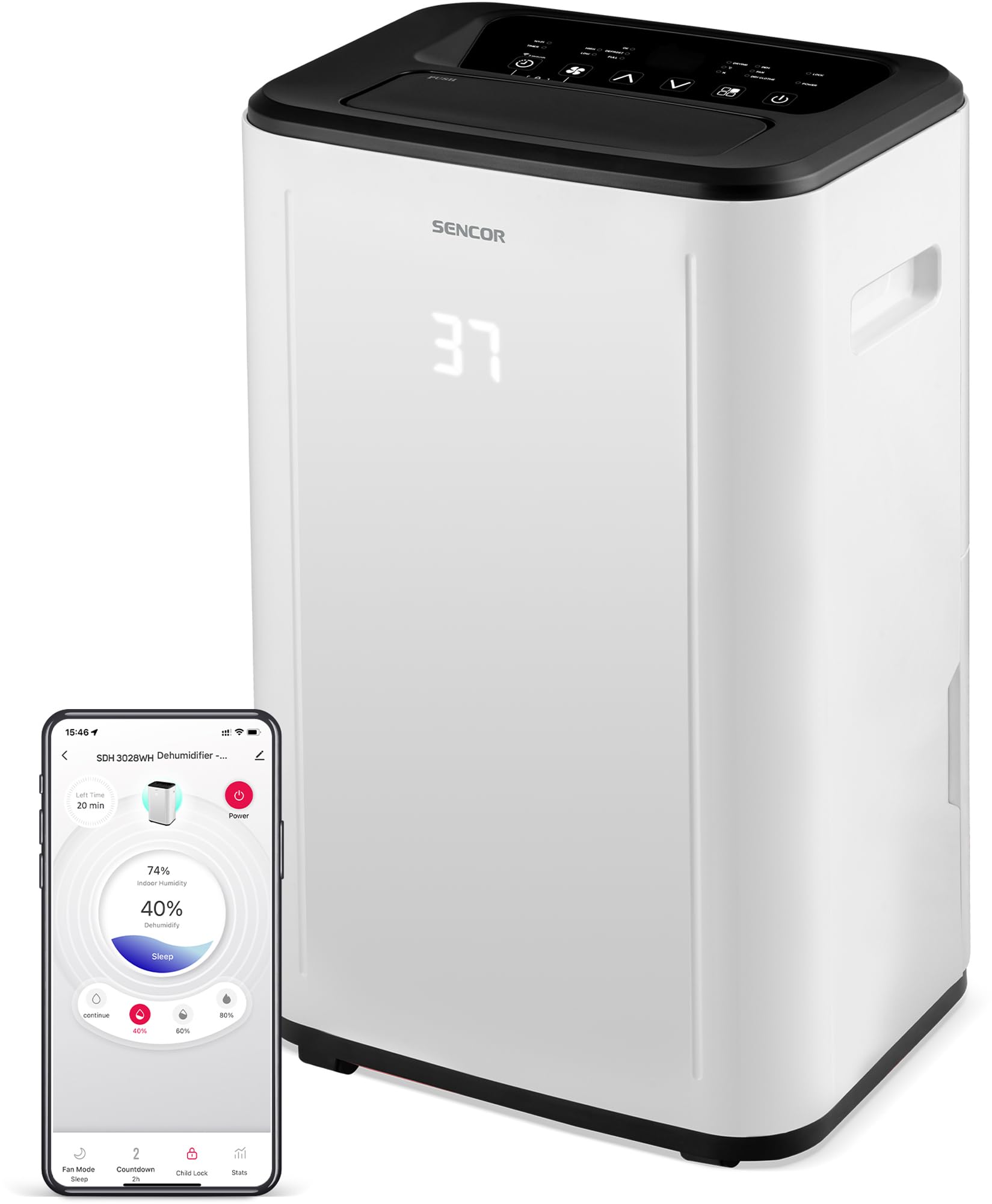
Mufananidzo 1: Mberi view of the SENCOR SDH 3028WH Portable Dehumidifier.
3. Package Zviri mukati
Pakuburitsa zvinhu, ndapota iva nechokwadi chekuti zvinhu zvese zviripo uye zviri mumamiriro akanaka:
- SENCOR SDH 3028WH Portable Dehumidifier
- Bhuku reMirayiridzo
- Drain Hose (1 meter)

Figure 2: Packaging of the SENCOR SDH 3028WH, illustrating key features.
4. Setup
4.1 Kuiswa
Place the dehumidifier on a firm, level surface in the area where dehumidification is desired. Ensure there is at least 20 cm (8 inches) of clear space around the air inlets and outlets for optimal airflow.
4.2 Simba Connection
Plug the power cord into a suitable grounded electrical outlet (220-240V, 50Hz). The unit will enter standby mode.
4.3 Wi-Fi Setup (Sencor HOME App)
- Download the Sencor HOME app from the App Store (iOS) or Google Play Store (Android).
- Gadzira account kana kupinda.
- Follow the in-app instructions to add your SDH 3028WH dehumidifier. This typically involves putting the dehumidifier into pairing mode (refer to the app or device display for specific instructions) and connecting it to your home Wi-Fi network.
- Once connected, you can control the dehumidifier remotely and monitor its status via the app.
5. Operating Instructions
5.1 Control Panel
The control panel on top of the unit allows you to manage all functions. The digital display shows the current humidity level or timer settings.
5.2 Simba On/Kudzima
Press the Simba bhatani rekubatidza kana kudzima unit.
5.3 Nzvimbo Hunyoro Hunodiwa
- Press the Humidity bhatani.
- Shandisa iyo Kumusoro/Kudzika arrows to adjust the desired humidity level between 35% and 85% RH in 5% increments.
- Chishandiso ichi chinoshanda kusvika hunyoro hwacho hwasvika, wobva watanga nekuchidzima kuti chirambe chiripo.
- To enable continuous dehumidification, select the 'Continuous' setting (usually indicated by 'CO' or similar on the display).
5.4 Maitiro Okushandisa
Press the Mode bhatani rekutenderera kuburikidza nemamodhi anowanikwa:
- Dehumidification Mode: Standard operation to remove moisture.
- Fan Mode: Circulates air without dehumidifying.
- Wacha Drying Mode: Optimized for drying clothes faster by continuously running the fan and dehumidifier.
5.5 Kumhanya kweFan
Press the Fan Speed bhatani rekuchinja pakati pekumhanya kwefeni kwakakwirira nekwakaderera.
5.6 Timer Basa
- Press the Timer bhatani.
- Shandisa iyo Kumusoro/Kudzika arrows to set the desired operating duration from 0 to 24 hours.
- The unit will automatically turn off or on after the set time.
5.7 Chivharo Chemwana
Kuti ushandise chivharo chemwana, tinya wobata bhatani Mwana Lock button (or a combination of buttons as indicated on the control panel) for a few seconds. This prevents accidental changes to settings. Repeat the action to deactivate.
6. Kuchengeta
Kugara kugadziridza kunovimbisa kuita kwakaringana uye kunowedzera hupenyu hwe dehumidifier yako.
6.1 Kubvisa Mutangi Wemvura
- When the water tank is full, the unit will stop operating, and the 'Full Tank' indicator will illuminate.
- Carefully pull out the water tank from the back or side of the unit.
- Dururira mvura yakaunganidzwa.
- Reinsert the empty tank firmly into its position. The unit will resume operation.
6.2 Kuenderera mberi kweDrainage
For continuous operation without needing to empty the tank, you can use the included drain hose.
- Locate the continuous drain outlet on the back of the dehumidifier.
- Bvisa chivharo cherabha (kana chiripo).
- Connect one end of the 1-meter drain hose to the outlet.
- Direct the other end of the hose to a suitable drain or larger container, ensuring it is lower than the dehumidifier's drain outlet for gravity flow.
6.3 Kuchenesa Sefa Yemhepo
- It is recommended to clean the air filter every two weeks or more frequently depending on usage.
- Dzima uye bvisa dehumidifier.
- Tsvaga wobvisa firita yemhepo (kazhinji iri kumashure kana kurutivi).
- Geza sefa nemvura inodziya uye nedetergent yakapfava. Sukurudza zvakakwana.
- Bvumira sefa kuti iome zvachose usati waidzosera muchikamu. Usashandise dryer kana kupisa kwakananga.
6.4 Kuchenesa Kunze
Pukuta kunze kweyuniti nekanyoro, damp cloth. Do not use harsh chemicals, abrasive cleaners, or solvents.
7. Kugadzirisa matambudziko
Usati wabata rutsigiro rwevatengi, ndapota tarisa kune anotevera akajairika nyaya uye mhinduro:
| Dambudziko | Zvinogona Kukonzera | Solution |
|---|---|---|
| Unit haibatike. | Hapana magetsi. Tambo yemagetsi haina kubatana zvakanaka. | Tarisa kana mudziyo wacho wakabatanidzwa mu soketi inoshanda. Ita shuwa kuti tambo yemagetsi yakabatana zvakachengeteka. |
| Dehumidifier not collecting water. | Sefa yemhepo yakavharwa. Room temperature is too low (below 5°C). Humidity setting yakanyanyisa. Water tank is not properly inserted. | Chenesa sefa yemhepo. Ensure room temperature is within 5-32°C. Deredza hunyoro hwaunoda. Reinsert the water tank correctly. |
| Unit is noisy or vibrating excessively. | Unit is on an uneven surface. Sefa yemhepo yakavharwa. | Isa iyo unit pane yakati sandara, yakagadzikana pamusoro. Chenesa sefa yemhepo. |
| "Full Tank" indicator is on, but tank is not full. | Water tank is not properly seated. Float switch is stuck. | Remove and reinsert the water tank firmly. Check the float switch inside the tank for obstructions. |
| Wi-Fi nyaya dzekubatanidza. | password yeWi-Fi isiriyo. Dehumidifier too far from router. Matambudziko erouter. | Chengetedza password yeWi-Fi. Move dehumidifier closer to the router. Restart your Wi-Fi router. Re-attempt pairing process. |
8. Zvinotsanangurwa
| Feature | Detail |
|---|---|
| Brand | SENCOR |
| Model Number | SDH 3028WH |
| Dehumidification Kugona | 30 Liters/day (at 30 °C, 80% RH) |
| Mvura Tangi Kugona | 6 litres |
| Kushandisa Simba | 420 Watts |
| Operating Temperature Range | 5-32 °C |
| Yakakurudzirwa Saizi Yekamuri | 30-89 m² |
| Noise Level | 43/41 dB |
| Dimensions (L x W x H) | 26 x 33.5 x 53 cm |
| Kurema | 15.3 kg |
| Material | Plastiki |
| Special Features | Digital display, Automatic defrost, Timer, Portable, Wi-Fi control, Child lock, Auto restart |
| Dhonza Hose Kureba | 1 mita |
9. Warranty uye Tsigiro
SENCOR products are manufactured to the highest quality standards. For warranty information, please refer to the warranty card included with your product or visit the official SENCOR website. For technical support or service inquiries, please contact SENCOR customer service through their official channels.
Spare parts availability: 5 Years.


