Nhanganyaya
Welcome to the user manual for your new boAt Stone 352 Pro Bluetooth Speaker. This guide provides detailed instructions on how to set up, operate, and maintain your speaker, ensuring you get the best audio experience. Please read this manual thoroughly before using the product.
Chii chiri muBhokisi
Upon unboxing your boAt Stone 352 Pro, you should find the following items:
- 1 x boAt Stone 352 Pro Bluetooth Speaker
- 1 x Cable yekuchaja (Type-C)
- 1 x Chinyorwa cheMushandisi (gwaro iri)
- 1 x Warranty Card
- 1 x Catalog

Image: The boAt Stone 352 Pro speaker, a USB Type-C charging cable, and the warranty card/user manual are shown, representing the contents of the product box.
Video: An unboxing demonstration of the boAt Stone 352 Pro Bluetooth Speaker, showing the speaker, charging cable, and documentation included in the package.
Product Overview
The boAt Stone 352 Pro is a portable Bluetooth speaker designed to deliver powerful audio with enhanced features. Key highlights include:
- 14W boAt Signature Sound: Experience clear and powerful audio output.
- Dynamic RGB LEDs: Enhance your listening experience with vibrant lighting effects.
- Up to 12 Hours Playback: Nakidzwa nekuridza mimhanzi kwenguva refu nekuchaja kamwe chete.
- TWS Feature: Connect two Stone 352 Pro speakers for a stereo sound experience.
- Yakavakirwa-mukati Maikorofoni: Facilitates hands-free calling.
- Bluetooth v5.3: Inovimbisa kubatana kwe wireless kwakasimba uye kunoshanda zvakanaka.
- IPX5 Kuramba Mvura: Inopa dziviriro kubva pakupfapfaidzwa nedikita.
- Multiple Connectivity Modes: Supports Bluetooth, AUX, and TF Card playback.
- Type-C kuchaja: Yazvino uye yakanakira yekuchaja interface.

Image: A black boAt Stone 352 Pro speaker, showcasing its cylindrical design and the illuminated RGB LED strip on the front.
Zvinodzora uye zviratidzo
Familiarize yourself with the speaker's controls and indicators for optimal use.

Image: The side panel of the boAt Stone 352 Pro speaker, highlighting the power button, volume up/down buttons, and mode selection button.
- Bhatani reSimba: Dzvanya wobata kuti ubate/udzime. Dzvanya pfupi kuti utambe/umise mimhanzi.
- Kukwidza inzwi (+): Dzvanya kwenguva pfupi kuti uwedzere vhoriyamu. Dzvanya kwenguva refu kuti uwane rwiyo runotevera.
- Vhoriyamu Pasi (-): Dzvanya kwenguva pfupi kuti uderedze vhoriyamu. Dzvanya kwenguva refu kuti uone rwiyo rwekare.
- Bhatani reModhi (M): Dzvanya kapfupi kuti uchinje pakati peBluetooth, AUX, uye TF Card modes.
- RGB LED Strip: Indicates power status, charging, and provides dynamic lighting effects.
Kutanga
Kuchaja Mutauriri
Before first use, fully charge your speaker. The boAt Stone 352 Pro features a Type-C charging port.
- Batanidza mugumo weType-C wetambo yekuchaja kune chiteshi chekuchaja chespika.
- Connect the USB-A end of the cable to a compatible USB power adapter (5V/1A recommended).
- The RGB LED strip will indicate charging status. It typically takes approximately 2 hours for a full charge.
- Kana wanyatsochajiswa, bvisa tambo yekuchaja.

Mufananidzo: Yakadzama view of the boAt Stone 352 Pro's side panel, illustrating the Type-C charging interface and the various connectivity ports (Bluetooth, AUX, TF Card).
Kubatidza/Kudzima
- To power on, press and hold the Power button until you hear an audible prompt and the RGB LEDs illuminate.
- To power off, press and hold the Power button again until you hear an audible prompt and the RGB LEDs turn off.
Operating Instruction
Kubatana kweBluetooth
- Ensure the speaker is powered on and in Bluetooth mode (indicated by a specific LED pattern or audible prompt).
- Pafoni yako kana mudziyo wekurira, vhura Bluetooth wobva watsvaga michina iripo.
- Select "boAt Stone 352 Pro" from the list of devices.
- Once paired, you will hear a confirmation tone, and the speaker's LED will indicate a successful connection.
- Chinotaurisa chinozobatanidzazve otomatiki kumudziyo wekupedzisira wakabatana kana chabatidzwa, kana mudziyo wacho uri pedyo.
AUX Maitiro
For wired connections, use the AUX port.
- Connect one end of a 3.5mm AUX cable (not included) to the speaker's AUX port.
- Connect the other end to your audio device's 3.5mm audio output.
- Press the 'M' (Mode) button on the speaker to switch to AUX mode.
- Audio yave kuridza kuburikidza nemutauri kubva pane chako chakabatana mudziyo.
TF Kadhi Kutamba
Ridza mimhanzi zvakananga kubva pakadhi reTF (microSD).
- Isa TF kadhi ine MP3 odhiyo files into the speaker's TF card slot.
- Press the 'M' (Mode) button to switch to TF Card mode.
- The speaker will automatically begin playing music from the card.
TWS (Chokwadi Wireless redhiyo) Rinoshanda
Connect two boAt Stone 352 Pro speakers wirelessly for a true stereo sound experience.
- Ita shuwa kuti vese vatauri vakabatidzwa uye havana kubatana kune chero imwe Bluetooth mudziyo.
- On one speaker (this will be the primary speaker), long press the 'M' (Mode) button until you hear a TWS pairing prompt.
- The two speakers will automatically search and pair with each other. A confirmation tone will indicate successful TWS pairing.
- Now, connect your audio device to the primary speaker via Bluetooth as described above.
- Both speakers will play audio in stereo.

Image: Two boAt Stone 352 Pro speakers, one black and one blue, operating in TWS mode, demonstrating synchronized audio playback from a connected smartphone.
Kufona Kwemaoko Kwemahara
The built-in microphone allows for convenient hands-free calls when connected via Bluetooth.
- When an incoming call is received, press the Power button once to answer.
- To end a call, press the Power button once again.
- To reject an incoming call, long press the Power button.
RGB LED Functionality
The boAt Stone 352 Pro features dynamic RGB LEDs that add a visual element to your audio experience.

Mufananidzo: Kuvhara view of the boAt Stone 352 Pro's RGB LED strip, displaying a gradient of colors from blue to green to orange, highlighting its dynamic lighting feature.
- The RGB LEDs automatically cycle through various colors, synchronizing with the music or providing ambient lighting.
- Specific button presses may allow for changing LED modes or turning them off (refer to product-specific quick start guide for advanced controls if available).
Maintenance and Care
- Kuchenesa: Shandisa jira rakapfava, rakaoma kuchenesa mukurukuri. Usashandise abrasive cleaners kana solvents.
- Kuramba Mvura (IPX5): The speaker is IPX5 rated, meaning it is protected against low-pressure water jets from any direction. It is not designed for submersion in water. Ensure the charging port cover is securely closed to maintain water resistance.
- Kuchengeta: Chengetedza mukurukuri munzvimbo inotonhorera, yakaoma kure nechiedza chezuva uye tembiricha yakanyanyisa.
- Battery Care: Kuti urebese hupenyu hwebhatiri, dzivisa kuburitsa sipika nguva zhinji. Ichajise nguva nenguva, kunyangwe isiri kushandiswa kwenguva yakareba.

Image: The boAt Stone 352 Pro speaker with water droplets on its surface, emphasizing its IPX5 splash and sweat resistance feature.
Kugadzirisa matambudziko
| Dambudziko | Possible Solution |
|---|---|
| Mutauri haabati simba. | Iva nechokwadi chekuti sipika yachajwa. Ibatanidze kune simba remagetsi woedza zvakare. |
| Haikwanise kubatanidza kuburikidza neBluetooth. |
|
| Hapana ruzha kana vhoriyamu yakaderera. |
|
| Kubatana kweTWS kwakundikana. |
|
| Kufona kunaka kwakashata. |
|
Zvinotsanangurwa
| Feature | Detail |
|---|---|
| Model Name | Dombo 352 Pro |
| Mutauri Rudzi | Portable Nomukurukuri |
| Mutauriri Wekubuda Simba | 14 Watts |
| Bluetooth Version | v5.3 |
| Bluetooth Range | 10 Mamita |
| Bhatiri Avhareji Hupenyu | 12 Maawa |
| Kuchaja Nguva | 2 Maawa |
| Battery Capacity | 3600 mamiriyoniamp Maawa |
| Kuramba Mvura | IPX5 |
| Kubatana Technology | Bluetooth, USB, Wi-Fi (Note: While Wi-Fi is listed, primary connectivity is Bluetooth, AUX, and TF Card as per product features.) |
| Kudzora Nzira | Push Bhatani |
| Product Dimensions | 15.8D x 9.4W x 9.4H Masendimita |
| Item Weight | 20 magiramu |
| Inosanganisirwa Zvikamu | Speaker, Cable, User Manual, Warranty Card, Catalogue |
Warranty uye Support
Your boAt Stone 352 Pro Bluetooth Speaker comes with a standard brand warranty. Please refer to the included Warranty Card for specific terms and conditions.
- Warranty Period: Typically 1 year from the date of purchase.
- Maitiro ekukumbira: For warranty claims or technical support, please contact boAt customer service or visit their official website. Keep your purchase receipt and warranty card handy.
- Warranty Yakawedzerwa: An optional 1 Year Extended Warranty by OneAssist is available for purchase.
Kuti uwane rumwe rubatsiro, unogona zvakare kutarisa kune App yeBoAt Hearables for additional user help guides and support resources.
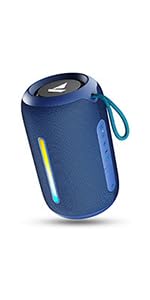
Image: A QR code for the boAt Hearables App, which provides additional support and features for the speaker.


