1. Nhanganyaya
This manual provides detailed instructions for the MESWAO 15.6 Inch Android 14 Tablet, model MES-B3. It covers essential information regarding product features, setup, operation, maintenance, and troubleshooting to ensure optimal performance and user experience. Please read this manual thoroughly before using your device.
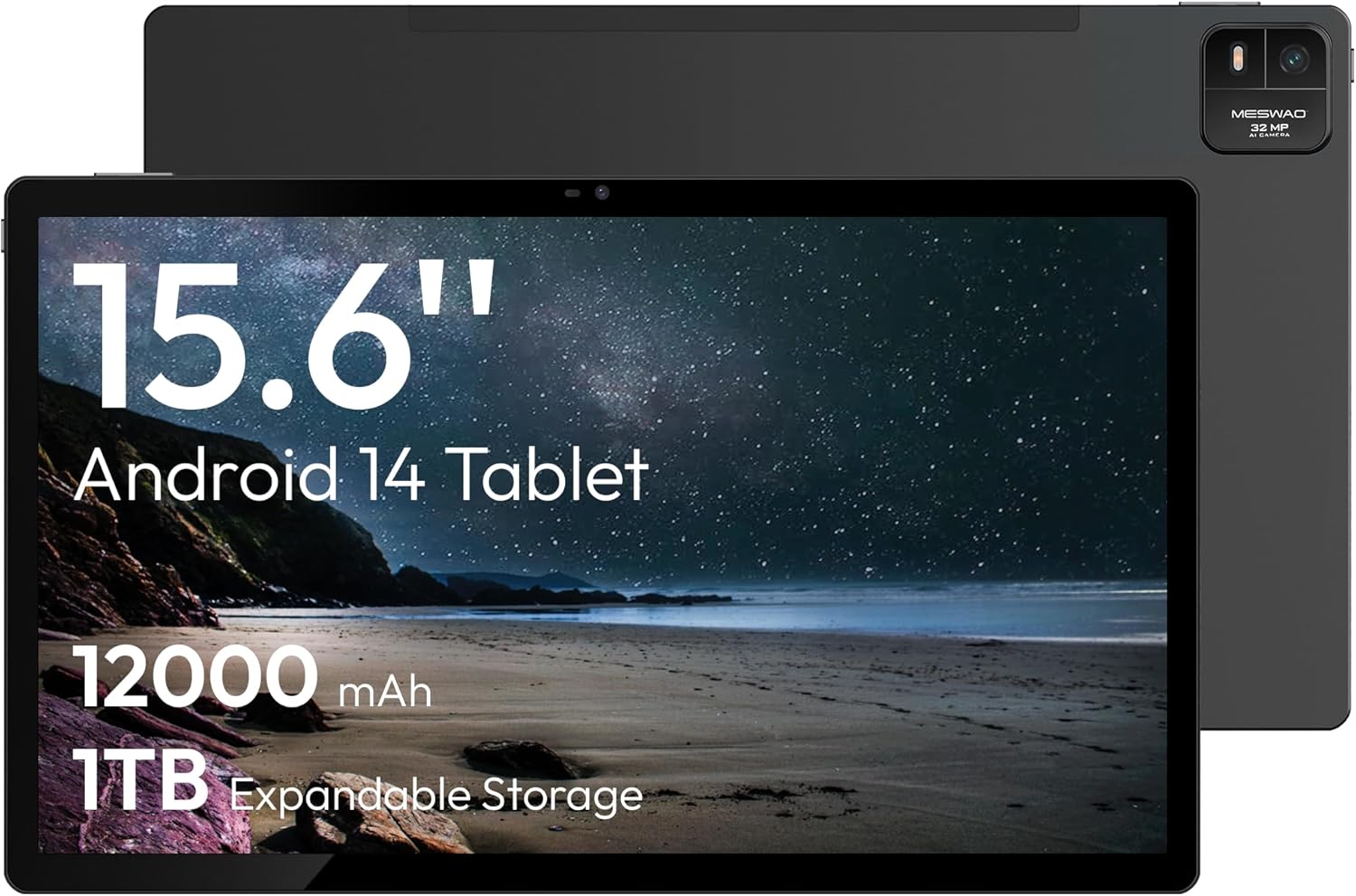
Figure 1.1: MESWAO 15.6 Inch Android 14 Tablet. This image displays the front and back view of the tablet, highlighting its large screen and rear camera module.
2. Safety Information
To prevent damage to your device or injury to yourself or others, please observe the following precautions:
- Usaisa piritsi racho kune tembiricha yakanyanyisa, zuva rakananga, kana hunyoro hwepamusoro.
- Dzivisa kudonhedza kana kuisa piritsi panjodzi huru.
- Shandisa chete majaja akatenderwa uye zvishongedzo.
- Do not attempt to disassemble or repair the tablet yourself.
- Chengetedza piritsi iri kure nemvura uye zvimwe zvinwiwa.
- Observe all local regulations regarding the use of electronic devices.
3. Package Zviri mukati
Tarisa uone kuti zvinhu zvese zviripo mupakeji:
- 15.6-inch Tablet x1
- 15W Charger x1
- Type-C to 3.5mm Adapter x1
- USB-A to Type-C Adapter x1
- Stuck Pin x1 (for SIM/TF card tray)
4. Mudziyo Pamusoroview
Familiarize yourself with the physical components of your MESWAO tablet.
4.1. Zvimiro zvemuviri
- Front Camera: Located at the top center of the screen when held horizontally.
- Rear Camera ine Flash: Located on the back, typically in a corner.
- Bhatani reSimba: Usually on the side, used to power on/off or wake/sleep the device.
- Mabhatani eVolume: Gadzirisa mwero weruzha.
- USB-C Chiteshi: Yekuchaja uye kutumira data.
- TF Kadhi Slot: Kuti uwedzere kuchengetedza.
- Vatauri: Quad speakers with 8 sound chambers for audio output.

Mufananidzo 4.1: Kupfuuraview of MESWAO Tablet's physical features. This image illustrates the location of stereo speakers, power and volume buttons, front camera, rear camera with flashlight, Type-C port, and TF card slot.
5. Setup
5.1. Kutanga Kuchaja
Before first use, fully charge the tablet using the provided 15W charger and USB-C cable. Connect the charger to the USB-C port on the tablet and plug it into a power outlet. The battery indicator on the screen will show charging progress.

Figure 5.1: Tablet charging illustration. This image shows the tablet connected to a charger, displaying a charging icon and indicating 100% charge in 3.5 hours.
5.2. Powering On / Off
- Kubatidza: Press and hold the Power button until the MESWAO logo appears.
- Kudzima: Press and hold the Power button until the power options menu appears, then select "Power off."
- Kurara/Kumuka: Muchidimbu tinya Simba bhatani.
5.3. Kutanga Kugadzirisa
Pakutanga simba-kubatika, tevera zviri-pa-skrini zvekumisikidza piritsi rako:
- Sarudza mutauro waunoda.
- Batanidza kune network yeWi-Fi.
- Pinda neakaundi yako yeGoogle kana gadzira itsva.
- Review uye gamuchira zviga nemamiriro.
- Seta kukiya skrini (PIN, pateni, kana password).
5.4. Kuisa TF Card
To expand storage, insert a TF (microSD) card:
- Locate the TF card slot on the side of the tablet.
- Use the provided stuck pin to gently eject the card tray.
- Place the TF card into the tray with the gold contacts facing down.
- Nyatsodzorera tireyi muhwendefa.

Figure 5.2: Tablet storage capabilities. This image highlights the 128GB ROM and support for up to 1TB expandable storage via TF card.
6. Operating Instructions
6.1. Basic Navigation
The MESWAO tablet uses Android 14, offering intuitive touch-based navigation:
- Top: Sarudza chinhu kana vhura application.
- Rova zvakasimba: Dzvanya nemasikirini kana zvinyorwa.
- Pina-ku-Zoom: Wedzera kana kuderedza zvirimo pascreen.
- Yakareba Press: Svika mamenu emamiriro ezvinhu kana kufambisa zvidhori.

Figure 6.1: Android 14 operating system interface. This image displays various application icons and highlights features like smooth multitasking, parental control, and enhanced privacy.
6.2. Kubatanidza kuWi-Fi
- Enda ku Settings > Network & internet > Wi-Fi.
- Toggle Wi-Fi On.
- Sarudza network yako yaunoda kubva pane iyo rondedzero.
- Isa password kana wakurudzirwa, wobva wadzvanya Connect.
6.3. Kutarisira Mapurogiramu
- Isa Zvishandiso: Download from the Google Play Store.
- Uninstall Apps: Long-press an app icon, then drag it to "Uninstall" or go to Settings > Apps.
- Vhara Mapurogiramu: Swipe up from the bottom of the screen and swipe away the app card.
6.4. Kushandiswa kwekamera
The tablet features a 32MP rear camera with flash and a 5MP front camera.
- Vhura iyo Kamera application.
- Tinya bhatani rekuvhara kuti utore mufananidzo.
- Chinja pakati pemakamera ekumberi neekumashure uchishandisa chiratidzo chekuchinja kamera.
- Access settings for flash, modes, and other options.
6.5. Battery Management
Bhatiri re12000mAh rinopa kushandiswa kwenguva refu. Kuti bhatiri rigare kwenguva refu, wedzera simba rayo:
- Gadzirisa kupenya kwescreen.
- Vhara zvisina kushandiswa.
- Bvumira modhi yekuchengetedza bhatiri mukati Settings > Bhatiri.
6.6. Kubatana
- Bluetooth: Pair with wireless headphones, speakers, or other devices via Settings > Zvishandiso zvakabatana > Bluetooth.
- USB-C: Batanidza pakombuta ye file transfer or use with compatible USB-C accessories.
- Kukanda Sikirini Isina Waya: Share your tablet's screen to a compatible smart TV or monitor. Access this feature from the Quick Settings panel or Settings > Zvishandiso zvakabatana > Cast.
6.7. Zvirongwa zveRuzha
Adjust volume and audio output options:
- Use the physical volume buttons on the side of the tablet.
- Access detailed settings in Settings > Inzwi & vibration.
- The tablet supports multiple audio options, including USB-C audio and 3.5mm via the provided adapter.
7. Kuchengeta
7.1. Kuchenesa Tablet Yako
Kuchenesa piritsi, shandisa jira rakapfava, risina ruvara. Kana paine tsvina yakaoma, pukuta zvishoma.ampIsa jira nemvura kana muchina wekuchenesa sikirini wakagadzirirwa zvemagetsi. Dzivisa makemikari ane hukasha kana zvinhu zvinogumbura.
7.2. Software Updates
Gara uchitarisa uye kuisa zvigadziriso zvesoftware kuti uve nechokwadi chekushanda, kuchengetedzeka, uye kuwana kune zvitsva zvinhu. Enda ku Settings > System > System update.
7.3. Kuchengetedza Kuchengetedza
Kuti urambe uchishanda zvakanaka, gara uchitarisira nzvimbo yekuchengetera tablet yako:
- Delete zvisina basa mapurogiramu uye files.
- Kufamba hombe files to the TF card or cloud storage.
- Bvisa cache data yemaapplication ari mukati Settings > Apps > [Zita reApp] > Kuchengetedza & cache.
8. Kugadzirisa matambudziko
Tarisa kune zvinotevera zvinowanzoitika uye mhinduro:
| Dambudziko | Solution |
|---|---|
| Tablet haibatike. | Ita shuwa kuti bhatiri rachajwa. Batanidza charger womira maminetsi mashoma usati waedza kubatidza zvakare. |
| Haikwanisi kubatana neWi-Fi. | Check if Wi-Fi is enabled. Verify the Wi-Fi password. Restart your router and the tablet. |
| Mapurogiramu ari kuparara kana kutonhora. | Close background apps. Clear the app's cache. Restart the tablet. Ensure the app is updated. |
| Kunonoka kuita. | Free up storage space. Close unused apps. Restart the tablet. |
| Bhatiri rinopera nekukurumidza. | Reduce screen brightness. Disable unused features like Bluetooth or GPS. Close background apps. Check battery usage in settings. |
9. Zvinotsanangurwa
Key technical specifications for the MESWAO 15.6 Inch Android 14 Tablet (MES-B3):
| Feature | Detail |
|---|---|
| Brand | MESWAO |
| Model Name | MES-B3 |
| Operating System | Android 14 |
| Screen Size | 15.6 inches |
| Screen Resolution | Mapikisheni 1920 x 1080 (IPS HD) |
| processor | Octa-Core (MediaTek Helio G99, up to 2.2 GHz) |
| Graphics Coprocessor | Mali-G57 |
| RAM (Memory Storage Capacity) | 6GB (DDR3 SDRAM) |
| Internal Storage (Flash Memory Size) | 128 GB |
| Expandable Storage | Up to 1TB via TF Card |
| Rear Camera Resolution | 32 MP |
| Front Camera Resolution | 5 MP |
| Battery Capacity | 12000mAh |
| Avhareji Hupenyu hweBhatiri | 12 Maawa |
| Wireless Type | 802.11a/b/g/n/ac (Wi-Fi 5) |
| Color | Gireyi |
| Item Weight | 2.35 makirogiramu |
| Zviyero zveChigadzirwa (LxWxH) | 14.53 x 8.78 x 0.43 inches |

Figure 9.1: Processor and performance details. This image highlights the Helio G99 Octa-Core chipset, 6nm process, 950MHz GPU, and smooth gaming/streaming capabilities.
10. Warranty uye Tsigiro
10.1. Ruzivo rweWaranti
The MESWAO 15.6 Inch Android 14 Tablet comes with a 12-mwedzi waranti covering manufacturing defects. Please retain your proof of purchase for warranty claims.
10.2. Mutengi Tsigiro
For technical assistance, troubleshooting, or warranty inquiries, please contact MESWAO customer support. They offer 24-awa mutengi rutsigiro uye ave local service centers in the US, EU, and Japan.
- Contact Method: Refer to the contact information provided with your product packaging or visit the official MESWAO website.
- Dambudziko Rekugadziriswa: Issues reported are typically responded to within 24 hours, with problems resolved or replaced according to policy.

Figure 10.1: MESWAO customer support and warranty details. This image highlights the 12-month warranty, 24-hour customer support, local after-sales centers, and quick response flow.


