1. Nhanganyaya
The OontZ Angle 3 Pro is a high-performance portable Bluetooth speaker designed for both indoor and outdoor use. It features robust audio output, extended battery life, and a durable waterproof design, making it suitable for various environments. This manual provides essential information for setting up, operating, and maintaining your speaker.
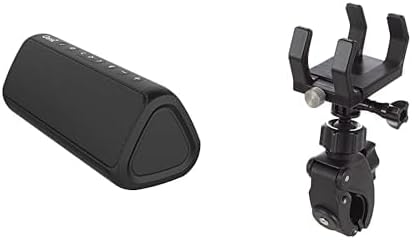
Image 1: The OontZ Angle 3 Pro Bluetooth Speaker (left) shown alongside its multipurpose bracket and clamp mount (right).
2. Key Features
- Superior Audio Hunhu: Engineered with 40% larger custom Neodymium drivers and a 21-Watt Digital AMP, delivering crystal clear sound, rich bass, and distortion-free audio even at maximum volume.
- Hupenyu Hwebhatiri Hwakawedzerwa: Enjoy up to 15 hours of playtime on a full charge when set to 2/3 volume.
- Robust Connectivity: Advanced antenna design provides a wireless range of up to 100 feet via Bluetooth 5.0, ensuring a fast and stable connection to your smartphone, tablet, laptop, or other Bluetooth-enabled devices.
- IPX7 Waterproof & Saltproof: Certified IPX7 water-resistant, allowing the speaker to be submerged up to 1 meter for 30 minutes. It is also saltproof, making it ideal for beach and outdoor activities.
- Portable Design: Lightweight and easy to carry, featuring a unique triangular shape that allows for versatile placement.
- Multipurpose Mounting: Includes an official bracket and clamp mount for secure attachment to boat railings, kayaks, rod holders, handlebars, or beach umbrellas.
- Integrated Controls: Features touch controls for power, volume, track navigation, and Bluetooth pairing.
- Zvekubatsira: Supports direct connection via an auxiliary input for non-Bluetooth devices.
- Power Bank Basa: The USB port can provide power to charge your iPhone, smartphone, or other devices (output up to 5V – 1A).
- Stereo Pairing: Connect two OontZ Angle 3 Pro speakers together for enhanced stereo sound.
- Kubatanidzwa kweVoice Assistant: Push a button to activate and talk to Siri on your iPhone.
3. Setup Guide
3.1 Kuchaja Mutauriri
- Locate the rubber flap on the side of the speaker.
- Gently open the flap to reveal the USB-C charging port.
- Connect the provided USB-C charging cable to the speaker and a compatible USB power source (e.g., wall adapter, computer USB port).
- The LED indicator will show charging status. A full charge typically takes a few hours.
- Once fully charged, securely close the rubber flap to maintain the IPX7 waterproof rating.
3.2 Kubatidza/Kudzima
- Kuti uwane simba, pfuurira uye ubatisise Simba bhatani (usually indicated by a circle with a vertical line) until you hear an audible cue and the LED indicator lights up.
- Kuti ubvise magetsi, pinda uye bata iyo Simba bhatani zvakare kusvika sipika yadzima.
3.3 Bluetooth Pairing
- Iva nechokwadi chekuti sipika yakabatidzwa uye iri pedyo neBluetooth device yako (semuenzaniso, smartphone, tablet).
- The Bluetooth LED indicator on the speaker will flash blue, indicating it is in pairing mode.
- Pamudziyo wako, enda kune zvigadziriso zveBluetooth uye tsvaga zvishandiso zviripo.
- Select "OontZ Angle 3 Pro" from the list.
- Once connected, the Bluetooth LED will turn solid blue, and you will hear a confirmation tone.
3.4 Kubatanidza Kwekuwedzera Kwemukati
- Open the rubber flap on the side of the speaker to access the auxiliary input port.
- Connect a 3.5mm audio cable (not included) from your audio source to the speaker's auxiliary input.
- The speaker will automatically switch to auxiliary mode.
- Gadzirisa vhoriyamu kubva kune yako audio source uye speaker.
4. Operating Instructions
4.1 Basic Controls
- Vhoriyamu kumusoro/Kudzika: Press the '+' or '-' mabhatani emutauri.
- Tamba/Kumbomira: Press the Bhatani rekutamba/kumbomira (chiratidzo chetriangle).
- Next Track: Press the Next Track bhatani (right arrow icon).
- Previous Track: Press the Bhatani rakapfuura Track (left arrow icon).
- Pindura/Pedzisa Kufona: Press the Bhatani rekutamba/kumbomira during an incoming call.
- Shandisa Mubatsiri weIzwi (Siri): Press the dedicated voice assistant button (if available, or long-press Play/Pause on some models) to activate Siri on your connected iPhone.
4.2 Stereo Pairing (Dual Speaker Mode)
For an immersive stereo experience, you can connect two OontZ Angle 3 Pro speakers together. Refer to the official OontZ app or Cambridge Soundworks website for detailed instructions on stereo pairing, as the process may vary slightly.
5. Kuchengeta uye Kuchengetedza
- Waterproof Kuvimbika: Always ensure the rubber flap covering the charging and auxiliary ports is securely closed when using the speaker near water or in wet conditions to maintain its IPX7 waterproof rating.
- Kuchenesa: Shandisa nyoro, damp cloth to clean the speaker. Avoid using harsh chemicals or abrasive cleaners.
- Kureba kwebhatiri: To prolong battery life, avoid fully discharging the speaker frequently. Charge it regularly, and if storing for an extended period, ensure it has a partial charge (around 50%).
- Kuchengeta: Chengeta sipika munzvimbo inotonhorera, yakaoma kure nekupisa kwakanyanya.
6. Kugadzirisa matambudziko
- Hapana Simba: Ensure the speaker is fully charged. Connect it to a power source and check the charging indicator.
- Hapana Inzwi: Check the volume levels on both the speaker and your connected device. Ensure the speaker is correctly paired via Bluetooth or connected via auxiliary cable.
- Bluetooth Disconnection/Pairing Issues:
- Ensure the speaker is within the 100-foot Bluetooth range.
- Turn off and on the Bluetooth on your device and the speaker.
- Forget the speaker from your device's Bluetooth list and re-pair.
- Ensure no other devices are actively connected to the speaker.
- Hunhu Husina kunaka: Ensure the speaker is not too far from your device. Check for obstructions between the speaker and your device. If using auxiliary input, try a different cable.
7. Zvinotsanangurwa
| Feature | Detail |
|---|---|
| Model Name | Angle 3 Pro |
| Mutauri Rudzi | Kunze |
| Special Feature | Lightweight, Wireless Charging (referring to power bank function) |
| Inowirirana Devices | Laptop, Smartphone, Tablet |
| Color | Nhema |
| Inodzivirira Mvura | Chokwadi (IPX7) |
| Kudzora Nzira | Bata |
| Wireless Communication Technology | Bluetooth |
| Simba Source | Battery Powered |
| Mvura Resistance Level | Isingapindi mvura |
| Audio Driver Type | Dynamic Driver |
| Bluetooth Range | 100 Tsoka |
| Mutauri Mukuru Wekubuda Simba | 21 Watts |
| Kubatana Technology | Bluetooth |
| Audio Output Mode | Stereo |
| Mounting Type | Vehicle Mount, Handlebar |
| Mugadziri | Cambridge Inonzwika |
| Item Model Number | fed95d1f-ed0f-48b2-ba82-6b915e90b190 |
8. Warranty uye Tsigiro
The OontZ Angle 3 Pro Bluetooth Speaker comes with a Limited Warranty. For specific warranty details, product support, or to register your product, please visit the official Cambridge Soundworks websaiti kana kubata basa ravo revatengi.
Rutsigiro rwepamhepo: www.TheOontZ.com


