1. Nhanganyaya
Welcome to the user manual for your King Lucky i21 Open Ear Clip On Earbuds. These wireless Bluetooth headphones are designed for comfort, stability, and high-quality audio, perfect for various activities including running, sports, and daily use. Their unique clip-on, open-ear design ensures a secure fit without discomfort, making them ideal for small ears and glasses wearers. This manual provides essential information on setting up, operating, maintaining, and troubleshooting your earbuds.

Figure 1.1: King Lucky i21 Open Ear Clip On Earbuds and Charging Case (Black)
Product Overview Vhidhiyo
Vhidhiyo 1.1: Kuperaview of the King Lucky i21 Open Ear Clip Earbuds, highlighting their design, features, and benefits. This video demonstrates the product's key functionalities and appearance.
2. Key Features
2.1 Dhizaini uye Nyaradzo
- Clip-on Dhizaini: Crafted for a secure and snug fit, ensuring stability during any activity.
- Open Ear Comfort: Provides clean ears without the discomfort of in-ear insertion, eliminating ear pain and promoting hours of comfort.
- Huremu: Weighing only 4.7g, these earbuds are designed for all-day wear without feeling weighed down.
- Glasses Wearer Friendly: Perfect for individuals who wear glasses, offering wide compatibility and no interference.

Figure 2.1: Demonstrating the comfortable and stylish clip-on design.

Figure 2.2: Earring-style design highlighting light, comfortable, stylish, and painless wear compared to other earbud types.

Figure 2.3: Visual representation of the earbuds' ultra-lightweight design (4.7g).
2.2 Ruzha uye Kubatana
- Yepamberi Bluetooth 5.3: Ensures zero latency, robust processing power, efficient energy use, more stable connections, longer transmission ranges, and faster data transfers.
- 13mm Dynamic Driver: Features a bass algorithm and large driver for a concert-like audio experience.
- Directional Sound Design: Reduces sound scatter and loss, making audio clearer while allowing awareness of surroundings.
- Noise Cancelling Microphone: Clearly picks up your voice even in windy conditions, ensuring crystal-clear calls.

Figure 2.4: Advanced Bluetooth 5.3 technology for superior connection.
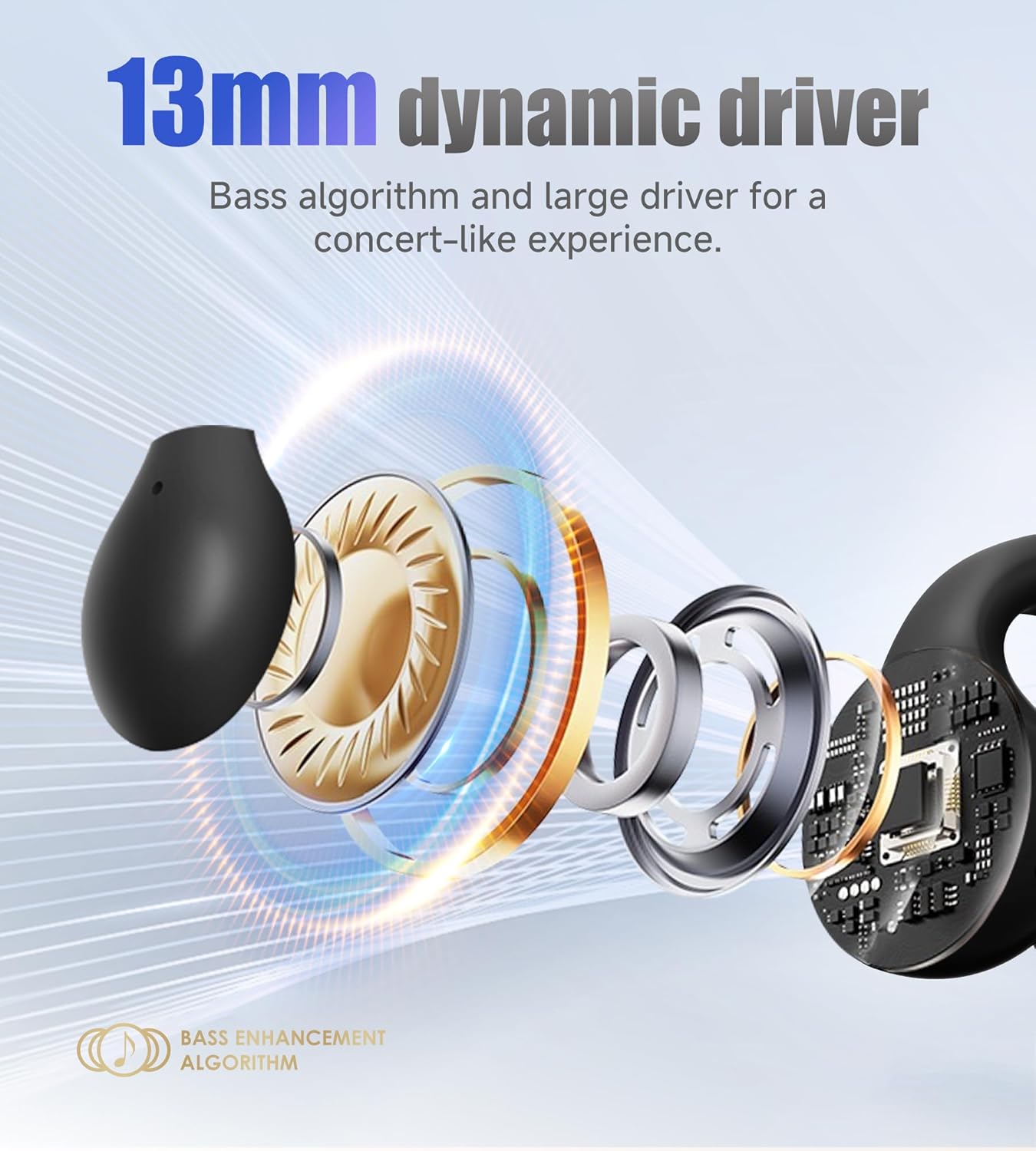
Figure 2.5: Illustration of the 13mm dynamic driver for enhanced bass.

Figure 2.6: Earring-style directional sound design for clearer audio.
2.3 Battery Life and Durability
- Yakawedzerwa Nguva Yekutamba: Enjoy 6 hours of continuous playtime on a single charge, extended to 45 hours with the charging case.
- Nguva Yakareba Yakamira: Features a 90-hour standby time.
- IPX4 Isingapindi mvura: Built with a nano hydrophobic coating for IPX4 waterproof protection, making them resistant to rain and sweat.

Figure 2.7: Battery life details for the King Lucky i21 earbuds.

Figure 2.8: IPX4 waterproof and sweat-proof design for active use.
3. Setup Guide
3.1 Chii chiri muBhokisi
Usati watanga, iva nechokwadi chokuti zvikamu zvose zviripo:
- Open Ear Earbuds x 2
- Nyaya yekuchaja x 1
- User Manual x 1
- Type-C yekuchaja Cable x 1

Mufananidzo 3.1: Zviri Mukati mePakeji.
3.2 Kutanga Kuchaja
For first-time use, fully charge the earbuds and the charging case. Connect the Type-C charging cable to the charging case and a power source. The charging time for both the earbuds and the carrying case is approximately 1.5 hours.
3.3 Kubatanidza neChishandiso Chako
The King Lucky i21 earbuds are compatible with all Bluetooth devices, including cellphones and telephones. Follow these steps to pair:
- Ita shuwa kuti maearbuds ari mucheji yekuchaja uye kesi ine simba.
- Vhura kesi yekuchaja. Maearbuds anozopinda otomatiki maitiro ekubatanidza.
- Pamudziyo wako (smartphone, piritsi, laptop), enda kuBluetooth marongero.
- Tsvaga zvishandiso zviripo uye sarudza "i21" kubva pane iyo rondedzero.
- Kana yangobatanidzwa, unonzwa toni yekusimbisa, uye maearbuds anenge agadzirira kushandiswa.

Figure 3.2: Wide device compatibility and pairing process.
4. Operating Instructions
The King Lucky i21 earbuds feature intuitive touch controls for easy management of calls and music playback.

Figure 4.1: Earphone Operation Guide.
4.1 Kudzora Mumhanzi
- Ridza/Misa Mimhanzi: Tap x2 on either the Left (L) or Right (R) earbud.
- Previous Track: Tap x3 on the Left (L) earbud.
- Next Track: Tap x3 on the Right (R) earbud.
4.2 Call Control
- Pindura Call: Tap x2 on either the Left (L) or Right (R) earbud.
- Pedzisa Kufona: Tap x2 on either the Left (L) or Right (R) earbud.
- Ramba Kufona: Long Press 2" on either the Left (L) or Right (R) earbud.
4.3 Izwi Mubatsiri
- Shandisa Izwi Mubatsiri: Long Press 2" on either the Left (L) or Right (R) earbud.
4.4 Clear Pairing
- Clear Pairing: Long Press 3" on the Charging case button. This can be useful for troubleshooting connection issues.
5. Kuchengeta
5.1 Kuchenesa
To ensure optimal performance and longevity of your earbuds, regular cleaning is recommended:
- Pukuta maearbud nekesi yekuchaja nejira rakapfava, rakaoma, risina lint.
- Patsvina yakasindimara, zvishoma dampen jira nemvura. Dzivisa kushandisa makemikari ane hasha kana abrasive zvinhu.
- Ita shuwa kuti macontacts ekuchaja pane ese maearbuds nekesi akachena uye haana tsvina.
- While the earbuds are IPX4 waterproof (resistant to splashes and sweat), do not submerge them in water or expose them to running water.
5.2 Kuchengeta
Kana usingashandise, chengeta ma earbuds mubhokisi rawo rekuchaja kuti uadzivirire kubva kuguruva, kukuvara, uye kuti arambe achichajiwa.
5.3 Kuchengeta Battery
- Dzivisa kupedza simba rebhatiri nguva nenguva.
- Store the earbuds with some charge if not used for extended periods.
- Use the provided Type-C charging cable for optimal charging.
6. Kugadzirisa matambudziko
If you encounter any issues with your King Lucky i21 earbuds, please refer to the following common solutions:
| Dambudziko | Zvinogona Kukonzera | Solution |
|---|---|---|
| Maearbuds haasi kubatanidza | Low battery; Bluetooth off; Earbuds not in pairing mode; Previous pairing conflict. | Charge earbuds and case; Ensure device Bluetooth is on; Place earbuds in case, open lid to activate pairing; Use 'Clear Pairing' function (Long Press 3" on case button). |
| Hapana ruzha kana yakaderera vhoriyamu | Volume too low on device; Earbuds not properly connected; Earbuds dirty. | Increase device volume; Re-pair earbuds; Clean earbuds and charging contacts. |
| Nyaya dzekuchaja | Cable not connected properly; Dirty charging contacts; Faulty cable/adapter. | Ensure secure connection; Clean charging contacts; Try a different Type-C cable or power adapter. |
| Kubatana kwepakati | Distance from device; Interference; Low battery. | Stay within Bluetooth range (10 meters); Move away from sources of interference; Charge earbuds. |
7. Zvinotsanangurwa
| Feature | Detail |
|---|---|
| Model Name | i21 |
| Brand | Mambo Lucky |
| Kubatana Technology | Wireless (Bluetooth) |
| Bluetooth Version | 5.3 |
| Bluetooth Range | 10 mamita |
| Kuiswa Nzeve | Open Ear / Clip On |
| Item Weight | 2.89 ounces (earbuds: 4.7g each) |
| Hupenyu hwebhatiri (Kuchaja Kamwechete) | 6 Maawa |
| Yese Yekutamba (ine Kesi yekuchaja) | 45 Maawa |
| Standby Time | 90 Maawa |
| Nguva Yekuchaja (Earbuds & Case) | 1.5 Maawa |
| Waterproof Rating | IPX4 |
| Audio Driver Type | Dynamic Driver (13mm) |
| Control Type | Bata Kudzora |
| Inosanganisirwa Zvikamu | Cable, Chinyorwa cheMushandisi, Chiteshi chekuchaja |
| Material | Plastiki, Metal |
| Package Dimensions | 4.8 x 4.09 x 1.26 inches |
8. Warranty uye Tsigiro
For detailed warranty information, please refer to the warranty card or specific documentation included with your King Lucky i21 earbuds package. King Lucky is committed to providing high-quality products and customer satisfaction.
If you require further assistance or have questions not covered in this manual, please contact King Lucky customer support through the contact information provided on the product packaging or the official King Lucky website.


