1. Nhanganyaya
The Autel MaxiTPMS TS508WF is an advanced Tire Pressure Monitoring System (TPMS) service tool designed for comprehensive TPMS sensor management. This device facilitates activation, programming, relearning, and diagnosis of TPMS sensors, ensuring proper tire pressure monitoring for vehicle safety. The TS508WF features Wi-Fi connectivity for convenient software updates, enhancing its functionality and vehicle coverage over time.

Image 1.1: Autel MaxiTPMS TS508WF device overview highlighting its core functions.
2. Chii chiri muBhokisi
Pakuvhura pasuru, simbisa kuti zvese zvirimo zviripo:
- TS508WF Main Unit
- Main Cable (OBDII connection)
- Simba Plug
- Chipanera
- Kutakura Nyaya
- Mini USB Cable
- Chinyorwa Chirairo (gwaro iri)
- Magnet (for certain sensor types)

Image 2.1: Contents of the TS508WF package.
3. Key Features
The Autel MaxiTPMS TS508WF offers a range of features for efficient TPMS service:
- Wi-Fi Update Capability: Allows for direct software updates over a Wi-Fi connection, eliminating the need for a PC.
- Kuronga Mapurogiramu eMX-Sensor: Supports programming of all Autel MX-Sensors using two methods: Copy by OBD and Auto Create 1-16.
- TPMS Sensor Relearn: Provides three methods for relearning TPMS sensors: Automatic Relearn, Stationary Relearn, and OBD Relearn.
- TPMS Sensor Activation: Activates all 315MHz and 433MHz TPMS sensors to retrieve sensor data.
- TPMS System Diagnosis: Reads and clears TPMS diagnostic trouble codes (DTCs) and displays live sensor data.
- Dual Service Modes: Offers Quick Mode for basic TPMS functions and Advanced Mode for comprehensive TPMS diagnostics.
- Kufukidzwa Kwemotokari Yakakura: Compatible with a broad range of US, European, and Asian vehicles.

Image 3.1: Main menu of the TS508WF.

Image 3.2: Wi-Fi and USB update feature comparison.
4. Setup uye Initial Configuration
4.1 Kuchaja Chishandiso
Before first use, ensure the TS508WF is fully charged. Connect the Mini USB cable to the device and the power plug to an electrical outlet. The device will indicate charging status on its screen.
4.2 Wi-Fi Connection and Software Update
The TS508WF supports Wi-Fi for convenient software updates. It is recommended to update the device regularly to ensure compatibility with the latest vehicle models and sensor types.
- From the main menu, select "My Device".
- Choose "Update by Wi-Fi".
- For the first-time Wi-Fi update, select "Scan Wi-Fi". The device will search for available WLAN hotspots.
- Sarudza yako yaunoda network kubva pane iyo rondedzero uye isa password kana ikakurudzirwa.
- Once connected, ensure the TS508WF is plugged into a power source.
- Confirm to begin the update process. The device will download and install the latest software.
Video 4.1: Official Autel video demonstrating the Wi-Fi update feature of the TS508WF.
5. Operating Instructions
The TS508WF offers two main service modes: Quick Mode and Advanced Mode. Quick Mode is suitable for basic TPMS functions, while Advanced Mode provides more in-depth diagnostics and programming options.

Image 5.1: Quick Mode and Advanced Mode overview.
5.1 Activating TPMS Sensors
To activate a TPMS sensor:
- Select the "TPMS" function from the main menu.
- Choose "Activate Sensors".
- Follow the on-screen prompts to select the vehicle make, model, and year.
- Position the tool near each tire's valve stem and press the trigger button to activate the sensor. The tool will display sensor ID, tire pressure, temperature, and battery status.
5.2 Programming MX-Sensors
The TS508WF can program Autel MX-Sensors to replace faulty or missing sensors. Two programming methods are available:
- Kopi yakaitwa naOBD: This method retrieves the sensor IDs from the vehicle's ECU via the OBDII port and writes them directly to the new MX-Sensor. This is ideal when the original sensor is no longer functional.
- Auto Create 1-16: This method generates new, unique sensor IDs for up to 16 MX-Sensors. This is useful when original sensor IDs are unavailable.
To program a sensor:
- Select "Program Sensor" from the TPMS menu.
- Choose the desired programming method (Copy by OBD or Auto Create 1-16).
- Follow the on-screen instructions to complete the programming. Ensure the MX-Sensor is within 4 inches of the tool during programming.

Image 5.2: MX-Sensor programming methods.
5.3 Relearning TPMS Sensors
After replacing sensors or rotating tires, the vehicle's ECU needs to learn the new sensor IDs. The TS508WF supports three relearn procedures:
- Kudzidzazve otomatiki: The vehicle automatically learns new sensor IDs by driving under specific conditions.
- Kudzidzazve Zvisingachinji: Requires the vehicle to be placed in a "Learn Mode" (often initiated via the vehicle's dashboard controls) and sensors activated in a specific order.
- Kudzidzazve kweOBD: The tool writes new sensor IDs directly to the vehicle's TPMS module via the OBDII connector. This is often the fastest method.
To perform a relearn:
- Select "Position Relearn" from the TPMS menu.
- Follow the on-screen instructions, which will guide you through the appropriate relearn procedure for the selected vehicle.
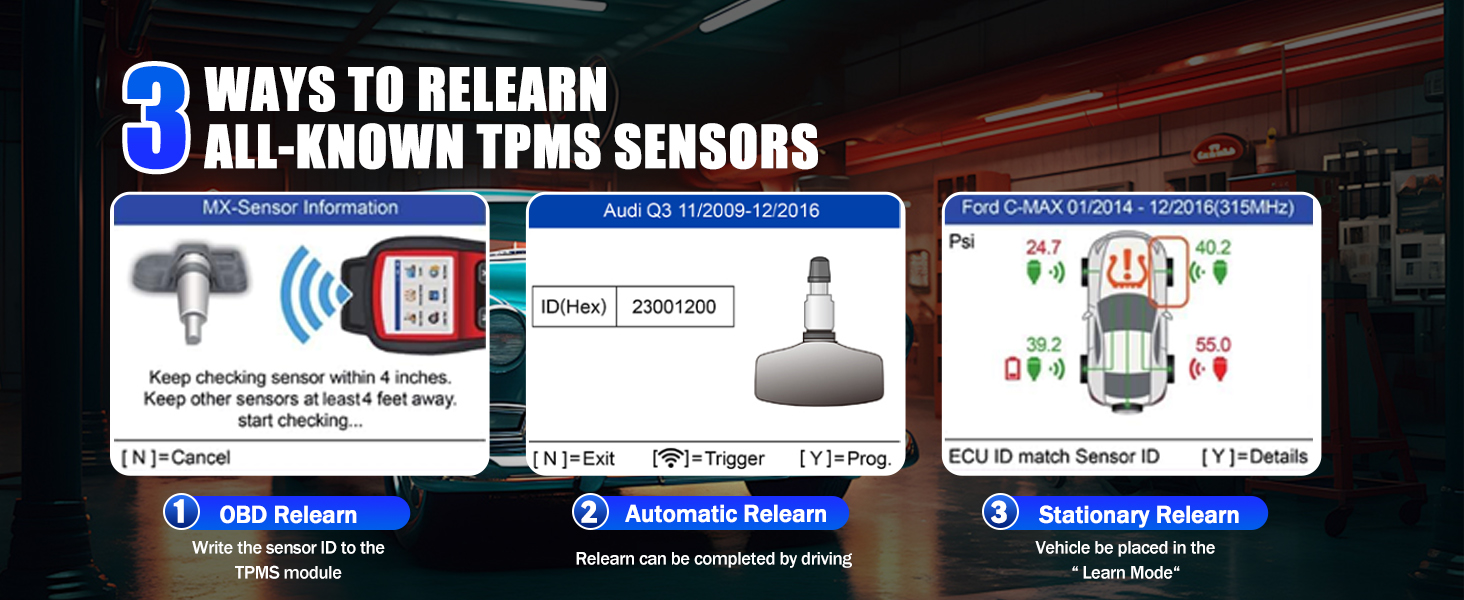
Image 5.3: TPMS sensor relearn methods.
5.4 TPMS System Diagnosis
The TS508WF can diagnose issues within the TPMS system:
- Connect the main cable to the vehicle's OBDII port and the TS508WF.
- Select "TPMS Diagnose" from the menu.
- The tool will read TPMS DTCs (Diagnostic Trouble Codes) and display detailed information about the system's health, including sensor IDs, tire pressure, temperature, and battery condition.
- If DTCs are present, you can choose to clear them after addressing the underlying issue.

Image 5.4: Reading and clearing TPMS DTCs.
6. Kuchengeta
To ensure the longevity and optimal performance of your Autel MaxiTPMS TS508WF:
- Kuchenesa: Shandisa nyoro, damp jira rekuchenesa mudziyo. Dzivisa zvinochenesa zvinogumbura kana zvinonyungudutsa.
- Kuchengeta: Store the tool in its carrying case in a dry, cool environment when not in use.
- Battery Care: Charge the internal Lithium Polymer battery regularly, even if the device is not frequently used, to maintain battery health. Avoid fully discharging the battery for extended periods.
- Zvigadziriso zveSoftware: Regularly check for and install software updates via Wi-Fi to ensure the tool has the latest vehicle coverage and features.
7. Kugadzirisa matambudziko
If you encounter issues with your TS508WF, refer to the following common problems and solutions:
| Dambudziko | Zvinogona Kukonzera | Solution |
|---|---|---|
| Mudziyo haubatike | Bhatiri rakaderera kana rakapera | Connect the device to a power source and charge for at least 30 minutes. |
| Unable to activate sensor | Incorrect sensor type selected, sensor too far from tool, or faulty sensor. | Verify vehicle selection. Ensure the tool is positioned correctly near the valve stem. Try activating a known good sensor. |
| Kugadziriswa kweWi-Fi kwakundikana | Weak Wi-Fi signal, incorrect password, or device not connected to power. | Move closer to the Wi-Fi router. Re-enter Wi-Fi password. Ensure the device is plugged into a power source during the update. |
| Cannot connect to vehicle OBDII | Loose cable connection, vehicle ignition off, or faulty OBDII port. | Ensure the OBDII cable is securely connected to both the tool and the vehicle. Turn the vehicle ignition to the ON position (engine off). Test the OBDII port with another diagnostic tool if available. |
8. Zvinotsanangurwa
Key technical specifications for the Autel MaxiTPMS TS508WF:
- Muenzaniso: autelTS508WIFI
- Chinhu Weight: 3.89 makirogiramu
- Package Dimensions: 12 x 10.5 x 4 inches
- Mabhatiri: 1 Lithium Polymer bhatiri inodiwa (inosanganisirwa)
- Kunobva Simba: Battery Powered
- Operating System: Android 11.0
- Kukura Kwesikirini: 3 inches
- UPC: 792499188818
- Zuva Rokutanga Kuwanikwa: Nyamavhuvhu 20, 2024

Image 8.1: Advanced hardware features of the TS508WF.
9. Warranty uye Tsigiro
For warranty information, please refer to the documentation included with your product or visit the official Autel website. Autel provides free lifetime software updates for the TS508WF. For technical assistance, troubleshooting beyond this manual, or service inquiries, please contact Autel customer support directly.
You can find additional support and resources by visiting the Autel Store on Amazon.


