Nhanganyaya
Thank you for choosing the Mesqool CR1025 Digital Alarm Clock Radio. This device combines multiple functions including a digital alarm clock, Bluetooth 5.0 speaker, FM radio, night light, and dual USB charging ports. This manual provides detailed instructions to help you set up and operate your new device effectively.
Package Zviri mukati
- Mesqool CR1025 Digital Alarm Clock Radio
- Power Adapter
- User Manual
- C Battery (for backup)
Product Overview
Familiarize yourself with the components and controls of your Mesqool CR1025 Digital Alarm Clock Radio.
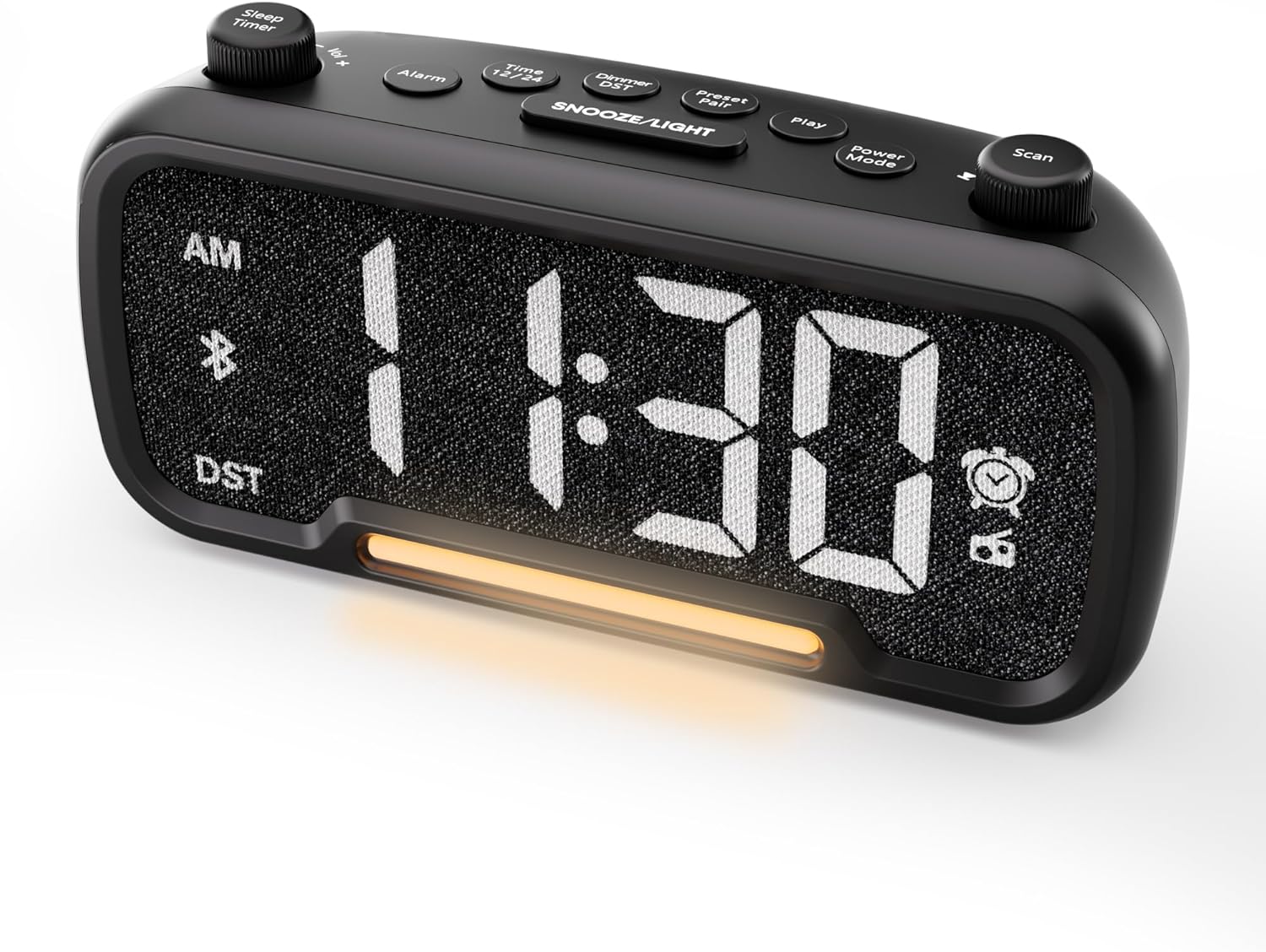

Control Buttons and Knobs:
- Sleep Timer / Vol +/- Knob (Left): Adjusts volume, sets sleep timer duration.
- Alarm Bhatani: Sets and activates/deactivates alarms.
- Time 12/24 Button: Inochinja pakati pemafomati enguva yemaawa gumi nemaviri kusvika makumi maviri nemana.
- Dimmer / DST Button: Adjusts display brightness, activates/deactivates Daylight Saving Time (DST).
- Preset / Pair Button: Saves FM radio presets, initiates Bluetooth pairing.
- Play Bhatani: Plays/pauses media in Bluetooth mode.
- Bhatani reMagetsi eModhi: Cycles through operating modes (FM, Bluetooth, AUX).
- Scan / TU +/- Knob (Right): Scans FM radio stations, manually tunes FM frequency.
- Bhatani SNOOZE/LIGHT: Activates snooze function, turns night light on/off.

Gadzirira
1. Yekutanga Simba-Kukwira
Connect the provided power adapter to the DC 5V IN port on the back of the alarm clock and plug it into a standard wall outlet. The display will light up. Ensure the C battery is installed for backup in case of power outage.

2. Nguva Kuisa
- Dzvanya uye ubate iyo Nguva 12/24 button for 2 seconds. The hour digits will begin to flash.
- Rotate the Vhoriyamu +/- knob (left knob) to adjust the hour.
- Press the Nguva 12/24 button again. The minute digits will begin to flash.
- Rotate the Vhoriyamu +/- knob kugadzirisa miniti.
- Press the Nguva 12/24 bhatani zvakare kuti usimbise nguva yakatarwa.
Video demonstrating how to set the time on the Mesqool Digital Alarm Clock Radio.
3. 12/24 Hora Nguva Fomati
To switch between 12-hour and 24-hour time formats, short press the Nguva 12/24 button. The display will change accordingly.
4. Daylight Saving Time (DST) Adjustment
Kuti ushandise kana kuti udzime DST, tinya wobata bhatani Dimmer / DST button for 2 seconds. The time will adjust by one hour forward or backward, and the DST indicator will appear or disappear on the display.
Operating Instruction
1. Alarm Kuisa
- Dzvanya uye ubate iyo Alarm button for 2 seconds. The hour digits will flash.
- Rotate the Vhoriyamu +/- knob to adjust the desired alarm hour.
- Press the Alarm button again. The minute digits will flash.
- Rotate the Vhoriyamu +/- knob to adjust the desired alarm minute.
- Press the Alarm button again. The alarm sound selection will flash (bell icon for buzzer, radio icon for FM radio). Rotate the Vhoriyamu +/- knob to choose between buzzer or FM radio as the alarm sound.
- If FM radio is selected, press the Alarm button again. The volume level will flash (L01-L16). Rotate the Vhoriyamu +/- knob to set the desired alarm volume.
- Press the Alarm button once more to confirm and activate the alarm. The alarm icon will appear on the display.
To deactivate the alarm, short press the Alarm bhatani. Chiratidzo chearamu chichanyangarika kubva pachiratidziro.

Snooze Basa:
Kana alarm yarira, tinya pa SNOOZE / CHIEDZA button to activate the snooze function for 9 minutes. The alarm will sound again after 9 minutes. To turn off the alarm completely, press any other button except SNOOZE / CHIEDZA.

2. FM Radio Kushanda
- Press the Power Mode button repeatedly until the radio icon lights up on the display, indicating FM radio mode.
- Auto-Scan and Save Presets: Press the Scan / TU +/- knob (right knob) to automatically search for available FM stations and save them as presets (up to 20 stations). The display will show "P01", "P02", etc., as stations are saved.
- Chinyorwa Kugadziridza: Rotate the Scan / TU +/- knob to manually browse frequencies.
- Recall Presets: Short Press the Preset / Pair bhatani rekutenderera nepakati pezviteshi zvakachengetwa.
- Gadzirisa Inzwi: Rotate the Vhoriyamu +/- knob (left knob) to adjust the radio volume (L01-L16).

Video demonstrating how to set the FM radio alarm on the Mesqool Digital Alarm Clock Radio.
3. Kushanda kweSipika yeBluetooth
- Press the Power Mode button repeatedly until the Bluetooth icon (bt) starts flashing on the display, indicating pairing mode.
- On your mobile device, enable Bluetooth and search for "CR1025" in the list of available devices.
- Select "CR1025" to pair. Once connected, the Bluetooth icon will stop flashing and remain solid.
- Iye zvino unogona kuridza odhiyo kubva pamudziyo wako uchishandisa sipika yealamu.
- Shandisa iyo Vhoriyamu +/- knob on the alarm clock or your mobile device to adjust the volume.
- Press the Play bhatani rekuridza kana kumbomira odhiyo.

Video demonstrating how to set up Bluetooth on the Mesqool Digital Alarm Clock Radio.
4. Kushanda kweChiedza cheHusiku
The alarm clock features a gentle night light. To turn the night light on or off, short press the SNOOZE / CHIEDZA bhatani.

5. Dimmer Setting
The display brightness can be adjusted to 5 levels. Short press the Dimmer / DST button to cycle through the brightness levels (L01-L05). Select the level that best suits your environment.

6. Sleep Timer Setting
The sleep timer allows you to set a duration for the FM radio or Bluetooth speaker to play before automatically turning off. This is useful for falling asleep to music or podcasts.
- While in FM radio or Bluetooth mode, press the Kurara Nguva button. The display will show the current sleep timer duration (e.g., "30" for 30 minutes).
- Rotate the Sleep Timer / Vol +/- knob to select the desired duration: 15, 30, 60, 90, or 120 minutes. You can also select "OFF" to disable the sleep timer.
- The timer will start counting down, and the device will automatically turn off after the selected duration.
7. Machiteshi ekuchaja eUSB
The alarm clock is equipped with two USB charging ports (Type-C and USB-A) on the back, each providing 5V/1A output. These ports can be used to conveniently charge your smartphone, tablet, or other USB-powered devices.

Kugadzirisa matambudziko
| Dambudziko | Possible Solution |
|---|---|
| Chiratidziro chewachi hachina chinhu. | Ensure the power adapter is securely connected to both the clock and a working power outlet. Check if the power outlet is functional. |
| Alarm hainzwi. | Verify that the alarm is set and activated (alarm icon visible on display). Check the alarm volume level. Ensure the correct alarm sound (buzzer or FM radio) is selected. |
| Kusagamuchirwa zvakanaka kweredhiyo yeFM. | Extend the FM antenna fully. Try repositioning the antenna or the clock for better signal. Perform an auto-scan again to find stronger stations. |
| Cannot pair Bluetooth device. | Ensure the clock is in Bluetooth pairing mode (flashing 'bt' icon). Make sure Bluetooth is enabled on your mobile device and it is within range. Forget "CR1025" from your device's Bluetooth list and try pairing again. |
| Mapombi ekuchaja eUSB haasi kushanda. | Confirm the alarm clock is powered on. Ensure the charging cables are properly connected to both the clock and your device. Try a different USB cable or device to rule out cable/device issues. |
Zvinotsanangurwa
| Feature | Detail |
|---|---|
| Brand | Mesqool |
| Model Number | CR1025 |
| Color | Nhema |
| Display Type | Digital LED |
| Product Dimensions | 6.61"L x 3.31"W x 2.32"H |
| Simba Source | Corded Electric (AC adapter included) |
| Battery Backup | 1 C bhatiri (inosanganisirwa) |
| Bluetooth Version | V5.0 |
| FM Radio Kakawanda | 87.5-108MHz |
| FM Presets | Zviteshi zvinosvika makumi matatu |
| Ratidza Dimmer | 5 mazinga |
| Alarm Sounds | Buzzer, FM Radio |
| Nguva yeSnooze | 9 kwemaminitsi |
| USB Kuchaja Output | Type-C & USB-A, 5V/1A each |
| Material | Plastiki |
| Item Weight | 0.48 Pounds (inenge 7.7 ounces) |
Maintenance
- Clean the device with a soft, dry cloth. Do not use liquid cleaners or abrasive materials.
- Keep the device away from direct sunlight, extreme temperatures, and high humidity.
- Iva nechokwadi chekufefetedza kwakaringana kutenderedza mudziyo kudzivirira kupisa.
- If the device will not be used for an extended period, remove the backup battery.
Safety Information
- Usaisa mudziyo kumvura kana unyoro.
- Usaedze kudimbura kana kugadzirisa mudziyo wega. Tarisa kune vashandi vanokwanisa.
- Chengetedza mudziyo usingasvikike nevana.
- Shandisa adapta yemagetsi yakapihwa chete. Kushandisa adapta dzisina mvumo kunogona kukuvadza mudziyo uye kuita kuti garandi isashande.
- Avoid placing the device near heat sources or open flames.
Warranty uye Support
Specific warranty details are not provided in the product information. For warranty claims, technical support, or further assistance, please contact Mesqool customer service through their official webnzvimbo kana mutengesi uko chigadzirwa chakatengwa. Ndapota chengetedza humbowo hwekutenga kune chero mibvunzo ine chekuita newaranti.
Visit the Mesqool Store for more information: Chitoro Chepamutemo cheMesqool


