1. Nhanganyaya
This manual provides essential information for the safe and efficient installation, operation, and maintenance of your TCP Economy LED UFO High Bay Luminaire. Please read this manual thoroughly before installation and retain it for future reference.
The TCP Economy LED UFO High Bay Luminaire is designed for commercial and industrial applications, offering high efficacy and a long operational lifespan. It features a robust design suitable for various environments, including warehouses, retail spaces, and gymnasiums.

Mufananidzo 1: Mberi view of the TCP Economy LED UFO High Bay Luminaire, showing the LED array and clear lens.
2. Safety Information
- Kuchengetedzwa Kwemagetsi: Installation must be performed by a qualified electrician in accordance with all national and local electrical codes. Always disconnect power at the circuit breaker before installing, servicing, or cleaning the fixture.
- Grounding: Iva nechokwadi chekuti chinhu chacho chakagadzirwa zvakanaka kuti chisavhunduke nemagetsi.
- Kubata: Do not handle the fixture with wet hands. Avoid touching the LED array directly.
- Operating Environment: This luminaire is rated IP65 for outdoor use and protection against dust and water jets. Do not submerge the fixture in water. Ensure the operating temperature is within the specified range.
- Kukwidza: The mounting structure must be capable of supporting the weight of the fixture.
- Zvakanatsiridzwa: Do not attempt to modify or disassemble the fixture. This will void the warranty and may create safety hazards.
3. Package Zviri mukati
Upon unpacking, verify that all components are present and undamaged. The package should contain:
- 1 x TCP Economy LED UFO High Bay Luminaire
- 1 x Eyebolt for suspended mounting
Note: Additional mounting hardware (e.g., chains, hooks) may be required and is sold separately.
4. Zvinotsanangurwa
| Feature | Tsanangudzo |
|---|---|
| Model Number | 762148336747 |
| Brand | TCP |
| Wattage Options | 115W / 160W / 200W |
| Efficacy | Kusvika ku145 LPW |
| Kupisa Kwemavara (CCT) | 4000K / 5000K |
| Dimming | 0-10V Dimming |
| IP Rating | IP65 (Inodzivirira guruva, yakadzivirirwa kubva kumhepo dzinopinda mumvura) |
| Hupenyu hurefu | 50,000 Maawa |
| Chiyamuro Voltage | 120-277V AC (Typical, verify product label) |
| Chiedza Chinyorwa Type | LED |
| Installation Type | Suspended (Eyebolt included) |
| Fixture Form | Ceiling |
| Indoor / Outdoor Kushandiswa | Kunze |
| Shade Material | Acrylic |
| Item Weight | 6.44 makirogiramu |
| Package Dimensions | 12.48 x 12.44 x 5.87 inches |
| Fixture Dimensions (approx.) | 11" Diameter x 5.9" Height (with eyebolt) |
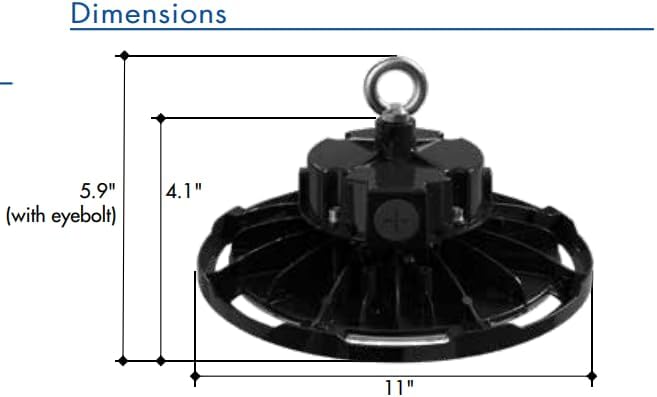
Figure 2: Approximate dimensions of the luminaire, including height with eyebolt and diameter.
5. Mirayiridzo yekuisa (Kugadzirisa)
This luminaire is designed for suspended mounting. Follow these steps for proper installation:
- Chengetedzo Kutanga: Ensure power to the installation area is turned OFF at the circuit breaker before beginning any work.
- Inspect Fixture: Carefully remove the luminaire from its packaging and inspect for any damage. Do not install if damaged.
- Prepare Mounting Point: Identify a suitable structural mounting point capable of safely supporting the luminaire's weight (6.44 lbs). Install appropriate mounting hardware (e.g., chain, hook) if not already present.
- Attach Eyebolt: Securely thread the provided eyebolt into the top of the luminaire housing.
- Suspend Fixture: Carefully lift the luminaire and attach the eyebolt to your chosen mounting hardware. Ensure the fixture is stable and level.
- Wiring:
- Open the wiring compartment on the top of the fixture.
- Connect the AC input wires (Line, Neutral, Ground) from your power supply to the corresponding wires on the luminaire. Refer to local electrical codes for proper wiring practices.
- For 0-10V dimming functionality, connect the purple (DIM+) and gray (DIM-) wires from your 0-10V dimmer to the corresponding dimming wires on the luminaire. If dimming is not desired, cap these wires individually.
- Ita shuwa kuti zvese zvinongedzo zvakachengeteka uye zvakavharirwa.
- Close Compartment: Securely close the wiring compartment cover.
- Dzosera Simba: Kana kuiswa kwapera uye zvese zvabatanidzwa zvasimbiswa, dzorera simba pacircuit breaker.
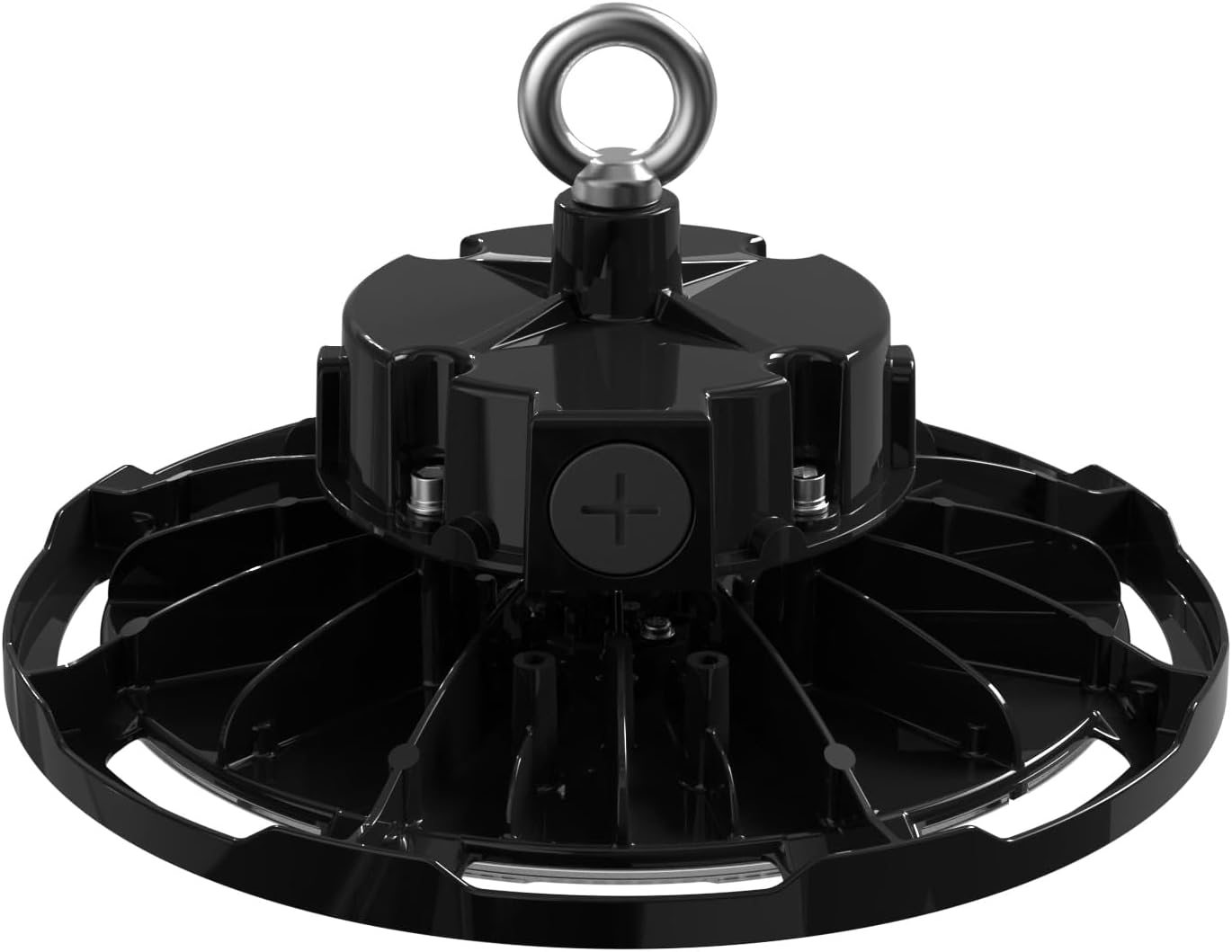
Mufananidzo 3: Pamusoro view of the luminaire, illustrating the eyebolt for suspension and the location of the wiring compartment.
6. Kushanda
The TCP Economy LED UFO High Bay Luminaire operates immediately upon receiving power.
- Batidza/Kudzima: Control the luminaire's power supply via the connected wall switch or circuit breaker.
- Kubuda: If connected to a compatible 0-10V dimmer, adjust the light output by manipulating the dimmer control. The luminaire will respond to the 0-10V signal to vary its brightness.
7. Kuchengeta
The TCP Economy LED UFO High Bay Luminaire requires minimal maintenance.
- Kuchenesa: Ensure power is disconnected before cleaning. Use a soft, damp cloth to wipe the exterior of the fixture. Do not use abrasive cleaners or solvents, as these may damage the finish or optical components.
- Kuongorora: Periodically inspect the fixture and its mounting hardware for any signs of damage, loose connections, or wear. Address any issues promptly.
- Hapana Zvikamu Zvinoshandiswa Nemushandisi: There are no user-serviceable parts inside the luminaire. Do not attempt to open or repair the unit.
8. Kugadzirisa matambudziko
If the luminaire is not functioning as expected, perform the following basic checks:
- Hapana Chiedza:
- Verify that the power supply to the fixture is active at the circuit breaker and wall switch.
- Check all wiring connections for proper contact and insulation.
- Kudzima Kwemvura Hakusi Kushanda:
- Ensure the 0-10V dimmer is compatible and correctly wired to the luminaire's dimming leads (purple and gray).
- Verify the dimmer is functioning correctly.
- Flickering:
- Tarisa kune loose wiring connections.
- Iva nechokwadi chekuisa voltage is stable and within the specified range.
If these steps do not resolve the issue, contact customer support for assistance. Do not attempt further repairs yourself.
9. Warranty uye Tsigiro
This TCP Economy LED UFO High Bay Luminaire is covered by a Makore mashanu Akaganhurirwa Warranty against defects in manufacturing. Please retain your proof of purchase for warranty claims.

Figure 4: Warranty statement and product listings (UL and cUL listed, IP65 Rated).
For technical support, warranty inquiries, or replacement parts, please contact TCP customer service:
- Websaiti: www.tcpi.com
- Runhare: Refer to TCP's official websaiti yeazvino manhamba ekubata.


