Nhanganyaya
The RadioShack Dual-Mode Wireless Bluetooth Mouse offers versatile connectivity and ergonomic comfort for various computing needs. This manual provides instructions for setting up, operating, and maintaining your mouse to ensure optimal performance.

Mufananidzo 1: Kumberi-kurutivi view of the RadioShack Dual-Mode Wireless Bluetooth Mouse.
Package Zviri mukati
- RadioShack Dual-Mode Wireless Bluetooth Mouse
- USB Receiver (stored in the mouse)
- USB Kuchaja Cable
- Mushandisi Chinyorwa (gwaro iri)
Gadzirira
1. Kuchaja Mbeva
The mouse features a built-in rechargeable battery. Before first use, or when the battery is low, connect the mouse to a USB power source using the provided USB charging cable. The charging port is located on the front side of the mouse.

Mufananidzo 2: Rutivi view of the mouse highlighting the USB charging port.

Figure 3: The mouse being charged via a USB connection to a laptop.
2. Kubatanidza Mouse
The mouse supports dual-mode connectivity: 2.4G Wireless (via USB receiver) and Bluetooth 3.0. You can switch between these modes using the switch on the bottom of the mouse.
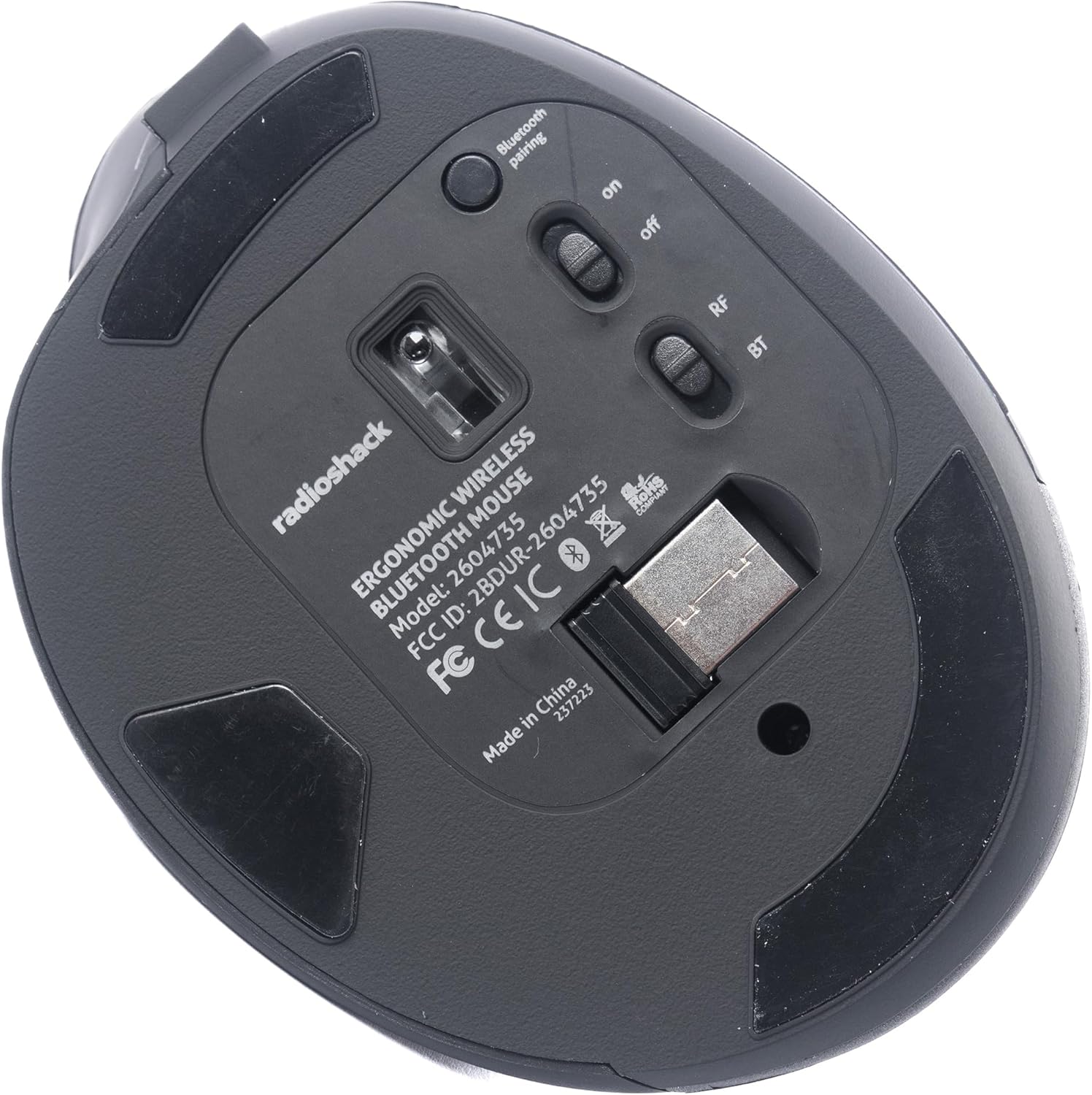
Mufananidzo 4: Pazasi view of the mouse, indicating the power switch, mode switch (RF/BT), and USB receiver compartment.
2.1. 2.4G Wireless Mode (USB Receiver)
- Tsvaga USB receiver yakachengetwa muchikamu chiri pasi pemouse.
- Isa iyo USB inogamuchira mune inowanikwa USB port pakombuta yako.
- Slide the mode switch on the bottom of the mouse to the "RF" position.
- Turn on the mouse using the ON/OFF switch. The mouse should connect automatically.
2.2. Makaralı Mode
- Svetesa switch yemode pasi pegonzo kusvika panzvimbo ye "BT".
- Batidza mbeva uchishandisa ON/OFF switch.
- Press and hold the Bluetooth pairing button (usually located near the mode switch) for 3-5 seconds until the indicator light flashes, indicating it is in pairing mode.
- Pakombuta yako kana mudziyo, enda kumasetin'i eBluetooth uye tsvaga zvishandiso zvitsva.
- Select "RadioShack Mouse" (or similar name) from the list of available devices to pair.
- Kana yabatanidzwa, rambi rechiratidzo rinomira kupenya.

Figure 5: The mouse positioned wirelessly next to a laptop, ready for use.
Kushandisa Mouse
Basic Mabasa
- Bhatani rekuruboshwe: Primary click function.
- Bhatani rekurudyi: Secondary click function (context menu).
- Mupumburu Wheel: Scroll up/down, and can also function as a middle click button.
- Mabhatani Ekumberi/Kumashure: Located on the side, these buttons allow for quick navigation in web browsers uye file vaongorori.
Kuchinja pakati peModes
To switch between 2.4G Wireless and Bluetooth modes, simply slide the mode switch on the bottom of the mouse to the desired position (RF for 2.4G, BT for Bluetooth).
Ergonomic Dhizaini
The mouse is designed with a contoured shape and rubber grips to provide comfortable support for your hand and wrist, reducing strain during extended use.

Figure 6: A hand demonstrating the ergonomic grip on the mouse.
Maintenance
Kuchenesa
- Dzima mbeva usati waichenesa.
- Shandisa jira rakapfava, rakaoma kupukuta pamusoro pembeva.
- Patsvina yakasindimara, zvishoma dampIsa jira nemvura kana mushonga wekuchenesa wakapfava, wobva wapukuta nekukurumidza.
- Dzivisa kushandisa makemikari ane hasha kana abrasive zvinhu.
Battery Care
- Charge the mouse regularly to maintain battery health.
- Dzivisa kuburitsa bhatiri zvakazara nguva zhinji.
- If storing the mouse for an extended period, charge it to about 50% capacity.
Kugadzirisa matambudziko
- Mbeva isingapindure:
- Ita shuwa kuti mbeva yakabatidzwa.
- Tarisa chiyero chebhatiri uye uchaja kana zvichidikanwa.
- For 2.4G mode, ensure the USB receiver is securely plugged into the computer and the mode switch is set to "RF".
- For Bluetooth mode, ensure Bluetooth is enabled on your device, the mouse is in "BT" mode, and it is properly paired. Try re-pairing if necessary.
- Try connecting the mouse to a different USB port or a different device to rule out port or device issues.
- Kufamba kwemuchina wekunyorera (cursor) kunochinja-chinja kana kuti kunononoka:
- Ensure the mouse sensor is clean and free from obstructions.
- Shandisa mbeva panzvimbo yakachena, isingatarisi.
- Tarisa kukanganiswa kubva kune mamwe mawaya zvishandiso.
- Mouse not charging:
- Iva nechokwadi chekuti tambo yekuchaja yakabatana zvakachengeteka negonzo nemagetsi.
- Edza imwe USB yekuchaja tambo kana adapta yemagetsi.
- Ita shuwa kuti sosi yemagetsi inoshanda.
Zvinotsanangurwa
| Feature | Detail |
|---|---|
| Model Number | 2604735 |
| Kubatana Technology | 2.4G Wireless, Bluetooth 3.0 (Dual-Mode) |
| Movement Detection Technology | Optical |
| Color | Black & Gray |
| Simba Source | Rechargeable Lithium Ion Battery (inosanganisirwa) |
| Item Weight | 9.1 ounces |
| Package Dimensions | 8.66 x 6.3 x 2.95 inches |
| Mugadziri | RadioShack |
Warranty uye Support
For warranty information and customer support, please refer to the official RadioShack website or contact their customer service directly. Details regarding product registration, warranty claims, and technical assistance can typically be found on the manufacturer's support pages.


