1. Nhanganyaya
Thank you for choosing the himaly IF1010AR Digital Bluetooth Body Weight Scale. This scale is designed to provide accurate measurements of your body weight and various body composition metrics, including BMI, body fat, muscle mass, and more, through its integrated mobile application. Please read this manual carefully before use to ensure proper operation and to maximize the benefits of your new scale.
Ruzivo Rwakakosha Chekuchengetedza
- Consult your physician before beginning any diet or exercise program.
- Do not use if you are pregnant, have a pacemaker, or other internal medical devices.
- Isa chikero panzvimbo yakaoma, yakati sandara kuti zviyerwe nemazvo. Dzivisa makapeti kana pasi pakaenzana.
- Nzvimbo yacho inogona kutsvedza kana yakanyorova. Iva nechokwadi chekuti nzvimbo yacho yakaoma usati waitsika.
- Usasvetuka pachikero.
- Chengetedza pasingasvikirwi nevana.
- This scale is for household use only and not for medical diagnosis or treatment.
2. Package Zviri mukati
Ona kuti zvinhu zvese zviripo mupasuru yako:
- himaly IF1010AR Digital Bluetooth Body Weight Scale
- USB Kuchaja Cable
- Mushandisi Chinyorwa (gwaro iri)
3. Chigadzirwa Pamusoroview
The himaly IF1010AR scale features a sleek design with a tempered glass surface and four high-precision sensors for accurate measurements. It includes a digital display and Bluetooth connectivity for app integration.

Mufananidzo 3.1: Mberi view of the himaly IF1010AR Digital Bluetooth Body Weight Scale, showing the display and electrode pads, alongside a smartphone displaying the companion app interface.

Mufananidzo 3.2: Pasi view of the himaly IF1010AR scale, highlighting the four non-slip mats, the 'UNIT' button for changing measurement units, and the USB charging port.
Zvikamu:
- Tempered Glass Platform: Nzvimbo huru yekuyera.
- Electrode Pads: Four metallic pads for body composition analysis.
- Digital LCD Ratidza: Shows weight and other basic readings.
- UNIT Bhatani: Located on the underside, used to switch between weight units (kg/lb/st).
- USB kuchaja Port: Yekuchaja bhatiri remukati.
- Non-Slip Mats: Four rubber feet on the bottom for stability.
4. Setup
4.1 Charging the Scale
The himaly IF1010AR scale is equipped with a built-in rechargeable battery. Before first use, ensure the scale is fully charged.
- Locate the USB charging port on the underside of the scale (refer to Figure 3.2).
- Connect the provided USB charging cable to the scale and to a standard USB power adapter (not included) or a computer's USB port.
- Chiratidziro chicharatidza mamiriro ekuchaja. Chaja kusvika chiratidzo chebhatiri charatidza kuti chazara.

Mufananidzo 4.1: Pedyo-kumusoro view illustrating the USB charging port on the side of the scale and the included USB cable for power.
4.2 Kurodha uye Kubatanidza App
To access full body composition analysis and track your progress, download the companion app and pair it with your scale.
- Dhaunirodha App: Tsvaga "Moving Life" in the Apple App Store (for iOS devices) or Google Play Store (for Android devices) and install it.
- Vhura Bluetooth: Ita shuwa kuti Bluetooth yakagoneswa pane yako smartphone.
- Vhura App: Launch the "Moving Life" app and follow the on-screen instructions to create your user profile.
- Batanidza Chikero: Step onto the scale barefoot to activate it. The app should automatically detect and connect to the scale via Bluetooth. If not, follow the app's instructions for manual pairing.

Figure 4.2: Image showing the scale's Bluetooth connectivity and icons for downloading the "Moving Life" app from Google Play and the App Store.
4.3 Chekutanga Kuchengetedza
For the most accurate first measurement, it is recommended to calibrate the scale:
- Isa chiyero panzvimbo yakaoma, yakati sandara.
- Lightly step on the scale until the display lights up, then step off immediately.
- The display will show "0.0" or "CAL" indicating successful calibration.
5. Operating Instructions
5.1 Kutora Chiyero
Follow these steps for an accurate body composition measurement:
- Iva nechokwadi chekuti tsoka dzako dzakachena uye dzakaoma.
- Open the "Moving Life" app on your smartphone and ensure Bluetooth is active.
- Step onto the scale barefoot, placing your feet on the electrode pads. Stand still until the measurement is complete.
- Your weight will be displayed on the scale's LCD. Detailed body composition data will be sent to the app.
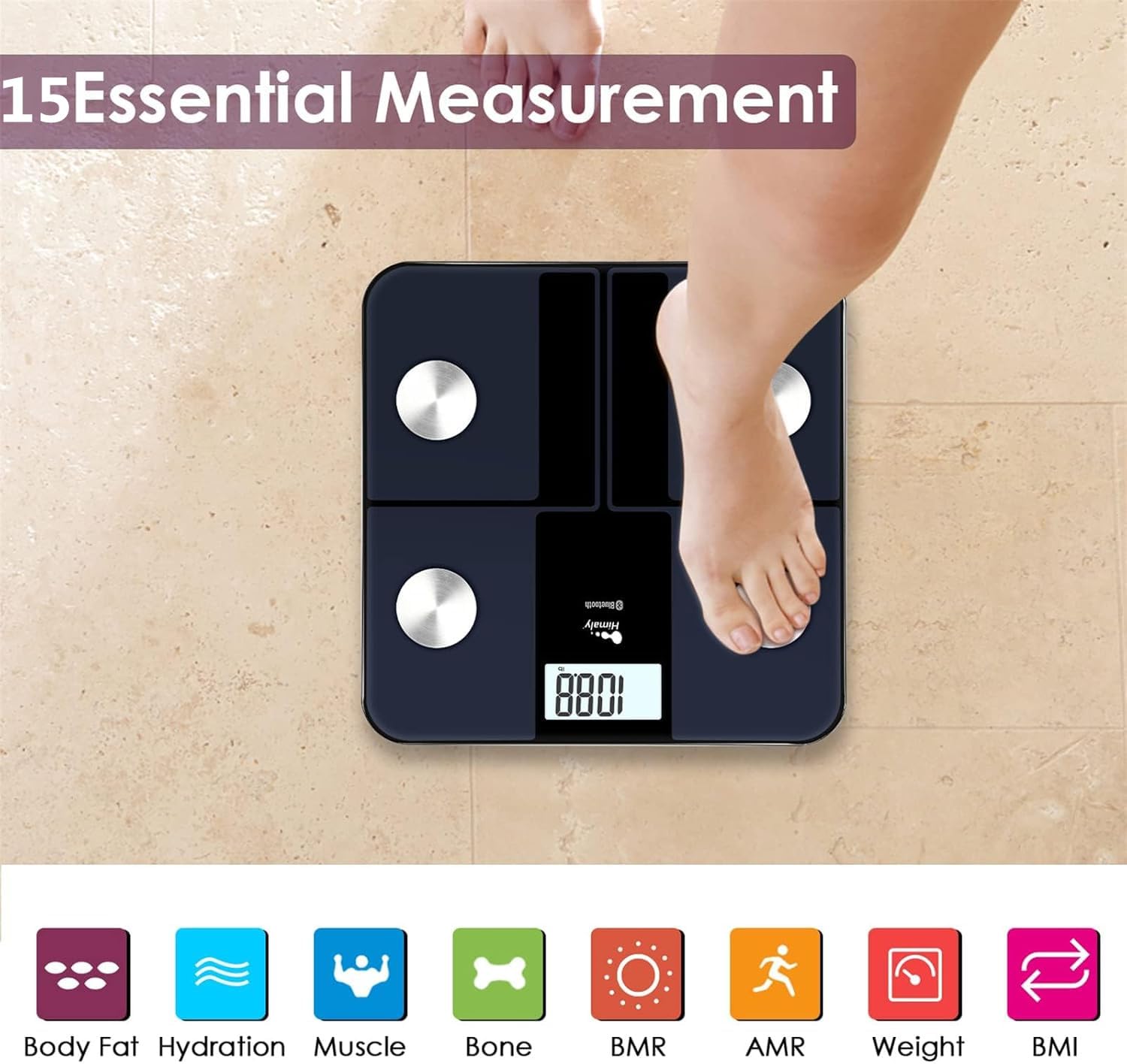
Figure 5.1: A person standing barefoot on the himaly scale, demonstrating the correct posture for obtaining 15 essential body composition measurements.
5.2 Kunzwisisa Chiratidziro
The scale's LCD displays your weight. The app provides a more comprehensive breakdown of your body composition.

Figure 5.2: The scale's LCD display illustrating how different weight ranges (Thin, Slim, Normal, Heavy, Overweight) are visually represented, providing a quick reference for body type.
5.3 Multiple User Profiles
The "Moving Life" app supports multiple user profiles, allowing each family member to track their individual health data.
- Within the app, navigate to the user management section.
- Add new users by entering their details (age, height, gender).
- Iva nechokwadi chekuti mushandisi akakodzerafile is selected in the app before taking a measurement to ensure data is assigned correctly.
6. Kunzwisisa Zviyero Zvako
The "Moving Life" app provides detailed insights into various body composition metrics. Here's a brief explanation of some key indicators:
- Kurema Kwemuviri: Huremu hwemuviri wako wese.
- BMI (Body Mass Index): Chiyero chemafuta emuviri zvichibva pahurefu nehuremu.
- Body Fat Percentage: Huwandu hwemafuta zvichienderana nehuremu hwemuviri wese.
- Tsandanyama Misa: Huremu hwese hwetsandanyama dziri mumuviri wako.
- Hydration (Water Percentage): Huwandu hwemvura mumuviri wako.
- Bone Mass: Huremu hwese hwemapfupa mumuviri wako.
- BMR (Basal Metabolic Rate): The number of calories your body burns at rest.
- AMR (Active Metabolic Rate): The total calories your body burns in a day, including activity.

Figure 6.1: An illustrative graph from the app demonstrating how weight and body fat trends can be tracked over time, providing visual progress monitoring.
7. Kuchengeta
7.1 Kuchenesa
- Pukuta chikero ne adamp jira uye nyoro detergent.
- Usashandise mishonga inokwesha kana kunyudza chikwambo mumvura.
- Iva nechokwadi chekuti chikero chacho chaoma zvachose usati wachengeta kana kushandisa zvakare.
7.2 Kuchengeta
- Chengetedza chiyero munzvimbo inotonhorera, yakaoma.
- Dzivisa zuva rakananga kana kupisa kwakanyanya.
8. Kugadzirisa matambudziko
| Dambudziko | Zvinogona Kukonzera | Solution |
|---|---|---|
| "Lo" inoratidzwa | Bhatiri rakaderera. | Recharge the scale using the provided USB cable. |
| "Err" yakaratidzwa | Kukanganisa kwekuremerwa zvakanyanya kana kuyera. | Step off the scale. Ensure weight is within the 400 lbs (181 kg) limit. Recalibrate if necessary. |
| Kurava kusina kururama | Scale on uneven surface, not calibrated, or feet not properly placed. | Place scale on a hard, flat surface. Perform initial calibration. Ensure bare feet are centered on electrode pads. |
| Hapana kubatana kweBluetooth | Bluetooth off, app not open, or scale not activated. | Ensure Bluetooth is enabled on your phone. Open the "Moving Life" app. Step on the scale to activate it. Try restarting both the app and your phone. |
| Body composition data not showing in app | Not standing barefoot, or feet not making proper contact with electrodes. | Ensure you are standing barefoot with clean, dry feet making full contact with all four electrode pads. |
9. Zvinotsanangurwa
| Feature | Detail |
|---|---|
| Model Number | IF1010AR |
| Brand | himaly |
| Weight Capacity | 400 lbs (181 kg) |
| Measurement Units | kg / lb / st |
| Display Type | Dhijitari LCD |
| Kubatana | Bluetooth 4.0 |
| Simba Source | Built-in Rechargeable Battery (USB charged) |
| Material | Tempered Glass, Plastiki |
| Dimensions | Approx. 33.7 X 32.8 X 4.3 masendimita |
| Item Weight | Approx. 1.77 kg |
| Kuenderana kweApp | iOS and Android (Moving Life App) |
10. Warranty uye Tsigiro
10.1 Ruzivo rweWaranti
The himaly IF1010AR Digital Bluetooth Body Weight Scale comes with a standard manufacturer's warranty. Please refer to the warranty card included in your package or contact himaly customer support for specific warranty terms and conditions. This warranty typically covers defects in materials and workmanship under normal use.
10.2 Mutengi Tsigiro
If you encounter any issues or have questions regarding your himaly scale, please contact our customer support team. For the most up-to-date contact information, please visit the official himaly webtarisa pawebhusaiti kana kuti tarisa kurongedza kwechigadzirwa chako.
Note: Specific contact details are not provided in this manual. Please check the product packaging or manufacturer's websaiti yerutsigiro yekuonana ruzivo.


