Nhanganyaya
This manual provides detailed instructions for the operation and maintenance of your WIITHINK WTB-795S Portable Cassette Player Recorder. This device combines classic audio playback with modern features, including AM/FM/SW radio, Bluetooth connectivity, USB/SD card playback, and MP3 conversion capabilities. Please read this manual thoroughly before using the product to ensure proper function and longevity.
Safety Information
- Usaise mudziyo wacho pamvura kana hunyoro kudzivirira moto kana kuvhundutswa nemagetsi.
- Usavhura casing. Tumira basa rekubatsira vashandi vane hunyanzvi chete.
- Dzivisa kuisa chikwata pedyo nezvinopisa kana muzuva rakananga.
- Iva nechokwadi chekufema kwakakodzera; usavhare mazaru emhepo.
- Shandisa adapta yemagetsi kana mabhatiri akatarwa chete.
- Chengetedza pasingasvikirwi nevana.
Package Zviri mukati
Tarisa uone kuti zvinhu zvese zviripo mupakeji:
- WIITHINK WTB-795S Portable Cassette Player Recorder
- AC Simba Cable
- Mushandisi Chinyorwa (gwaro iri)
Product Overview
The WIITHINK WTB-795S is a versatile audio device designed for both classic and modern listening experiences. It features a cassette player and recorder, AM/FM/SW radio, Bluetooth connectivity, and USB/SD card playback with MP3 conversion capabilities.

Mufananidzo: Mberi view of the WIITHINK WTB-795S Portable Cassette Player Recorder, showing the cassette deck, radio tuner, and speakers.
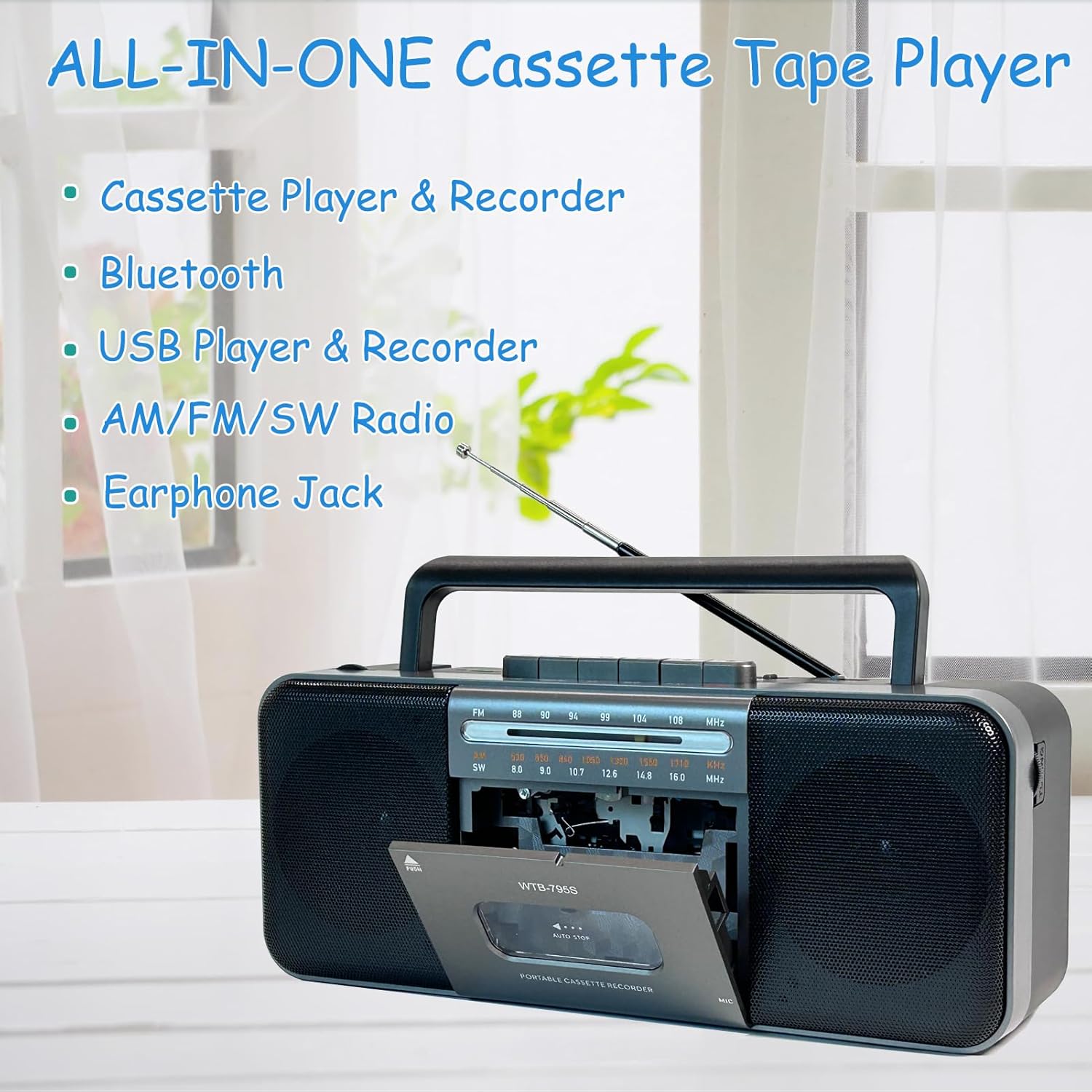
Image: Diagram highlighting the all-in-one features of the WTB-795S, including Cassette Player & Recorder, Bluetooth, USB Player & Recorder, AM/FM/SW Radio, and Earphone Jack.
Zvinokosha:
- Mutambi weKaseti neRekodha: Play and record audio to cassette tapes.
- Redhiyo yeAM/FM/SW: Built-in tuner for receiving various radio bands.
- Kubatana kweBluetooth: Wireless audio streaming from compatible devices.
- USB/SD Card Playback & Recording: Ridza odhiyo files from USB drives and SD cards, and record to them.
- MP3 Converter: Convert cassette audio to MP3 format on USB/SD.
- Yakavakirwa-mukati Maikorofoni: For direct voice recording.
- 10W Dual Speakers: Provides clear and powerful stereo sound (radio is mono).
- Nhare mbozha Jack: Zvekuterera wega.
- AC/DC Powered: Operates with AC power cable or batteries for portability.
Gadzirira
Kusimbisa Chishandiso:
The WTB-795S can be powered by either AC electricity or batteries.
AC Simba:
- Ita shuwa kuti unit yakadzimwa.
- Connect the supplied AC power cable to the AC input jack on the back of the unit.
- Plug the other end of the AC power cable into a standard wall outlet.
Battery Power:
For portable use, the unit requires 4 x D-size batteries (not included) or 2 x 18650 button-top rechargeable batteries (not included).

Mufananidzo: Rear view of the WTB-795S showing the battery compartments for 4 D-size batteries and 2 18650 button-top rechargeable batteries, along with the AC power input. Note: Only button-top 18650 batteries are compatible.
- Vhura chivharo chebhatiri kuseri kweyuniti.
- Insert 4 D-size batteries or 2 18650 button-top rechargeable batteries, observing the correct polarity (+/-) as indicated inside the compartment.
- Vhara chivharo chebhatiri zvakachengeteka.
- Cherechedza: The 18650 battery compartment only accommodates button-top battery models. Flat-top battery models cannot be used.
Antenna:
Extend the telescopic antenna for optimal FM and SW radio reception. For AM reception, rotate the unit for best signal.
Operating Instruction
1. Cassette Playback and Recording

Image: A person holding a cassette tape, with the WTB-795S in the foreground showing the open cassette deck, illustrating its cassette playback and recording function.
Kuridza Kaseti:
- Press the MIRA/EJECT bhatani rekuvhura gonhi rekaseti.
- Isa tepi yekaseti yakavhurika mupendero wakatarisa kumusoro.
- Vhara gonhi rekaseti.
- Press the ITAMBA bhatani kutanga kutamba.
- Gadzirisa iyo VOLUME knob to your desired level.
- Shandisa FAST FORWARD (FF) or REWIND (REW) mabhatani ekufambisa tepi.
- Press MIRA/EJECT kumisa kutamba.
Kurekodha kuKaseti:
You can record from the built-in microphone, radio, or external sources (via Bluetooth/USB/SD).
- Insert a blank or recordable cassette tape.
- Select the desired source (e.g., Radio, Bluetooth, USB/SD).
- Press the RECORD button (usually red) simultaneously with the ITAMBA button. The recording will begin.
- For microphone recording, ensure the microphone is unobstructed.
- Press MIRA/EJECT kupedza kurekodha.
2. Radio Operation (AM/FM/SW)

Image: An elderly man smiling while listening to the WTB-795S, which has its telescopic antenna extended, demonstrating its radio function.
- Gadza chinja chebasa ku RADIO.
- Select the desired band: AM, FM, kana SW using the band selector switch.
- Extend the telescopic antenna for FM and SW reception. Rotate the unit for optimal AM reception.
- Rotate the TUNING knob to find your desired station.
- Gadzirisa iyo VOLUME knob.
3. Makaralı Mode

Image: A hand holding a smartphone displaying a music app, with the WTB-795S on a table in the background, indicating Bluetooth connectivity.
- Gadza chinja chebasa ku Bluetooth. The unit will enter pairing mode, indicated by an audible prompt or flashing indicator.
- On your Bluetooth-enabled device (smartphone, tablet, etc.), search for available devices.
- Select "WTB-795S" from the list to pair.
- Once paired, you can stream audio from your device to the WTB-795S.
- Adjust volume on both the unit and your connected device.
4. USB/SD Card Playback and Recording

Image: The WTB-795S with a red USB flash drive inserted into its USB port, demonstrating its USB playback and recording capabilities.
Playing from USB/SD:
- Isa USB flash drive mu USB port kana SD kadhi muSD card slot.
- Gadza chinja chebasa ku USB/SD.
- Iyo unit ichaona otomatiki uye yotanga kutamba inowirirana odhiyo files (fomati yeMP3).
- Use the playback control buttons (Play/Pause, Next, Previous) to manage your audio.
- Cherechedza: Compatible with FAT32 file systems only. NTFS is not supported.
Recording to USB/SD (MP3 Conversion):
You can convert audio from cassette tapes to MP3 format on a USB drive or SD card.
- Isa USB flash drive kana SD card.
- Isa tepi yekaseti yaunoda kushandura.
- Press the ITAMBA button on the cassette deck.
- Press the RECORD button (often labeled 'USB/SD Record' or similar, refer to unit markings) to start converting the cassette audio to MP3 on the inserted USB/SD media.
- Press MIRA to end the conversion.
5. Nhare mbozha Jack

Image: A woman wearing headphones and listening to the WTB-795S, illustrating the use of the earphone jack for private listening.
Plug standard 3.5mm headphones into the earphone jack for private listening. The main speakers will be muted when headphones are connected.
Maintenance
Kuchenesa Chikamu:
- Pukuta kunze nemucheka wakapfava, wakaoma.
- Usashandise abrasive cleaners kana solvents.
- For the cassette head and pinch roller, use a cotton swab lightly dampened with isopropyl alcohol. Clean gently to remove tape residue.
Cassette Tape Care:
- Store tapes away from direct sunlight and extreme temperatures.
- Avoid touching the tape surface.
- Periodically fast forward and rewind tapes to prevent sticking.
Kugadzirisa matambudziko
| Dambudziko | Zvinogona Kukonzera | Solution |
|---|---|---|
| Hapana simba | Waya yeAC haina kubatana; Mabhatiri apera kana kuti akaiswa zvisiri izvo. | Check AC cable connection; Replace or correctly insert batteries. |
| Hapana ruzha | Vhoriyamu yakaderera zvakanyanya; Mahedhifoni akabatana; Modhi isiriyo yakasarudzwa. | Increase volume; Disconnect headphones; Select correct function mode. |
| Kugamuchirwa kweredhiyo kusina kunaka | Antena haina kuwedzerwa; Chiratidzo chisina simba. | Extend telescopic antenna; Rotate unit for better signal. |
| Cassette playback distorted/slow | Tape head dirty; Tape worn out; Batteries low. | Clean tape head; Try a different tape; Replace batteries. |
| USB/SD haisi kutamba | Hazvina kururama file format; Incompatible file system (NTFS); Media not inserted correctly. | Iva nechokwadi files are MP3; Format media to FAT32; Reinsert USB/SD card. |
| Bluetooth haina kubatana | Unit not in pairing mode; Device too far; Bluetooth off on source device. | Ensure unit is in Bluetooth mode; Bring devices closer; Enable Bluetooth on source device. |
Zvinotsanangurwa
| Feature | Detail |
|---|---|
| Model | WTB-795S |
| Zviyero zveChigadzirwa (L x W x H) | 11 x 5 x 2 inches (27.9 x 12.7 x 5.1 cm) |
| Item Weight | 3.41 makirogiramu (1.55 kg) |
| Kubatana Technology | Bluetooth, USB |
| Mutauri Rudzi | Stereo (2 x 5W) |
| Simba Source | AC Power (included adapter) or DC Battery (4 x D-size or 2 x 18650 button-top, not included) |
| Radio Frequency | AM: 530-1710kHz, FM: 88-108MHz, SW: 8.0-16.0MHz |
| USB/SD Compatibility | FAT32 file system, MP3 format |
Warranty uye Support
WIITHINK is committed to customer satisfaction. This product comes with an 18-month replacement policy and lifetime technical support.
Kubata Rutsigiro:
For any inquiries or issues, please contact WIITHINK customer support through your purchase platform (e.g., Amazon Buyer-Seller Message) or refer to the contact information provided with your product packaging.
Optional Protection Plans:
Extended protection plans may be available for purchase separately:
- 2-Yegore Dziviriro Chirongwa
- 3-Yegore Dziviriro Chirongwa
- Zadzisa Dziviriro (chirongwa chemwedzi nemwedzi chinovhara kutenga kwakakodzera)
Please refer to the specific terms and conditions of these plans at the time of purchase.


