1. Nhanganyaya
Ndatenda nekutengaasing the Max Power MPD437 Ultra PRO M2 Portable Bluetooth Speaker. This speaker is designed to provide high-quality audio in various environments, featuring water resistance and dust-proof capabilities for outdoor use. Please read this manual carefully before using the product to ensure proper operation and to maximize its lifespan.
Safety Information
- Usaisa mutauri panzvimbo inopisa zvakanyanya kana kuti pachiedza chezuva kwenguva yakareba.
- Dzivisa kudonhedza kana kuita kuti mukurukuri apedzisire akasimba.
- Usaedze kupatsanura kana kugadzirisa sipika. Izvi zvinoita kuti garandi isashande.
- Chengeta sipika kure nemidziyo yekurapa.
- Shandisa chete tambo yekuchaja yakapihwa.
2. Package Zviri mukati
Ita shuwa kuti zvinhu zvese zviripo mupakeji:
- Max Power MPD437 Ultra PRO M2 Portable Bluetooth Speaker
- Power Cable
- AUX Cable
- Mushandisi Chinyorwa (gwaro iri)
3. Chigadzirwa Pamusoroview
Familiarize yourself with the components of your Max Power MPD437 Ultra PRO M2 speaker.
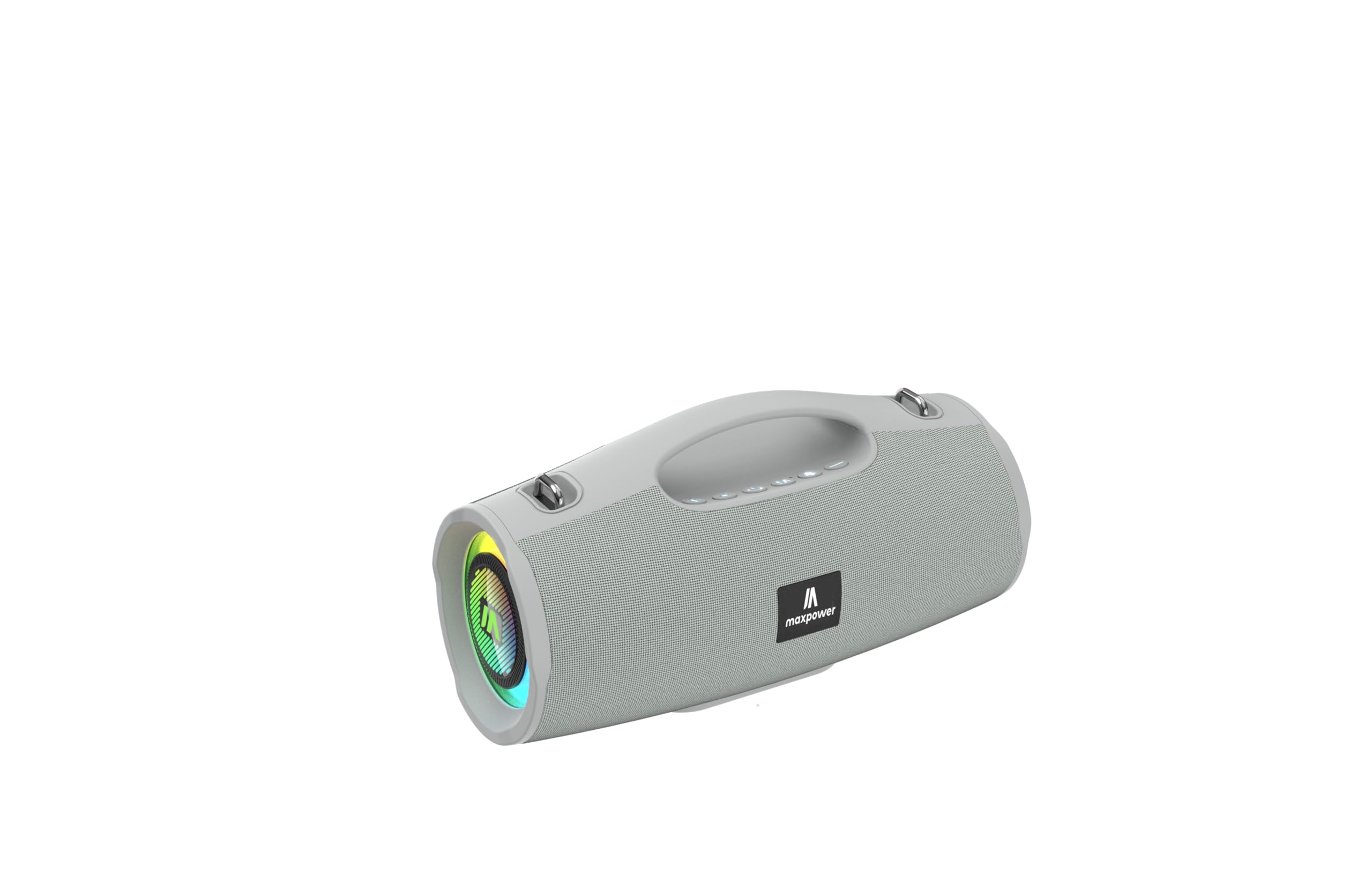
This image displays the Max Power MPD437 Ultra PRO M2 speaker. It features a robust grey casing, an integrated carrying handle at the top, and a series of control buttons. One end of the speaker is equipped with an LED light ring, indicating its operational status and adding visual effects.
Zvikamu Zvikuru:
- Integrated Carrying Handle: Kuti zvive nyore kutakura.
- Mabhatani ekudzora: For power, volume, playback, and mode selection.
- Mutauri Grille: Protects the speaker drivers.
- Chiedza che LED Mhete: Provides visual effects and indicates status.
- Kuchaja Port: Yekubatanidza tambo yemagetsi.
- AUX Input: Kune wired audio connection.
4. Setup
4.1 Kuchaja Mutauriri
- Connect the provided Power Cable to the charging port on the speaker.
- Plug the other end of the Power Cable into a suitable power source.
- Chiratidzo che LED chicharatidza mamiriro ekuchaja. Kuchaja kwakazara kunotora maawa maviri.
- Bvisa tambo yekuchaja kana yachaja zvizere.
4.2 Bluetooth Pairing
- Press and hold the Power button to turn on the speaker. The speaker will enter Bluetooth pairing mode, indicated by a flashing LED light.
- Pamudziyo wako (smartphone, piritsi, laptop), shandisa Bluetooth uye tsvaga zvishandiso zviripo.
- Select "MPD437 Ultra PRO M2" from the list of devices.
- Once paired, the speaker will emit an audible confirmation, and the LED light will stop flashing.
- Chinopakurira chinozoedza otomatiki kubatanidzazve nemudziyo wekupedzisira wakabatana kana chavhurwa.
4.3 AUX Kubatana
- Connect one end of the provided AUX Cable to the AUX input port on the speaker.
- Connect the other end of the AUX Cable to the audio output jack of your device.
- Mutauri anozochinja otomatiki kuenda kuAUX mode.
5. Operating Instructions
5.1 Simba On/Kudzima
- Power On: Dzvanya wobata bhatani rePower kwemasekondi maviri kusvika matatu.
- Power Off: Dzvanya wobata bhatani rePower kwemasekondi maviri kusvika matatu.
5.2 Kudzora Inzwi
- Wedzera Vhoriyamu: Dzvanya bhatani re'+'.
- Deredza Vhoriyamu: Dzvanya bhatani '-'.
5.3 Playback Control (Bluetooth/AUX Mode)
- Tamba/Kumbomira: Dzvanya bhatani rePlay/Pause.
- Next Track: Dzvanya uye bata bhatani re'+'.
- Previous Track: Dzvanya uye bata bhatani re'-'.
5.4 Mode Sarudzo
Press the 'M' (Mode) button to switch between Bluetooth, AUX, and FM Radio modes.
5.5 FM Radio Kushanda
- Switch to FM Radio mode using the 'M' button.
- Press the Play/Pause button to automatically scan and save available FM stations.
- Shandisa mabhatani ekuti '+' uye '-' kuti ufambise pakati pezviteshi zvakachengetwa.
5.6 LED Mwenje Modes
The speaker features vibrant LED lights. Press the dedicated LED button (if available, or a long press on a specific button) to cycle through different light modes or turn them off.
6. Kuchengeta
6.1 Kuchenesa
- Pukuta mutauri nekanyoro, damp jira.
- Usashandise abrasive cleaners, doro, kana makemikari zvinonyungudutsa.
- Iva nechokwadi chekuti maport ese akaoma usati wachaja kana kubatanidza tambo.
6.2 Kuchengeta
- Store the speaker in a cool, dry place away from direct sunlight.
- Kana ikachengetwa kwenguva yakareba, bhadharisa bhatiri kusvika pa50% mwedzi mishoma yega yega kuti bhatiri rirambe richishanda zvakanaka.
7. Kugadzirisa matambudziko
| Dambudziko | Zvinogona Kukonzera | Solution |
|---|---|---|
| Mutauri haabati simba. | Bhatiri rapera. | Charge the speaker using the provided power cable. |
| Hapana ruzha kubva kumutauri. | Volume is too low or muted. Device not paired correctly. AUX cable not fully inserted. | Increase volume on both speaker and connected device. Re-pair Bluetooth. Ensure AUX cable is securely connected. |
| Haikwanise kubatanidza kuburikidza neBluetooth. | Speaker is not in pairing mode. Device Bluetooth is off. Speaker is too far from device. | Ensure speaker is in pairing mode (flashing LED). Turn on Bluetooth on your device. Move speaker closer to your device (within 35 feet). |
| Kusagamuchirwa zvakanaka kweredhiyo yeFM. | Weak signal in current location. | Move the speaker to a location with better signal reception. |
8. Zvinotsanangurwa
| Model Name | Ultra Pro M2 |
| Item Model Number | MPD437 |
| Brand | Max Simba |
| Mutauri Rudzi | Portable Nomukurukuri |
| Kubatana Technology | Bluetooth, Inobatsira |
| Wireless Communication Technology | Bluetooth |
| Bluetooth Range | 35 Tsoka |
| Special Features | Dustproof, FM Radio, LED Light, Water Resistant |
| Mvura Resistance Level | Mvura Inodzivirira |
| Simba Source | Battery Powered |
| Battery Capacity | 3000 mamiriyoniamp Maawa |
| Kuchaja Nguva | 3 Maawa |
| Audio Output Mode | Stereo |
| Chiratidzo-ku-Ruzha Ratio | 85 dB |
| Kudzora Nzira | Bata |
| Product Dimensions | 4.5"D x 5"W x 9.9"H |
| Item Weight | 2.65 Pondo |
| Inosanganisirwa Zvikamu | AUX Cable, Power Cable |
| UPC | 785571466584 |
| GTIN | 785571466584 |
9. Warranty uye Tsigiro
9.1 Yakakwana Warranty
The Max Power MPD437 Ultra PRO M2 Portable Bluetooth Speaker comes with a limited warranty. Please refer to the warranty card included in your package or contact Max Power customer support for detailed warranty terms and conditions.
9.2 Mutengi Tsigiro
For technical assistance, troubleshooting, or warranty inquiries, please contact Max Power customer support. Contact information can typically be found on the product packaging or the official Max Power website.


