1. Nhanganyaya
This manual provides essential information for the safe and effective operation of your PRORECK PR-208AP Dual 8'' Powered Line Array Speaker System. Please read this manual thoroughly before use and retain it for future reference.
The PR-208AP is a high-fidelity, professional sound system designed for live performances, outdoor events, and stage applications. It features dual 8-inch woofers, a 3-inch ferrite driver, a built-in Class-D amplifier with 4000W P.M.P.O, and DSP sound processing for optimal audio performance.
2. Safety Information
- Kuchengetedzwa Kwemagetsi: Always connect the unit to a grounded power outlet. Do not expose the unit to rain or moisture. Do not open the speaker enclosure; refer servicing to qualified personnel.
- Kuiswa: Ensure the speaker is placed on a stable, level surface or securely mounted using appropriate hardware. Avoid placing near heat sources or in direct sunlight.
- Kudzivirira Kunzwa: Prolonged exposure to high volume levels can cause permanent hearing damage. Use caution when adjusting volume.
- Kufefetedza Ensure adequate ventilation around the speaker to prevent overheating. Do not block ventilation openings.
- Simba Cable: Use only the provided power cable. Do not modify or damage the power cable.
3. Package Zviri mukati
- PRORECK PR-208AP Array Speaker
- Power Cable
4. Chigadzirwa Pamusoroview

Mufananidzo 1: Mberi view of the PRORECK PR-208AP Line Array Speaker.

Figure 2: Rear panel of the PRORECK PR-208AP, showing various inputs, outputs, and controls.
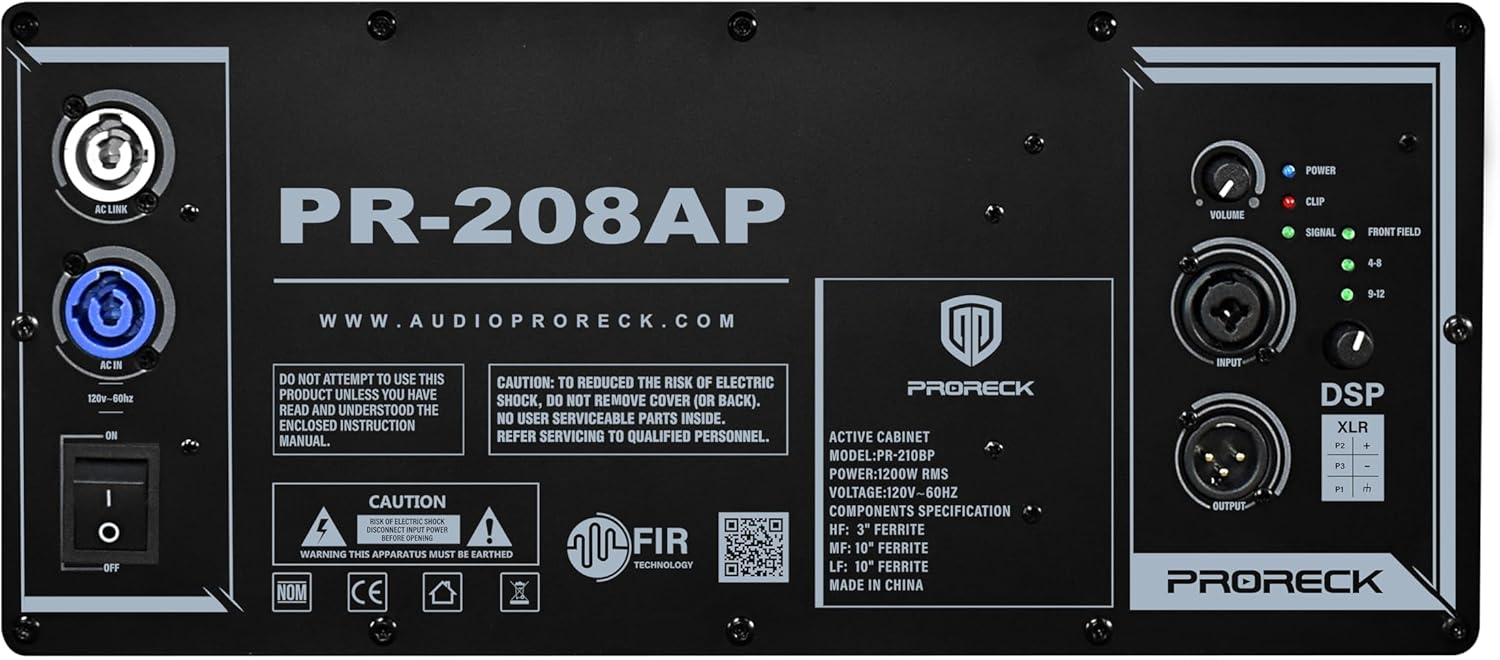
Mufananidzo 3: Detailed view of the PR-208AP control panel, highlighting DSP presets, volume controls, and input/output options. For more information, visit audioproreck.com.
Zvinokosha:
- Dual 8-inch woofers and 3-inch ferrite driver for high-fidelity audio.
- Yakavakirwa-mukati Kirasi-D amplifier with 4000W P.M.P.O.
- Integrated DSP with 4 preset modes (Normal, Live, DJ, Speech).
- Multiple input/output options including XLR and 1/4" TRS combo jacks.
- Kubatana kweBluetooth kwekutumira odhiyo pasina waya.
- TWS (True Wireless Stereo) linking for stereo pairing with another compatible speaker.
- Robust all-birch plywood enclosure for durability.
- Easy mounting options and 6 preset angles (0°, 2°, 4°, 6°, 8°, 10°) for sound coverage adjustment.
5. Setup
5.1 Musangano Wenyama
The PR-208AP is designed for easy stacking and secure fastening. Up to 12 units can be linked together. Ensure the mounting system is stable for all configurations.

Mufananidzo 4: Rutivi view illustrating the pin settings for adjusting the speaker's angle (0°, 2°, 4°, 6°, 8°, 10°).
5.2 Kubatana
Connect the power cable to the AC IN port on the rear panel and then to a grounded power outlet. Use XLR or 1/4" TRS combo jacks for audio input. For connecting multiple speakers, use the XLR output to link to another active speaker.
Video 1: This video demonstrates the physical setup and cabling for a PRORECK line array system (StagePro 12 model). While the model differs, the general principles of connecting line array speakers and power are similar to the PR-208AP.
6. Operating Instructions
6.1 Control Panel Pamusoroview
The rear panel features controls for input levels, Bluetooth, DSP modes, and master volume. LEDs indicate power, signal, and clip status.
Video 2: This video provides detailed operation instructions for a similar PA system (NBVOICE NBVXA218). The control panel layout and functionality, including DSP modes, volume adjustments, and input/output connections, are highly comparable to the PRORECK PR-208AP.
Video 3: This video demonstrates the setup and use of a similar PA system (NBVOICE 15" Subwoofer). It covers connecting cables, adjusting controls, and highlights features like Bluetooth and portability, which are also present in the PR-208AP.
6.2 Maitiro eDSP
The PR-208AP offers 4 DSP preset modes to optimize sound for different applications:
- Zvakajairwa Standard sound profile zvekushandisa zvakanyanya.
- Live: Enhanced for live music performances.
- DJ: Optimized for DJ sets with boosted bass and treble.
- Kutaura: Clear vocal reproduction for presentations and speeches.
Rotate the DSP Mode knob to select the desired preset.
6.3 Volume Controls
- Sub Level: Adjusts the volume of the subwoofer output.
- Full Range Level: Adjusts the overall volume of the full-range speakers.
- CH1/CH2 Level: Controls the input gain for Microphone/Line inputs.
- BT Level: Adjusts the volume for Bluetooth audio.
6.4 Bluetooth and TWS Linking
To connect via Bluetooth, press the 'Mode' button on the MP3 control digital display until 'Bluetooth' appears. On your device, search for 'NBVOICE' and pair. For True Wireless Stereo (TWS) linking, ensure both PR-208AP speakers are powered on and in Bluetooth mode. Press the TWS button on both units to pair them for stereo sound.
7. Kuchengeta
- Kuchenesa: Shandisa jira rakapfava, rakaoma kuchenesa kunze kwespika. Usashandise zvinochenesa zvinogumbura kana zvinonyungudutsa.
- Kuchengeta: Chengetedza mukurukuri munzvimbo inotonhorera, yakaoma kure nechiedza chezuva uye tembiricha yakanyanyisa.
- Kuongorora: Regularly inspect cables and connections for any signs of wear or damage.
8. Kugadzirisa matambudziko
| Dambudziko | Zvinogona Kukonzera | Solution |
|---|---|---|
| Hapana simba | Power cable not connected; power switch off; blown fuse. | Check power cable connection; ensure power switch is ON; replace fuse if necessary. |
| Hapana inzwi rinobuda | Volume too low; incorrect input selected; faulty cable; device not paired (Bluetooth). | Increase volume; verify input selection; check/replace cables; re-pair Bluetooth device. |
| Inzwi rakakanganiswa | Input level too high (Clip LED active); faulty cable; speaker overload. | Reduce input level; check/replace cables; lower overall volume. |
| Bluetooth haina kubatana | Chipika hachisi muchimiro chekupairira; mudziyo wakanyanya kure; kupindira. | Ensure speaker is in Bluetooth mode (display shows 'Bluetooth'); move device closer; minimize interference. |
9. Zvinotsanangurwa
| Feature | Detail |
|---|---|
| Model Name | PR-208AP |
| Mutauri Rudzi | Woofer (Line Array) |
| Mutauri Mukuru | 8 Inches (dhayamita yeWoofer) |
| Audio Driver Type | Dynamic Driver |
| Mutauri Mukuru Wekubuda Simba | 4000 Watts PMPO |
| Kubatana Technology | XLR, Bluetooth |
| Audio Output Mode | Stereo |
| Kudzora Nzira | Kubata (Kuratidzwa kweDigital) |
| Material | Wood (All-birch plywood enclosure) |
| Product Dimensions | 15"D x 29.5"W x 11"H |
| Mounting Type | Chimiro Gomo |
| Inosanganisirwa Zvikamu | Power Cable |
| Mugadziri | PRORECK |
10. Warranty uye Tsigiro
The PRORECK PR-208AP Array Speaker comes with a Limited Warranty. For specific warranty terms and conditions, please refer to the documentation included with your purchase or contact PRORECK customer support.
For technical support, troubleshooting assistance, or service inquiries, please visit the official PRORECK websaiti kana kubata dhipatimendi ravo rebasa revatengi. Ruzivo rwekutaurirana runogona kuwanikwa pane chigadzirwa kurongedza kana kumugadziri website.


