1. Nhanganyaya
This manual provides detailed instructions for the installation, operation, and maintenance of your ANNKE 8MP Security Camera System. This system includes a 16-channel Network Video Recorder (NVR) with AI Human/Vehicle Detection capabilities and four 4K Turret Power over Ethernet (PoE) cameras featuring Color Night Vision and two-way audio. Please read this manual thoroughly before using the product to ensure proper setup and functionality.
2. Package Zviri mukati
Verify that all items listed below are included in your package. If any items are missing or damaged, please contact ANNKE customer support.
- 1 x 16CH 12MP PoE NVR with 4TB Hard Drive
- 4 x 4K 2-way Talk Turret Cams & Screw Kits
- 2 x 60ft Network Cables
- 2 x 100ft Network Cables
- 1 x HDMI Cable
- 1 x Ethernet Cable
- 1 x Power Adapter
- 1 x USB Mouse
- 1 x Wall Sticker
- 1 x Chinyorwa cheMushandisi (gwaro iri)
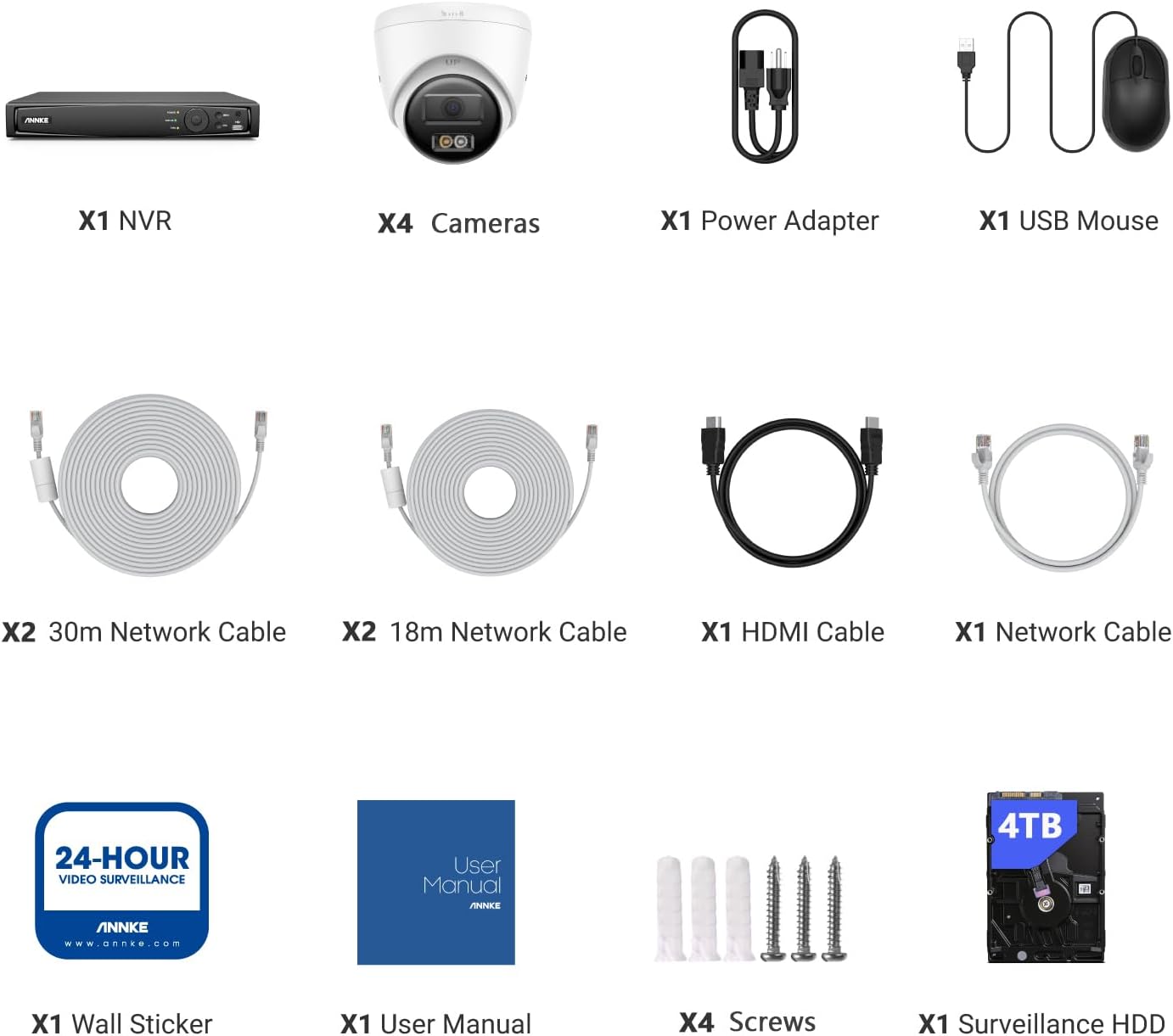
Image: All components included in the ANNKE 8MP Security Camera System package.
3. System Yaperaview
3.1 NVR (Network Video Recorder)
- Supports up to 16 IP cameras.
- Rarama view, recording, and playback at up to 12 MP resolution.
- Built-in PoE inputs for simplified camera connection.
- HDMI video output up to 4K (3840 × 2160) resolution.
- 4TB HDD pre-installed, expandable up to 16TB.
- AI Human and Vehicle Detection for 4 channels (without camera support) or 16 channels (with camera support).
3.2 4K Turret PoE Cameras
- 8MP (3840*2160) resolution with 16:9 image scale.
- 4mm@F1.6 lens for clear imaging.
- Efficient H.265+ compression technology.
- Built-in two-way audio (microphone and speaker).
- Smart Dual-Light technology for Color Night Vision up to 100ft.
- Motion Detection 2.0 with Human & Vehicle Detection.
- IP67 Dust and Waterproof Rating.
- Supports PoE & DC12V power.

Mufananidzo: Eksample of 4K video quality with 16:9 image scale from an ANNKE camera.
4. Kuisa Nongedzo
4.1 NVR Setup
- Batanidza Monitor: Connect the NVR to a monitor using the HDMI or VGA cable.
- Batanidza Mouse: Batanidza USB mouse mu USB port iri paNVR.
- Batanidza Network: Batanidza NVR kurouter yako uchishandisa tambo yeEthernet yakapihwa kuti uwane internet uye kure kure viewing.
- Power On: Connect the power adapter to the NVR and plug it into a power outlet. The NVR will start automatically.
4.2 Kuiswa Kamera
The ANNKE system utilizes Power over Ethernet (PoE) for simplified installation, requiring only a single Ethernet cable for both power and video transmission.
- Nzvimbo yekukwirisa: Choose suitable locations for your cameras, ensuring they cover desired areas and are within reach of the Ethernet cables. The cameras are IP67 weatherproof for outdoor use.
- Secure Mounting: Use the provided screw kits to securely mount each camera. Adjust the camera angle for optimal viewing.
- Connect PoE Cable: Connect one end of the Ethernet cable to the camera's PoE port and the other end to an available PoE port on the NVR. The camera will power on and connect automatically.

Image: Illustration of the Plug and Play PoE system, demonstrating direct camera connection to the NVR.
5. Basic Operation
5.1 Yekutanga Setup Wizard
Upon first power-up, the NVR will guide you through an initial setup wizard. Follow the on-screen prompts to set up language, date/time, network settings, and create a secure password for your system.
5.2 Rarama View
After setup, the NVR will display the live view kubva kumakamera ese akabatana. Unogona kushandura pakati pekamera imwe chete view, multi-camera grids, and customize display settings using the USB mouse.
5.3 Kurekodha uye Kutamba
- Kuenderera Kurekodha: The system is configured for 24/7 continuous recording by default on the 4TB HDD.
- Motion-Triggered Recording: Configure motion detection zones and sensitivity in the NVR settings to record only when activity is detected.
- Kutamba Svika yakanyorwa footage by right-clicking on the live view screen and selecting 'Playback'. Use the timeline to navigate through recordings by date and time.
6. Advanced Features
6.1 Kuonekwa kweAI yeVanhu neMotokari
The NVR's AI capabilities can differentiate between humans, vehicles, and other moving objects, significantly reducing false alarms caused by animals, rain, or swaying branches. Configure detection zones and rules in the NVR's 'Smart Event' settings.

Image: Human and Vehicle Detection in action, reducing false alerts.
6.2-Nzira mbiri Audio
Each 4K turret camera is equipped with a built-in microphone and speaker, enabling two-way communication. This feature allows you to speak to visitors or deter intruders directly through the ANNKE Vision App or NVR interface.

Image: Demonstrating instant two-way talk functionality with a delivery person.
6.3 Color Night Vision (Smart Dual-Light)
The cameras feature Smart Dual-Light technology, offering multiple night vision modes:
- Color Mode: Provides full-color images in low-light conditions using built-in white light.
- IR Mode: Traditional black and white infrared night vision for discreet monitoring.
- Smart Dual-Light Mode: The camera operates in IR mode, but automatically switches to color mode and activates white light upon detecting human or vehicle motion, providing clear, colored evidence.

Image: Comparison of Color, IR, and Smart Dual-Light night vision modes.
6.4 Kusvika Kure (ANNKE Vision App)
Download the ANNKE Vision App on your smartphone or tablet to access your security system remotely. The app allows you to view live feeds, play back recordings, receive push notifications for events, and configure system settings from anywhere with an internet connection.

Image: Remote viewing of camera feeds via the ANNKE Vision App.
6.5 Kubatanidzwa kweAlexa
The ANNKE system is compatible with Amazon Alexa. Link your ANNKE account to Alexa to view live camera feeds on compatible Alexa-enabled devices (e.g., Echo Show) using voice commands.

Image: ANNKE system integration with Alexa for voice-controlled viewing.
7. Kuchengeta
7.1 Kutarisira Hard Drive
The NVR comes with a 4TB HDD. When the hard drive is full, the system will automatically overwrite the oldest recordings. You can configure recording schedules and storage settings in the NVR menu. The NVR supports up to 16TB HDD capacity for extended recording.
7.2 Firmware Updates
Periodically check the ANNKE website or your NVR's system settings for available firmware updates. Keeping your system updated ensures optimal performance, security, and access to new features.
7.3 Kuchenesa Kamera
Regularly clean the camera lenses with a soft, damp jira rekubvisa guruva, tsvina, kana makwapa emvura anogona kuvharira view. Dzivisa kushandisa makemikari ane hasha.
8. Kugadzirisa matambudziko
- Hapana Kuratidzwa kweVhidhiyo: Ensure the NVR is powered on, connected to a monitor, and the monitor input is correctly selected. Check all cable connections (HDMI/VGA).
- Cameras Not Showing: Verify that cameras are properly connected to the NVR's PoE ports and that the Ethernet cables are not damaged. Restart the NVR.
- Hapana Kupinda Kure: Ensure the NVR is connected to the internet and has a stable network connection. Check your router settings and firewall. Verify that the ANNKE Vision App is correctly configured and linked to your NVR.
- Nhema dzeNhema: Adjust the sensitivity and detection zones for AI Human/Vehicle Detection in the NVR settings. Ensure cameras are not pointed at areas with constant motion (e.g., busy roads, swaying trees).
- No Two-Way Audio: Check microphone and speaker settings in the NVR or app. Ensure volume levels are adequate.
For further assistance, please refer to the ANNKE support websaiti kana kubata basa revatengi.
9. Zvinyorwa zveUnyanzvi
| Feature | Tsanangudzo |
|---|---|
| Brand | ANNKE |
| Model Number | N46PCK4-V4-94DS |
| Kubatana Technology | Waya (PoE) |
| Vhidhiyo Capture Resolution | 4K (8MP) |
| Special Features | AI Human/Vehicle Detection, Color Night Vision, 2-Way Talk, IP67 Weatherproof, Alexa Compatible |
| Nhamba yeChannels | 16 |
| Memory Storage Capacity | 4 TB HDD (expandable up to 16 TB) |
| Color | Chena |
| Simba Source | DC (NVR), PoE (Cameras) |
| Saizi dzeNVR (L x W x H) | 19.5 x 16.84 x 11.02 inches |
| Inowirirana Devices | Cameras, Laptops, Personal Computers, Smartphones, Tablets |
| Video Compression | H.264+/H.264/H.265/H.265+ |
| Kamera Lenzi | 4 mm |
| Camera Audio Output | Built-in Speaker, max. sound pressure level: 10 cm: 95 dB |
10. Warranty uye Tsigiro
ANNKE products come with a limited warranty. For specific warranty terms and conditions, please refer to the warranty card included in your package or visit the official ANNKE website. For technical support, troubleshooting assistance, or any product-related inquiries, please contact ANNKE customer service through their official channels. You can find contact information on the ANNKE websaiti kana mune zvinyorwa zvakapihwa nechigadzirwa chako.


