1. Nhanganyaya
Welcome to the CUBOT GT1 Smartwatch user manual. This guide provides essential information for setting up, operating, maintaining, and troubleshooting your new smartwatch. The CUBOT GT1 is designed for outdoor enthusiasts, featuring a durable zinc alloy casing, high-precision dual-frequency GPS, a 1.43-inch HD AMOLED display, and comprehensive health monitoring capabilities.
2. Setup
2.1 Package Zviri mukati
- CUBOT GT1 Smartwatch
- Chaja Cable
- Mushandisi Chinyorwa (gwaro iri)
2.2 Kutanga Kuchaja
Before first use, fully charge your CUBOT GT1 Smartwatch. Connect the provided charging cable to the charging port on the back of the watch and to a standard USB power adapter (not included). The watch will display a charging indicator. A full charge can take approximately 2-3 hours.
Note: The watch features a 480 mAh high-voltage polymer battery. A single charge can last up to 90 days in standby mode, 20-30 days with normal daily use, and up to 22 hours with continuous GPS activation.
2.3 Kubatanidza neSmartphone Yako
- Download the official CUBOT smartwatch application from your smartphone's app store (compatible with Android 9.0+ and iOS 9.0+).
- Ita shuwa kuti Bluetooth yakagoneswa pane yako smartphone.
- Open the CUBOT app and follow the on-screen instructions to create an account or log in.
- Sarudza 'Wedzera Mudziyo' kana 'Pair the New Device' mukati meapp.
- The app will search for your CUBOT GT1. Select it from the list of available devices.
- Simbisa chikumbiro chekubatanidza pane zvese zviri zviviri smartphone yako uye smartwatch.
Once paired, the watch will synchronize data and notifications with your smartphone.
3. Operating Instructions
3.1 Basic Controls
The CUBOT GT1 features a 1.43-inch HD AMOLED touchscreen and two physical buttons:
- Touchscreen: Swipe to navigate menus, tap to select, swipe down for quick settings, swipe up for notifications.
- SIMBA Bhatani: Press to wake the screen, return to the main watch face, or access the main menu.
- Bhatani reCustom Configurable for quick access to a specific function (e.g., sport mode). Long press for stopwatch.
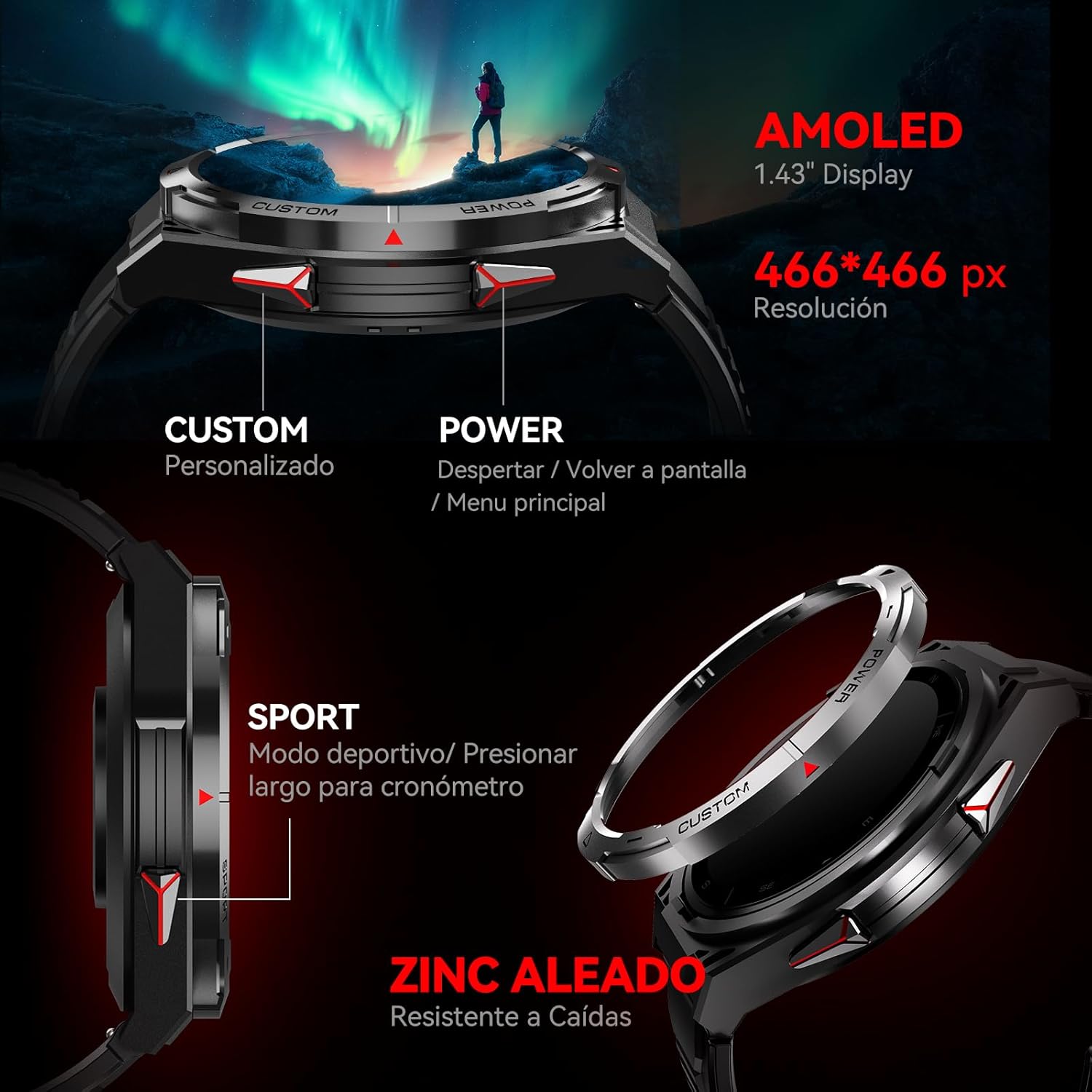
Mufananidzo: Side view of the CUBOT GT1 Smartwatch, highlighting the 'CUSTOM' and 'POWER' buttons and indicating the 1.43-inch AMOLED display with 466x466 pixel resolution.
3.2 Kushanda kweGPS
The smartwatch integrates a dual-frequency L1+L5 GPS system for high-precision positioning. This system supports features such as:
- Real-time Tracking: Calibrates exercise routes and distances.
- Return-to-Start: Guides you back to your starting point via the same path or a straight line.
- Kutsungirira Kwezvakatipoteredza: Provides reliable positioning in various environments.

Image: The CUBOT GT1 Smartwatch displaying a GPS tracking map on its screen, with satellites in the background, illustrating its dual-frequency GPS precision for navigation.
3.3 Mitambo Modes
The GT1 offers over 150 built-in sport modes. It utilizes the professional Savy sports algorithm and can automatically recognize 6 common sport modes. Each mode provides detailed exercise data to help users train scientifically.
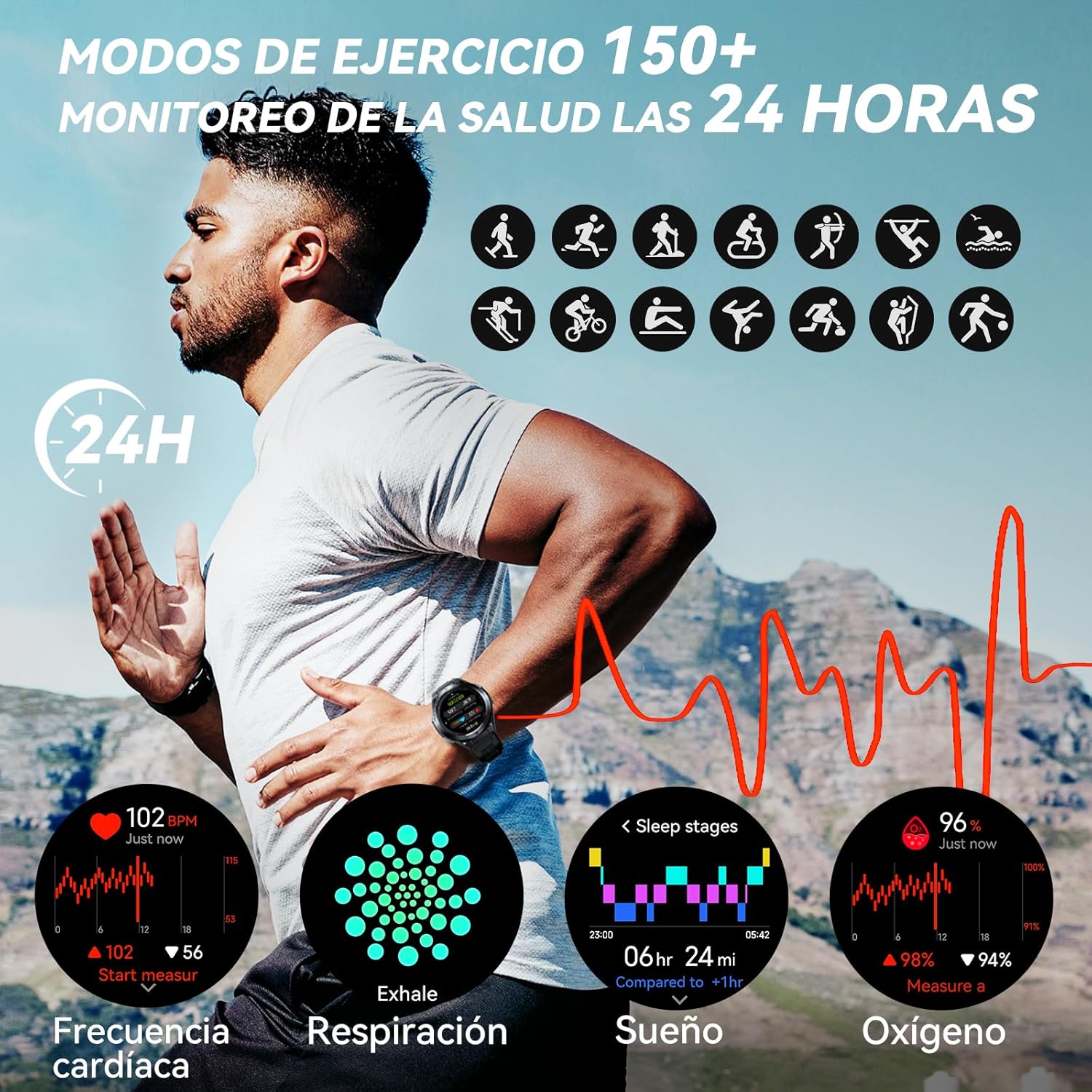
Image: A visual representation of various sport modes icons and health monitoring graphs for heart rate, respiration, sleep, and blood oxygen, indicating 24-hour tracking.
3.4 Kuongorora Utano
The smartwatch provides comprehensive 24-hour health monitoring through scientific algorithms, including:
- Heart Rate monitoring
- Blood Oxygen Saturation (SpO2) tracking
- Sleep Data analysis
- Real-time Pressure detection
3.5 Zviziviso uye Mafoni
Connect your smartwatch to your smartphone via the app to receive real-time notifications for incoming calls, text messages, and social media alerts (e.g., Facebook, Instagram, Twitter). You can answer or reject calls directly from the watch.

Image: The CUBOT GT1 Smartwatch displaying various communication features, including WhatsApp notifications, AI assistant interaction, Bluetooth call handling, and an SOS call screen.
3.6 Zvimwe Zvimwe
The CUBOT GT1 offers several other convenient functions:
- Kudzora Mumhanzi: Dzora mimhanzi kutamba pane yako smartphone.
- Kamera Remote: Remotely trigger your smartphone's camera.
- Mamiriro ekunze: View mamiriro ekunze aripo iye zvino.
- Sedentary Alert: Reminds you to move after periods of inactivity.
- SOS Bhatani: For emergency situations (refer to app settings for configuration).
- Environmental Sensors: Includes atmospheric pressure, altitude, and compass.

Image: A collage of various smartwatch functions, including an 'All In One Smartwatch' screen showing app icons, music control, sedentary alert, camera control, and weather display.
4. Kuchengeta
4.1 Kuramba Mvura
The CUBOT GT1 is water-resistant up to 5 ATM (50 meters), making it suitable for swimming. However, it is crucial to follow these guidelines:
- After exposure to water, especially deep water or corrosive liquids like seawater, activate the drainage function on the watch. This function vibrates the watch to expel water from the speaker and microphone holes.
- Always drain and dry the device thoroughly after use in water.
- Store the watch in a dry place to prolong its lifespan.
- Dzivisa kuisa wachi pamvura inopisa, utsi, kana majeti emvura ane simba guru.

Image: The CUBOT GT1 Smartwatch submerged in water, illustrating its 5 ATM water resistance. Additional icons show IP69K dustproof rating and resistance to drops, along with atmospheric pressure, altitude, and compass features.
4.2 Kuchenesa
Regularly clean your smartwatch and strap to prevent skin irritation and maintain functionality:
- Pukuta wachi netambo nekanyoro, damp, jira risina mucheka.
- Usashandise makemikari ane hasha, abrasive cleaners, kana zvinonyungudutsa.
- Ita shuwa kuti macontacts ekuchaja akachena uye akaoma usati wachaja.
4.3 Kuchengeta Battery
- Dzivisa kupisa kwakanyanya, izvo zvinogona kukanganisa hupenyu hwebhatiri.
- Usasiye wachi ichibudiswa zvizere kwenguva yakareba.
- If the watch will not be used for a long time, charge it to about 50% before storing.

Image: The back of the CUBOT GT1 Smartwatch showing the heart rate sensor and charging contacts, with text detailing battery life: 90 days standby, 25 days daily, 22 hours continuous GPS, and 10 days frequent use, powered by a 480mAh battery.
5. Kugadzirisa matambudziko
- Watch not kubatidza: Iva nechokwadi chekuti wachi yacho yachajwa zvizere. Ibatanidze netambo yekuchaja uye panobva magetsi.
- Haikwanise kubatana ne smartphone:
- Ita shuwa kuti Bluetooth yakabatidzwa pafoni yako uye wachi.
- Make sure the CUBOT app is installed and running.
- Tangazve zvese wachi uye yako smartphone.
- Tarisa kana wachi yatopetwa nemumwe mudziyo.
- Mashoko ehutano asina kururama: Ita shuwa kuti wachi yakapfekwa zvakanaka paruoko rwako, kwete yakanyanya kusimba kana kuregedzera. Chenesa sensor kuseri kwewachi.
- GPS masaini nyaya: Ita shuwa kuti uri munzvimbo yakavhurika ine yakajeka view of the sky. GPS performance can be affected by buildings, dense foliage, or adverse weather.
- Sikirini haina kupindura: Try restarting the watch by long-pressing the power button. If unresponsive, allow the battery to fully drain and then recharge.
- Water damage after swimming: Although the watch is water-resistant, improper drainage or exposure to corrosive liquids can cause issues. Always activate the drainage function and dry thoroughly after water exposure. If issues persist, contact support.
6. Zvinotsanangurwa
| Feature | Tsanangudzo |
|---|---|
| Brand | CUBOT |
| Model | GT1 |
| Kukura Kwekuratidza | 1.43 inches |
| Display Type | AMOLED |
| RAM | 256 MB |
| Battery Capacity | 480 mamiriyoniamp Maawa |
| Avhareji Hupenyu hweBhatiri | 7 days (normal use), up to 90 days (standby), 22 hours (continuous GPS) |
| Kubatana | Bluetooth |
| GPS | Integrated GPS (Dual-frequency L1+L5) |
| Kuramba Mvura | 5 ATM (mamita makumi matatu) |
| Special Features | SOS Button, GPS, Phone Calls, Notifications, Music Player, Touchscreen |
| Inowirirana Devices | Smartphone (Android 9.0+, iOS 9.0+) |
| Mounting Accessories | Kuchaja tambo |
7. Warranty uye Tsigiro
7.1 Ruzivo rweWaranti
For detailed warranty information, please refer to the warranty card included with your product packaging or the purchase documentation provided by your retailer. Keep your proof of purchase for any warranty claims.
7.2 Mutengi Tsigiro
If you encounter any issues or have questions not covered in this manual, please visit the official CUBOT website or contact their customer support through the contact information provided on their websaiti kana chikuva chako chekutenga.


