Nhanganyaya
Welcome to your new RadioShack BT Headphones. This manual provides essential information for the proper setup, operation, and maintenance of your headphones. Please read these instructions carefully before use to ensure optimal performance and longevity of your device.
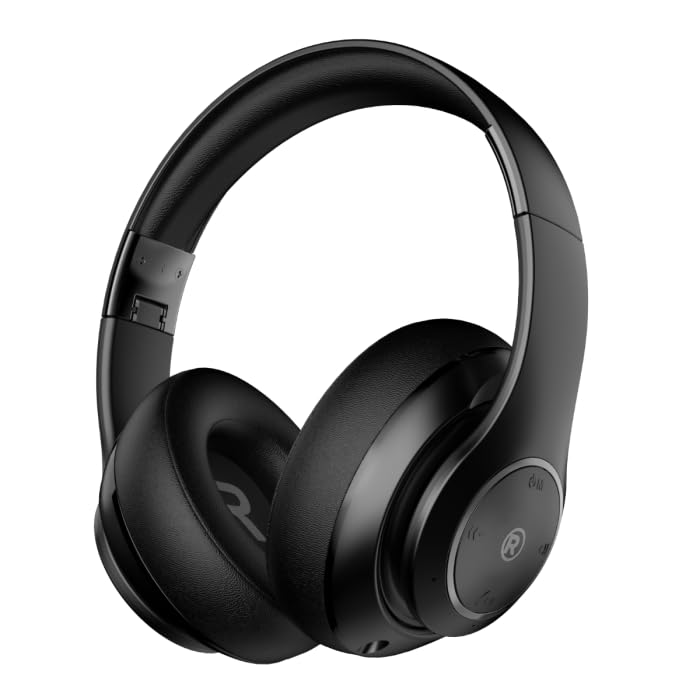
A pamberi-kona view of the black RadioShack BT Headphones, showcasing their over-ear design and cushioned earcups.
Chii chiri muBhokisi
Ona kuti zvinhu zvese zviripo mupasuru yako:
- RadioShack BT Headphones
- Chaja Cable
- Yekubatsira Audio Cable
- User Manual
This video demonstrates the unboxing process of the RadioShack BT Headphones, showing the contents included in the package.
Product Features
The RadioShack BT Headphones are designed for an enhanced audio experience with convenience and durability.
- Yakawedzerwa Nguva Yekutamba: Enjoy up to 30 hours of uninterrupted music.
- Yakavakirwa-mukati Maikorofoni: Features a built-in microphone for clear and convenient calling functions.
- Yepamberi Bluetooth 5.4: Equipped with Bluetooth version 5.4 for seamless and stable wireless connectivity.
- Mutsindo Wepamusoro-soro: 40mm drivers deliver rich, immersive sound with excellent sensitivity and impedance.
- Yakagadzirwa Dhizaini: Compact and foldable design for easy portability and storage.

An informational graphic highlighting the built-in microphone, 400mAh battery capacity, and Bluetooth 5.4 compatibility of the headphones.
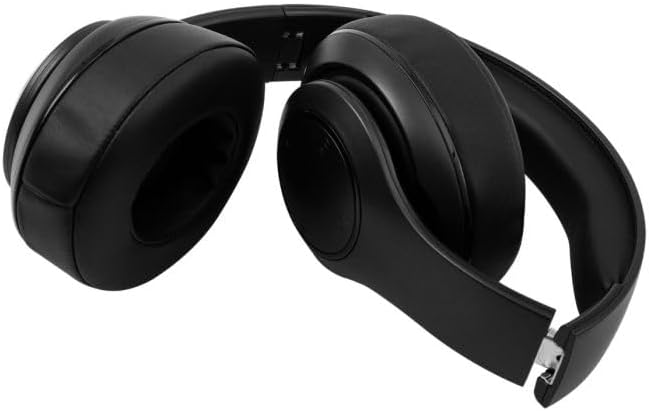
The RadioShack BT Headphones folded for compact storage and portability.
Vhidhiyo iyi inopa pfupiso pamusoroview of the RadioShack Over-the-Head Earphones, showcasing their design and use.
Gadzirira
Kuchaja mahedhifoni
- Batanidza tambo yekuchaja yeUSB yakapihwa kune chinongedzo chekuchaja chiri pamahedhifoni.
- Batanidza rimwe divi retambo yeUSB mune imwe sosi yemagetsi yeUSB inoenderana nayo (semuenzaniso, komputa, adapta yemadziro).
- The LED indicator will illuminate during charging and turn off or change color when fully charged.
- Kuchaja kwakazara kunopa kusvika maawa masere ekutamba.
Pairing kuburikidza neBluetooth
- Ita shuwa kuti mahedhifoni akachajwa zvizere.
- Dzvanya wobata bhatani rePower pamahedhifoni kusvika chiratidzo che LED chapenya bhuruu netsvuku, zvichiratidza kuti pane pairing mode.
- Pamudziyo wako (smartphone, piritsi, komputa), gonesa Bluetooth uye tsvaga zvishandiso zviripo.
- Select "RadioShack BT Headphones" from the list of found devices.
- Kana yabatanidzwa, chiratidzo che LED chinoratidza chiedza chebhuruu chakasimba kana kuti bhuruu rinopenya zvishoma nezvishoma.
Operating Instruction
Simba On/Kudzima
- Power On: Dzvanya uye bata bhatani reSimba kweanenge masekonzi matatu kusvika chiratidzo che LED chavheneka.
- Power Off: Dzvanya uye bata bhatani reSimba kweanenge masekonzi matatu kusvika chiratidzo che LED chadzima.
Music Playback
- Tamba/Kumbomira: Dhinda iyo Multi-function bhatani kamwe.
- Next Track: Dzvanya uye bata Volume Up bhatani.
- Previous Track: Dzvanya uye bata Volume Down bhatani.
Fonera Management
- Pindura/Pedzisa Kufona: Dhinda iyo Multi-function bhatani kamwe.
- Ramba Kufona: Dzvanya uye bata bhatani reMulti-function kwemasekonzi maviri.
- Dhonzazve Nhamba Yekupedzisira: Dzvanya kaviri bhatani reMulti-function.
Volume Control
- Vhoriyamu Kumusoro: Dzvanya bhatani reVolume Up.
- Vhoriyamu Pasi: Dzvanya bhatani reVolume Down.
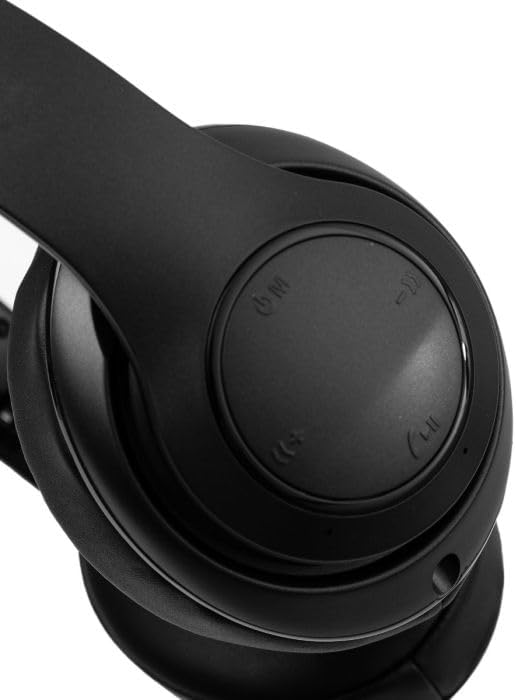
A pedyo-up view of the right earcup, showing the integrated control buttons for power, volume, and playback.
Maintenance
Kuchenesa
- Pukuta mahedhifoni nemucheka wakapfava, wakaoma.
- Usashandise abrasive cleaners kana solvents.
- Chengetedza chiteshi chekuchaja chisina huruva nemarara.
Storage
- Chengetedza mahedhifoni munzvimbo inotonhorera, yakaoma kure nechiedza chezuva uye tembiricha yakanyanyisa.
- When not in use for extended periods, charge the headphones at least once every three months to preserve battery life.
Kugadzirisa matambudziko
| Nyaya | Possible Solution |
|---|---|
| Mahedhifoni haabatike | Ita shuwa kuti mahedhifoni akachajwa. Batanidza kune sosi yemagetsi uye edza zvakare. |
| Haikwanise kubatanidzwa nemudziyo | Ensure headphones are in pairing mode (flashing blue/red LED). Turn off and on Bluetooth on your device. Move closer to the device. |
| Hapana ruzha kana yakaderera vhoriyamu | Check volume levels on both headphones and connected device. Ensure headphones are properly paired. Try reconnecting. |
| Kubatana kwepakati | Reduce distance between headphones and device. Avoid obstacles. Ensure no other devices are interfering with the Bluetooth signal. |
Zvinotsanangurwa
| Feature | Detail |
|---|---|
| Brand | RadioShack |
| Model Number | 3304403-PRNT |
| Color | Nhema |
| Kuiswa Nzeve | On Ear |
| Fomu Factor | Over Ear |
| Noise Control | Active Noise Cancellation |
| Bluetooth Version | 5.4 |
| Bhatiri Avhareji Hupenyu | 30 Maawa |
| Frequency Range | 20Hz - 20,000Hz |
| Audio Driver Type | Dynamic Driver |
| Yakavakwa-In Media | Cable |
| Enclosure Material | Plastiki |
| Item Weight | 0.34 makirogiramu |
| Mvura Resistance Level | Isingapindi mvura |
| Inowirirana Devices | Smartphones, Laptops, Desktops, Tablets, Televisions, Smart Speakers |
Warranty uye Support
Warranty Information
These RadioShack BT Headphones come with a 6-mwedzi waranti kubva pazuva rawakatenga. Iyi waranti inovhara zvikanganiso zvekugadzira pasi pekushandiswa kwakajairika. Haivhari kukuvara kunokonzerwa nekushandiswa zvisizvo, tsaona, shanduko dzisina mvumo, kana kusakara kwakajairika.
Mutengi Support
For technical assistance, warranty claims, or further inquiries, please contact RadioShack customer support through their official website or the retailer where the product was purchased. Please have your model number (3304403-PRNT) and proof of purchase ready.
You can visit the official RadioShack store for more information: RadioShack Store on Amazon


