1. Nhanganyaya
This manual provides detailed instructions for the setup, operation, and maintenance of your THOMSON 8-inch Digital Photo Frame (Model: TRDF-8001C). Please read this manual thoroughly before using the device to ensure proper functionality and to maximize your enjoyment of its features. This digital photo frame is designed to display your cherished photos and videos with an 8-inch IPS HD screen, offering a clear and vibrant viewing experience.
2. Chii chiri muBhokisi
Pakuburitsa, ndapota ita shuwa kuti zvinhu zvese zvakanyorwa pazasi zviripo uye mune zvakanaka:
- THOMSON 8-inch Digital Photo Frame
- Remote Control
- Power Adapter
- Photo Frame Stand
- User Manual

Figure 2.1: Contents of the THOMSON Digital Photo Frame package.
3. Setup
3.1 Simba Connection
- Connect the power adapter to the DC-IN port on the back of the digital photo frame.
- Batanidza dhiraivha yemagetsi mugetsi remagetsi.
- The frame will automatically power on.
3.2 Kutanga Setup
- Upon first startup, you will be prompted to select your preferred language. Use the navigation buttons on the remote control or the physical buttons on the back of the frame to select and confirm.
- Seta zuva uye nguva iripo.
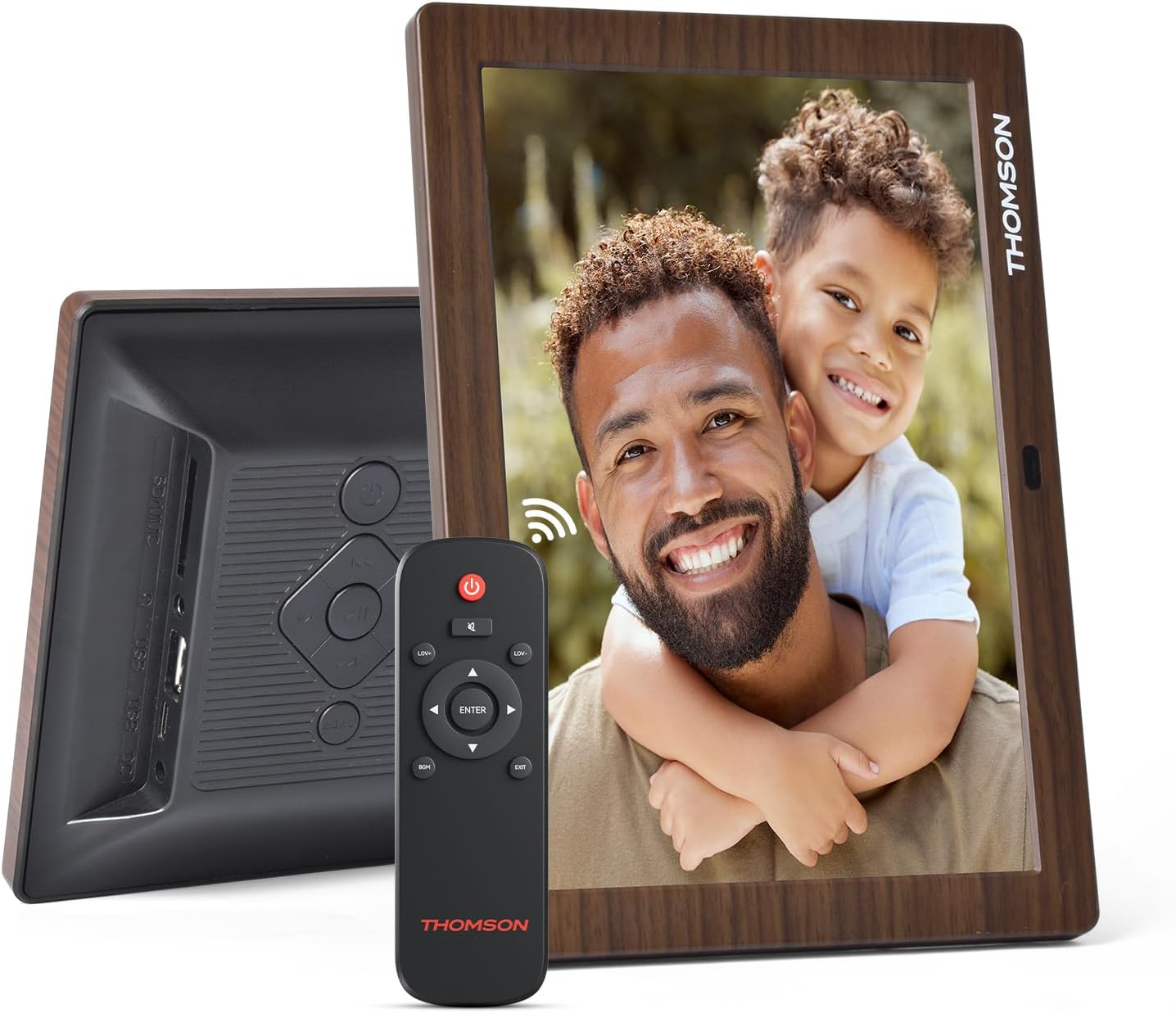
Mufananidzo 3.1: Kumashure view of the frame with power input and physical controls.
3.3 Kuisa Stand
The digital photo frame can be placed on a flat surface using the included stand. Insert the stand into the designated slot on the back of the frame. The frame also supports wall mounting using the integrated mounting holes.
4. Operating Instructions
4.1 Ratidza Zvimiro
- 8-inch IPS HD Screen: Enjoy clear and vibrant images with a 1280x800 resolution from various viewing angles.
- Kutenderera otomatiki: The built-in gravity sensor automatically adjusts the photo orientation (landscape or portrait) for optimal viewing.

Figure 4.1: The 8-inch IPS HD screen provides a high-quality display for your memories.
4.2 Media Playback
The frame supports playback of photos, music, and videos. You can navigate through your media using the remote control or the physical buttons.
- Mufananidzo Slideshow: Configure slideshow intervals and transition effects in the settings.
- Kuridza Mumhanzi: Ridza mimhanzi yekumashure panguva viewing mifananidzo.
- Vhidhiyo Kutamba: Enjoy your favorite video clips directly on the frame.

Figure 4.2: User interface for media selection and playback options.
4.3 Remote Control and Physical Buttons
Control your digital photo frame conveniently using the included remote control or the physical buttons located on the back of the frame.
- Remote Control Mabasa: Power on/off, adjust volume, navigate images, control background music, and access menus.
- Mabhatani enyama: Provide direct control for essential functions, useful for elderly users.

Figure 4.3: Remote control for convenient operation of the frame.
4.4 Expansion Modes
The frame supports various expansion options for storing your media:
- SD/SDHC/MMC Card: Expand storage up to 32 GB.
- USB-A/Type-C/U-disk: Connect USB drives for additional media.
- Cherechedza: This frame does not have built-in storage. An external memory card or USB drive is required for media storage.

Figure 4.4: Memory expansion slots on the back of the frame.
4.5 Automatic Power On/Off
You can set a customized automatic start and stop time for the frame to conserve energy and manage display times.

Figure 4.5: Setting automatic power on/off times for convenience.
5. Kuchengeta
- Kuchenesa Screen: Use a soft, dry, lint-free cloth to gently wipe the screen. For stubborn marks, slightly dampsn jira nemvura kana mushonga wekuchenesa skrini. Dzivisa makemikari ane hasha.
- Kuchenesa Frame: Wipe the frame with a soft, dry cloth.
- Kuchengeta: When not in use for extended periods, disconnect the power adapter and store the frame in a cool, dry place away from direct sunlight.
6. Kugadzirisa matambudziko
| Dambudziko | Zvinogona Kukonzera | Solution |
|---|---|---|
| Furemu haibatidzi. | Power adapter haina kubatana kana kukanganisa. | Ensure the power adapter is securely connected to the frame and a working power outlet. Try a different outlet. |
| Hapana mifananidzo/mavhidhiyo anoratidzwa. | No memory card/USB drive inserted or media files are corrupted/unsupported. | Insert a memory card or USB drive with supported media files. Check file formats (JPEG for photos, MP4 for videos). Ensure the memory card/USB drive is properly inserted. |
| Remote control haisi kushanda. | Bhatiri shoma kana kuti kuvharika. | Replace the remote control battery. Ensure there are no obstructions between the remote and the frame's IR receiver. |
| Images are distorted or incorrect orientation. | Incorrect display settings or disabled auto-rotation. | Check display settings in the menu. Ensure the auto-rotation feature is enabled if desired. |
7. Zvinotsanangurwa
- Model Number: TRDF-8001C
- Kukura Kwesikirini: 8 inches
- Resolution: 1280x800 (WXGA)
- Aspect ratio: 16:10
- Ratidza Tekinoroji: IPS HD
- Kubatana: DC-4.0, USB-A, Type-C, SD Card, 3.5MM earphone jack
- Kuwedzera Memory: SD/SDHC/MMC card up to 32GB, U-disk
- Kunobva Simba: Corded Electric
- User Interface Input: Buttons, Remote Control
- Frame Material: Plastiki
- Zviyero zvechigadzirwa: 24.4 x 18 x 2.51 cm
- Product Weight: 240 magiramu
8. Warranty uye Tsigiro
For warranty information and customer support, please refer to the documentation included in your product packaging or visit the official Thomson website. Chengetedza risiti yako yekutenga sehumbowo hwekutenga kune chero vimbiso yewaranti.


