1. Nhanganyaya
The Audizio Avola is a comprehensive audio system designed to provide a wide range of listening options. It integrates Internet Radio, DAB+, FM radio, a CD player, and Bluetooth connectivity into a single, elegant unit. This manual will guide you through the setup, operation, and maintenance of your Avola system, ensuring you can fully utilize its features for an optimal audio experience.
2. Mirayiridzo Yekuchengetedza
- Magetsi: Shandisa adapta yemagetsi yakapihwa chete. Iva nechokwadi chekuti volttage inopindirana nezvinodiwa munharaunda yako.
- Mvura uye Unyoro: Do not expose the unit to rain, moisture, or liquids. Avoid placing objects filled with liquids, such as vases, on the unit.
- Kufefetedza Iva nechokwadi chekuti mhepo inofema yakakwana yakatenderedza mudziyo. Usavhare maburi emhepo.
- Kunobva Kupisa Chengeta mudziyo uyu kure nezvinhu zvinopisa zvakaita sema radiator, ma heat registers, mastove, kana zvimwe zvinhu zvinopisa.
- Kuchenesa: Disconnect the unit from the power supply before cleaning. Use a soft, dry cloth. Do not use liquid cleaners or aerosol cleaners.
- Sevhisi: Usaedza kushandira iyo unit iwe pachako. Tumira masevhisi ese kuvashandi vanokwanisa.
- CD Player: Do not insert foreign objects into the CD tray. Handle CDs by their edges to avoid scratches.
3. Package Zviri mukati
Iva nechokwadi chekuti zvinhu zvese zviripo mupakeji:
- 1x Audizio Avola Internet Radio
- 1x Remote Control
- 1x Power Adapter
- 1x User Manual (Quick Start Guide)

Image: Audizio Avola unit shown with its remote control and power adapter.
4. Chigadzirwa Pamusoroview
4.1 Pamberi Panel

Mufananidzo: Mberi view of the Audizio Avola with the CD tray closed.
The front panel features the main display, control buttons, a CD tray, and input ports.
- Ratidza: Color display for navigation and information.
- Mabhatani ekudzora: MENU, INFO, REC/DEL, PRESET/REPEAT, STANDBY, I/R, Play/Pause, Stop, Skip/Fast Forward/Rewind.
- CD Tray: Yekuisa maCD ekuteerera.
- TUNE/SELECT Knob: Rotate to navigate menus, press to select.
- VOLUME Knob: Inogadzirisa mwero wekubuda kweodhiyo.
- USB Port: Yekubatanidza USB midziyo yekuchengetedza.
- SD Card Slot: Yekuisa SD memori makadhi.
- AUX Input: 3.5mm jack for external audio sources.
- Headphone Jack: Jeki ye3.5mm yekuteerera yega.

Image: Close-up of the Audizio Avola front panel showing USB, SD, AUX, and headphone ports.
4.2 Rear Panel
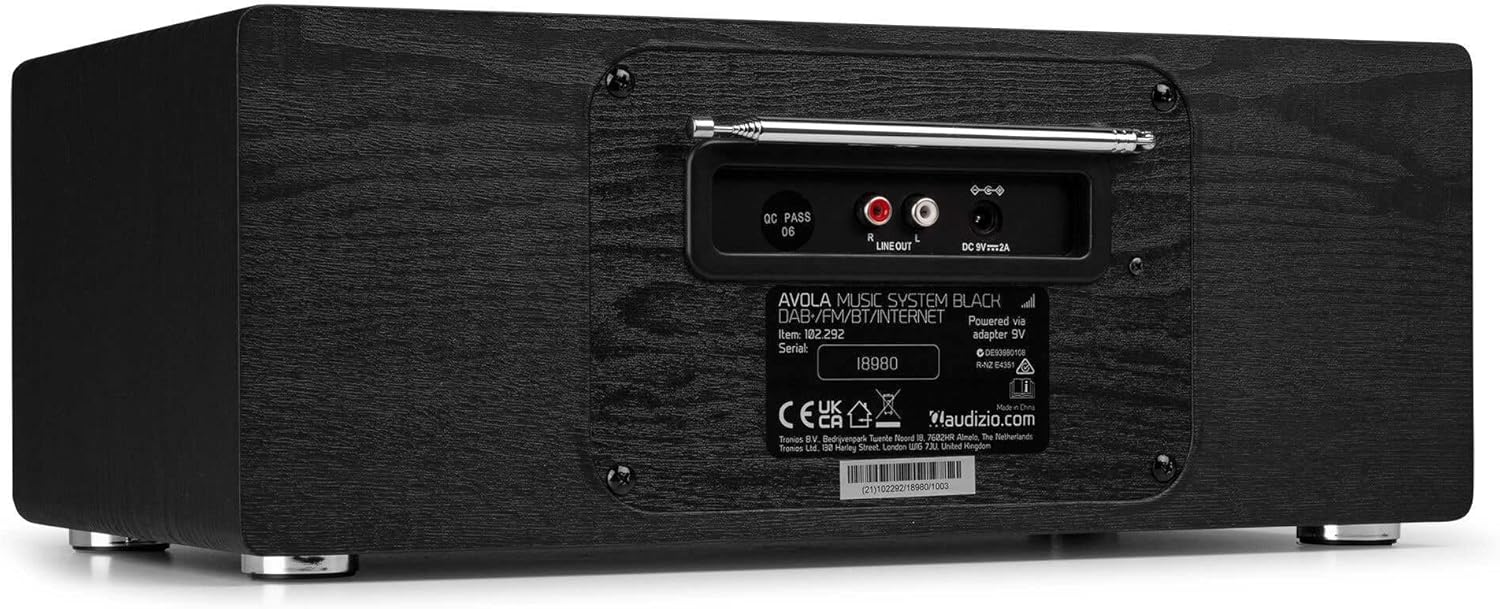
Mufananidzo: Rear view of the Audizio Avola, highlighting the antenna and connection ports.
The rear panel houses essential connections:
- Telescopic Antenna: Kuti utore DAB+ neredhiyo yeFM. Tambanudza zvizere kuti uwane chiratidzo chakanakisa.
- KUTANGA MUTAMBO (RCA): Yekubatanidza kune ekunze amplifiers kana vatauri.
- DC 9V 2A Power Input: Yekubatanidza iyo adapta yemagetsi.
5. Setup
5.1 Simba Connection
- Connect the power adapter to the DC 9V 2A input on the rear of the Avola unit.
- Batanidza iyo adapta yemagetsi mune yakakodzera madziro yekubuda.
- The unit will enter standby mode. Press the STANDBY button on the unit or remote control to power on.
5.2 Antenna Setup
For optimal DAB+ and FM radio reception, fully extend the telescopic antenna located on the rear panel. Adjust its position for the best signal quality.
5.3 Initial Setup (WLAN Connection)
To access Internet Radio features, the Avola must be connected to a Wi-Fi network.
- Upon first power-on, the unit may prompt you to set up the network connection. If not, press MENU, navigate to 'System Settings' and then 'Network'.
- Select 'Wi-Fi Network' and choose 'Scan' to find available networks.
- Sarudza yako Wi-Fi network kubva pane iyo runyorwa.
- Enter your Wi-Fi password using the TUNE/SELECT knob to navigate characters and press to confirm each character.
- Once connected, the display will show a Wi-Fi icon.
6. Maitiro Okushandisa
6.1 Internet Radio
Access thousands of radio stations worldwide via your Wi-Fi connection.
- Press the MENU button and select 'Internet Radio'.
- You can browse stations by location, genre, or search for specific stations.
- Use the TUNE/SELECT knob to navigate and select.
- To save a station as a preset, press and hold the PRESET/REPEAT button until the preset menu appears, then select a preset number.

Image: The Audizio Avola display showing the Internet Radio interface.
6.2 DAB+ Radio
Digital Audio Broadcasting Plus offers high-quality digital radio.
- Press the MENU button and select 'DAB Radio'.
- The unit will automatically scan for available DAB+ stations.
- Use the TUNE/SELECT knob to browse and select stations.
- Chengetedza presets sezvakatsanangurwa paInternet Radio.
6.3 FM Radio
Listen to traditional analog FM radio broadcasts.
- Press the MENU button and select 'FM Radio'.
- Use the TUNE/SELECT knob to manually tune or press and hold to auto-scan for stations.
- Chengetedza presets sezvakatsanangurwa paInternet Radio.
6.4 CD Player
Play your favorite audio CDs.
- Press the MENU button and select 'CD Player'.
- Press the 'Open' button next to the CD tray to open it.
- Carefully place an audio CD onto the tray with the label side facing up.
- Press the 'Open' button again to close the tray. The unit will begin playing the CD automatically.
- Use the Play/Pause, Stop, and Skip buttons for playback control.
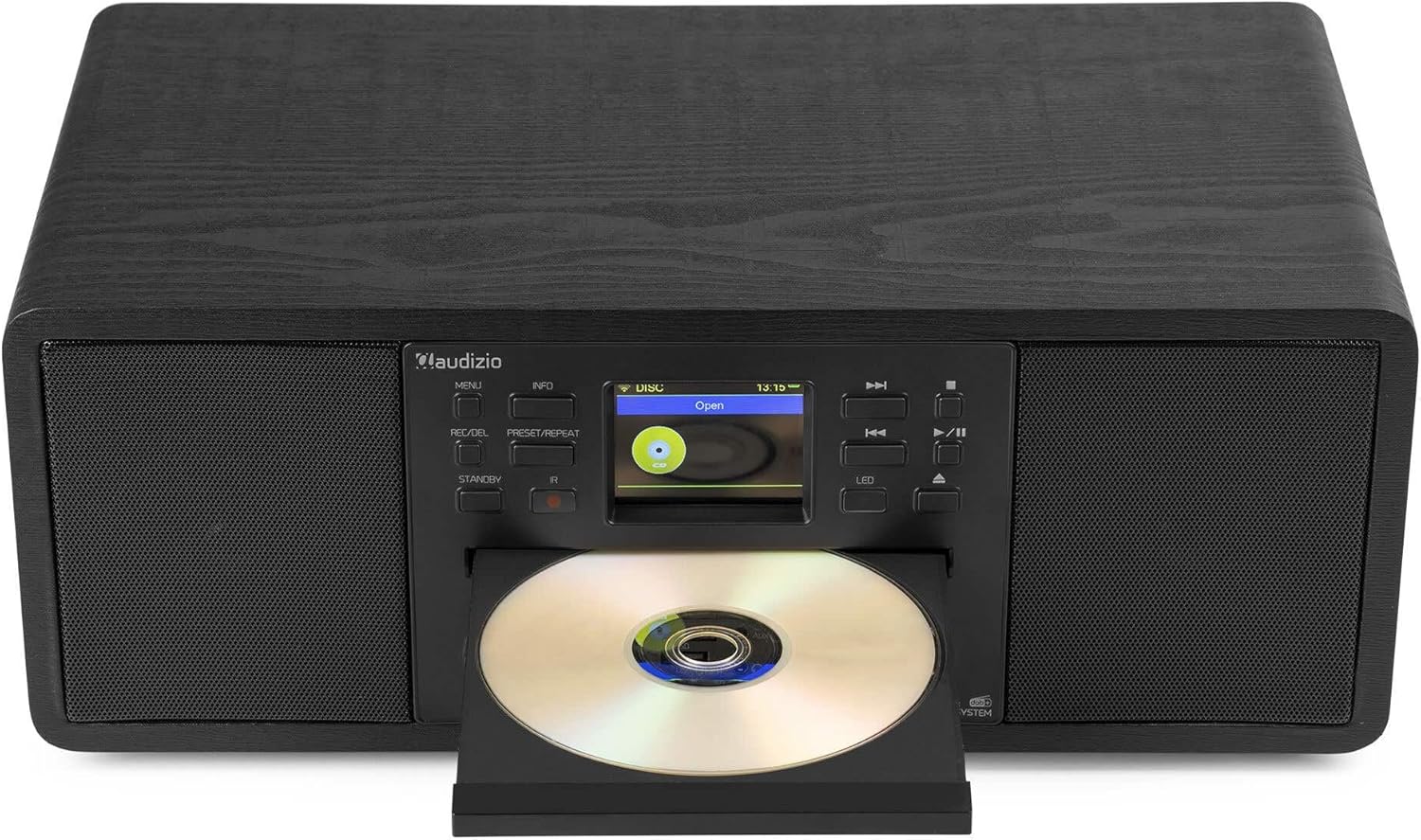
Image: The Audizio Avola with its CD tray open, ready for disc insertion.
6.5 Kubatana kweBluetooth
Teredzera odhiyo pasina waya kubva pafoni yako, tablet, kana mimwe midziyo inogoneswa neBluetooth.
- Press the MENU button and select 'Bluetooth'.
- The Avola will enter pairing mode and become discoverable.
- On your Bluetooth device, search for 'Audizio Avola' in the Bluetooth settings and select it to pair.
- Once connected, the display will show 'BT Connected'. You can now play audio from your device through the Avola.

Image: The Audizio Avola display indicating a successful Bluetooth connection.
6.6 USB/SD Kutamba
Ridza odhiyo files kubva kumadhiraivha eUSB kana makadhi eSD.
- Insert a USB drive into the USB port or an SD card into the SD card slot on the front panel.
- Press the MENU button and select 'USB' or 'SD' (the unit may automatically switch to the correct mode).
- Navigate kuburikidza neyako files and folders using the TUNE/SELECT knob.
- Press the TUNE/SELECT knob to play a selected track.
7. Kuchengeta
- Kuchenesa Chikamu: Use a soft, dry, lint-free cloth to clean the exterior of the unit. Do not use abrasive cleaners, waxes, or solvents.
- Kuchenesa Magirazi eCD: Kana kutamba maCD kukava kusina kurongeka, shandisa dhisiki rekuchenesa malenzi eCD rinowanikwa kumusika kuti uchenese lenzi yelaser.
- Kuchengeta: Kana ukachengeta mudziyo kwenguva yakareba, bvisa simba rawo kubva pamagetsi wouchengeta munzvimbo inotonhorera, yakaoma.
8. Kugadzirisa matambudziko
| Dambudziko | Zvinogona Kukonzera | Solution |
|---|---|---|
| Hapana simba | Power adapta haina kubatana kana kukanganisa kubuda. | Tarisa kubatana kwemagetsi. Edza imwe nzira yekuburitsa magetsi. |
| Hapana ruzha | Volume too low, mute activated, or incorrect source selected. | Increase volume. Check if mute is active. Ensure correct input source is selected. |
| Internet Radio not connecting | Incorrect Wi-Fi password, weak signal, or network issue. | Re-enter Wi-Fi password. Move unit closer to router. Check router status. |
| DAB+/FM reception poor | Antena haina kureba kana nzvimbo isina kunaka yechiratidzo. | Fully extend and adjust the telescopic antenna. Try repositioning the unit. |
| CD haisi kutamba | CD inserted incorrectly, dirty/scratched CD, or unsupported format. | Ensure CD is inserted label-side up. Clean or replace CD. Verify CD format (supports CD-DA, MP3). |
| Bluetooth haina kubatanidza | Device not in pairing mode, or Avola not discoverable. | Ensure both devices are in pairing mode. Check Bluetooth settings on your device. |
9. Zvinotsanangurwa
| Feature | Tsanangudzo |
|---|---|
| Model Name | Avola |
| Item Number | 102.292 |
| Dimensions (LxWxH) | 45.8 x 25.8 x 19.7 cm |
| Kurema | 4 kg |
| Power Input | 220 Volt (via power adapter) |
| Speaker Output Power (Max) | 60 Watt |
| Audio Output Mode | Stereo |
| Inotsigirwa Audio Formats | CD-DA, MP3 |
| Kubatana Technology | WLAN, Bluetooth, AUX, RCA |
| Inowirirana Devices | MP3 Player, PC, Smartphone, Tablet |
| Color | Nhema |
10. Warranty uye Tsigiro
Audizio products are designed and manufactured to the highest standards. In the unlikely event of a problem with your product, please contact your retailer for assistance. Keep your proof of purchase for warranty claims. For further support or inquiries, please refer to the official Audizio websaiti kana kubata basa ravo revatengi.


