1. Nhanganyaya
Ndatenda nekutengaasing the XO F41 Mirror Bluetooth Speaker. This device combines a digital clock display with a portable Bluetooth speaker, offering multiple playback options including Bluetooth, TF card, and FM radio. Please read this manual carefully before use to ensure proper operation and to maximize your experience with the product.

Image 1.1: The XO F41 Mirror Bluetooth Speaker in use, showing its digital clock display.
2. Zvigadzirwa zveChigadzirwa
- Bluetooth 5.3 Kubatana: For stable and efficient wireless audio streaming.
- Mirror Display: Clear digital time display with adjustable brightness.
- Multiple Playback Modes: Supports Bluetooth, TF card, and FM radio.
- Yakabatanidzwa Microphone: Zvekufona pasina maoko.
- Nguva Yekutamba Yakareba: Up to 8 hours at 50% volume, 5 hours at 100% volume.
- Compact uye Inotakurika Dhizaini: Easy to carry and place anywhere.
- Kuchaja USB-C: Chiteshi chemazuva ano uye chiri nyore chekuchaja.
3. Package Zviri mukati
Ndokumbira utarise pasuru yezvinhu zvinotevera:
- XO F41 Mirror Bluetooth Speaker
- USB-C Kuchaja Cable
- User Manual

Image 3.1: The XO F41 Mirror Bluetooth Speaker packaging.
4. Kurongeka kweChishandiso uye Kudzora
Familiarize yourself with the speaker's buttons and ports:
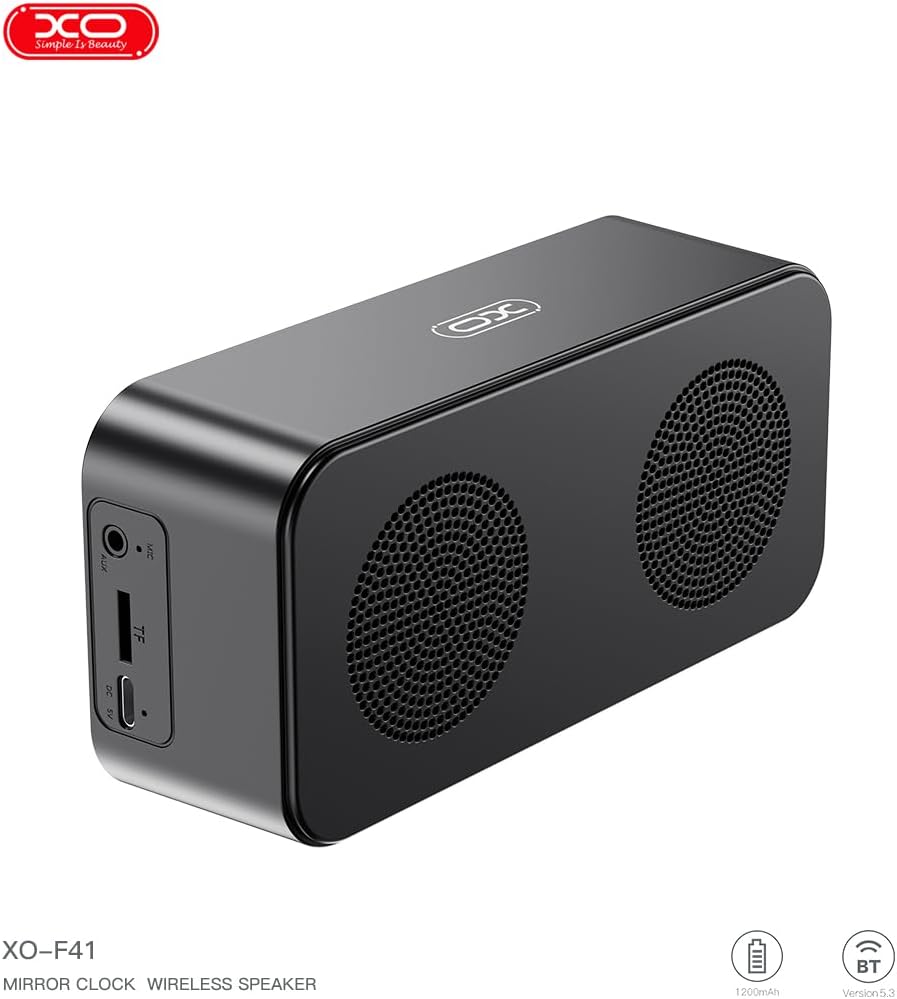
Mufananidzo 4.1: Kurutivi view of the XO F41 with ports labeled.
- Bhatani reSimba: Dzvanya wobata kuti ubate/udzime. Dzvanya pfupi kuti uchinje mamodhi.
- Bhatani reTamba/Kumbomira: Ridza kana kumbomira odhiyo. Pindura/gumisa mafoni.
- Vhoriyamu Kumusoro / Inotevera Track: Kudzvanya kupfupi kukwidza vhoriyamu, dzvanya kwenguva refu kune inotevera track.
- Vhoriyamu Pasi / Yakapfuura Rondedzero: Dzvanya kwenguva pfupi kuti vhoriyamu ideredzwe, tinya kwenguva refu kuti uone rwiyo rwekare.
- USB-C Chiteshi: Zvekuchaja mudziyo.
- TF Kadhi Slot: Isa kadhi reTF (MicroSD) kuti utarise mimhanzi yemuno.
- AUX Port: Kuti muwane odhiyo yekubatanidza newaya.
5. Setup
5.1 Kuchaja Mutauriri
- Batanidza tambo yeUSB-C yakapihwa kune chinongedzo chekuchaja chiri paspika.
- Batanidza imwe magumo etambo kune USB magetsi adapta (isina kuisirwa) kana komputa USB port.
- The charging indicator will illuminate. It takes approximately 3 hours for a full charge.
- The indicator will turn off or change color once fully charged.
5.2 Simba On/Kudzima
- Kubatidza: Dzvanya wobata bhatani rePower kwemasekondi matatu. Uchanzwa ruzha rwunonzwika.
- Kudzima: Dzvanya wobata bhatani rePower kwemasekondi matatu. Uchanzwa ruzha rwunonzwika.
6. Operating Instructions
6.1 Bluetooth Pairing
- Ensure the speaker is powered on and in Bluetooth mode. If not, short press the Power button to cycle through modes until "BT" or a Bluetooth icon appears on the display.
- Panharembozha yako, shandisa Bluetooth uye tsvaga zvishandiso zviripo.
- Select "XO-F41" from the list of devices.
- Once paired, the speaker will indicate a successful connection, and you can begin playing audio from your device.
6.2 TF Kadhi Mode
- Isa kadhi reTF (MicroSD) rine MP3 odhiyo files kupinda muTF kadhi slot.
- The speaker will automatically switch to TF card mode and begin playing music. If not, short press the Power button to cycle to TF card mode.
- Use the Volume Up/Down buttons for track navigation and the Play/Pause button for playback control.
6.3 FM Radio Modhi
- Short press the Power button to switch to FM radio mode. The display will show the FM frequency.
- Long press the Play/Pause button to automatically scan and save available FM stations.
- Short press the Volume Up/Down buttons to switch between saved stations.
6.4 Clock and Alarm Settings
The XO F41 features a digital clock display. Specific instructions for setting the time and alarm are typically found in the detailed manual included with the product. Generally, a dedicated 'M' (Mode) or 'Set' button is used to enter time/alarm setting mode, and volume buttons are used to adjust values.

Image 6.1: The XO F41 speaker functioning as a bedside clock.
6.5 Kugadzirisa Kupenya Kwechiratidziro
The display brightness is adjustable. Look for a dedicated button (often labeled with a sun icon or similar) or a combination of button presses (e.g., double-pressing the Power button) to cycle through brightness levels. Refer to the included quick start guide for exact steps.
7. Kuchengeta
- Kuchenesa: Shandisa jira rakapfava, rakaoma kuchenesa pamusoro pemukurukuri. Usashandise abrasive cleaners kana solvents.
- Kuchengeta: Chengetedza mukurukuri munzvimbo inotonhorera, yakaoma kure nechiedza chezuva uye tembiricha yakanyanyisa paunenge usingashandiswi kwenguva yakareba.
- Kuramba Mvura: Chigadzirwa ichi hachina mvura. Dzivisa kusangana nemvura kana kunyorova kwakanyanyisa.
- Battery Care: Kurebesa bhatiri, dzivisa kuburitsa bhatiri zvakazara nguva zhinji. Chaja mudziyo nguva nenguva, kunyangwe usiri mukushandisa nguva dzose.
8. Kugadzirisa matambudziko
| Dambudziko | Zvinogona Kukonzera | Solution |
|---|---|---|
| Mutauri haabati simba. | Bhatiri rakaderera. | Chaja sipika kwemaminitsi makumi matatu. |
| Haikwanise kubatanidza kuburikidza neBluetooth. | Speaker not in pairing mode; Bluetooth disabled on device; too far from device. | Ensure speaker is in Bluetooth mode. Enable Bluetooth on your device. Move speaker closer to your device (within 10 meters). |
| Hapana ruzha runobva kuTF card. | TF card not inserted correctly; unsupported file format; no audio files on card. | Reinsert TF card. Ensure files are in MP3 format. Verify audio files are present on the card. |
| Kusagamuchirwa zvakanaka kweredhiyo yeFM. | Weak signal; environmental interference. | Move the speaker to a different location. Re-scan for stations. |
9. Zvinotsanangurwa
| Feature | Detail |
|---|---|
| Model Number | XO-F41 |
| Bluetooth Version | Bluetooth V5.3 |
| Bluetooth Frequency | 2.402GHz-2.480GHz |
| Battery Capacity | 1200mAh |
| Kuchaja Input | USB-C, DC5V/0.5A |
| Kuchaja Nguva | Anenge maawa maviri |
| Play Time | 8H (50% volume); 5H (100% volume) |
| Chinobudirira Chinhambwe | Asingasviki 10 metres |
| Maximum Power | 5W |
| Chitaurisa Chikwata | 52mm |
| Chiratidzo-ku-Ruzha Ratio | >80dB |
| Product Dimensions | 15 x 3.81 x 11 masendimita (inenge 150 x 45 x 72 mm) |
| Product Weight | 320 g (approx. 0.28 kg) |
| Material | Plastiki |
| Special Feature | Kupenya Kunochinjika |

Mufananidzo 9.1: Zviyero zvechigadzirwa zvakadzama.
10. Ruzivo rweWaranti
The XO F41 Mirror Bluetooth Speaker comes with a standard manufacturer's warranty. Please refer to the warranty card included in your package for specific terms, conditions, and duration. Keep your purchase receipt as proof of purchase for any warranty claims.
11. Mutengi Tsigiro
For further assistance, technical support, or inquiries regarding your XO F41 Mirror Bluetooth Speaker, please contact the retailer or manufacturer's customer service department. Contact details are typically provided on the product packaging or the official brand website.