1. Nhanganyaya
The edelkrone HeadPlus v3 Pro is a powerful and user-friendly motorized camera head designed for precise motion control in videography and photography. It offers a unique combination of manual and motorized movement capabilities, allowing for intuitive programming and advanced shot creation. This device is compatible with various cameras and can be integrated with other edelkrone motion control systems.
2. Package Zviri mukati
Before proceeding with setup, please verify that all components are present:
- HeadPLUS PRO unit
- L-bracket for cameras up to 9 kg
- AC/DC adapta
- Sony NP-F battery holder (batteries not included)
- Allen key
3. Setup
3.1 Mounting the HeadPlus v3 Pro
Attach the HeadPlus v3 Pro securely to a compatible tripod or support system using its standard mounting thread. Ensure the connection is stable before proceeding.
3.2 Kubatanidza Kamera Yako
Use the included L-bracket to mount your camera onto the HeadPlus v3 Pro. The L-bracket supports cameras weighing up to 9 kg. Secure the camera firmly to prevent any movement during operation. The revised camera holder allows for vertical folding, enabling vertical video capture.

Image 1: edelkrone HeadPlus v3 Pro with a camera mounted, demonstrating its compact design and camera support.
3.3 Kusimbisa Chishandiso
The HeadPlus v3 Pro can be powered using the provided AC/DC adapter for continuous operation or via a Sony NP-F battery (not included) using the dedicated battery holder. Ensure the power source is correctly connected before use. The design allows for easy access to the camera's battery connection, facilitating battery changes without disrupting your setup.

Image 2: The HeadPlus v3 Pro in a typical setup, highlighting its wireless connectivity and app control capabilities.
3.4 App yekubatanidza
Download the edelkrone app on your smartphone or tablet. The HeadPlus v3 Pro is app-controlled and connects wirelessly via Bluetooth. Follow the in-app instructions to pair your device and establish a connection.

Image 3: Diagram illustrating the Bluetooth connectivity of HeadPlus v3 Pro with other edelkrone devices like SliderONE, JibONE, SliderPLUS, JibPLUS, DollyONE, and DollyPLUS.
4. Kushanda
4.1 Manual and Motorized Movement
The HeadPlus v3 Pro offers both manual and motorized control. You can physically adjust the camera head for quick positioning or use the app for precise, repeatable movements. It operates with super quiet and smooth motion.
4.2 Programming Movements (Keypose Buttons)
The HeadPlus v3 Pro allows for easy programming by demonstrating the desired movement. Simply move the camera head to a specific position, save it as a 'Keypose' using the app, and then recall or transition between multiple saved Keyposes. This feature makes it one of the fastest programmable camera heads available.

Image 4: The edelkrone app interface displaying Keypose buttons (1-6) for saving, recalling, and transitioning between camera positions.
4.3 Advanced Features and Integration
The HeadPlus v3 Pro communicates with other edelkrone sliders and jibs, enabling synchronized multi-axis motion. It can also pursue stationary targets while gliding. Optional add-on modules enhance its capabilities:
- Target Module: For precise target tracking.
- Vision Module: Enables face recognition and automatic tracking.
- Focus/Zoom Module: Provides motorized control over camera focus and zoom.
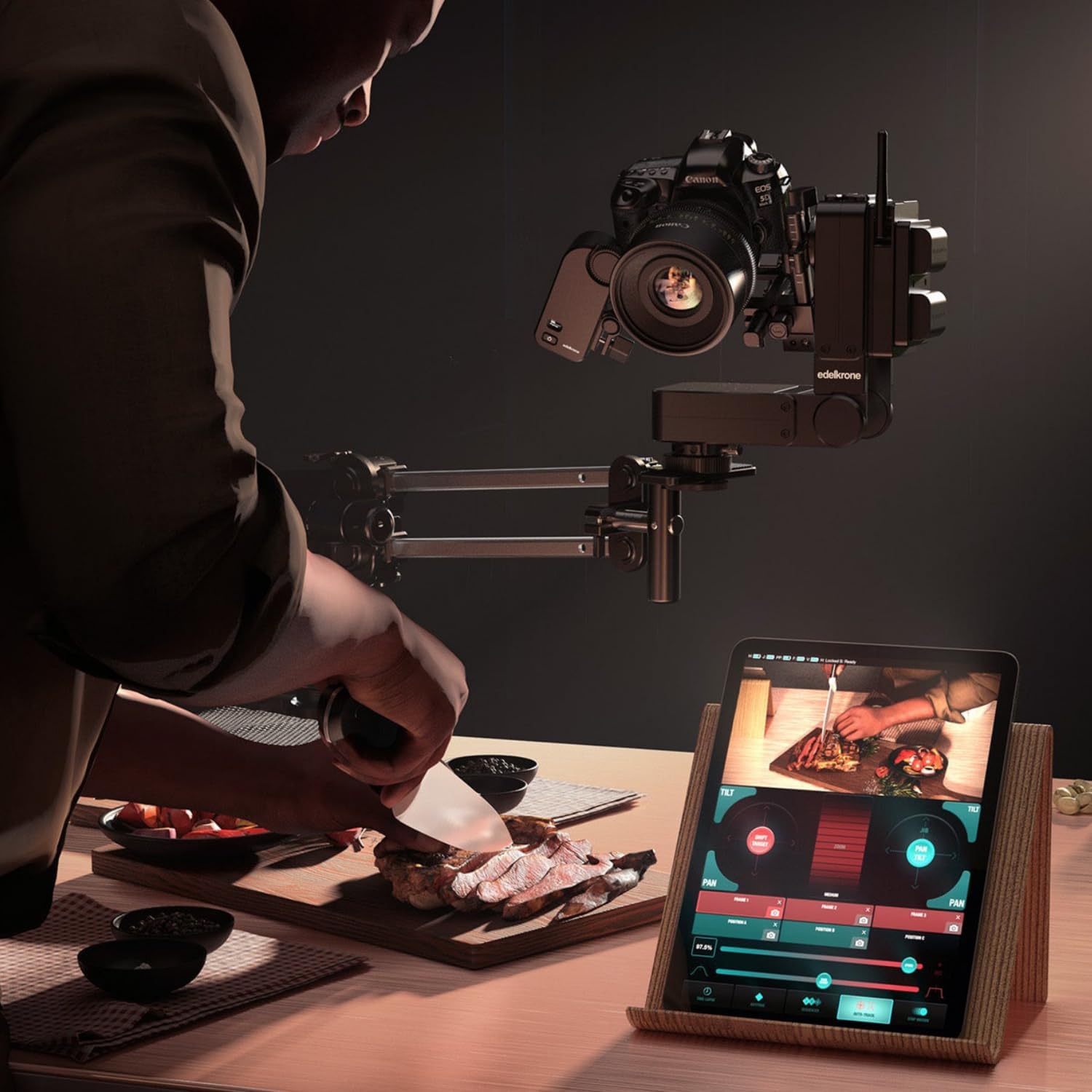
Image 5: An operational setup showing the HeadPlus v3 Pro with a camera, being controlled remotely via a tablet displaying the live camera feed and motion controls.
5. Kuchengeta
To ensure the longevity and optimal performance of your edelkrone HeadPlus v3 Pro, follow these maintenance guidelines:
- Chengeta mudziyo wakachena uye usina guruva kana marara. Shandisa jira rakapfava, rakaoma pakuchenesa.
- Dzivisa kuisa mudziyo kune tembiricha yakanyanyisa kana hunyoro.
- Regularly check all connections and mounting points for tightness.
- Store the HeadPlus v3 Pro in a protective case when not in use.
6. Kugadzirisa matambudziko
If you encounter issues with your HeadPlus v3 Pro, consider the following common solutions:
- Mudziyo Hausi Kupindura: Ensure the device is properly powered and the battery (if used) is charged. Check all cable connections.
- Matambudziko eApp Connectivity: Verify Bluetooth is enabled on your mobile device. Restart both the HeadPlus v3 Pro and the app. Ensure the app is updated to the latest version.
- Unusual Movement/Noise: Check for any obstructions around the camera head. Ensure the camera is securely mounted and within the weight limit (9 kg).
- Nzvimbo Isina Kurongeka: Recalibrate the device through the app if available. Ensure the mounting surface is stable and level.
For persistent issues, refer to the official edelkrone support resources.
7. Zvinotsanangurwa
| Feature | Tsanangudzo |
|---|---|
| Brand | edelkrone |
| Model | Pro |
| Mugadziri | edelkrone |
| Chikamu Nhamba | EDCVX |
| Inowirirana Devices | Kamera |
| Inosanganisirwa Zvikamu | HeadPLUS PRO, L-bracket for cameras up to 9 kg, AC/DC adapter, Sony NP-F battery holder (batteries not included), Allen key |
| Item Weight | 3.3 makirogiramu |
| Package Dimensions | 50 x 20 x 15 cm |
| UPC | 810011812185 |
| Color | Nhema |
| Nyika Yekwakabva | Teki |
8. Ruzivo rweWaranti
Specific warranty details for the edelkrone HeadPlus v3 Pro are typically provided by the manufacturer at the time of purchase or can be found on the official edelkrone website. Please retain your proof of purchase for any warranty claims. A 30-day return policy may apply depending on the retailer.
9. Tsigiro
For further assistance, technical support, or to explore additional resources, please visit the official edelkrone website or contact their customer service department. Online tutorials, FAQs, and software updates are often available through their official channels.
Official edelkrone Websaiti: www.hwevite.net


