Nhanganyaya
The 1Mii SafeFly Pro is a versatile Bluetooth 5.3 audio adapter designed to transmit and receive audio wirelessly. It features an OLED screen for clear status display and supports advanced audio codecs for high-quality sound. This device allows you to connect your wireless headphones to non-Bluetooth audio sources or stream audio from your Bluetooth-enabled devices to wired audio systems.
Chii chiri muBhokisi

This image displays all items included in the 1Mii SafeFly Pro package. You will find the SafeFly Pro Bluetooth Audio Adapter, a USB-C Charging Cable, a 3.5mm Female to Female Audio Adapter, and a Keychain.
- SafeFly Pro Bluetooth Audio Adapter
- USB-C Kuchaja Cable
- Adapta yeAudio ye3.5mm yeMukadzi kuenda kuMukadzi
- Keychain
- Mushandisi Chinyorwa (gwaro iri)
Product Overview

Mufananidzo uyu unopa zvakadzama view of the 1Mii SafeFly Pro, highlighting its key components. These include the flexible audio cable with a 3.5mm audio connection, an audio plug protector, the OLED display screen, the 'M' key, the 'OK' key, the TX/RX sliding switch, a one-click reset button, and the USB-C charging port.
Zvikamu uye Mabasa:
- 3.5mm Audio Connection: Connects to audio source (TX mode) or audio receiver (RX mode).
- Audio Plug Protector: Protects the 3.5mm audio plug when not in use.
- OLED Display Screen: Shows battery level, volume, paired device names, and active audio codecs.
- 'M' Key: In pairing mode, press once to select the connected device. In TX mode, press twice to switch the Bluetooth decoding format.
- 'OK' Key: Power ON/OFF (long press for 1 second). Long press for 2 seconds to enter pairing mode. Also functions as Play/Pause.
- TX/RX Sliding Switch: Inosarudza modhi yeTransmitter (TX) kana Receiver (RX).
- Reset Bhatani: Dzvanya kwenguva refu kwemasekonzi mashanu kuti ugadzirise zvakare mudziyo.
- USB-C yekuchaja Port: Yekuchaja bhatiri remukati.
Gadzirira
1. Kuchaja Chishandiso
Before first use, fully charge the SafeFly Pro using the provided USB-C charging cable. Connect the cable to the USB-C port on the device and a standard USB power adapter (not included). The OLED screen will indicate charging status.
2. Powering On / Off
- Kubatidza: Long press the 'OK' button for 1 second.
- Kudzima: Long press the 'OK' button for 1 second.
3. Kusarudza Operating Mode (TX/RX)
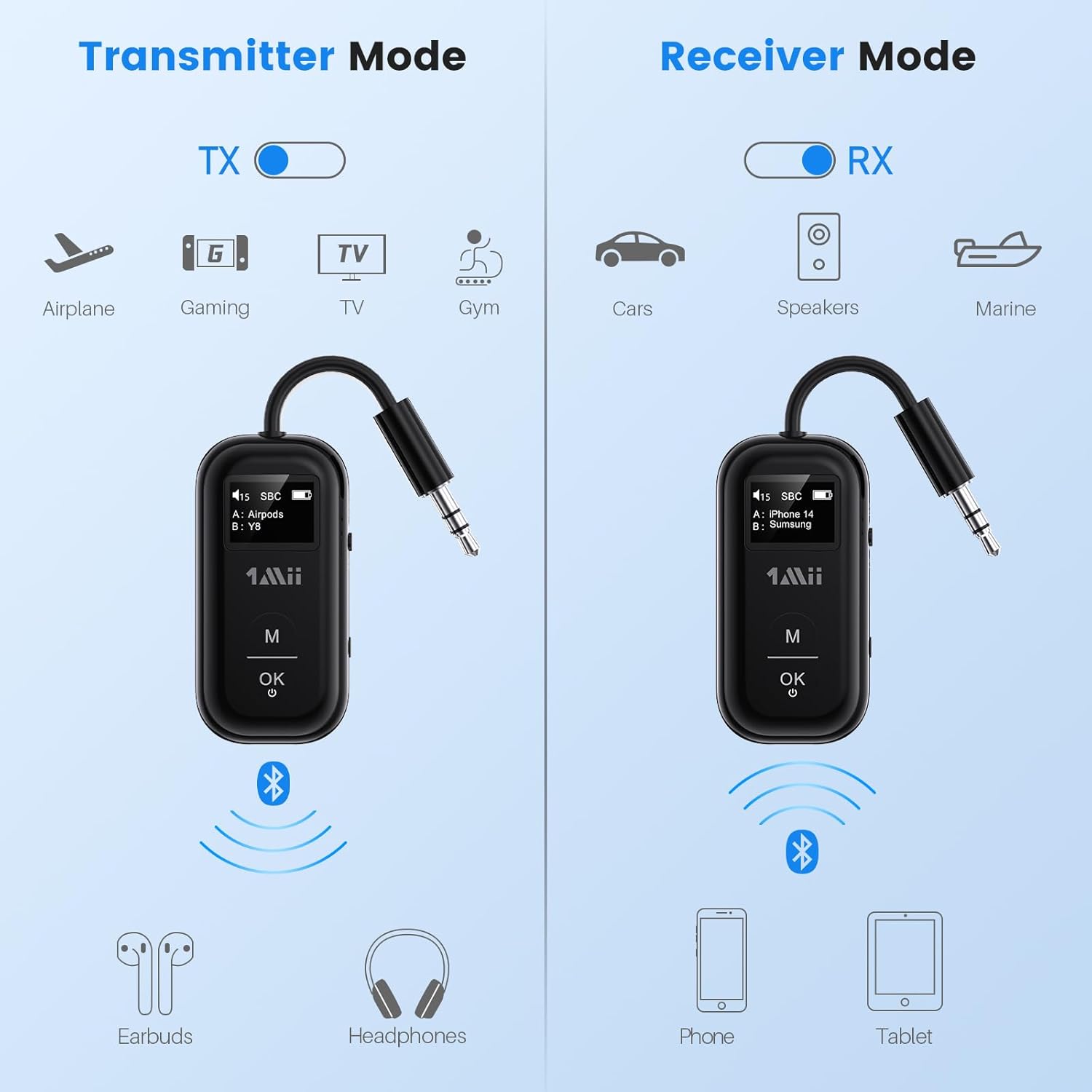
This image illustrates the two operating modes: Transmitter (TX) and Receiver (RX). TX mode is used for devices like airplanes, gaming consoles, TVs, and gym equipment to transmit audio to earbuds or headphones. RX mode is used for cars, speakers, and marine systems to receive audio from phones or tablets.
Use the TX/RX sliding switch on the side of the device to select the desired mode:
- TX (Transmitter) Modhi: For sending audio from non-Bluetooth devices (e.g., airplane entertainment, TV, gym equipment) to Bluetooth headphones or speakers.
- RX (Receiver) Modhi: For receiving audio from Bluetooth-enabled devices (e.g., smartphones, tablets) to wired audio systems (e.g., car stereo, home speakers).
4. Pairing in TX Mode (Connecting to Headphones)

- Set the SafeFly Pro to TX mode using the sliding switch.
- Plug the 3.5mm audio connection into your audio source (e.g., airplane entertainment system, TV headphone jack). If needed, use the dual-prong airplane adapter.
- Long press the 'OK' button on the SafeFly Pro for 2 seconds to enter pairing mode. The screen will display "Searching".
- Put your Bluetooth headphones or speakers into pairing mode. Refer to your headphone's manual for specific instructions.
- The SafeFly Pro will automatically search for and connect to nearby Bluetooth devices. Once connected, the device name will appear on the OLED screen.
- To connect a second pair of headphones: After the first device is connected, long press the 'OK' button again for 2 seconds to enter pairing mode for the second device. Put the second pair of headphones into pairing mode. Both devices will then be connected simultaneously.

This image shows the 1Mii SafeFly Pro connected to an airplane's in-flight entertainment system, enabling wireless audio streaming to a user's Bluetooth headphones.
5. Pairing in RX Mode (Connecting to Smartphones/Tablets)
- Set the SafeFly Pro to RX mode using the sliding switch.
- Plug the 3.5mm audio connection into your wired audio system's AUX input (e.g., car stereo, home speaker).
- Long press the 'OK' button on the SafeFly Pro for 2 seconds to enter pairing mode. The screen will display "Searching".
- On your smartphone or tablet, go to Bluetooth settings and select "1Mii SafeFly Pro" from the list of available devices to connect.
- Once connected, the device name will appear on the OLED screen.
- To connect a second smartphone/tablet: After the first device is connected, long press the 'OK' button again for 2 seconds to enter pairing mode for the second device. Connect the second smartphone/tablet via its Bluetooth settings.

This image shows the 1Mii SafeFly Pro in RX mode, connected to a car's audio system, receiving audio wirelessly from a smartphone.
Operating Instruction
OLED Screen Display

Ichi chifananidzo chinopa pedyo-up view of the OLED screen, indicating the power status, audio format (e.g., SBC), volume level, battery level, and the names of the two currently paired devices (A and B).
The OLED screen provides real-time information:
- Battery Level: Inoratidza chaji yebhatiri yasara.
- Nhamba yevhoriyamu: Displays the current audio output volume.
- Papaired Device: Shows the name(s) of the connected Bluetooth headphones or smartphones.
- Audio Codec: Displays the active audio codec (e.g., aptX LL, aptX HD, aptX Adaptive, aptX, AAC, SBC).
Bhatani Mabasa
- 'OK' Button: Short press to Play/Pause audio.
- Bhatani re'M': In TX mode, press twice to cycle through available audio codecs (aptX LL, aptX HD, aptX Adaptive, AAC, SBC) if supported by your connected headphones.
Maintenance
To ensure the longevity and optimal performance of your 1Mii SafeFly Pro, follow these maintenance guidelines:
- Kuchenesa: Pukuta chigadziro nemucheka wakapfava, wakaoma. Usashandise zvicheneso zvemvura kana zvinhu zvinokurisa.
- Kuchengeta: Chengetedza mudziyo munzvimbo inotonhorera, yakaoma kure nechiedza chezuva uye tembiricha yakanyanyisa.
- Battery Care: Avoid fully discharging the battery frequently. Charge the device regularly, even if not in use, to maintain battery health.
- Kubata: Bata mudziyo nekungwarira. Dzivisa kuidonhedza kana kuzviisa pasi pesimba rakasimba.
Kugadzirisa matambudziko
If you encounter issues with your SafeFly Pro, try the following steps:
- Mudziyo Haubatiki. Iva nechokwadi chekuti mudziyo wacho wachajwa zvizere. Batanidza kune simba remagetsi uchishandisa tambo yeUSB-C.
- Kusakwanisa Kubatanidza:
- Ensure the SafeFly Pro is in the correct TX or RX mode.
- Make sure both the SafeFly Pro and your target Bluetooth device are in pairing mode.
- Fambisai midziyo iyi pedyo.
- Dzima wobva wavhura zvishandiso zvese zviri zviviri, wobva waedza kubatanidza zvakare.
- Hapana Audio / Yakashata Hunhu Hwekunzwika:
- Check that the 3.5mm audio cable is securely connected to both the SafeFly Pro and the audio source/receiver.
- Ensure the volume on both the SafeFly Pro and the connected device is turned up.
- Verify that the correct audio codec is selected (in TX mode, press 'M' twice to cycle).
- Test with a different audio cable or source/receiver if possible.
- Device Frozen/Unresponsive: Long press the Reset Button (small hole on the side) for 3 seconds using a thin object (e.g., paperclip) to restart the device.
Zvinotsanangurwa
| Product Dimensions | 2.24 x 1.18 x 0.51 inches |
| Item Weight | 0.64 ounces |
| Item Model Number | SafeFly Pro |
| Mabhatiri | 1 Lithium Polymer bhatiri (inosanganisirwa) |
| Kubatana Technology | AUX, Bluetooth 5.3 |
| Simba Source | Battery Powered |
| Material | Acrylonitrile Butadiene Styrene (ABS) |
| Special Features | AptX LL/HD/Adaptive, Bluetooth Transmitter & Receiver, Built-in Battery, Connect 2 Devices, with Screen |
Safety Information
Ndapota verengai uye teverai nhungamiro idzi dzekuchengetedza kudzivirira kukuvara kwemudziyo kana kukuvara kwemunhu:
- Avoid exposure to extreme temperatures (hot or cold).
- Handle the battery with care. Do not puncture, disassemble, or expose to fire.
- Be aware of potential interference with other wireless devices.
- Chengetedza mudziyo kure nemvura uye zvimwe zvinwiwa.
- Do not attempt to repair or modify the device yourself. Contact customer support for assistance.
Warranty uye Support
1Mii products are designed for reliability and performance. For warranty information, technical support, or customer service inquiries, please refer to the official 1Mii website or contact their customer support team directly. Keep your purchase receipt as proof of purchase for warranty claims.