Nhanganyaya
Welcome to your JLab Go Lux ANC Wireless Headphones. This manual provides detailed instructions to help you get the most out of your new headphones, covering setup, operation, maintenance, and troubleshooting.
Chii chiri muBhokisi
- JLab Go Lux ANC Wireless Headphones
- USB-C Kuchaja Cable

Image: JLab Go Lux ANC Headphones and included USB-C charging cable.
Product Overview
Familiarize yourself with the key components and controls of your JLab Go Lux ANC Wireless Headphones.

Mufananidzo: Pedyo-up view of the right earcup, highlighting the power button, volume controls, and ANC/Be Aware mode button.
Zvinokosha:
- Kudzima Ruzha Runoshanda RweHybrid (ANC): Reduces external distractions by up to 30 dB.
- Nzira Yekuziva: Inokutendera kuti unzwe zvakakukomberedza uchiteerera odhiyo.
- Kunyaradzwa kweFuro reMakore: Ergonomically shaped Form-Fit Earcups with 1-inch Cloud Foam cushions and adjustable hinges for extended comfort.
- JLab App Customization: Gadzirisa marongero eANC/Be Aware, zvidzoreso zvekubata, uye zvaunofarira pakurira kweruzha.
- Crystal Clear Calls: Equipped with noise-canceling microphones for clear communication.
- Bluetooth Multipoint: Batanidza kumidziyo miviri panguva imwe chete.
- Wireless Share Mode: Share audio wirelessly between two Lux headphones.
- Google Fast Pair & Microsoft Swift Pair: Effortless pairing with Android and Windows devices.
- Tsvagai Chishandiso Changu paGoogle: Locate your headphones if misplaced.
- Yakagadzirwa Dhizaini: Rotating earcups for compact storage and portability.
Gadzirira
1. Kutanga Kuchaja
Before first use, fully charge your headphones using the provided USB-C cable. The LED indicator will show charging status.
2. Simba On / Off
- Power On: Dzvanya uye ubate bhatani remagetsi kusvika chiratidzo che LED chavheneka.
- Power Off: Dzvanya uye bata bhatani remagetsi kusvika chiratidzo che LED chadzima.
3. Bluetooth Kubatanidza
- Turn on your JLab Go Lux ANC headphones.
- The headphones will automatically enter pairing mode (LED will flash blue/red).
- On your device (smartphone, laptop, etc.), open Bluetooth settings and select "JLab Go Lux ANC" from the list of available devices.
- Kana yabatanidzwa, LED inoshanduka kuita bhuruu.
Google Fast Pair & Microsoft Swift Pair: For supported Android and Windows 10/11 devices, simply turn on your headphones near the device, and a pop-up notification will prompt you to connect with a single click.
4. JLab App Customization
Download the JLab App from the App Store or Google Play Store to unlock full customization options for your headphones.
- Customize ANC/Be Aware settings.
- Adjust touch controls.
- Fine-tune sound with the equalizer (JLab Signature, Balance, Bass Boost presets available).
- Enable Safe Hearing with volume limits.
- Gamuchira zviziviso zvesoftware.

Image: The JLab App interface on a smartphone, demonstrating sound and noise control customization options.
Operating Instruction
1. Active Noise Cancelling (ANC) & Be Aware Mode
Toggle between ANC, Be Aware, and ANC Off modes using the dedicated button on the earcup.
- Hybrid ANC: Eliminates external distractions for an immersive audio experience.
- Nzira Yekuziva: Inobvumira manzwi ambient kupfuura, ichikuchengeta iwe uchiziva nezvekwaunogara.

Image: A person wearing the headphones, demonstrating the use of ANC or Be Aware mode in a public environment.
2. Call Mabasa
The built-in noise-canceling microphones ensure clear calls.
- Pindura/Pedzisa Kufona: Single dzvanya bhatani re-multi-function.
- Ramba Kufona: Dzvanya uye bata bhatani re-multi-function.
- Shandisa Izwi Mubatsiri: Dzvanya kaviri bhatani re-multi-function.

Image: A person engaged in a phone call while wearing JLab Go Lux ANC headphones, emphasizing the clear call feature.
3. Mumhanzi Playback
- Tamba/Kumbomira: Single dzvanya bhatani re-multi-function.
- Vhoriyamu Kumusoro: Muchidimbu dzvanya bhatani re'+'.
- Vhoriyamu Pasi: Muchidimbu dzvanya bhatani re'-'.
- Next Track: Dzvanya kwenguva refu bhatani re'+'.
- Previous Track: Dzvanya kwenguva refu bhatani re'-'.
4. Bluetooth Multipoint
Connect your headphones to two devices simultaneously. For example, connect to your laptop for work calls and your phone for music. The headphones will intelligently switch between devices.
5. Nzira Yokugovana Isina Waya
Share your audio with another pair of JLab Lux headphones. Refer to the JLab App or JLab support for detailed instructions on activating Wireless Share Mode.
6. Google Tsvaga Chishandiso Changu
If you misplace your headphones, use the Google Find My Device feature to locate them. Ensure this feature is enabled and configured on your connected Android device.

Image: A person using the Google Find My Device app on a smartphone to locate their JLab headphones.
Nyaradzo uye Fit
The JLab Go Lux ANC headphones are designed for comfort during extended use.
- Form-Fit Earcups: Ergonomically shaped to the natural outline of the ear.
- Cloud Foam Cushions: 1-inch thick cushions provide plush comfort.
- Mahinji Anogadziriswa: Customize the fit for various head sizes and shapes.

Image: A person wearing JLab Go Lux ANC headphones, showcasing the comfortable Cloud Foam earcups.
Kuchaja uye Hupenyu hweBhatiri
Your JLab Go Lux ANC headphones offer extended battery life.
- Hupenyu hwebhatiri: Up to 70+ hours of playtime (40+ hours with ANC on).
- Kuchaja: Use the included USB-C cable to charge. A full charge typically takes a few hours.
- Chiratidzo che LED: The LED light on the earcup indicates charging status and battery level.
Maintenance
- Clean headphones with a soft, damp jira. Dzivisa makemikari ane hasha.
- Chengetedza munzvimbo inotonhorera, yakaoma kana isiri kushandiswa.
- Usafumure kune tembiricha yakanyanyisa kana unyoro.
- The headphones are not water resistant. Avoid contact with liquids.
- The foldable design with rotating earcups allows for compact storage.
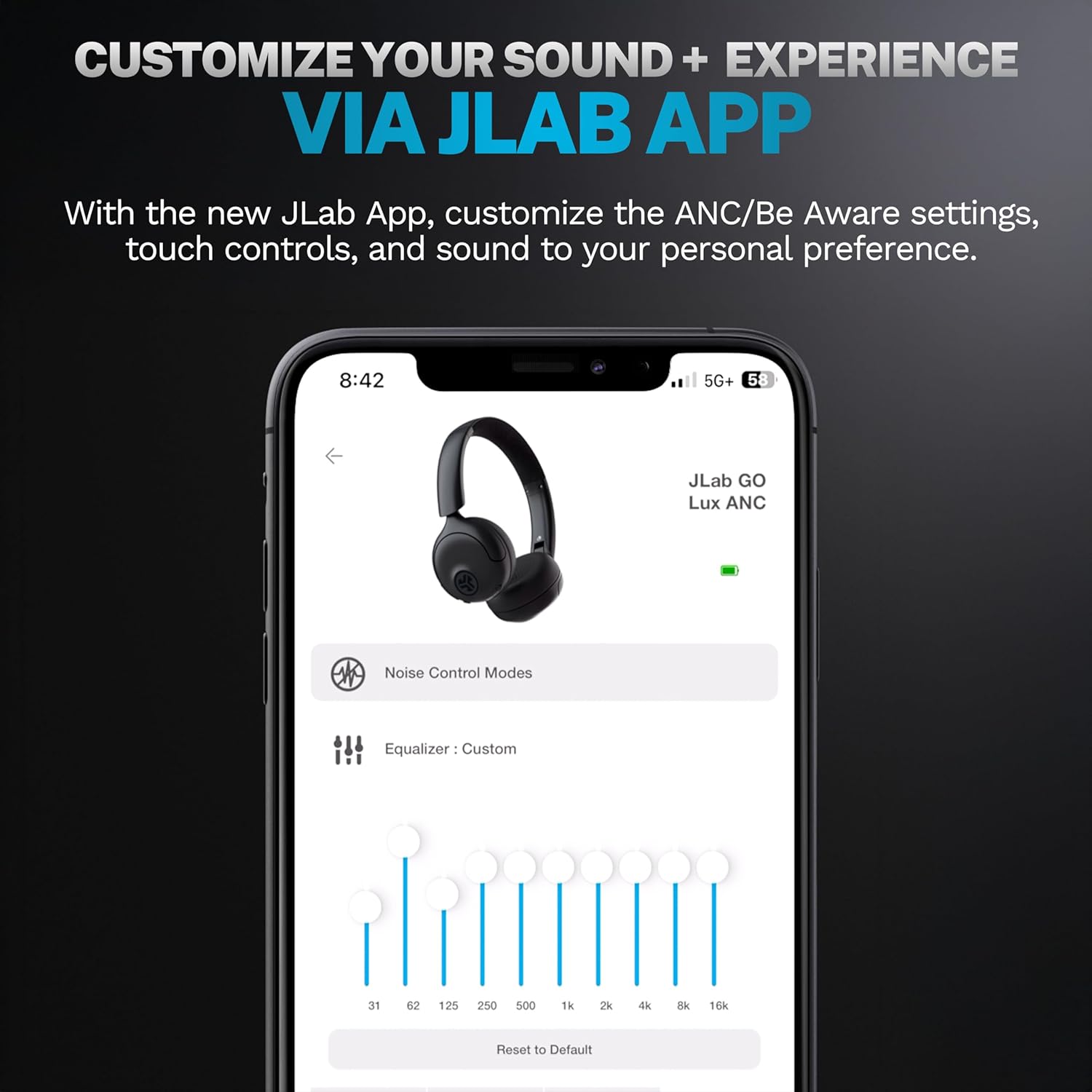
Image: JLab Go Lux ANC headphones in their folded position, demonstrating portability.
Kugadzirisa matambudziko
| Dambudziko | Solution |
|---|---|
| Maheadphones haasi kubatika | Ensure headphones are charged. Press and hold the power button for 3-5 seconds. |
| Haikwanise kubatanidzwa nemudziyo | Make sure Bluetooth is enabled on your device. Ensure headphones are in pairing mode (flashing blue/red LED). Forget the device in your Bluetooth settings and re-pair. |
| Hapana ruzha kana yakaderera vhoriyamu | Tarisa huwandu hwevhoriyamu pamahedhifoni ese ari maviri nemudziyo wako wakabatana. Iva nechokwadi chekuti mahedhifoni akabatana zvakanaka. |
| ANC haisi kushanda nemazvo | Iva nechokwadi chekuti ANC mode yashanda. Gadzirisa maearphone kuti ave nechokwadi chekuti akavharwa zvakanaka panzeve dzako. |
| Dana nyaya dzemhando | Ensure microphones are not obstructed. Check your device's connection and signal strength. |
Zvinotsanangurwa
| Feature | Detail |
|---|---|
| Model Name | HBGOLUXANCMVE20WEB |
| Kubatana Technology | Wireless (Bluetooth) |
| Bluetooth Version | 5.0 |
| Earpiece Shape | On-Nzeve |
| Zvinhu Zvinodzora Ruzha | Hybrid Active Noise Canceling, Be Aware Mode |
| Audio Driver Type | Dynamic Driver (40mm) |
| Frequency Response | 20 Hz - 20 KHz |
| Sensitivity | 104 dB |
| Hupenyu hwebhatiri | Up to 70+ hours (40+ hours with ANC) |
| Kudzora Nzira | Kubata, Kudzora App |
| Item Weight | 10.6 ounces (0.3 Makirogiramu) |
| Product Dimensions | 2.95 x 6.1 x 7.48 inches |
| Mvura Resistance Level | Kwete Kudzivirira Mvura |
Warranty uye Support
Mahedhifoni ako eJLab Go Lux ANC Wireless anouya ne Waranti yeJLab yemakore maviri.
For detailed warranty information, product support, or to contact customer service, please visit the official JLab websaiti kana tarisa kune waranti kadhi inosanganisirwa nechigadzirwa chako.
Unogonawo kushanyira Chitoro cheJLab paAmazon for more information and accessories.