1. Nhanganyaya
This manual provides essential information for the proper use and operation of your Seeed Studio XIAO nRF52840 Sense (Pre-Soldered) microcontroller board. Please read this manual thoroughly before use to ensure optimal performance and longevity of the device.
The Seeed Studio XIAO nRF52840 Sense is a compact, versatile microcontroller board featuring the Nordic nRF52840 chip. It is designed for various applications, including embedded Machine Learning, wearable devices, and IoT projects, offering Bluetooth 5.0, BLE, and NFC capabilities, along with an onboard digital microphone and 6-axis IMU.
2. Key Features
- Microcontroller: Nordic nRF52840 with FPU, operating up to 64 MHz.
- Wireless Kubatana: Bluetooth 5.0, BLE, and NFC with an onboard antenna.
- Sensors: Integrated digital microphone and 6-axis IMU (Inertial Measurement Unit).
- Power Management: Ultra-low power consumption (5 µA in deep sleep) and lithium battery charge management.
- Development Support: Compatible with Arduino and CircuitPython.
- Compact Design: Thumb-sized form factor (21 x 17.5mm).
3. Setup Guide
3.1 Package Zviri mukati
Verify that your package contains the Seeed Studio XIAO nRF52840 Sense (Pre-Soldered) board.
3.2 Hardware Connection
- Batanidza kuKombuta: Use a USB-C cable to connect the XIAO nRF52840 Sense to your computer. Ensure you use a reliable USB 2.0 port if encountering connection issues, as some USB 3.0 ports may cause DFU mode errors.
- Magetsi: The board can be powered via the USB-C port or an external lithium battery (JST connector). The board includes charge management for lithium batteries.


3.3 Kugadzika Software (Arduino IDE)
- Isa Arduino IDE: Dhawunirodha uye isa iyo Arduino IDE kubva kune yepamutemo Arduino website.
- Add Board Support:
- Vhura Arduino IDE, enda ku File > Zvaunoda.
- In "Additional Board Manager URLs", add the URL for Seeed Studio XIAO nRF52840 Sense board support. (Note: Specific URL can be found on Seeed Studio's official documentation.)
- Enda ku Tools > Board > Board Manager, search for "Seeed Studio nRF52 Boards" and install it.
- Sarudza Bhodhi: Enda ku Zvishandiso > Bhodhi and select "Seeed Studio XIAO nRF52840 Sense".
- Sarudza Port: Enda ku Zvishandiso > Chiteshi and select the COM port associated with your XIAO board.
4. Operating Instructions
4.1 Uploading Code
- Write or Load Sketch: Vhura example sketch or write your own code in the Arduino IDE.
- Verify Code: Dzvanya bhatani rekuti "Simbisa" (chiratidzo chekutarisa) kuti uunganidze kodhi yako uye utarise zvikanganiso.
- Kodhi Yokurodha: Click the "Upload" button (right arrow icon) to upload the compiled code to your XIAO nRF52840 Sense board.
4.2 Entering DFU Mode (Bootloader)
To upload new firmware or recover the board, you may need to enter DFU (Device Firmware Upgrade) mode:
- Locate the small reset button on the board.
- Double-click the reset button quickly. The onboard LED may change color or blink to indicate DFU mode.
- In DFU mode, a new drive (often labeled "D" or similar) and a COM port should appear on your computer.
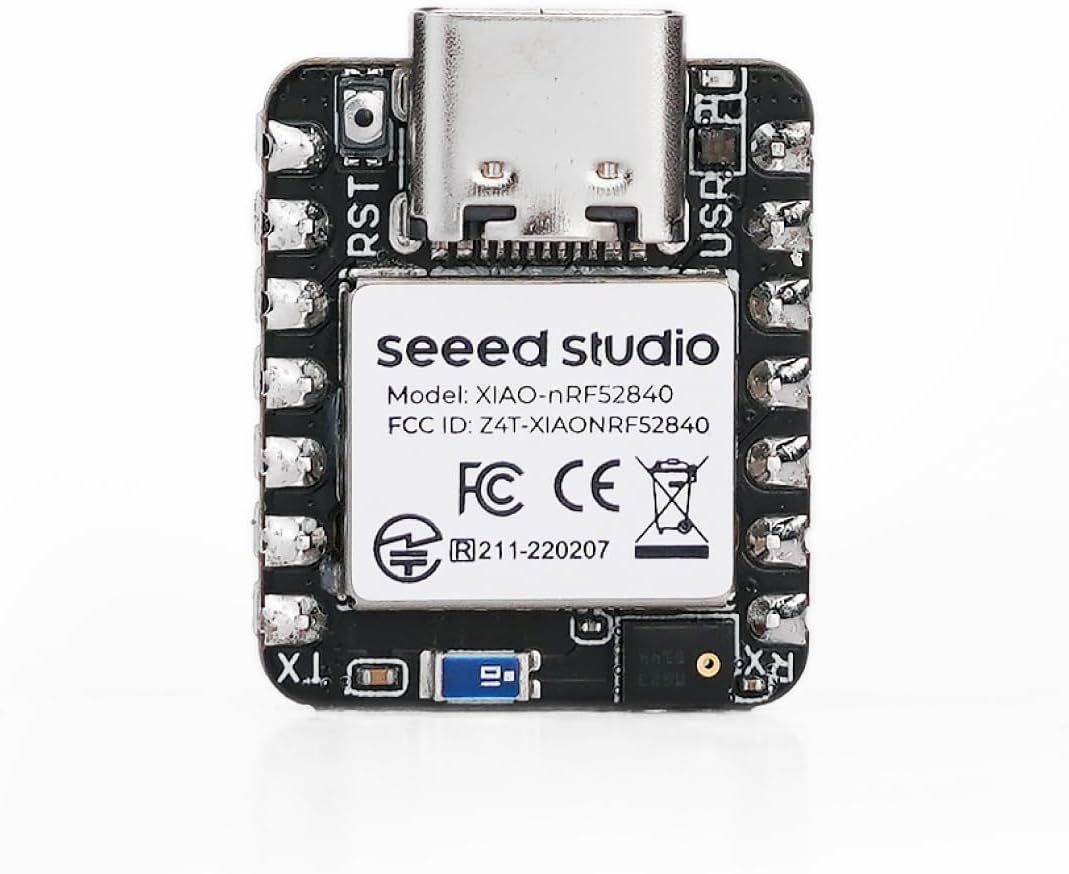
4.3 Pinout Diagram
Refer to the pinout diagram for detailed information on the board's GPIOs, power pins, and peripheral interfaces.

5. Kuchengeta
- Kuchenesa: Shandisa jira rakaoma uye rakapfava kuchenesa bhodhi. Dzivisa kushandisa mvura kana zvinonyungudutsa.
- Kuchengeta: Store the board in an anti-static bag in a dry environment when not in use.
- Firmware Dzokorora: Regularly check the official Seeed Studio website for the latest firmware and board support package updates to ensure optimal performance and access to new features.
6. Kugadzirisa matambudziko
- Board not recognized / "not in DFU mode" error:
Try connecting the board to a USB 2.0 port instead of a USB 3.0 port. Some users have reported issues with USB 3.0 ports preventing proper DFU mode entry or recognition. Ensure you double-click the reset button to enter DFU mode.
- Upload failures:
Verify that the correct board and COM port are selected in the Arduino IDE. Ensure the board is in DFU mode if required for the upload process. Check your USB cable for proper connection and functionality.
- Board becomes unresponsive or burns out:
Ensure proper power supply. Avoid reverse polarity when connecting external batteries. If using a lithium battery, ensure correct JST cable connection. Over-current or incorrect wiring can damage the board. If issues persist, contact support.
- Difficulty finding resources or documentation:
Refer to the official Seeed Studio documentation and community forums for comprehensive guides and support. Tsvaga "Seeed Studio XIAO nRF52840 Sense documentation" online.
7. Zvinyorwa zveUnyanzvi
| Feature | Detail |
|---|---|
| processor | Nordic nRF52840 (64 MHz) |
| RAM | LPDDR (256 KB) |
| Flash Memory | 1 MB |
| Wireless Type | Bluetooth 5.0, BLE, NFC |
| Operating System Support | Arduino / CircuitPython |
| Onboard Sensors | Digital Microphone, 6-axis IMU |
| Low Power Mode | 5 µA (deep sleep) |
| Dimensions | 21 x 17.5 mm |
| Item Weight | 0.634 ounces |
| Kubatana Technology | Bluetooth, NFC |
8. Ruzivo rweWaranti
For warranty details and terms, please refer to the official Seeed Studio webwebhusaiti kana kuti bata rubatsiro rwevatengi vavo zvakananga. Chengeta humbowo hwekutenga kwako kana paine chero zvikumbiro zvewarandi.
9. Kutsigira uye Zviwanikwa
For further assistance, technical documentation, tutorials, and community forums, please visit the official Seeed Studio websaiti:
You can also find additional resources and project examples on platforms like Hackaday, Hackster.io, and GitHub by searching for "Seeed Studio XIAO nRF52840 Sense".


