1. Nhanganyaya
Thank you for choosing the HBN Digital Outdoor Timer Socket. This device is designed to provide flexible and reliable control over your outdoor electrical appliances, such as garden lighting, pool pumps, and holiday decorations. With its 8 programmable settings, random function, and IP44 weather resistance, it offers convenience and energy efficiency. Please read this manual thoroughly before use to ensure proper operation and safety.
2. Mirayiridzo Yekuchengetedza
- Ensure the timer is correctly installed and connected to a suitable power outlet.
- Do not exceed the maximum load capacity of 16A/3680W. Overloading can cause damage or fire.
- The timer is rated IP44 for outdoor use, meaning it is protected against splashing water from any direction. However, do not immerse the device in water or expose it to direct, heavy rainfall for extended periods.
- Usavhure kana kuedza kugadzirisa mudziyo. Tumira mabasa ese ekugadzirisa kune vashandi vane hunyanzvi.
- Keep children away from the device. The integrated child lock provides additional safety.
- Always unplug the timer from the power outlet before cleaning.
3. Package Zviri mukati
Pasuru yako inofanira kunge iine zvinhu zvinotevera:
- HBN Digital Outdoor Timer Socket (x2)
- Chinyorwa Chirairo (gwaro iri)
4. Chigadzirwa Pamusoroview
The HBN Digital Outdoor Timer Socket features a clear digital display and intuitive buttons for easy programming. Below is an illustration of the device and its main components.
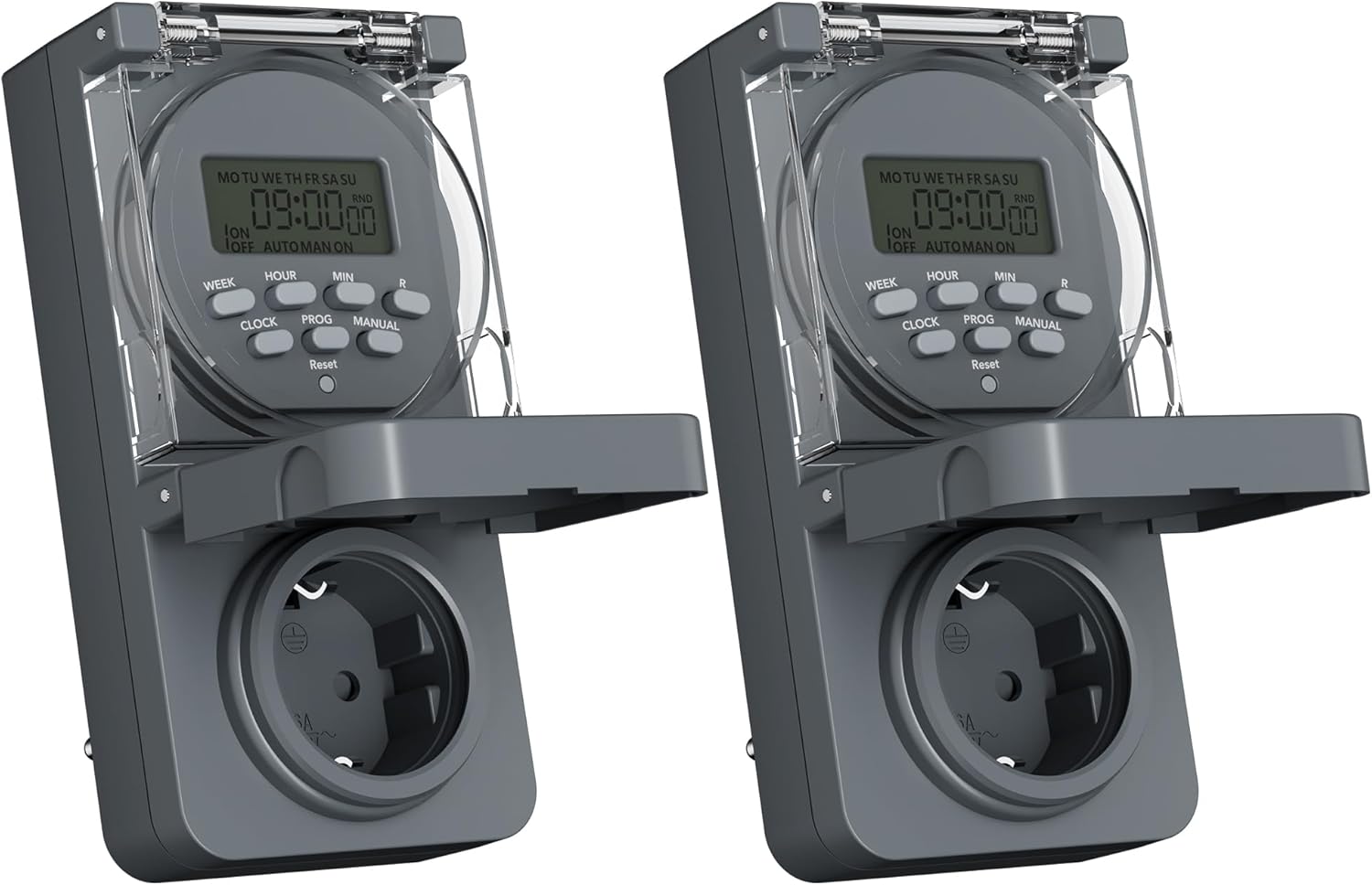
Image 1: Two HBN Digital Outdoor Timer Sockets, front view.

Image 2: Close-up of the timer's display and control buttons.
Bhatani Mabasa:
- VHIKI: Selects the day(s) of the week for programming.
- AWA: Adjusts the hour setting.
- MIN: Adjusts the minute setting.
- WACHI: Exits programming mode and displays the current time. Used to set the current time.
- PROG: Enters and cycles through the 8 ON/OFF program settings.
- MANOKODZO: Toggles between ON, AUTO, and OFF modes.
- RND (Random): Inoshanda kana kudzima basa re random.
- Dzorera zvakare: Clears all settings and returns the timer to factory defaults. Use a pointed object (e.g., a pen tip) to press.
5. Setup
5.1 Initial Charging and Reset
Before first use, or after a long period of inactivity, plug the timer into a live power outlet for at least 30 minutes to charge the internal backup battery. This ensures that settings are retained during power outages.
After charging, press the Reset button using a pointed object to clear any pre-existing settings and ensure a fresh start.
5.2 Kuisa Nguva Yazvino uye Zuva
- Dzvanya uye ubate iyo WACHI bhatani.
- Ndichiri kubata WACHI, press VHIKI repeatedly to set the current day of the week (MO, TU, WE, TH, FR, SA, SU).
- Ndichiri kubata WACHI, press AWA repeatedly to set the current hour (12-hour or 24-hour format).
- Ndichiri kubata WACHI, press MIN kakawanda kuti uise miniti iripo.
- Sunungura iyo WACHI button. The current time and day are now set.
6. Operating Instructions
6.1 Setting ON/OFF Programs
The timer allows you to set up to 8 ON/OFF programs. Each program consists of an ON time and an OFF time, along with specific days of the week.

Mufananidzo 3: Eksamples of setting ON and OFF times for different programs.
- Press the PROG button once. The display will show "1 ON". This is for setting the first ON time.
- Press VHIKI repeatedly to select the desired day(s) for this program. Options include individual days, weekdays (MO TU WE TH FR), weekends (SA SU), all days (MO TU WE TH FR SA SU), or various combinations.
- Press AWA kuti uise awa yaunoda yenguva yeON.
- Press MIN kuti uise miniti inodiwa yenguva yeON.
- Press PROG again. The display will show "1 OFF". This is for setting the first OFF time.
- Repeat steps 2-4 to set the day(s), hour, and minute for the OFF time. Ensure the day selection matches the ON time if you want the program to apply to the same days.
- Ramba uchidzvanya PROG to cycle through programs 2 ON, 2 OFF, up to 8 ON, 8 OFF. Repeat the setting process for each program as needed.
- Mushure mekuisa mapurogiramu ese aunoda, tinya bhatani rekuti WACHI bhatani rekubuda mu programming mode wodzokera kunguva iripo.
6.2 Basa Risina Kurongwa
The random function is designed to simulate presence by randomly turning the connected appliance ON and OFF within a specific time window, typically around your programmed ON/OFF times. This can deter potential intruders.

Image 4: The random function (RND) activated on the timer display.
- To activate the random function, press the RND button. The display will show "RND".
- To deactivate, press the RND button again. "RND" will disappear from the display.
6.3 Manual Control (ON/AUTO/OFF)
You can manually override the programmed settings using the MANUAL bhatani.
- Press MANUAL once: The timer switches to ON mode (output is continuously ON).
- Press MANUAL again: The timer switches to AUTO mode (follows programmed settings).
- Press MANUAL a third time: The timer switches to DZIMA mode (output is continuously OFF).
6.4 Summer/Winter Time Adjustment
To adjust for daylight saving time:
- Dzvanya uye ubate iyo WACHI bhatani.
- Ndichiri kubata WACHI, dzvanya iyo MANUAL button. The display will show "+1h" for summer time or revert to normal for winter time.
7. Kuchengeta
7.1 Kuchenesa
To clean the timer, unplug it from the power outlet. Wipe the exterior with a soft, damp jira. Usashandise zvinochenesa zvinogumbura, zvinonyungudutsa, kana kunyudza mudziyo mumvura.
7.2 Kuchengeta
Kana usingashandiswe kwenguva yakareba, chengeta nguva yacho munzvimbo inotonhorera, yakaoma, kure nezuva rakananga uye tembiricha yakanyanya.
8. Kugadzirisa matambudziko
- Timer haisi kubatidza/kudzima sezvakarongwa:
- Check if the timer is in AUTO mode (not ON or OFF manually).
- Verify that the programmed ON/OFF times and days are set correctly.
- Ensure the connected appliance is working and properly plugged into the timer.
- Kuratidza hakuna chinhu:
- Ensure the timer is plugged into a live power outlet.
- The internal backup battery might be completely drained. Plug the timer in for at least 30 minutes to charge it.
- Magadzirirwo anorasika mushure mekunge magetsi abudatage:
- The internal backup battery may not be sufficiently charged. Ensure the timer is regularly connected to power. If settings are lost, re-enter them after charging.
- Random function not working:
- Iva nechokwadi chekuti RND function is activated (RND icon visible on display).
- The random function operates around programmed times; ensure at least one program is set.
9. Zvinotsanangurwa

Image 5: Back of the timer showing electrical specifications.
| Feature | Tsanangudzo |
|---|---|
| Model | CP-GOE22-1 |
| Magetsi | 230V~, 50Hz |
| Max Load | 16A / 3680W |
| Dziviriro Kirasi | IP44 (Splash-proof) |
| Nhamba Yezvirongwa | 8 ON / OFF mapurogiramu |
| Nguva Ishoma Yekuchinja | 1 miniti |
| Kudzora Modes | ON, AUTO, OFF |
| Anokosha Mabasa | Random function, Summer/Winter time, 24-hour mode |
| Backup Battery | Integrated (retains settings during power outages) |
| Dimensions (approx.) | 5.5D x 8.5W x 12H masendimita |
| Item Weight | 160 magiramu |
| Material | Plastiki |
| UPC | 810079587476 |
| Mugadziri | Ergo I&E CO.,LTD |
10. Warranty uye Tsigiro
Kuti uwane ruzivo nezvewarandi kana rutsigiro rwehunyanzvi, ndapota tarisa magwaro akapihwa panguva yekutenga kana kubata mutengesi wako. Chengeta humbowo hwekutenga kwako kune chero zvikumbiro zvewarandi.


