1. Nhanganyaya
This user manual provides detailed instructions for the setup, operation, maintenance, and troubleshooting of your AOC Gaming 27G42E Full HD 27-inch monitor. Designed for an immersive gaming experience, this monitor features a 180Hz refresh rate, 1ms GtG response time, Fast IPS panel, AdaptiveSync technology, and HDR10 support.
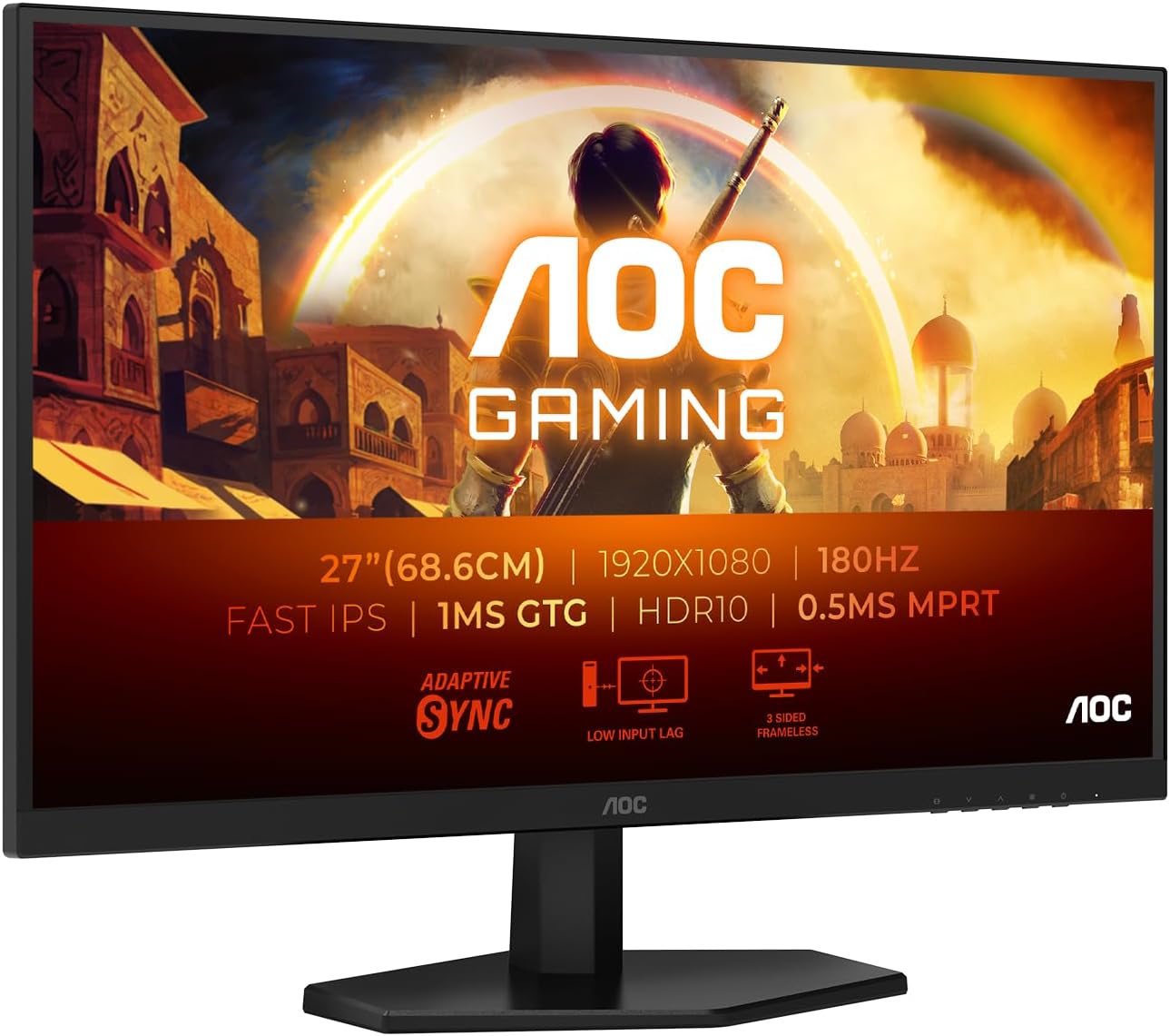
Figure 1.1: AOC Gaming 27G42E Monitor
The AOC Gaming 27G42E monitor is a 27-inch Full HD display, offering a 1920x1080 resolution, 180Hz refresh rate, and 1ms GtG response time for smooth and responsive visuals.
2. Safety Information
Please read all instructions carefully before using the monitor. Keep this manual for future reference.
- Usafumure iyo monitor kune mvura kana hunyoro.
- Usavhura monitor casing; hapana zvikamu zvinogona kushandiswa mukati.
- Shandisa chete adapta yemagetsi inopihwa nemonitor.
- Iva nechokwadi chekufefetera kwakaringana kwakatenderedza monitor.
- Geza sikirini nejira rakapfava, risina maronda. Dzivisa kushandisa makemikari ane simba.
3. Package Zviri mukati
Ona kuti zvinhu zvese zviripo mupasuru yako:
- AOC Gaming 27G42E Monitor
- Power Cable
- HDMI Cable
- RatidzaPort Cable
- Dhiraivha CD
- Warranty Card
4. Setup
4.1 Kuunganidza Chigadziko
Carefully attach the monitor stand to the back of the display panel. Ensure it clicks securely into place or is fastened with the provided screws. For VESA mounting, remove the stand and attach a compatible 100x100mm VESA mount.

Mufananidzo 4.1: Mberi view of the monitor, showing the display and stand.
This image displays the front of the AOC Gaming 27G42E monitor with its attached stand, ready for use.

Mufananidzo 4.2: Kumashure view of the monitor, highlighting the VESA mount area and ports.
Kumashure view of the AOC Gaming 27G42E monitor, showing the design and the central area for stand attachment or VESA mounting.
4.2 Kubatanidza kuPC
Connect the monitor to your computer using either the HDMI or DisplayPort cable. For optimal performance, especially for 180Hz refresh rate, DisplayPort is recommended.
- HDMI Connection: Connect one end of the HDMI cable to the HDMI 2.0 port on the monitor and the other end to the HDMI port on your computer.
- DisplayPort Connection: Connect one end of the DisplayPort cable to the DisplayPort 1.4 port on the monitor and the other end to the DisplayPort on your computer.

Mufananidzo 4.3: Machiteshi ekubatanidza Monitor
This diagram illustrates the available input ports on the AOC Gaming 27G42E monitor, including HDMI 1x2.0, DisplayPort, and Audio Out.
4.3 Simba Connection
Connect the power cable to the monitor's power input and then plug the other end into a power outlet.
5. Kushandisa Monitor
5.1 Kubatidza/Kudzima
Dzvanya bhatani rekubatidza riri pamonitor kuti uribatidze kana kudzima. Chiedza chekuratidza simba chichavheneka kana monitor yabatidzwa.
5.2 Pa-Screen Display (OSD) Navigation
The monitor features an On-Screen Display (OSD) menu for adjusting various settings. Use the buttons on the monitor's bezel to navigate through the menu options. Alternatively, you can use the AOC G-Menu software for desktop control.

Figure 5.1: AOC G-Menu Software Interface
The AOC G-Menu software allows for convenient adjustment of monitor settings directly from your desktop, including game modes and display preferences.
5.3 Zvirongwa zveMifananidzo
Adjust brightness, contrast, color temperature, and other visual settings through the OSD menu to optimize your viewing experience. The monitor supports HDR10 for enhanced dynamic range.
5.4 Zvimiro Zvemitambo
- Refresh Rate (180Hz): Provides ultra-smooth motion for fast-paced games. Ensure your graphics card and connection support this refresh rate.
- Response Time (1ms GtG): Minimizes motion blur and ghosting for crisp visuals.
- AdaptiveSync: Inopindirana nerefresh rate ye monitor ne frame rate ye GPU yako kuti ibvise kubvaruka uye kudhonzwa kwechiso.
- Low Input Lag: Reduces the delay between your input and the on-screen action, providing a more responsive gaming experience.
- Game Modes: Switch between pre-set modes for FPS, racing, or RTS games, or customize and save your own ideal settings.
- Flicker Free & Low Blue Mode: Technologies designed to reduce eye strain during extended use.

Figure 5.2: 1ms GtG Response Time
This image illustrates the benefit of a 1ms Gray-to-Gray (GtG) response time, showing significantly reduced motion blur compared to a 4ms response time.

Figure 5.3: Low Input Lag Advantage
This visual demonstrates the advantage of low input lag, showing a more immediate and precise response in gaming scenarios compared to higher input lag.
6. Kuchengeta
6.1 Kuchenesa Screen
pukuta skrini zvinyoro nyoro nemucheka wakapfava, usina lint. Nokuda kwemavara akasindimara, dampen the cloth slightly with water or a mild, non-abrasive screen cleaner. Never spray liquid directly onto the screen.
6.2 Kutarisira Kwese
Keep the monitor away from direct sunlight, excessive heat, and humidity. Avoid placing heavy objects on the monitor or its cables. Disconnect the power cable before cleaning or moving the monitor.
7. Kugadzirisa matambudziko
- Hapana Chiratidziro: Ensure the power cable is securely connected and the monitor is turned on. Check that the video cable (HDMI/DisplayPort) is firmly connected to both the monitor and your computer. Verify the correct input source is selected in the OSD menu.
- Flickering Screen: Tarisa kubatana kwetambo yevhidhiyo. Iva nechokwadi chekuti madhiraivha emakadhi ako emifananidzo akagadziridzwa. Edza kugadzirisa mwero wekudzoreredza muzvirongwa zvechiratidziro chekombuta yako.
- Chiyero Chekugadziriswa/Kuvandudzwa Chisina Kururama: Ensure your computer's display settings are configured to 1920x1080 resolution and 180Hz refresh rate. Update your graphics card drivers.
- No Audio from Headphone Out: Ensure the audio cable from your PC is connected to the monitor's audio input (if applicable, or ensure audio is routed via HDMI/DP) and that the volume is not muted on the monitor or PC.
8. Zvinotsanangurwa
| Feature | Tsanangudzo |
|---|---|
| Brand | AOC |
| Model Number | 27G42E |
| Screen Size | 27 inches |
| Resolution | 1920 x 1080 (Full HD) |
| Aspect ratio | 16:9 |
| Panel Type | Fast IPS |
| Refresh Rate | 180 Hz |
| Nguva Yekupindura | 1 ms (GtG) |
| Kusiyanisa Ratio | 1000:1 |
| Kupenya | 300 cd/m² |
| Surface Description | Matt |
| Kubatana | 1 x HDMI 2.0, 1 x DisplayPort 1.4, Audio Out |
| VESA kuenderana | 100 x 100 mm |
| HDR Tsigiro | HDR10 |
| Adaptive Sync | Ehe |
| Kushandisa Simba (SDR) | 21.0 W |
| Kushandisa Simba (HDR) | 28.0 W |
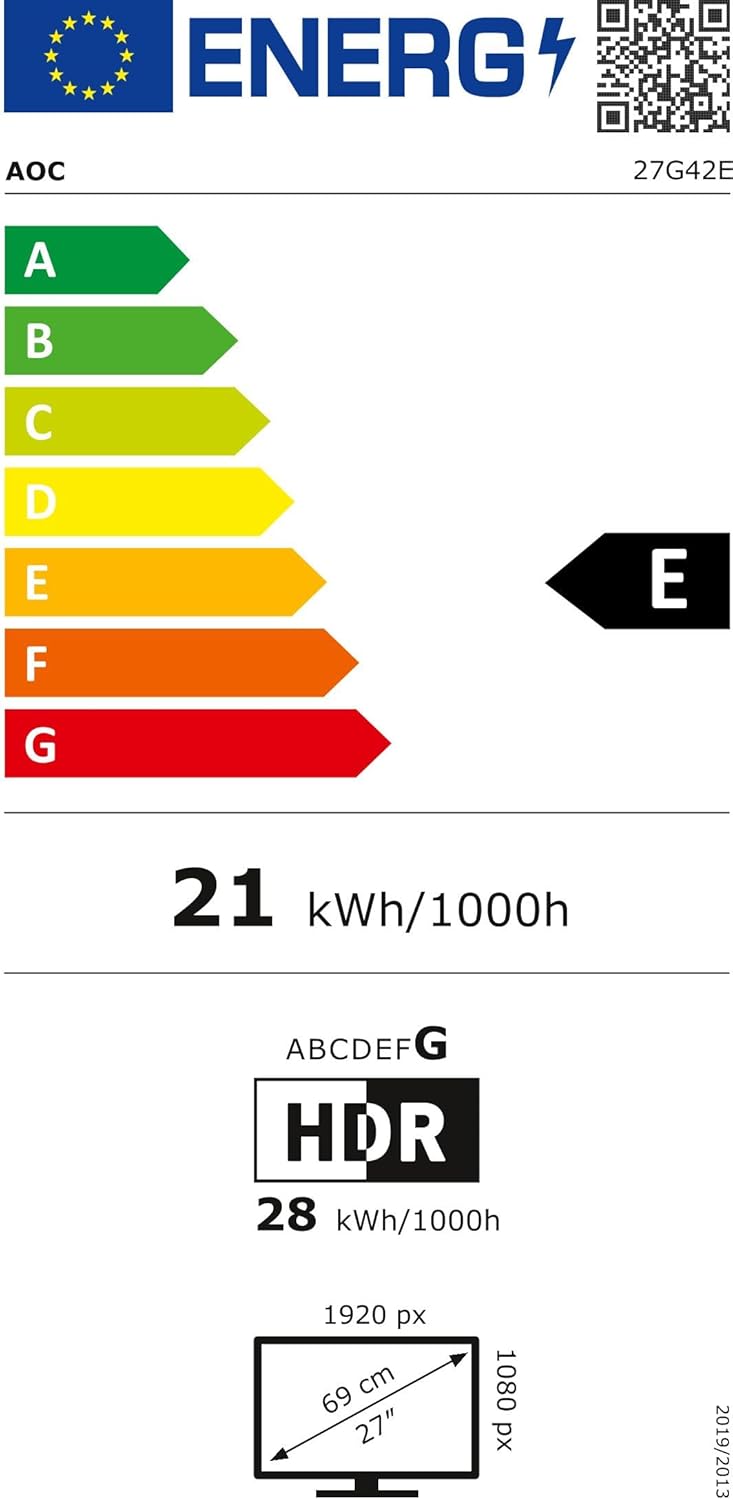
Figure 8.1: AOC Gaming 27G42E Energy Label
The energy label for the AOC Gaming 27G42E monitor, indicating its energy efficiency class and power consumption. More details can be found at https://eprel.ec.europa.eu/qr/2125815.
9. Warranty uye Tsigiro
Your AOC Gaming 27G42E monitor comes with a general guarantee of 3 years. Additionally, minimum guaranteed product support is available for 8 years from the date of placement on the market.
For technical support, warranty claims, or further assistance, please visit the official AOC websaiti kana kubata basa ravo revatengi:
- Mugadziri: AOC International
- Websaiti: https://eu.aoc.com


